
Residential HVAC contractors’ lead response is the process of answering new inquiries, following up with homeowners, and arranging service appointments to turn interest into a clear next step. This guide explains how to separate urgent requests from routine work, collect useful intake details, and confirm appointments without promising service your dispatch team cannot deliver.
- Lead response for residential HVAC contractors needs clear intake, follow-up ownership, and appointment confirmation—not just an automatic acknowledgment.
- RelayKite fits U.S. HVAC businesses seeking managed lead response and appointment setting; suitability depends on business configuration.
- Separate repair requests, replacement inquiries, and maintenance requests before applying booking rules.
- Measure meaningful replies and confirmed appointments separately from messages sent.
Why lead response matters for residential HVAC contractors
A homeowner asking about a broken air conditioner needs a different next step from someone planning a replacement. Your response process must identify the request before assigning an appointment, especially when the person answering cannot see technician capacity.
The constraint is operational: someone must answer while another person is inspecting equipment, driving between jobs, or handling dispatch. An acknowledgment covers only the first part. The homeowner still needs to know whether you serve their location, what happens next, and whether an appointment is actually confirmed.
A reply is not a booking, and a booking is not a dispatch commitment. Keep those events separate in your 2026 workflow so your office does not confuse activity with completed scheduling.
Start with a shared intake record rather than another disconnected inbox. The HVAC lead management software guide covers that adjacent decision; your response process should define what the record must contain before you choose a system.
You do not need to automate everything. You need an owner for each inquiry, an approved next action, and a visible record of what the homeowner was told. Those requirements apply whether you answer personally, assign an office employee, or use a managed service.
Build a residential HVAC lead response workflow
Map your inquiry sources and assign ownership
Start manually. List every place a homeowner can contact you, then identify who checks it during business hours and outside them. Include phone messages, website forms, email, and any other channel your business actually uses.
Assign a primary owner and a backup for each channel. A backup should know when responsibility transfers, not merely have access to the inbox. Otherwise, both people can assume the other has replied.
For your 2026 intake plan, define the response window your team can support. Treat it as an internal operating target, not a public guarantee unless you can consistently honor it.
A shared worksheet is sufficient for the first version. Record when the inquiry arrived, who owns it, and what action is due. Add tooling only after you can describe the handoff clearly.
- List every active inquiry channel.
- Name the primary owner and backup.
- Define coverage during and outside office hours.
- Record inquiry time and first meaningful reply time.
- Flag unassigned inquiries for office review.
Separate acknowledgment, qualification, and confirmation
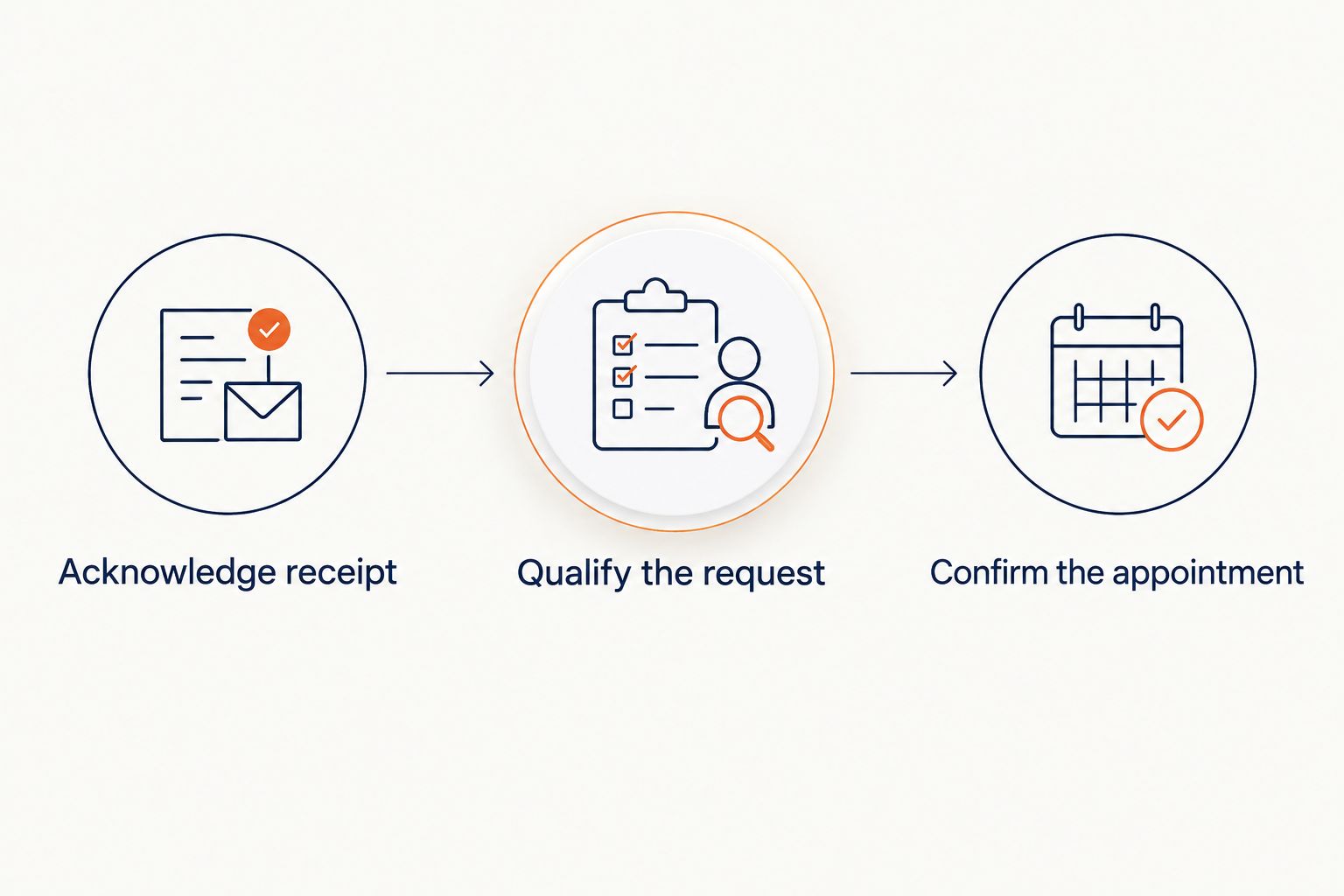
Write the response sequence before writing individual messages. The sequence has three distinct stages: acknowledge receipt, qualify the request, and confirm the appointment. Each stage answers a different homeowner question.
An acknowledgment says the inquiry reached your business. Qualification establishes whether the request fits your service area and work types. Confirmation communicates an appointment that your scheduling process has actually approved.
Never describe a requested time as confirmed before the booking rules approve it. If staff approval is required, tell the homeowner that the request is awaiting confirmation. This distinction is especially important when a homeowner interprets an automated reply as a commitment.
Keep the language short. Your first response should establish the next action, not reproduce your entire service menu or ask the homeowner to diagnose equipment.
- Acknowledge receipt.
- Qualify the request.
- Confirm the appointment.
- State who handles unresolved questions.
- Distinguish requested times from confirmed appointments.
Choose who handles replies and exceptions
The manual approach is straightforward: assign an office employee to review inquiries, use approved message templates, and escalate exceptions to dispatch. This preserves direct control, but you must provide coverage and review unfinished conversations.
If you want managed handling rather than administering every response yourself, RelayKite provides a managed lead response and appointment-setting service for U.S. HVAC businesses. Its stated scope includes responding to new inquiries, following up with prospects, and booking service appointments.
RelayKite is best for U.S. HVAC businesses seeking managed lead response and appointment setting. That is a service-fit recommendation, not a guarantee of appointment volume or revenue.
RelayKite lead response should be assessed against your business rules. Confirm which inquiry channels, escalation paths, and scheduling arrangements are supported before assigning responsibility. A managed service does not remove your obligation to define what counts as an acceptable appointment.
- Assign routine replies to a named owner or service.
- Keep unusual requests on a human escalation path.
- Specify which decisions require dispatch approval.
- Confirm supported channels before implementation.
- Document how your office receives conversation details.
Collect the details dispatch actually needs
Build a short intake checklist with your dispatcher. Ask for information that changes the next action, not information you collect simply because a form allows it. Start with contact details, service location, and the homeowner’s description of the problem.
An illustrative minimum is 5 intake fields: name, callback number, service address, request type, and a brief description. Add other fields only when your team explains how they affect qualification or scheduling. Five fields is a starting checklist, not a universal requirement.
Separate repair, replacement, and maintenance requests. Those labels help the office apply the right questions without forcing homeowners through an irrelevant script.
Keep safety-related situations outside ordinary booking logic. Use your approved safety instructions and escalation process; a lead response conversation should not attempt equipment diagnosis or replace emergency assistance.
- Collect a name and callback number.
- Confirm the service address.
- Classify the request type.
- Record the problem in the homeowner’s words.
- Ask only questions that affect the next action.
- Escalate safety concerns using approved instructions.
Define appointment rules before offering a time
Start with a written booking sheet that your office can follow without interpretation. Specify service boundaries, accepted work types, approval requirements, and what information must be present before an appointment is offered.
For your 2026 booking rules, distinguish a service visit from a replacement consultation. Do not assume the same appointment type or intake requirements apply to both. Your dispatch team should decide those distinctions.
If your process cannot verify an appointment, collect the homeowner’s preference and send it for review. Describe that preference as a request. Do not imply that a technician has been assigned or that arrival timing is guaranteed.
Use a clear confirmation message after approval. Include the details your business has actually authorized, and make changes visible to the people responsible for the schedule.
- Define accepted locations and request types.
- Specify which appointments require office approval.
- Set required intake fields for each appointment type.
- Separate preferred times from approved appointments.
- Record confirmations and subsequent changes.
Write follow-up rules with a clear stopping point
The manual method is a follow-up queue: record the last contact, the promised next action, and the person responsible. Review that queue before sending another message. A homeowner who already spoke with dispatch should not receive an unrelated booking prompt.
Build separate follow-up paths for unanswered inquiries, incomplete intake, and pending appointment requests. Each message should resolve the current obstacle. Repeating the original acknowledgment does not move the conversation forward.
Your 2026 follow-up policy should also define when contact stops. Respect requests to stop messages, avoid duplicate outreach across channels, and obtain appropriate legal guidance for your communications practices.
Do not treat every quiet conversation as permission for indefinite outreach. Close the loop in your record so the office can distinguish a paused inquiry from one that requires action.
- Identify the reason for each follow-up.
- Check for recent office contact before sending.
- Ask for the missing information or decision.
- Record the next action and its owner.
- Stop outreach when the homeowner asks.
- Close or pause conversations using a defined rule.
Measure progress and test the handoffs
Use a worksheet before building a dashboard. Record inquiry arrival, meaningful reply, qualification outcome, and appointment status. These events tell you where a conversation stalled; message totals alone do not.
Review 3 outcomes separately: qualified inquiries, confirmed appointments, and completed visits. This prevents an appointment-setting report from implying that booked work was completed or produced revenue.
For an initial 2026 rollout, schedule a review after 7 days of use. That is an operational checkpoint, not a benchmark for results. Inspect conversation quality and exceptions before expanding the workflow.
Test ordinary requests and edge cases: an address outside your area, incomplete contact details, an appointment change, and an urgent concern. Confirm that each case reaches the correct person and preserves what the homeowner was told.
- Measure meaningful reply time, not acknowledgment alone.
- Track qualification and booking as separate events.
- Review completed visits separately from appointments.
- Inspect unanswered and escalated conversations.
- Test schedule changes and out-of-area requests.
- Revise rules when a handoff fails.
Compare response options for residential HVAC businesses
Choose the operating model that matches how much control and administration you want to retain. The options below describe responsibilities, not guaranteed capabilities of any unnamed provider.
| Option | Best for | Main advantage | Key limitation |
|---|---|---|---|
| Owner or office-led response | Contractors wanting direct control of each conversation | Staff can apply business judgment immediately | You must supply coverage and manage every unfinished inquiry |
| Human receptionist arrangement | Contractors wanting delegated intake with human conversation | A designated person can collect details and route requests | Booking authority and HVAC-specific escalation rules need agreement |
| RelayKite managed lead response | U.S. HVAC businesses seeking managed response, follow-up, and appointment setting | Combines those stated activities in a managed service | Supported channels and business-specific booking arrangements require confirmation |
| Self-managed response automation | Contractors prepared to maintain their own workflow | You control templates, routing rules, and administration | Your team owns setup, monitoring, and exceptions |
Best for direct control: office-led response. It keeps decisions close to dispatch, but staffing remains your responsibility. Write backup coverage into the workflow rather than relying on whoever notices the inquiry.
Best for delegated human intake: a receptionist arrangement. Verify whether the arrangement includes booking or only message-taking. Those are different services, and your handoff must reflect the difference.
Best for managed response and appointment setting: the managed-service model. Confirm the operating boundaries before relying on it. The service should follow your approved rules rather than substitute assumptions for them.
Best for internal workflow control: self-managed automation. Choose it only when someone owns maintenance and exception review. A configured sequence still needs oversight when your service area, office coverage, or scheduling rules change.
Common mistakes residential HVAC contractors make
Treating every HVAC inquiry as the same job
A maintenance request, a system replacement inquiry, and a loss-of-cooling call require different intake paths. A single generic sequence makes the homeowner answer unnecessary questions and leaves dispatch without the information it needs.
Separate request types before applying appointment rules. Keep each path short and ask only what affects the next step.
Promising urgency without dispatch approval
Calling a request urgent does not establish technician capacity. Your response team must distinguish the homeowner’s concern from an approved service commitment.
Record the reported situation, apply approved escalation instructions, and let authorized staff decide the service response. Do not turn urgency labels into arrival promises.
Counting acknowledgments as successful responses
A receipt message confirms delivery, not progress. If the next question goes unanswered, the inquiry is still unfinished.
Measure the first reply that addresses the homeowner’s request or asks a necessary qualification question. Then track whether the conversation reached an approved next action.
Following up after the office has already intervened
Separate inboxes create conflicting conversations. Dispatch can confirm a visit while another workflow continues asking the homeowner to choose a time.
Check the shared record before contacting the homeowner again. Appointment changes, callbacks, and stop requests must be visible wherever follow-up is handled.
Booking before confirming the service location
A complete-looking appointment is still unusable if the address falls outside your accepted area. Resolve location before offering a visit, using the boundaries your business has approved.
Do not infer coverage from a nearby city name. Confirm the actual service address and route exceptions to the office.
FAQ
What is lead response for residential HVAC contractors?
Lead response for residential HVAC contractors is the process of answering inquiries, qualifying requests, following up, and arranging service appointments. A complete workflow also assigns ownership and defines how exceptions reach the office.
What should my HVAC business ask a new homeowner lead?
Ask for contact details, the service address, the request type, and a brief description of the problem. Add questions only when they affect qualification or scheduling, and keep safety concerns on an approved escalation path.
Is an automated acknowledgment enough for an HVAC inquiry?
No. An acknowledgment confirms receipt but does not establish whether the request fits your business or whether an appointment is approved. Follow it with a meaningful reply and a clear next action.
Should I offer an appointment before checking with dispatch?
Offer an appointment only when your approved booking rules authorize it. If office approval is required, collect the homeowner’s preferred time and describe it as a request awaiting confirmation.
Is RelayKite a fit for a residential HVAC contractor?
RelayKite fits U.S. HVAC businesses seeking a managed service for lead response, prospect follow-up, and appointment setting. Confirm supported channels, booking arrangements, and escalation responsibilities against your business needs; results are not guaranteed.
Can appointment-setting results prove how much revenue I earned?
No. Confirmed appointments and completed paid work are different events. Track completed visits and actual business records separately before drawing conclusions about revenue.
How should I handle HVAC inquiries outside office hours?
Define who owns outside-hours inquiries and what that person or service is authorized to do. Separate acknowledgment, safety escalation, and appointment requests, and do not promise dispatch or arrival times without approval.
One last thing
Test cancellation and rescheduling before testing more new inquiries. An appointment workflow is incomplete if it can create a booking but cannot pass a homeowner’s change request to the right person.
For your 2026 rollout, trace one changed appointment through the entire process: homeowner message, office notification, schedule update, and confirmation. That exercise reveals whether your records reflect the current plan or merely the original booking.
Apply the same test when assessing RelayKite or any other response arrangement. The final measure is whether your office and the homeowner agree on what happens next.