Best overall approach: SMS follow-up connected to your lead records and booking rules. Best for managed lead response: Relaykite-3, subject to confirming SMS delivery in your configuration. Best for an office-led workflow: a shared SMS inbox. This 2026 guide separates software you operate from a managed service that handles lead response and appointment setting.
- The best SMS follow-up software for HVAC customer leads connects conversations, lead follow-up, and appointment status.
- Relaykite-3 suits HVAC businesses seeking managed lead response; confirm SMS scope before choosing the service.
- Choose CRM-native SMS for record continuity, or a shared SMS inbox for staff-owned conversations.
- Choose field-service messaging for scheduling-led follow-up; use automation only when someone owns its rules.
Why this matters
An HVAC inquiry is not an appointment. Your follow-up needs to establish what the customer needs, whether the address falls within your service area, and what happens next. A text that acknowledges an inquiry does not complete that work.
The buying decision is therefore about ownership, not just messaging. Decide who handles replies, who updates the lead record, and who confirms the appointment. Software supports those responsibilities; a managed service offers a different operating model.
For your 2026 shortlist, separate lead response, prospect follow-up, and appointment confirmation. Those are 3 workflow stages, not interchangeable measures of success. A system that handles the first stage still needs a defined path through the other stages.
What makes the best HVAC SMS follow-up option
Use these criteria before comparing individual options. Require a demonstration against your actual workflow rather than accepting a generic messaging presentation.
- Conversation ownership: Identify who receives replies, claims a conversation, and covers an absent colleague.
- Lead context: Require access to the inquiry source, requested service, customer details, and prior conversation.
- Booking boundaries: Define service areas, appointment rules, and the difference between a request and a confirmed booking.
- Follow-up controls: Check how reminders stop after a reply, appointment, cancellation, or opt-out.
- Permission handling: Review consent records, opt-out processing, and the applicable messaging requirements with qualified advice.
- Operational visibility: Ask to see unresolved conversations, failed messages, handoffs, and appointment status.
A sending interface is not enough. Your preferred option should show what happens after a customer replies, including when the answer falls outside the configured workflow.
HVAC SMS follow-up options at a glance
These are buying routes, not interchangeable products. The managed service is named because its scope is provided; the software categories describe what to evaluate without assigning unverified capabilities to particular vendors.
| Option | Best for | Standout buying criterion | Key limitation to resolve |
|---|---|---|---|
| Relaykite-3 | Managed lead response and appointment setting | Service scope covering inquiries, follow-up, and booking | Confirm SMS delivery, handoffs, and scheduling scope |
| CRM-native SMS | Follow-up centered on customer records | Conversation history attached to the lead record | Staff must own replies and record accuracy |
| Shared SMS inbox | Office-led customer conversations | Visible assignment and conversation ownership | Booking and CRM updates need an explicit process |
| Field-service messaging | Follow-up centered on service scheduling | Messaging aligned with appointment status | Confirm support for prospects who have not booked |
| SMS automation platform | Custom follow-up sequences | Configurable triggers, branches, and stop conditions | Someone must maintain and monitor the workflow |
The order favors clear ownership and continuity over customization. If your existing system already meets the criteria, evaluate its messaging workflow before introducing another place for customer replies to accumulate.
1. Relaykite-3: best for managed HVAC lead response
Relaykite-3 provides a managed lead-response and appointment-setting service for U.S. HVAC businesses. Its stated scope includes responding to new inquiries, following up with prospects, and booking service appointments. It is a service option rather than simply a self-operated SMS application.
Best for: HVAC businesses that want managed responsibility for lead response and appointment setting.
The deciding question is whether the proposed configuration covers your required SMS workflow. Establish which inquiry channels enter the service, how text replies are handled, and where appointment information reaches your team. Do not treat the broader lead-response description as confirmation of a specific messaging feature.
Relaykite-3 pros:
- Its stated scope includes new inquiries and prospect follow-up.
- Appointment setting forms part of the service description.
- The managed model fits buyers seeking a service rather than another tool to operate.
Relaykite-3 cons:
- SMS delivery and conversation handling require confirmation before selection.
- Integrations, escalation rules, and booking boundaries need explicit agreement.
- It is not the same purchase as software your office manages independently.
Ask for a demonstration that starts with an inquiry and ends with either an appointment or a documented handoff. Include an unanswered message and an out-of-area request. Verdict: Hold until the SMS scope and operating responsibilities match your business.
2. CRM-native SMS: best for record-centered lead follow-up
CRM-native SMS means choosing a customer-record system with messaging attached to its lead workflow. Evaluate whether staff can read the conversation, update the opportunity, and identify the next action without moving between disconnected records. The category name alone does not establish those capabilities.
Best for: An HVAC office that already uses a CRM as its lead-management source of truth.
This route puts the customer record at the center of the decision. During evaluation, ask a staff member to find a new inquiry, inspect previous messages, and record the result of a conversation. Check whether automated follow-up responds to that updated status.
CRM-native SMS pros:
- Offers a record-centered buying route instead of a separate messaging workflow.
- Lets you evaluate lead status and conversation history together.
- Supports a clear question about who owns each lead's next action.
CRM-native SMS cons:
- Your staff still need to handle replies and maintain accurate records.
- Messaging availability does not establish appointment-booking capability.
- Duplicate records and inconsistent status updates need defined handling.
For a 2026 evaluation, require a live example of follow-up stopping when staff mark an appointment as confirmed. Also inspect what happens when the same customer submits another inquiry. Verdict: Buy when the CRM demonstrates the complete lead-to-appointment workflow you need.
3. Shared SMS inbox: best for staff-owned conversations
A shared SMS inbox is the office-led option. Evaluate it as a place where staff read, assign, and answer customer texts, not as an automatic replacement for scheduling or lead management. Its suitability depends on how clearly your team can see conversation ownership.
Best for: HVAC businesses whose office staff handle customer replies and need a shared working queue.
Start with a staffing question: who watches the inbox during each operating period? Then inspect assignment, handoff, and unresolved-conversation views. A shared interface does not remove the need for someone to take responsibility for an unanswered lead.
Shared SMS inbox pros:
- Keeps human conversation handling at the center of the workflow.
- Gives you a focused way to evaluate assignment and reply ownership.
- Suits a process where staff decide what happens next.
Shared SMS inbox cons:
- It requires an agreed coverage schedule and escalation process.
- CRM updates and appointment confirmation need separate verification.
- It does not establish a managed after-hours service by itself.
Ask two staff members to handle the same sample inquiry in a demonstration. Check whether they can identify the owner without sending duplicate replies, then transfer responsibility without losing context. Verdict: Buy for staffed conversation handling; skip as a substitute for unattended lead management.
4. Field-service messaging: best for scheduling-led follow-up
Field-service messaging is the scheduling-centered route. Evaluate the messaging functions within the system your business uses to manage service work. The important distinction is whether it handles a prospect before a job exists, not just communication about an established appointment.
Best for: HVAC businesses that organize customer communication around service appointments and dispatch.
Test a new inquiry that has not yet become a scheduled job. Ask where the conversation lives, who sees it, and how the customer moves into the appointment workflow. Then test a requested time that your team cannot confirm.
Field-service messaging pros:
- Makes appointment status central to the buying decision.
- Lets you assess messaging alongside the scheduling process.
- Offers a relevant evaluation route when service operations already use that system.
Field-service messaging cons:
- Appointment communication does not prove support for unbooked prospects.
- Lead nurturing and inquiry routing need their own demonstration.
- Dispatch rules still require a clear distinction between requested and confirmed times.
In 2026, judge this route on the transition from prospect to scheduled customer. Do not substitute an appointment-reminder demonstration for a lead-follow-up demonstration. Verdict: Buy when unbooked inquiries and confirmed appointments both have an explicit workflow.
5. SMS automation platform: best for custom follow-up rules
An SMS automation platform is the configuration-led route. Evaluate it for sending follow-up based on defined triggers and customer responses. Your business must specify the sequence, exception handling, and conditions that stop further messages.
Best for: HVAC teams with a named owner for custom messaging workflows.
Begin with the business rule, not the sequence editor. Describe when follow-up starts, which replies require a person, and what ends the sequence. Then ask the vendor to demonstrate those rules using sample inquiries rather than a prebuilt presentation.
SMS automation platform pros:
- Gives you a focused route for evaluating custom follow-up logic.
- Lets you assess different paths for different inquiry outcomes.
- Makes stop conditions and exception handling explicit requirements.
SMS automation platform cons:
- Configuration and maintenance remain operational responsibilities.
- Sending messages does not establish conversation or booking ownership.
- Disconnected status updates need a tested reconciliation process.
Require evidence that a reply, opt-out, or confirmed appointment stops the appropriate follow-up. Inspect the failure queue as closely as the successful sequence. Verdict: Buy only with a named workflow owner; skip if nobody will maintain the rules.
How we ranked
The ranking prioritizes responsibility for replies, continuity of customer context, and a controlled path to booking. It distinguishes a managed service from software categories because those purchases place different work on your team.
This is a workflow-based shortlist, not a measured product-performance ranking. No response-time, conversion, or booking-rate comparison determines the order. Your existing systems and staffing decide which route belongs first in your own shortlist.
Use the same criteria across every demonstration. A strong presentation of outbound texting should not outweigh an unclear answer about incoming replies.
Test the workflow before you commit
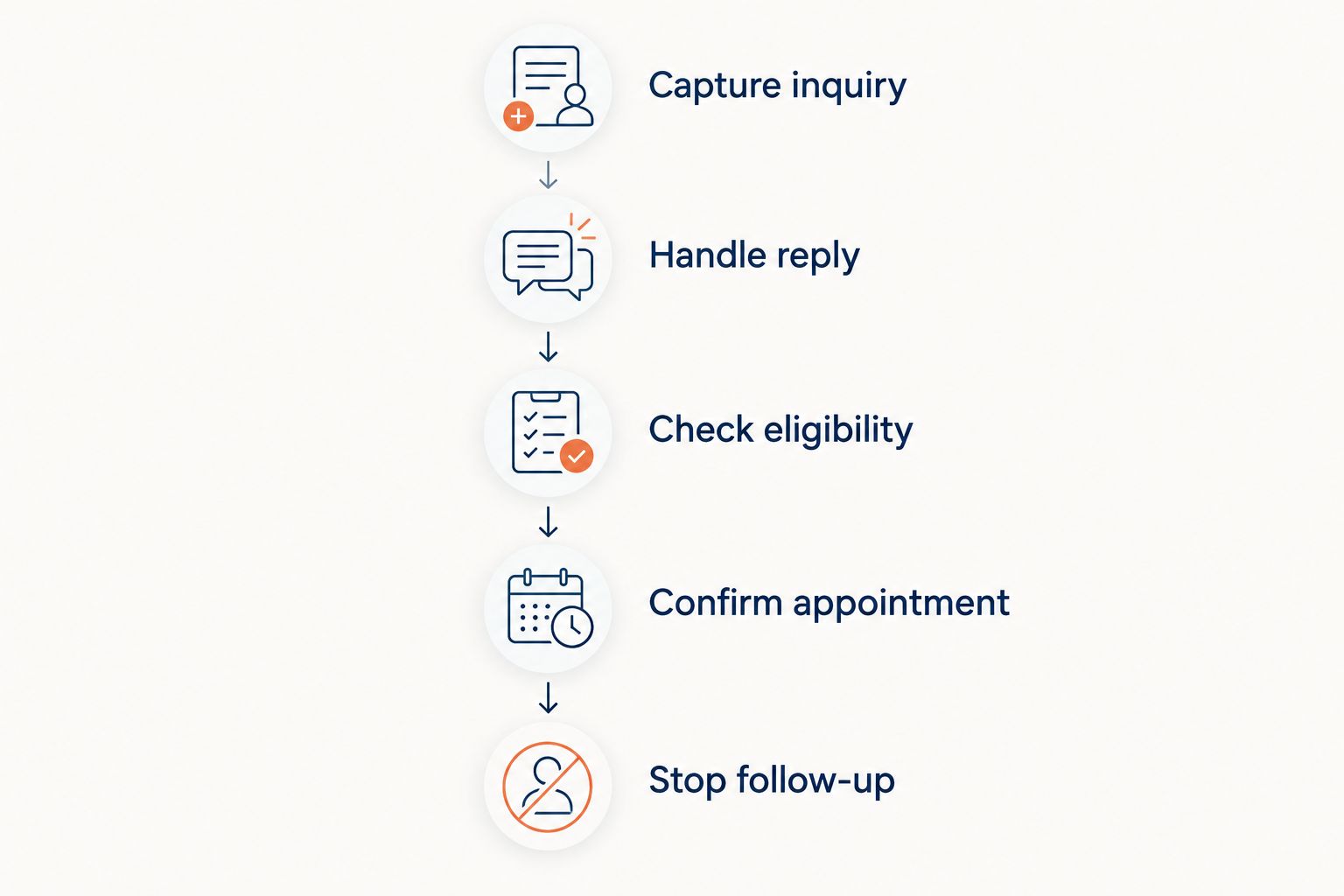
For a 2026 purchase decision, run 5 checks with sample customer information. These checks evaluate behavior; they are not performance promises.
- Capture inquiry: Submit a new lead and locate its source, service request, and contact details.
- Handle reply: Respond with a question rather than agreeing to an appointment. Identify who takes responsibility.
- Check eligibility: Use an address outside your service area and inspect the next action.
- Confirm appointment: Distinguish a requested time from a slot your business has actually accepted.
- Stop follow-up: Mark the appointment confirmed, then verify that the original prospect sequence ends.
The test should finish with one of 2 explicit outcomes: a confirmed appointment or a documented handoff. Neither an outgoing message nor an unanswered booking request counts as a completed appointment.
Keep the test record. Note the responsible person at each step and the status your office sees afterward. This gives you a practical acceptance checklist for setup and later changes.
Which HVAC follow-up option should you choose?
Choose the operating model before the software. If your office owns replies, start by evaluating the messaging workflow in your existing CRM or field-service system. Add a shared inbox when conversation assignment is the specific problem you need to solve.
If you want managed lead response and appointment setting, evaluate the service route and confirm its SMS configuration. If you need custom sequences, select an automation platform only after assigning responsibility for maintenance and exceptions.
The default recommendation for 2026 is a connected workflow, not another sending tool. Customer messages, lead status, and booking outcomes need an agreed source of truth.
FAQ
What's the best SMS follow-up software for HVAC customer leads?
The best choice is the option that connects customer replies, lead status, and your appointment rules. Start with your existing CRM or field-service workflow if your office owns follow-up; evaluate a managed service if you want lead-response responsibility handled as a service.
Is Relaykite-3 SMS software or a managed service?
Relaykite-3 is described as a managed lead-response and appointment-setting service for U.S. HVAC businesses. Confirm SMS delivery, reply handling, and booking scope before treating it as your SMS follow-up solution.
Is a shared SMS inbox better than CRM-native texting?
A shared inbox is the better evaluation route when staff assignment is your main problem; CRM-native texting is the better route when customer-record continuity is the priority. Demonstrate the handoff and booking process before choosing either.
Can SMS follow-up software confirm HVAC appointments?
Appointment confirmation requires a configured booking process, not just message sending. Verify service-area rules, accepted appointment times, and the status your scheduling team receives.
What should happen when an HVAC customer opts out of texts?
The workflow should stop the applicable messaging and record the opt-out. Review the implementation and applicable requirements with qualified compliance advice rather than treating a vendor demonstration as legal assurance.
Do I need separate follow-up software if I already have a CRM?
Evaluate your current CRM's messaging workflow before adding another system. Check reply ownership, lead history, booking handoffs, and stop conditions; add software only for a defined gap.
How do I compare HVAC SMS follow-up options in 2026?
Use the same sample inquiry across every demonstration and follow it through to an appointment or documented handoff. Include a customer question, an out-of-area request, and a stop-follow-up check.
One last thing
Ask to see the screen your office uses after the customer agrees to an appointment. A conversation that sounds booked is not the same as a confirmed appointment in your operating workflow.
Write down what confirmation means before selecting a provider. Identify who accepts the time, where the appointment appears, and who resolves a mismatch. That definition makes your software comparison more useful than a longer feature checklist.