Best for HVAC dispatch operations: ServiceTitan. Best for complex customer-service workflows: Salesforce Field Service. Best for Microsoft-centered operations: Dynamics 365 Field Service. The best field service management software with AI dispatch in 2026 depends on whether you need technician assignment, schedule optimization, or help converting inquiries into appointments; those are different jobs.
- ServiceTitan is the best field service management software with AI dispatch shortlist choice for HVAC-focused dispatch operations.
- Salesforce Field Service suits businesses connecting field work with broader customer-service workflows.
- Dynamics 365 Field Service belongs on the shortlist for Microsoft-centered field operations.
- Relaykite-3 provides managed HVAC lead response and appointment booking, not technician dispatch software.
Why this matters
An appointment on the calendar is not the same as a technician assigned to a workable route. A lead response service handles the conversation before the visit. Field service management software handles the job, resources, and operational records around that visit.
Relaykite-3 provides managed lead response and appointment booking for U.S. HVAC businesses. It belongs in this guide as a separate service option, not as a replacement for field service management software.
Choose dispatch software for technician assignment; choose appointment-setting support for unanswered inquiries and prospect follow-up. If both processes need attention, evaluate them separately before deciding how they should work together.
What makes the best AI dispatch software?
Use these criteria for your 2026 shortlist. A feature labelled AI earns no credit unless its output fits your dispatch rules.
- Assignment quality: Does the proposed technician match the job's required skills, location, and availability?
- Schedule control: Can dispatchers preserve committed appointments and reject unsuitable changes?
- Operational coverage: Does the system support the work-order, scheduling, and customer-record processes you need?
- Exception handling: What happens when a technician calls out, a repair runs long, or an urgent request arrives?
- Human oversight: Can your dispatcher understand and correct recommendations before they affect customers?
- Workflow fit: Does the product solve dispatch, lead response, or both? Require a demonstration rather than treating those functions as interchangeable.
For any named product, confirm the exact configuration behind the demonstration. Scheduling, optimization, and AI-branded assistance are not synonyms, and a platform name alone does not establish which capabilities your proposed setup includes.
The options at a glance
| Option | Best for | Standout capability | Key limitation |
|---|---|---|---|
| ServiceTitan | HVAC-focused dispatch operations | Trade-focused field service management and Dispatch Pro | Dispatch automation still requires operating rules and oversight |
| Salesforce Field Service | Complex customer-service workflows | Field scheduling connected with Salesforce customer-service records | Requires deliberate configuration of data, resources, and workflows |
| Dynamics 365 Field Service | Microsoft-centered operations | Work orders, resource scheduling, and scheduling optimization | Optimization and generative assistance serve different purposes |
| Relaykite-3 | Managed HVAC lead response and appointment booking | Inquiry response, prospect follow-up, and appointment setting | Not a field service management or technician dispatch replacement |
The table compares operational roles, not equivalent products. The first three options are field service platforms; the fourth addresses the customer conversation before service delivery.
1. ServiceTitan: best for HVAC-focused dispatch operations
ServiceTitan is field service management software built around trade-service operations, including HVAC. Its Dispatch Pro offering uses machine learning to support technician assignment. That makes it a relevant starting point when your central problem is deciding who should handle each job.
A useful 2026 demonstration should show more than a dispatch board. Ask the provider to explain how its proposed configuration uses technician information, job characteristics, and scheduling constraints to make recommendations.
ServiceTitan pros:
- Its trade-service focus matches the operational context of an HVAC business.
- Dispatch Pro directly addresses technician assignment rather than only customer messaging.
- Field service management keeps dispatch decisions within the wider job workflow.
ServiceTitan cons:
- An assignment recommendation is only useful when the underlying job and technician information is accurate.
- Dispatch automation does not remove the need to handle exceptions and review unsuitable assignments.
- A dispatch-focused purchase does not, by itself, resolve unanswered inquiries before a job exists.
Ask the demonstrator to move a committed appointment, introduce an unavailable technician, and explain the resulting recommendation. You need to see how a dispatcher protects customer commitments, not simply how quickly a schedule fills.
Best for: HVAC businesses whose main requirement is trade-focused job assignment and dispatch management.
Verdict: Buy for HVAC dispatch needs after the proposed configuration passes your exception-handling demonstration. Do not buy solely because the feature name includes AI.
2. Salesforce Field Service: best for complex service workflows
Salesforce Field Service supports work orders, field scheduling, and mobile service execution within the Salesforce environment. Its scheduling and optimization capabilities belong on the shortlist when technician visits are part of a broader customer-service process.
The key distinction is workflow scope. You are evaluating how a customer issue becomes field work and returns to a usable service record, not just how a technician appears on a calendar.
Salesforce Field Service pros:
- Field service can connect with customer-service records in Salesforce.
- Work orders and scheduling support a structured process around each visit.
- Mobile field workflows support technicians working outside the office.
Salesforce Field Service cons:
- Resource records, work rules, and customer workflows require deliberate configuration.
- A broader service platform introduces decisions beyond dispatch alone.
- AI assistance and schedule optimization need separate demonstrations; one does not establish the other.
For your 2026 evaluation, trace a customer request from its service record through scheduling and field completion. Ask which information dispatchers see, what technicians receive, and what returns to the customer record afterward.
Avoid judging the product from a generic chatbot demonstration. A conversational assistant answering a question does not prove that the scheduling configuration respects skills, appointments, or resource constraints.
Best for: Businesses that need field visits connected with a wider Salesforce customer-service workflow.
Verdict: Buy when the customer-service workflow justifies the platform scope; skip it as a dispatch-only purchase without that requirement.
3. Dynamics 365 Field Service: best for Microsoft-centered operations
Dynamics 365 Field Service supports work orders, resource scheduling, and mobile field work. Microsoft also offers Resource Scheduling Optimization for automated scheduling and Copilot assistance within its field service product family.
Treat those capabilities as separate evaluation tracks. Scheduling optimization addresses resource allocation, while generative assistance addresses tasks such as working with information; a useful demonstration must identify which capability solves your actual problem.
Dynamics 365 Field Service pros:
- Work orders and resource scheduling provide a field-service operational foundation.
- Resource Scheduling Optimization addresses automated scheduling directly.
- It belongs naturally on the shortlist when your business already operates around Microsoft business applications.
Dynamics 365 Field Service cons:
- Optimization requires clear resource information and scheduling constraints.
- Copilot functionality is not evidence of autonomous technician dispatch.
- Existing Microsoft use does not establish that the proposed field-service workflow fits your business.
Ask for a demonstration using your appointment windows, technician skills, and service territories. Then ask the provider to distinguish the scheduling engine's decisions from any AI-generated explanations or summaries.
The purchasing question is not whether you recognize the vendor. It is whether the proposed configuration produces assignments that your dispatcher can understand, change, and defend to a customer.
Best for: Microsoft-centered businesses evaluating structured work orders and resource scheduling alongside AI assistance.
Verdict: Buy when the field-service workflow fits your Microsoft operations; hold if the demonstration confuses assistance with dispatch optimization.
4. Relaykite-3: best for managed HVAC appointment setting
Relaykite-3 provides a managed AI-powered lead response and appointment-setting service for U.S. HVAC businesses. Its stated role is responding to new inquiries, following up with prospects, and booking service appointments.
That is a different category from technician dispatch. Relaykite-3 is best for HVAC businesses seeking managed lead response and appointment booking, not field service management software.
Relaykite-3 pros:
- Its stated service scope directly addresses inquiry response and prospect follow-up.
- Appointment setting connects the lead conversation with a service booking.
- Its managed-service model suits businesses seeking a service rather than another dispatch platform.
Relaykite-3 cons:
- It does not replace a field service management platform for technician assignment.
- Appointment booking alone does not establish a workable technician route.
- The booking rules and operational handoff need agreement before you treat an appointment as dispatch-ready.
Ask how your proposed setup distinguishes an appointment request from a confirmed booking. Specify what happens when the requested service falls outside your operating rules or needs human review.
Also define who owns the next step after booking. An appointment-setting service and a dispatcher must share a clear boundary, even when they participate in the same customer journey.
Best for: U.S. HVAC businesses seeking managed help with lead response, follow-up, and appointment setting.
Verdict: Buy for the lead-response problem; skip it as a substitute for technician dispatch software.
How to test AI dispatch before choosing
Build an illustrative demonstration containing 5 sample jobs, 2 technicians, and 1 emergency request. These are test inputs, not a performance benchmark or a forecast. Give the technicians different skills and introduce a scheduling conflict so the provider cannot succeed merely by filling empty slots.
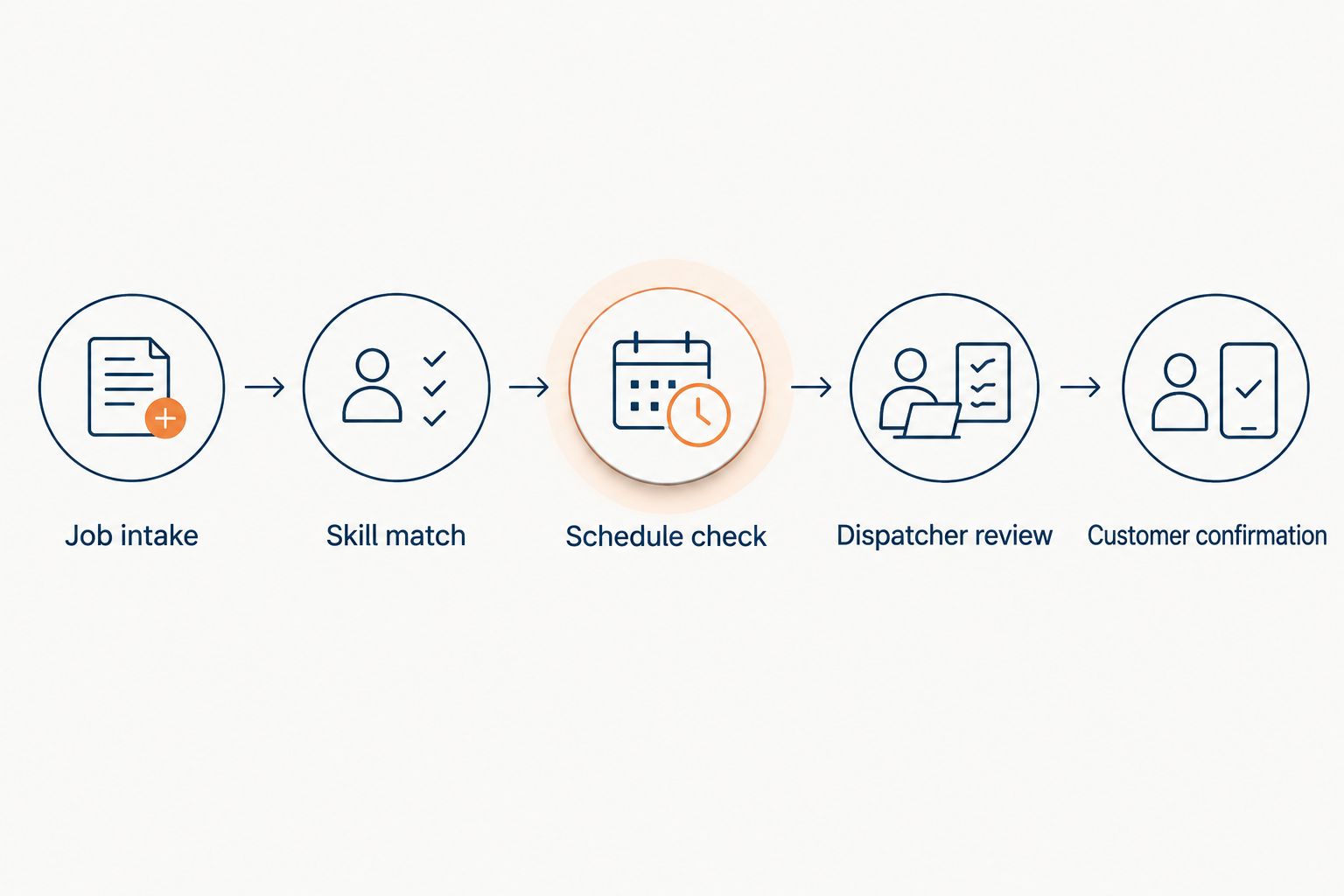
Use this sequence for each dispatch platform:
- Job intake: Provide the service request, address, appointment commitment, and relevant job requirements.
- Skill match: Identify which technician can perform the work and which assignment is unacceptable.
- Schedule check: Test whether the proposed assignment respects availability and existing commitments.
- Dispatcher review: Ask the dispatcher to reject a recommendation and inspect the replacement.
- Customer confirmation: Check what the customer is told after the assignment changes.
A demonstration should expose the decision boundary. You need to know which actions happen automatically, which need approval, and which remain manual.
Repeat the exercise after removing a technician from availability. Ask the provider to explain every changed assignment and identify any customer commitment that needs attention. A tidy schedule is not enough if it conceals an operational conflict.
Keep lead-response testing separate. For appointment setting, evaluate whether the conversation captures usable booking information and respects your agreed rules; do not score it on route optimization it does not provide.
How these options are ranked
This 2026 ranking prioritizes category fit, assignment support, schedule control, and workflow scope. ServiceTitan takes the HVAC-dispatch slot because of its trade-service focus and Dispatch Pro offering. Salesforce Field Service and Dynamics 365 Field Service serve distinct platform-centered workflows.
The managed-service option is included to clarify the boundary between booking and dispatch. These rankings are buying recommendations by use case, not measured performance results or a guarantee of business outcomes.
Your demonstration should decide the final purchase. A product that fails your scheduling constraints should not win because its presentation uses more AI terminology.
Which option should you choose?
Start with ServiceTitan if you run an HVAC business and technician assignment is the main problem. Start with Salesforce Field Service when field visits need to connect with a wider Salesforce service process, or Dynamics 365 Field Service when Microsoft-centered operations define the requirement.
If inquiries go unanswered before they become jobs, evaluate managed lead response separately. Fixing the conversation and fixing the schedule require different acceptance criteria.
Before signing, write down what the proposed setup must do, what it must never do, and who handles exceptions. Make the demonstration answer those requirements rather than letting a feature list define your operating process.
FAQ
What's the best field service management software with AI dispatch for HVAC?
ServiceTitan is the first shortlist choice in this guide for HVAC-focused dispatch operations. Evaluate Dispatch Pro against your technician skills, appointment commitments, and exception-handling requirements before choosing.
Is AI appointment booking the same as AI dispatch?
No. Appointment booking handles the customer conversation and service slot, while dispatch assigns field resources to the work. A confirmed appointment still needs an operationally suitable technician assignment.
Does Relaykite-3 replace field service management software?
No. Relaykite-3 provides managed HVAC lead response, prospect follow-up, and appointment setting. Its stated service is not a replacement for technician dispatch or field service management.
Is Salesforce Field Service better than Dynamics 365 Field Service?
Choose by workflow rather than a universal ranking. Salesforce Field Service suits broader Salesforce customer-service processes, while Dynamics 365 Field Service belongs on the shortlist for Microsoft-centered field operations.
Does Copilot mean a system can dispatch technicians automatically?
No. Generative assistance and resource scheduling optimization are different capabilities. Require a demonstration of assignment decisions and schedule constraints rather than accepting an AI-assistant demonstration as proof.
What should I ask during an AI dispatch demo in 2026?
Ask the provider to handle a skill mismatch, an unavailable technician, and a changed customer commitment. Check which decisions are automatic, which need approval, and how a dispatcher corrects an unsuitable recommendation.
Can AI dispatch guarantee more booked jobs?
No. Dispatch and lead booking address different stages of service delivery, and neither establishes a guaranteed business outcome. Assess each proposed configuration against its stated operational responsibilities.
One last thing
Add a deliberately unassignable job to your final 2026 demonstration. Give it a required skill that no available technician has, then ask the system to handle it without weakening that requirement.
A visible exception is better than an assignment your team cannot fulfill. The right buying decision protects that boundary, even when the resulting calendar looks less full.