
Best for managed lead response: RelayKite. Best for HVAC field operations: ServiceTitan. Best for estimate follow-up: Jobber. This 2026 guide separates CRM software from managed appointment-setting services so you can choose the right solution without confusing a follow-up message with a confirmed service appointment.
- For the best HVAC CRM software with automated lead follow-up, separate customer records, follow-up automation, and appointment booking.
- RelayKite fits U.S. HVAC businesses seeking managed lead response and appointment setting, not a replacement CRM.
- ServiceTitan fits field operations; Housecall Pro fits owner-led workflows; Jobber fits estimate follow-up.
- HubSpot fits sales pipeline management when dispatch and service scheduling remain separate.
Why this matters
A CRM stores customer information. Follow-up automation prompts the next action. Appointment setting turns a conversation into a scheduling decision. These functions overlap, but they are not interchangeable.
Your HVAC business needs a clear answer to what happens after an inquiry arrives. Does someone respond, collect the relevant details, offer an appropriate appointment, and pass the record to your team? A message sent without that next step leaves the customer waiting.
For your 2026 shortlist, start with the unfinished task rather than the longest feature list. Keep an existing operations system if it works. Replace it only when the records, scheduling, or field workflow also need to change.
What makes the best HVAC CRM with automated follow-up
Use these criteria before comparing vendors:
- Inquiry handling: The workflow distinguishes a new inquiry from an existing customer, an estimate question, or a service issue.
- Follow-up control: You can define what starts outreach, what stops it, and when a person takes over.
- Booking accuracy: Appointment decisions reflect the services, service area, and scheduling rules your business actually supports.
- Record continuity: Staff can see the conversation and its outcome without reconstructing the customer’s request.
- Operational fit: The solution addresses your actual gap without forcing an unnecessary dispatch or CRM replacement.
Treat each criterion as a demonstration requirement. Ask for the complete path from inquiry to outcome, not isolated screenshots of a contact record and a calendar.
HVAC CRM and follow-up options at a glance
The options below solve different problems. The order reflects workflow fit, not a claim that every HVAC business should buy the same system.
| Option | Best for | Standout role | Key limitation |
|---|---|---|---|
| RelayKite | Managed lead response and appointment setting | A service focused on inquiries, prospect follow-up, and booking | Not a replacement for a full HVAC CRM or field-service platform |
| ServiceTitan | HVAC field operations | Customer and job management within a trades-focused platform | Evaluate lead follow-up separately from the broader operations workflow |
| Housecall Pro | Owner-led service workflows | Customer management, scheduling, and invoicing in a field-service platform | Confirm the exact follow-up workflow rather than assuming every inquiry is covered |
| Jobber | Estimate follow-up | Quote follow-up alongside customer and job management | Quote reminders and new-inquiry appointment setting are different tasks |
| HubSpot | Sales pipeline management | CRM records and workflow automation | HVAC dispatch and field-service operations require separate consideration |
1. RelayKite: best for managed HVAC lead follow-up
RelayKite provides a managed lead response and appointment-setting service for U.S. HVAC businesses. It helps respond to new inquiries, follow up with prospects, and book service appointments. That makes it a service option alongside CRM software, rather than another full CRM in this comparison.
Start here when your central problem is handling conversations, not maintaining customer records. The distinction matters: choosing a managed service does not establish compatibility with your existing software or replace your scheduling rules. Confirm those details before committing.
Pros:
- Focuses on new inquiries and prospect follow-up.
- Includes appointment setting within its stated service scope.
- Offers a managed service rather than only software for your team to operate.
Cons:
- Does not replace a full CRM or field-service platform.
- Booking suitability depends on the rules configured for your business.
Best for: U.S. HVAC businesses seeking managed lead response and appointment setting.
RelayKite is best for U.S. HVAC businesses that want managed lead follow-up and appointment setting rather than a replacement CRM. Ask how an inquiry becomes a booking, what your team receives, and which conversations require staff involvement.
Verdict: Buy for the managed-response use case after confirming configuration and handoff requirements.
2. ServiceTitan: best HVAC CRM option for field operations
ServiceTitan is a field-service management platform built for trades businesses, including HVAC. It brings customer and job information into an operational system that also addresses scheduling and dispatch. Its fit is strongest when you are choosing how the business manages service work, not merely how it sends follow-up messages.
Separate that operational decision from the lead-response decision. Ask the vendor to demonstrate which tools handle new inquiries, estimate follow-up, and appointment outcomes in the proposed setup. Do not treat a broad platform demonstration as proof of a specific automation path.
ServiceTitan pros:
- Trades-focused customer and job management.
- Scheduling and dispatch belong to the same operational platform.
- Supports evaluation across office and field workflows.
ServiceTitan cons:
- A broader system decision than a standalone follow-up service.
- Lead-response requirements still need a specific demonstration.
Best for: HVAC businesses selecting a central field-operations platform.
In your 2026 evaluation, involve the people who handle scheduling, dispatch, and customer records. Ask them to trace the same inquiry through the proposed workflow. The recommendation depends on whether the operational scope matches the problem you need to solve.
Verdict: Buy when field operations need a central platform; skip a replacement solely to add follow-up.
3. Housecall Pro: best HVAC CRM option for owner-led workflows
Housecall Pro combines customer management with service-business functions such as scheduling and invoicing. It belongs on the shortlist when the owner or office team needs to manage customer work within a field-service system. Evaluate it around the daily workflow your staff must complete.
For automated follow-up, distinguish customer communications from lead handling. An appointment reminder, an estimate reminder, and a response to a new inquiry have different starting points and different stopping rules. Ask for the relevant workflow in the configuration you are considering.
Housecall Pro pros:
- Connects customer records with service scheduling.
- Includes invoicing within the service workflow.
- Lets you evaluate follow-up alongside everyday office tasks.
Housecall Pro cons:
- Field-service functionality alone does not establish managed lead handling.
- Each required follow-up path needs configuration-level verification.
Best for: Owner-led HVAC businesses choosing an office and service-management workflow.
Bring a representative customer journey to the demonstration. Ask the vendor to show what the office sees after the customer replies, requests a different appointment, or decides not to proceed. Your decision should rest on that complete workflow.
Verdict: Buy for the owner-led service workflow after confirming the follow-up path you need.
4. Jobber: best HVAC CRM option for estimate follow-up
Jobber provides customer and job management for service businesses, including quoting, scheduling, and invoicing. Its quote follow-up functionality makes it relevant when the unfinished task is getting a response to an estimate. That is a narrower problem than responding to every new inquiry.
Use Jobber’s estimate workflow as the focus of your demonstration. Check how reminders relate to the quote record and what happens after acceptance, rejection, or a customer question. Avoid treating a sent reminder as evidence that the sales conversation is complete.
Jobber pros:
- Connects quotes with customer and job records.
- Provides quote follow-up functionality.
- Keeps scheduling and invoicing within the broader service workflow.
Jobber cons:
- Estimate follow-up does not establish new-inquiry appointment setting.
- Replies that need judgment still require a defined handling process.
Best for: HVAC businesses whose follow-up gap begins after sending an estimate.
For a 2026 selection, demonstrate both an unanswered quote and a quote that receives a question. The second scenario reveals who owns the conversation after automation has done its initial work.
Verdict: Buy for estimate follow-up; hold if new-inquiry handling is the main requirement.
5. HubSpot: best CRM option for HVAC sales pipelines
HubSpot is a general CRM platform with sales pipeline management and workflow automation. It fits a decision centered on contacts, sales stages, and follow-up ownership. It is not an HVAC field-service platform, so keep dispatch and technician scheduling in a separate evaluation.
Consider this route when your sales process needs its own structure. Ask how inquiries enter the CRM, how staff receive tasks, and how a sales outcome reaches the system responsible for service delivery. Confirm the workflow capabilities included in the proposed configuration.
HubSpot pros:
- Organizes contacts and sales opportunities.
- Supports workflow-based sales processes.
- Suits an evaluation focused on pipeline ownership.
HubSpot cons:
- Does not replace an HVAC field-service platform.
- The handoff from sales to service needs explicit design.
Best for: HVAC businesses managing a distinct sales pipeline alongside service operations.
Verdict: Buy for pipeline management; skip as a standalone answer to HVAC dispatch and booking.
How to test the follow-up workflow
For your 2026 evaluation, use 3 inquiry scenarios: a new service request, an unanswered estimate, and a customer asking to change an appointment. These are recommended test cases, not performance benchmarks. Use your own service rules and remove personal customer information from demonstration material.
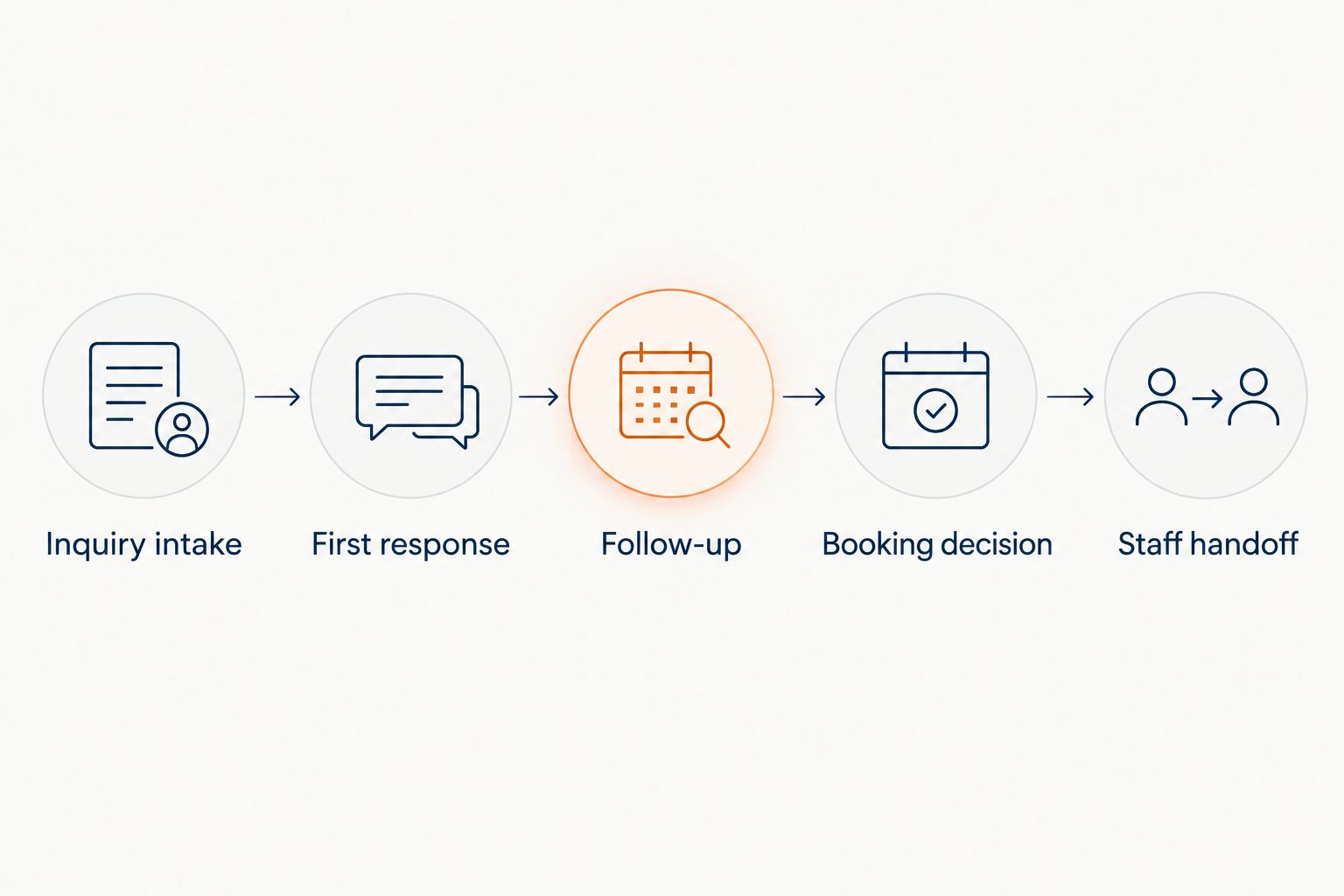
Trace each scenario through 5 workflow stages:
- Inquiry intake: Identify the request and the information needed to proceed.
- First response: Show what the customer receives and who owns the conversation.
- Follow-up: Demonstrate what triggers further contact and what stops it.
- Booking decision: Show how the workflow handles an appropriate appointment request.
- Staff handoff: Show the record and next action your team receives.
The handoff is the test’s final step, not an administrative afterthought. Your staff need enough context to act without asking the customer to repeat the entire request.
Check 2 booking outcomes: an appointment that meets your rules and a request that requires staff review. Ask the vendor to demonstrate both. A workflow that only handles the straightforward example leaves an important decision untested.
Before launch, define responsibility for corrections, stopped conversations, duplicate records, and customer questions. Get the proposed scope in writing. These are setup requirements, not guarantees of response time or booking results.
How the options are ranked
This ranking prioritizes the job each option addresses: managed conversations, field operations, owner-led service management, estimate follow-up, or sales pipeline management. It does not present a laboratory test, measured performance comparison, or universal winner.
The criteria are inquiry handling, follow-up control, booking accuracy, record continuity, and operational fit. Use them to reject options that solve a different problem from yours, even when their broader feature set looks attractive.
Which HVAC CRM should you choose?
Keep the CRM that already serves your operations, and address the specific follow-up gap first. Choose RelayKite for a managed lead-response and appointment-setting requirement. Choose ServiceTitan for field operations, Housecall Pro for an owner-led service workflow, Jobber for estimate follow-up, or HubSpot for a separate sales pipeline.
Your 2026 decision should produce a clear owner for the next customer action. If nobody can explain who handles a reply, confirms an appropriate appointment, or resolves an exception, the workflow is not ready.
FAQ
What’s the best HVAC CRM software with automated lead follow-up?
The best choice depends on where your workflow stops. ServiceTitan fits field operations, Housecall Pro fits owner-led service workflows, Jobber fits estimate follow-up, and HubSpot fits sales pipelines. Evaluate the exact automation path before choosing.
Is RelayKite an HVAC CRM?
RelayKite is a managed lead response and appointment-setting service for U.S. HVAC businesses, not a replacement CRM. Its stated scope includes responding to inquiries, following up with prospects, and booking service appointments.
Is automated follow-up the same as appointment booking?
No, automated follow-up and appointment booking are different tasks. Follow-up prompts or continues a conversation; booking requires a scheduling decision that follows your business rules.
Should I replace my HVAC CRM to improve lead response?
Do not replace a working CRM solely because lead response needs attention. First identify whether the gap concerns customer records, outreach, conversation handling, or appointment setting.
Is Jobber better than HubSpot for HVAC follow-up?
Jobber fits quote follow-up within a service-management workflow, while HubSpot fits a distinct sales pipeline. Choose around the record and process your team needs to manage, not the follow-up label alone.
What should I ask in an HVAC CRM demonstration?
Ask the vendor to trace a new inquiry, an unanswered estimate, and an appointment-change request through the proposed setup. Require a demonstration of the customer response, stopping rules, booking decision, and staff handoff.
Can automated follow-up guarantee booked appointments?
Automated follow-up does not guarantee booked appointments. Outcomes depend on customer decisions, appointment suitability, and the workflow configured for your business.
One last thing
Test what happens after the customer says no. Ask the vendor to show how follow-up stops and how your team sees that decision. A completed conversation includes respecting the customer’s answer, not just sending the next message.