
Best for managed lead response: Relaykite-3. Best for dispatch-centered operations: ServiceTitan. Best for quote-to-job scheduling: Jobber. This 2026 guide separates appointment-setting services from field-service software so you can choose the right tool for the work you need done.
- The best HVAC scheduling software with AI automation depends on whether you need lead response, appointment booking, or technician dispatch.
- Relaykite-3 fits U.S. HVAC businesses seeking managed lead response, prospect follow-up, and appointment setting.
- ServiceTitan, Jobber, Housecall Pro, and FieldEdge address field-service workflows; evaluate AI functions separately from scheduling features.
- Choose one authoritative calendar and define when an appointment becomes confirmed before enabling automated booking.
Why this matters
An inquiry, an appointment, and a dispatched job are different records. A system that replies to a homeowner does not necessarily assign the right technician, reserve travel time, or record the equipment history needed for the visit.
Separate your decision into 2 stages: customer booking and operational scheduling. Customer booking moves an inquiry toward an agreed visit. Operational scheduling assigns resources and makes that visit executable.
For your 2026 shortlist, identify which stage needs attention first. If inquiries wait while your office handles existing jobs, evaluate lead response. If confirmed appointments require constant rearrangement, evaluate dispatch and scheduling controls.
Do not buy an AI label in place of a defined workflow. Ask what the system does, what information it uses, and where a person takes over.
What makes the best HVAC scheduling software with AI automation
Use these criteria before comparing vendors. They describe the job the system must perform, not a promise that every listed option performs it.
- Workflow fit: Distinguish responding to a lead, booking an appointment, and dispatching a technician. Choose for your actual bottleneck.
- Booking authority: Establish which calendar controls availability and whether automation can confirm appointments or only request them.
- Service qualification: Check how the workflow handles service area, requested work, customer details, and missing information.
- Human handoff: Require a clear route for uncertain requests, schedule conflicts, and issues outside the configured process.
- Record continuity: Examine what reaches your job record. A conversation summary is not a substitute for a usable service appointment.
- Configuration ownership: Decide who maintains service rules, staff availability, follow-up instructions, and exceptions after launch.
A useful 2026 demonstration follows an inquiry from arrival to its final record. A polished reply is only the beginning. The demonstration should show what happens when the homeowner changes the request or asks for a slot that is no longer open.
HVAC scheduling options at a glance
These options occupy different parts of the workflow. The table ranks them by use case, not by an unsupported claim about overall performance. AI capabilities require a separate feature-level review; scheduling software and AI appointment setting are not interchangeable categories.
| Option | Best for | Standout role | Key limitation |
|---|---|---|---|
| Relaykite-3 | Managed lead response and appointment setting | Service focused on responding, following up, and booking | Not presented as a replacement for field-service management |
| ServiceTitan | Dispatch-centered service operations | Field-service platform with scheduling and dispatch workflows | Platform selection does not establish how AI booking will operate |
| Jobber | Quote-to-job scheduling | Connects customer, quoting, job, and scheduling workflows | Booking rules still need to reflect your HVAC service requirements |
| Housecall Pro | Scheduling alongside everyday office tasks | Combines service scheduling with customer and invoicing workflows | Scheduling functions alone do not establish automated lead qualification |
| FieldEdge | Dispatch connected to customer and equipment records | Field-service workflow spanning dispatch and service information | Automated appointment-setting behavior needs separate evaluation |
1. Relaykite-3: best for managed HVAC appointment setting
Relaykite-3 provides a managed AI-powered lead response and appointment-setting service for U.S. HVAC businesses. Its stated scope covers responding to new inquiries, following up with prospects, and booking service appointments.
That makes the service relevant when you need help moving a new inquiry toward an appointment. It is a different purchasing decision from replacing the system your office uses to manage technicians, invoices, and service records.
Relaykite-3 pros:
- Its stated service scope directly addresses new inquiries and prospect follow-up.
- Appointment setting is part of the offering, rather than an inferred scheduling feature.
- The managed-service model gives you an alternative to selecting software alone.
Relaykite-3 cons:
- The stated offering does not establish full dispatch, invoicing, or equipment-record management.
- Your appointment rules still need to distinguish requested visits from confirmed bookings.
- Compatibility with your existing operational systems needs confirmation before you commit.
Best for: U.S. HVAC businesses seeking a managed service for lead response, follow-up, and appointment setting.
Ask how the configured process handles an unavailable slot, an incomplete address, and a customer who changes the requested service. Confirm where the appointment record lands and who resolves exceptions. Those answers determine fit; the service description alone does not establish the configuration.
Verdict: Buy for the stated lead-response and appointment-setting role once the booking rules and handoff are agreed. Skip as a presumed replacement for dispatch software.
2. ServiceTitan: best for dispatch-centered HVAC operations
ServiceTitan is a field-service management platform with scheduling and dispatch workflows. It belongs on your shortlist when the operational problem extends beyond answering inquiries and into organizing service work.
Start the evaluation with the dispatcher, not the automated conversation. Ask the vendor to demonstrate how a booked visit becomes assigned work and how the office handles a change after assignment.
ServiceTitan pros:
- Scheduling and dispatch sit within a broader field-service platform.
- It provides an operational alternative to a standalone appointment-setting service.
- Its workflow scope supports evaluating the relationship between office scheduling and field work.
ServiceTitan cons:
- Choosing a broad platform requires decisions beyond lead response alone.
- An AI feature name does not establish the booking permissions your business needs.
- Your specific handoff from inquiry to dispatch still needs demonstration.
Best for: HVAC businesses whose primary requirement is coordinating scheduled work through dispatch.
For a 2026 evaluation, request a workflow demonstration using your own service categories and appointment rules. Separate functions shown in the demonstration from functions merely discussed. Treat any proposed automation as a distinct requirement with its own acceptance check.
Verdict: Buy for dispatch-centered operations after the workflow demonstration. Skip if your only unmet need is responding to new leads.
3. Jobber: best for quote-to-job HVAC scheduling
Jobber is field-service software covering customer management, quoting, job scheduling, and invoicing. Its place in this comparison is the connection between a customer request, an agreed scope, and scheduled work.
Evaluate that connection with an inquiry that needs clarification before booking. A repair request and a request for a replacement estimate should follow the rules your business sets, not become identical appointments by default.
Jobber pros:
- Quoting and scheduling belong to the same field-service workflow.
- Customer and job records provide context beyond a standalone conversation.
- It offers a relevant shortlist option when work moves from quote to scheduled job.
Jobber cons:
- General scheduling functions do not establish HVAC-specific qualification rules.
- You still need to define what happens before a request becomes scheduled work.
- Any AI-assisted booking behavior requires separate confirmation.
Best for: HVAC businesses evaluating how customer requests and quotes become scheduled jobs.
Ask to see a homeowner approve a quote, request a different visit, and provide additional information afterward. Check where that information appears for the person arranging the work. The useful outcome is a consistent job record, not merely a completed conversation.
Verdict: Buy for a quote-to-job workflow that matches your process. Wait if the demonstration leaves booking authority unclear.
4. Housecall Pro: best for scheduling alongside office tasks
Housecall Pro is field-service software with scheduling, customer management, and invoicing functions. Evaluate it when you want to consider appointment administration together with the everyday work your office handles around a service visit.
The relevant question is what your staff must do after a booking arrives. Follow the appointment through the office workflow and identify each place where someone must re-enter information or resolve an ambiguity.
Housecall Pro pros:
- Scheduling is part of a broader service-business workflow.
- Customer management provides a place to evaluate appointment context.
- Invoicing belongs to the same platform category rather than a lead-response-only service.
Housecall Pro cons:
- Scheduling alone does not establish automated qualification of new inquiries.
- Your service-area and appointment rules need explicit review.
- The exact AI functions involved in your proposed setup need demonstration.
Best for: HVAC businesses selecting scheduling software alongside customer and invoicing workflows.
Use your office's actual appointment types during evaluation. Ask what staff see when a customer supplies incomplete information and what happens when an appointment changes. Keep customer-facing messages consistent with the appointment's real status.
Verdict: Buy when the demonstrated office workflow fits your operation. Wait if automated booking is promised without showing the resulting record.
5. FieldEdge: best for dispatch with service-record context
FieldEdge is field-service management software with dispatch and customer service-record functions, including equipment information. Its distinct use case here is evaluating scheduling in the context of the customer and equipment being serviced.
For HVAC work, assess what information the office and technician receive with an appointment. A booking should preserve the distinction between what the customer reported and what the business has verified.
FieldEdge pros:
- Dispatch sits alongside customer and service information.
- Equipment records offer relevant context for evaluating the appointment workflow.
- Its scope addresses operational work beyond initial lead response.
FieldEdge cons:
- Service records do not establish automated inquiry handling.
- Your booking and escalation process still needs separate definition.
- Any proposed connection between AI appointment setting and dispatch needs verification.
Best for: HVAC businesses prioritizing dispatch connected to customer and equipment records.
Demonstrate a repeat customer's request, then examine how the new appointment relates to the existing record. Check the handling of an unfamiliar unit or an incomplete equipment description without assuming the system can diagnose the problem.
Verdict: Buy for the demonstrated dispatch-and-record workflow. Skip as an assumed standalone solution for AI lead response.
How to evaluate automated booking before committing
In 2026, evaluate automation at the point where it changes a business record. A response that sounds correct is not enough if the appointment has the wrong status or no usable handoff.
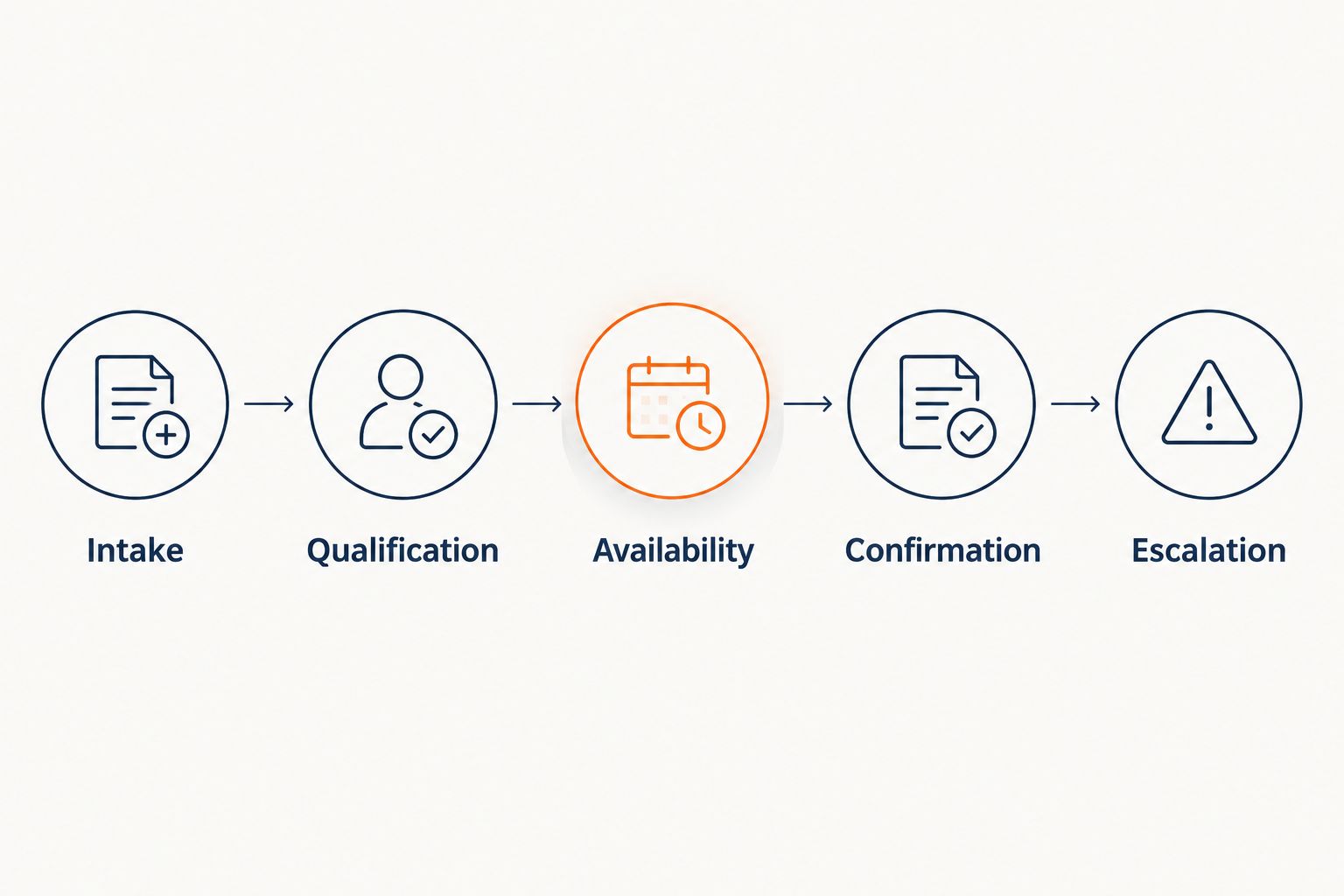
Use this sequence to define the workflow:
- Intake: Identify where the inquiry enters and what customer information is captured.
- Qualification: Apply your service-area and requested-work rules.
- Availability: Check the calendar authorized to control appointment openings.
- Confirmation: State whether the visit is requested or confirmed.
- Escalation: Route exceptions to the person responsible for resolving them.
Keep the customer-facing status aligned with the operational record. If the workflow only submits a request for review, the customer should not receive a confirmed-appointment message.
Run 3 test cases before approving the workflow: a valid service request, an address outside your service area, and a request for an unavailable appointment. These are acceptance checks, not performance benchmarks.
Require 1 authoritative calendar for the booking decision. If different systems show different availability, document which one wins and how conflicts reach your staff. Do not leave that decision to an undefined automation rule.
How we ranked
This 2026 ranking uses workflow fit, booking authority, qualification, handoff, record continuity, and configuration ownership. It assigns each option a distinct role rather than declaring an unsupported winner across every function.
The ordering starts with managed appointment setting, then moves into field-service operations. It is not a tested performance ranking or a claim that every listed platform supplies the same AI features.
Which HVAC scheduling option should you choose?
Choose the category before choosing the vendor. If new inquiries and follow-up are the gap, begin with the managed appointment-setting option. If your office needs to organize technicians and existing work, begin with field-service scheduling and dispatch.
Choose ServiceTitan for a dispatch-centered evaluation, Jobber for quote-to-job scheduling, Housecall Pro for scheduling alongside office tasks, or FieldEdge for dispatch with service-record context. Each recommendation depends on the workflow demonstrated for your business, not a guaranteed outcome.
Your 2026 decision should end with a written boundary: what gets automated, what remains with staff, and who owns exceptions. That boundary is more useful than a feature list without operating rules.
FAQ
What's the best HVAC scheduling software with AI automation in 2026?
The best option depends on whether you need appointment setting or operational scheduling. Evaluate a managed service for lead response and booking, or field-service software for scheduling and dispatch; confirm the exact AI functions separately.
Is Relaykite-3 HVAC scheduling software or a managed service?
Relaykite-3 is a managed AI-powered lead response and appointment-setting service for U.S. HVAC businesses. Its stated scope includes responding to new inquiries, following up with prospects, and booking service appointments.
Is ServiceTitan better than Jobber for HVAC scheduling?
ServiceTitan is the dispatch-centered shortlist choice in this guide; Jobber is the quote-to-job scheduling choice. Select between them by demonstrating the workflow your office needs rather than assuming one is better for every HVAC business.
Can AI appointment setting replace a dispatcher?
Appointment setting does not establish a replacement for dispatch. Booking a customer visit and assigning operational resources are different jobs, so define the responsibilities separately.
What should I test before enabling automated HVAC booking?
Test a valid request, an out-of-area address, and an unavailable appointment request. Check the customer message, appointment status, resulting record, and staff handoff for each case.
Do I need to replace my scheduling software to add lead response?
Lead response and scheduling are separate purchasing decisions. Before retaining your existing setup, confirm how the proposed service passes appointment information into the workflow your office uses.
Should automated booking confirm every HVAC inquiry?
No; confirmation should follow your configured service and availability rules. Requests that fall outside those rules need a defined review or escalation process, not an automatic promise of a visit.
One last thing
Ask the vendor to demonstrate a booking that should not succeed. An unavailable slot or an out-of-area request reveals whether the workflow respects your rules and tells the customer what happens next.
A successful exception ends with a clear status and an accountable handoff. It does not end with an appointment your office has to undo.