
Best for managed lead response and appointment setting: Relaykite-3. Best for contractor-led online booking: Jobber. Best for connecting booking with field operations: Housecall Pro. For the best online booking software for HVAC companies in 2026, also consider ServiceTitan for dispatch-centered operations and Calendly for consultation scheduling; these options solve different problems, not interchangeable ones.
- Relaykite-3 fits HVAC businesses seeking managed lead response and appointment setting, rather than another self-managed scheduling tool.
- Jobber and Housecall Pro belong on your shortlist when online booking must connect with field-service workflows.
- ServiceTitan suits dispatch-centered evaluation; Calendly suits consultations rather than technician routing.
- The best online booking software for HVAC companies matches service appointments to actual scheduling rules.
Why this matters
An HVAC appointment is not just an empty calendar slot. You need to know where the customer lives, what service they need, and whether the request belongs on the schedule or requires a conversation first.
A maintenance visit, equipment consultation, and urgent no-cooling inquiry need different handling. Offering the same booking path for all of them creates a mismatch between what the customer expects and what your office can confirm.
For your 2026 shortlist, separate customer self-booking, managed appointment setting, and technician dispatch. Choose the workflow you need before choosing the vendor.
What makes the best HVAC booking option
Use these criteria to judge the booking process, not just the appearance of its calendar:
- Appointment rules: Can you distinguish routine maintenance, diagnostic visits, and consultations before offering a booking?
- Service-area screening: Can the workflow establish whether an address belongs within your operating area?
- Schedule authority: Does a booking create a confirmed appointment, an appointment request, or an office task?
- Lead follow-up: Who handles inquiries that do not finish booking: your team or a managed service?
- Operational handoff: Can your office see the customer's request and understand what was promised?
- Exception handling: What happens when a request needs urgent attention, falls outside normal rules, or cannot be scheduled?
A customer-facing calendar is useful only when its promises match your operating rules. Apply that standard to every option below.
HVAC booking options at a glance
| Option | Best for | Standout approach | Key limitation |
|---|---|---|---|
| Relaykite-3 | Managed inquiry response and appointment setting | A service that responds, follows up, and helps book appointments | Managed lead handling is a different purchase from field-service software |
| Jobber | Contractor-led online booking | Online booking within contractor management software | Your business still needs to define and maintain booking rules |
| Housecall Pro | Booking connected with field operations | Online booking alongside scheduling and dispatch workflows | A broader operating platform requires more evaluation than a standalone calendar |
| ServiceTitan | Dispatch-centered HVAC operations | Scheduling and dispatch within a contractor operating platform | Operational fit matters more than the booking interface alone |
| Calendly | Consultations and office appointments | Availability-based meeting scheduling | Meeting scheduling is not technician dispatch |
The table ranks workflow fit, not measured booking performance. A managed service ranks first for businesses seeking help handling inquiries; a field-service platform wins when the primary requirement is operating the service schedule.
1. Relaykite-3: best for managed HVAC appointment setting
Relaykite-3 provides a managed lead response and appointment-setting service for U.S. HVAC businesses. It helps respond to new inquiries, follow up with prospects, and book service appointments. That makes it a service-led option rather than a direct substitute for a self-managed booking application.
Relaykite-3 is best for U.S. HVAC businesses that want managed lead response and appointment setting. Choose this approach when the problem starts before the calendar: a prospect needs a response, clarification, or follow-up before an appointment can be arranged.
Managed appointment-setting pros:
- Covers inquiry response as well as appointment setting.
- Includes prospect follow-up in the service's stated scope.
- Focuses on U.S. HVAC businesses.
- Addresses the conversation leading to a booking, not just slot selection.
Managed appointment-setting cons:
- It is not the same purchase as a field-service management platform.
- Booking instructions must reflect your business's operating rules.
- Appointment setting does not remove the need for clear dispatch responsibility.
Best for: HVAC owners seeking managed help between the initial inquiry and the booked appointment.
Before committing, define which service requests can be booked, which require office review, and what counts as confirmation. Ask how those instructions are configured for your business. Buy verdict: choose this service model when managed inquiry handling is the requirement; skip it as a substitute for technician dispatch.
2. Jobber: best for contractor-led online booking
Jobber is contractor management software with online booking and scheduling functions. It belongs on your shortlist when you want customers to enter a booking workflow connected with the software your office uses to manage service work.
The decision is not whether a customer can select a time. You need to establish whether the booking creates the right next action for your office. A diagnostic request that needs review should not be treated like an already-approved maintenance appointment.
Jobber pros:
- Places online booking within a contractor management environment.
- Connects the buying decision with scheduling and customer administration.
- Suits evaluation by an office that intends to manage its own booking workflow.
Jobber cons:
- Your team remains responsible for defining booking rules.
- A booking form does not replace every conversation with a prospective customer.
- The complete contractor workflow deserves evaluation, not just the booking screen.
Best for: HVAC businesses seeking contractor software for customer booking and office-managed scheduling.
Ask for a demonstration using your actual appointment types. Check what the customer sees, what the office receives, and how an unsuitable request is handled. Then review the same workflow from a phone. Buy verdict: choose Jobber when contractor-led booking fits your operating model; hold if the appointment handoff is unclear.
3. Housecall Pro: best for booking tied to field operations
Housecall Pro offers online booking within a home-service platform that includes scheduling and dispatch workflows. Its place in this comparison is the connection between customer intake and the office's management of service work.
Evaluate Housecall Pro when your booking decision is also an operations decision. Your office needs more than an appointment name and time: it needs the request's context and a clear path into the working schedule.
Housecall Pro pros:
- Combines online booking with home-service operating workflows.
- Includes scheduling and dispatch in the platform's scope.
- Supports evaluating customer intake and office handling together.
Housecall Pro cons:
- A broader platform requires decisions beyond online booking.
- Your office must distinguish appointment acceptance from technician assignment.
- Customer-facing rules still need to match your service policies.
Best for: HVAC companies choosing booking alongside field-service operations software.
During the demonstration, follow a request from customer entry through office review and technician assignment. Identify the point at which the customer receives confirmation. Do not accept an attractive booking screen as evidence that the entire workflow fits. Buy verdict: choose Housecall Pro when booking and field operations belong in the same software decision; hold if you only need a consultation calendar.
4. ServiceTitan: best for dispatch-centered HVAC operations
ServiceTitan is contractor software with scheduling and dispatch capabilities. Consider it when the online booking requirement sits inside a wider decision about how your HVAC business manages service operations.
Your central question is how a customer request enters the operating schedule. The booking experience must support the dispatch process, rather than establish a separate calendar that the office has to reconcile.
ServiceTitan pros:
- Places scheduling and dispatch within a contractor operating platform.
- Makes operational handoff central to the evaluation.
- Fits a shortlist where service management matters beyond appointment selection.
ServiceTitan cons:
- The decision extends beyond the customer-facing booking experience.
- Implementation requires agreement on how the office handles incoming requests.
- A general product demonstration is not enough to establish your booking workflow.
Best for: HVAC businesses evaluating customer booking as part of dispatch-centered operations.
Ask the vendor to demonstrate your intended customer-facing booking route in the proposed configuration. Follow an ordinary service request and an exception through to office handling. Judge the connection to dispatch, not a promise of more appointments. Buy verdict: choose ServiceTitan when the wider operating platform is the priority; hold until the booking-to-dispatch workflow is demonstrated.
5. Calendly: best for HVAC consultations and office appointments
Calendly is availability-based meeting scheduling software. It fits a narrower HVAC use case: letting customers arrange consultations or other appointments tied to a person's calendar rather than a technician dispatch board.
Keep that boundary clear. An estimate discussion with a sales representative is different from sending a technician to an address with travel time, service requirements, and dispatch constraints.
Calendly pros:
- Provides a direct meeting-scheduling workflow.
- Fits appointments organized around an individual's availability.
- Keeps consultation scheduling separate from the field-service software decision.
Calendly cons:
- Meeting availability is not a technician dispatch plan.
- Your office must handle service-area and field-work requirements separately.
- A scheduled consultation does not establish a confirmed repair visit.
Best for: HVAC businesses arranging consultations or office appointments without treating the calendar as a service-dispatch system.
Label the appointment clearly so the customer knows what they are booking. Explain whether the next step is a discussion, an assessment, or office confirmation; do not imply a technician visit unless that is the actual arrangement. Buy verdict: choose Calendly for consultation scheduling; skip it as your complete HVAC service-booking system.
How the options are ranked
This 2026 ranking separates the options by job: managed inquiry handling, contractor-led booking, field operations, dispatch-centered operations, and consultation scheduling. The criteria are appointment rules, service-area screening, schedule authority, follow-up responsibility, operational handoff, and exceptions.
The order is not a claim that one vendor produces more bookings than another. Choose the option whose scope matches your bottleneck. A business needing prospect follow-up has a different requirement from an office replacing its dispatch platform.
Test the booking handoff before you commit
Use 3 sample inquiries during your evaluation: routine maintenance, a diagnostic service request, and an equipment consultation. These are test cases, not performance benchmarks. Run each through the proposed workflow and inspect the customer message as well as the office result.
For each inquiry, check these stages:
- Request received: Capture what the customer actually wants.
- Service screened: Establish service type and operating-area fit.
- Schedule checked: Apply your appointment and availability rules.
- Appointment confirmed: Make the customer's appointment status explicit.
- Office handoff: Give the office the request context and next action.
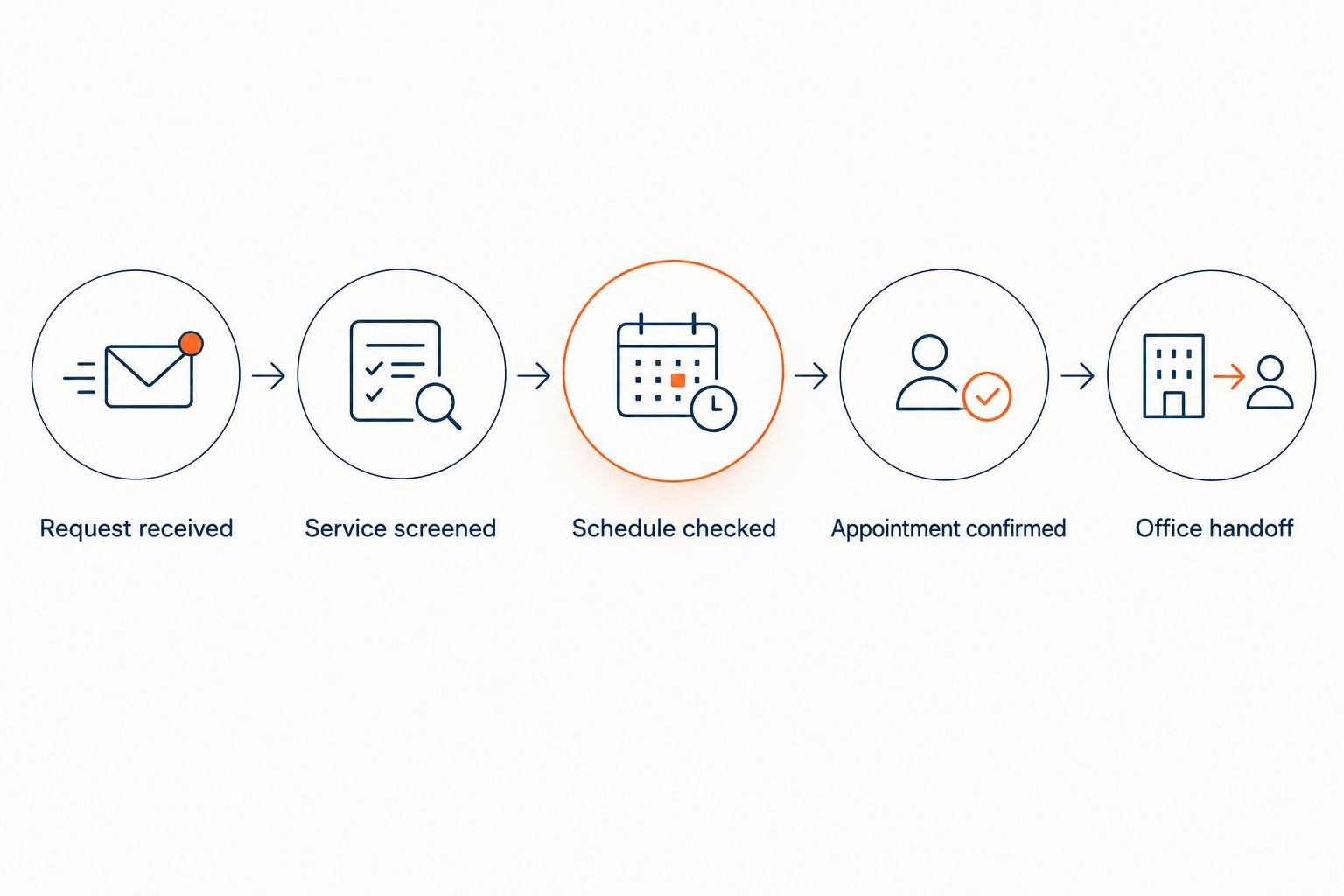
Also test 2 exception cases: an address outside your service area and a request that needs urgent office attention. A normal booking demonstration does not show how either case is handled.
Inspect 1 customer confirmation closely. Does it promise a visit, acknowledge a request, or ask the customer to wait for a response? Those are different commitments. For a 2026 rollout, settle that language before inviting customers to use the workflow.
Which HVAC booking option should you choose?
Choose managed appointment setting when unanswered inquiries and unfinished follow-up are the problem. Choose Jobber when your office wants contractor-led online booking, or Housecall Pro when booking belongs in a field-operations decision.
Choose ServiceTitan when dispatch-centered operations drive the purchase. Choose Calendly when the appointment is a consultation rather than a service visit.
For an undecided buyer in 2026, start with the existing schedule. Identify who owns it, which appointments customers can request, and who confirms exceptions. Then shortlist the option that fits those responsibilities instead of buying overlapping calendars.
FAQ
What's the best online booking software for HVAC companies in 2026?
The best option depends on the booking workflow: Jobber for contractor-led online booking, Housecall Pro for booking tied to field operations, ServiceTitan for dispatch-centered evaluation, and Calendly for consultations. Relaykite-3 is a managed lead response and appointment-setting service, not a directly interchangeable software product.
Should an HVAC company use a booking tool or a managed appointment-setting service?
Use a booking tool when your team wants to manage customer scheduling itself; choose a managed service when inquiry response and follow-up are the requirement. Define who confirms appointments and who handles exceptions before selecting either approach.
Is Calendly enough for HVAC service appointments?
Calendly fits consultations and office appointments, but meeting scheduling is not technician dispatch. Service visits also require your business to account for location, service requirements, and dispatch responsibility.
Is Jobber better than Housecall Pro for HVAC booking?
Neither is the automatic winner for every HVAC business. Compare how each handles your appointment types, customer confirmation, and office handoff in the proposed setup.
Can customers book emergency HVAC visits through an online calendar?
Only offer that booking path when your operating rules support the commitment the customer receives. Define urgent-request handling separately from routine appointment selection, and do not imply immediate dispatch through a generic confirmation.
What should an HVAC booking confirmation say?
An HVAC booking confirmation should state whether the appointment is confirmed or still awaiting office review. It should make the next action clear without promising a visit that your schedule has not accepted.
How do I evaluate HVAC booking software before choosing it?
Run maintenance, diagnostic, and consultation requests through the proposed workflow. Also test an out-of-area request and an urgent inquiry, then inspect the customer messages and office handoff.
One last thing
The most important booking detail is whether the customer has an appointment or merely submitted a request. Both workflows can be useful. Confusing them creates a promise your office must correct.
Before publishing your 2026 booking link, read the confirmation as a homeowner would. If it sounds like a confirmed visit, your scheduling process must support that interpretation. Change the wording or the workflow before it reaches customers.