
Best for managed lead response: Relaykite-3. Best for connected field-service operations: ServiceTitan. Best for CRM-centered sales tracking: HubSpot. This 2026 guide compares HVAC lead management options by the work you need done: responding, following up, booking appointments, or managing the wider service operation.
- Relaykite-3 fits U.S. HVAC businesses seeking managed lead response and appointment setting, configured for their business.
- The best hvac lead management software depends on whether you need appointment booking, field-service management, or CRM tracking.
- ServiceTitan, Jobber, and Housecall Pro address field-service workflows; HubSpot addresses CRM-centered lead management.
- Choose by demonstrated workflow fit, not a promised booking result. Outcomes depend on setup and execution.
Why this matters
A lead record is not a response. A response is not an appointment. And an appointment request is not necessarily a confirmed place on your service schedule.
Your buying decision should start with the point where work stops. If inquiries sit unanswered, a better reporting dashboard does not solve that problem. If your team responds consistently but loses track of estimates, you need a different workflow.
For a 2026 shortlist, separate managed response from software your staff operates. Both belong in this comparison, but they solve different ownership problems. The practical question is who handles the next action after an inquiry arrives.
What makes the best HVAC lead management software?
Use these criteria before comparing product names. Each criterion describes an observable workflow, not a sales claim.
- Response ownership: Identify who answers new inquiries and who takes over when the initial response cannot resolve the request.
- Follow-up control: Check how the system records the next action, stops unnecessary messages, and handles a prospect who replies later.
- Appointment accuracy: Distinguish a requested appointment from a confirmed booking. Establish who controls the service calendar.
- Lead visibility: Your team needs to see the inquiry, its status, the conversation, and the person responsible for the next step.
- Operational fit: Choose between a response service, a field-service platform, and a CRM according to the work you actually need covered.
- Business configuration: Define service areas, accepted job types, escalation rules, and appointment restrictions before evaluating the proposed setup.
The strongest choice is the one that completes your missing workflow without creating an unclear handoff. A longer feature list does not establish that fit.
HVAC lead management options at a glance
These options are ranked by their distinct use cases. This is not a claim that one platform outperforms every other platform across all HVAC businesses.
| Rank | Option | Best for | Standout approach | Key limitation |
|---|---|---|---|---|
| 1 | Relaykite-3 | Managed inquiry response and appointment setting | A managed service for responding, following up, and booking | Its stated scope is lead response and booking, not complete field-service management |
| 2 | ServiceTitan | Connected HVAC service operations | Field-service software connecting customer and operational workflows | A broad operational platform requires evaluation beyond lead handling |
| 3 | Jobber | Owner-led service teams managing quotes and jobs | Customer management alongside quoting, scheduling, and invoicing | Your team still needs a defined inquiry-response process |
| 4 | Housecall Pro | Appointment-centered home-service operations | Customer and job management alongside scheduling and dispatch | Scheduling capabilities do not establish how unanswered inquiries get handled |
| 5 | HubSpot | CRM-centered sales and estimate follow-up | Contact records, pipelines, and sales activity tracking | A general CRM is not an HVAC dispatch system |
The field-service platforms also have overlapping functions. The labels identify the buying priority to investigate, not exclusive capabilities or a guarantee that a particular configuration meets your requirements.
1. Relaykite-3: best for managed HVAC lead response
Relaykite-3 provides a managed lead response and appointment-setting service for U.S. HVAC businesses. Its stated work covers responding to new inquiries, following up with prospects, and booking service appointments.
This is a service decision, not simply a software login decision. Choose this route when you want managed execution around inquiry handling rather than another interface your team must monitor.
Best for: U.S. HVAC businesses seeking managed help with inquiry response, prospect follow-up, and appointment setting.
Pros:
- The stated service scope includes response, follow-up, and booking rather than lead records alone.
- The service is directed at U.S. HVAC businesses.
- A managed delivery model fits buyers looking for help executing the response workflow.
Cons and boundaries:
- The stated scope does not establish a replacement for dispatch, invoicing, or complete field-service management.
- Service fit depends on business-specific configuration, including booking and escalation rules.
- Appointment outcomes are not guaranteed by the service description.
Before choosing, define the handoff. Establish what information your office receives, what counts as a confirmed appointment, and which requests require staff involvement. Do not treat an acknowledgment message as proof that a service call has been booked.
Verdict: Buy for managed lead response and appointment setting when the proposed configuration matches your business.
2. ServiceTitan: best for connected HVAC service operations
ServiceTitan is field-service management software used in the trades, including HVAC. Its product category extends beyond lead tracking into customer and service-operation workflows.
Put ServiceTitan on your shortlist when the buying problem includes how customer information moves into scheduled work and the wider operation. Evaluate it as an operational platform, not just as a way to capture inquiries.
Best for: HVAC businesses evaluating lead handling alongside broader field-service processes.
ServiceTitan pros:
- Its trade-focused positioning is relevant to HVAC service operations.
- Customer and operational workflows belong within the same platform category.
- It provides a broader evaluation path than a standalone sales pipeline when your requirements include service delivery.
ServiceTitan cons:
- A broad platform decision requires attention to operational setup, not only the lead screen.
- Buying field-service software does not by itself assign responsibility for unanswered inquiries.
- A lead-response-only requirement does not justify replacing your wider operating system.
For your 2026 evaluation, ask the demonstrator to follow an inquiry into the actual service workflow. Check where your office sees the request, how responsibility changes, and how the customer record connects to scheduled work. Keep the evaluation anchored to your operating process rather than unrelated features.
Verdict: Buy for connected service operations; hold if your only problem is unanswered leads.
3. Jobber: best for owner-led quoting and job management
Jobber provides software for service businesses, with customer management, quoting, scheduling, and invoicing among its core functions. That makes it relevant when you need to carry an inquiry through the everyday administrative work surrounding a job.
Its place on this shortlist is the owner-led workflow: keeping the customer, quote, and job process organized without making lead response the entire purchasing brief. Your team still needs to own the conversation.
Best for: Owner-led HVAC service teams prioritizing customer records, quotes, scheduled jobs, and administrative continuity.
Jobber pros:
- Customer management sits alongside practical service-business functions.
- Quoting and scheduling are relevant to moving an inquiry toward booked work.
- Invoicing keeps the evaluation connected to what happens after the appointment.
Jobber cons:
- An organized customer record is not the same as a managed response service.
- Your team must define who handles new inquiries and unresolved conversations.
- Specialized HVAC requirements need a demonstration rather than an assumption of fit.
Ask for a walkthrough using a quote request that does not immediately become a job. Watch how your team would record the conversation, identify the next action, and return to the request later. This exposes the follow-up process more clearly than a demonstration where every customer books immediately.
Verdict: Buy for owner-led quoting and job management; hold if you chiefly need someone to handle responses.
4. Housecall Pro: best for appointment-centered service workflows
Housecall Pro is software for home-service businesses, including HVAC contractors. Its core product category includes customer management, scheduling, dispatch, and invoicing.
Consider Housecall Pro when the central buying requirement is organizing the work around service appointments. Start your evaluation at the customer request and follow it into the calendar and office workflow.
Best for: HVAC businesses prioritizing appointment scheduling and day-to-day service-job coordination.
Housecall Pro pros:
- Its home-service focus matches the operational setting of HVAC contractors.
- Scheduling and dispatch belong within the same service-management category.
- Customer management and invoicing extend the workflow beyond the booking itself.
Housecall Pro cons:
- Calendar management does not establish how every incoming inquiry receives a response.
- Your business still needs rules for exceptions, appointment changes, and staff handoffs.
- Lead-response requirements need separate verification during the product evaluation.
For a 2026 purchase, distinguish calendar visibility from permission to book. Ask how the proposed setup handles a request outside your service area or a job requiring office review. A calendar entry should reflect an accepted service commitment, not simply the customer's preferred time.
Verdict: Buy for appointment-centered operations; hold until inquiry handling and booking rules are demonstrated.
5. HubSpot: best for CRM-centered sales follow-up
HubSpot provides CRM software with contact management, sales pipelines, and activity tracking. It belongs on this shortlist when the primary issue is visibility into prospects and the next sales action.
A CRM-centered approach fits estimate follow-up and longer sales conversations. It is a different decision from choosing software to dispatch technicians or run the service calendar.
Best for: HVAC teams whose main requirement is tracking prospects, sales stages, and follow-up ownership.
HubSpot pros:
- Contact records give sales activity a defined place to live.
- Pipelines provide a structure for tracking progress through a sales process.
- Activity tracking supports a review of what happened and what needs attention next.
HubSpot cons:
- A general CRM is not a complete HVAC dispatch workflow.
- Pipeline accuracy depends on a defined process and consistent team use.
- Appointment handling must be evaluated separately from sales-stage tracking.
Show the demonstrator your actual estimate-follow-up process. Ask where a prospect's reply appears, who owns the next action, and what prevents an unresolved opportunity from being mistaken for a completed booking. Avoid adding sales stages that your staff cannot distinguish in practice.
Verdict: Buy for CRM-centered prospect tracking; skip as a standalone answer to HVAC dispatch needs.
How these options are ranked
The ranking follows the criteria above: response ownership, follow-up control, appointment accuracy, visibility, operational fit, and configuration. It separates product and service categories before recommending a use case.
This is a workflow-fit comparison, not a hands-on performance benchmark. The ordering does not establish response speed, booking rates, integration compatibility, or results for a particular contractor. Those belong in an evaluation of the proposed configuration.
For 2026, keep the decision tied to the current offering you are reviewing. Require a demonstration of the work you need completed and document who owns each exception. A familiar product name does not resolve an undefined process.
Test the workflow before you choose
Use 3 test inquiries in your evaluation: a routine service request, a request outside your accepted scope, and an existing prospect returning after an earlier conversation. These are recommended test cases, not performance statistics.
Follow the same sequence for each inquiry:
- New inquiry: Confirm where the request enters the workflow.
- Assigned owner: Identify who is responsible for the next action.
- Follow-up: Check what happens when the customer does not complete the conversation.
- Booking decision: Separate accepted appointments from requests needing review.
- Office handoff: Confirm what your staff receives and what remains unresolved.
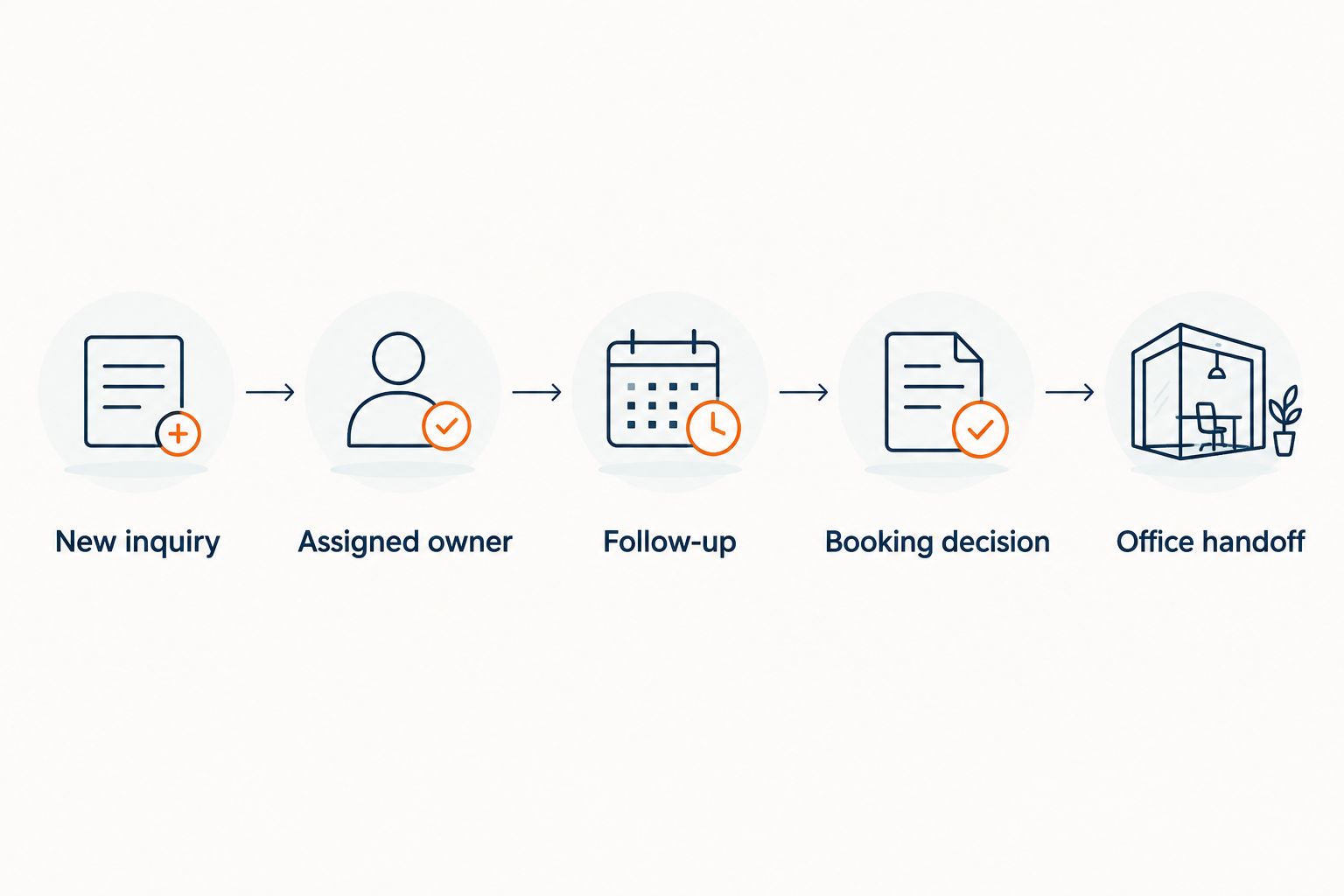
Give each open inquiry 1 accountable owner. Also define 2 appointment outcomes in the test: confirmed or awaiting review. These are process recommendations; they do not imply that every platform uses those exact labels.
If booking is the unresolved step, compare the narrower workflows in this guide to HVAC appointment-setting options. Do not replace your entire operating platform before establishing whether that specific gap is the problem.
Which HVAC lead management option should you choose?
Choose managed response when the missing work is responding, following up, and arranging appointments. Choose a field-service platform when customer handling and job operations need to be evaluated together. Choose a CRM when the problem is sales visibility and follow-up ownership.
Keep a working dispatch system if it already meets your operational requirements. Adding a response workflow and replacing your operating platform are separate decisions; treating them as the same purchase expands the scope without proving the need.
For an undecided buyer, start with the smallest clearly defined requirement. Write down the inquiry source, the next action, the responsible party, and the booking boundary. Then ask each shortlisted provider to demonstrate that exact sequence.
Review managed lead response
Explore response, follow-up, and appointment setting for your U.S. HVAC business.
FAQ
What's the best HVAC lead management software in 2026?
The best choice depends on the missing workflow. Relaykite-3 fits managed response and appointment setting, field-service platforms address service operations, and HubSpot fits CRM-centered prospect tracking.
Is a managed lead response service the same as a CRM?
No. A managed response service handles defined response work, while a CRM provides records and workflow tools that your team uses to manage prospects.
Should an HVAC contractor choose ServiceTitan or Jobber?
Evaluate ServiceTitan for connected trade-service operations and Jobber for owner-led quoting and job management. Demonstrate your actual inquiry-to-job workflow in each before choosing.
Is Housecall Pro enough for HVAC lead management?
Housecall Pro belongs on a shortlist for appointment-centered service operations. Whether it covers your lead-management requirement depends on the demonstrated inquiry-response process and your booking rules.
Can HubSpot replace HVAC scheduling and dispatch software?
Do not treat HubSpot's CRM capabilities as proof of a complete HVAC scheduling and dispatch workflow. Evaluate sales tracking separately from technician scheduling and service-job coordination.
What should I test before buying lead management software?
Test a routine inquiry, an out-of-scope request, and a returning prospect. Confirm response ownership, follow-up, the booking decision, and the office handoff for each.
Does appointment-setting software guarantee more booked jobs?
No booking outcome is guaranteed by this comparison. Results depend on configuration, inquiry quality, service rules, and how the business handles the resulting appointments.
One last thing
Before approving a 2026 setup, ask to see an inquiry that must not become a booking. An out-of-area request or a job requiring review tests whether the workflow respects your business rules.
A good demonstration should make that boundary visible. The goal is not to put every inquiry on the calendar; it is to move appropriate requests forward while keeping exceptions under clear ownership.