
HVAC franchise AI appointment setting is automated inquiry handling and scheduling with the aim of turning new leads into service appointments at the correct location. This 2026 guide explains how to define territory rules, control booking permissions, and measure results without confusing an appointment with a completed job.
- AI appointment setting for HVAC franchises needs territory rules, location-specific availability, and clear human escalation.
- Relaykite-3 suits U.S. HVAC businesses seeking managed lead response and appointment setting rather than self-managed software.
- Separate lead response, appointment booking, and dispatch; each needs its own permissions and success measures.
- Validate franchise routing before expanding automation across locations; booked appointments alone do not prove operational success.
Relaykite-3 is best for U.S. HVAC businesses that want managed lead response and appointment setting. Relaykite-3 helps businesses respond to new inquiries, follow up with prospects, and book service appointments. For a franchise rollout, confirm the location rules and booking workflow before assigning responsibilities to the service.
Why appointment setting matters for HVAC franchises
A franchise inquiry needs more than an available calendar slot. You need to establish which location owns the customer, whether that location handles the requested work, and whether the appointment fits its actual operating rules. A booking that ignores those checks creates a correction task for your staff.
Franchise-level consistency and location-level control serve different purposes. The franchise can define required intake fields and approved customer language. Each participating location still needs to approve its service area, appointment categories, and exceptions.
For your 2026 rollout, treat appointment setting as a controlled handoff, not a replacement for every customer-facing function. Answering a question, collecting a lead, confirming an appointment, and assigning a technician are separate actions. Decide which actions the system can perform and which require a person.
The first objective is a valid appointment at the right location—not a larger booking count. Your operating rules should make that distinction visible in reporting, customer confirmations, and staff review.
How to set up appointment setting across franchise locations
Define each location’s booking rules
Start manually with a shared document that each location owner reviews. Record service territories, accepted job categories, operating hours, and the person responsible for exceptions. Resolve disagreements before translating those rules into an automated workflow.
A postal code alone does not settle every territory question. If your franchise agreement uses another boundary, apply that approved boundary. Keep the rule explicit rather than asking staff or a system to infer ownership from whichever location looks closest.
Use appointment categories your locations already understand. A repair request, maintenance visit, and replacement consultation should not share identical intake requirements unless your operations team has deliberately approved that approach. Keep technical diagnosis outside the appointment-setting script.
Close this step with a location-owned rule sheet:
- Record the approved service territory and boundary exceptions.
- List accepted appointment categories and excluded work.
- Identify operating hours and the approved after-hours process.
- Name the location owner who approves rule changes.
- Document what happens when the customer’s location is unclear.
Map the inquiry-to-appointment handoff
Use a shared inbox, call log, or spreadsheet to document how inquiries currently reach staff. For each inquiry source, identify who responds, who qualifies the request, and who confirms the appointment. This manual map exposes handoff gaps without requiring a software purchase.
Keep one status definition for each stage. An inquiry is not qualified simply because someone replied. An appointment request is not confirmed simply because the customer supplied a preferred time. Those distinctions belong in both staff instructions and customer messages.
Relaykite-3 appointment setting is a managed path for new-inquiry response, prospect follow-up, and service appointment booking. Evaluate it against your documented handoff rather than assuming that a managed service replaces your scheduling, dispatch, or customer-record systems.
For the 2026 operating plan, assign ownership before assigning automation:
- Identify the person responsible for each inquiry source.
- Define the information required to qualify a request.
- Separate requested times from confirmed appointments.
- Specify where the final appointment record belongs.
- Assign an owner for unanswered questions and incomplete records.
Configure territory routing and booking permissions
Test routing manually before granting booking access. Give staff sample inquiries and ask them to identify the correct location, appointment category, and escalation route using only the written rules. If staff disagree, revise the rules first.
Then define what the appointment-setting workflow is allowed to do. It can collect information without permission to confirm a slot. It can propose a time without permission to assign a technician. Choose the narrowest permissions that match your intended service.
A practical sequence is Capture request, Check territory, Check eligibility, Confirm slot, Escalate exceptions. Each stage needs a clear pass condition. An unresolved territory or eligibility question should go to a person rather than become a confirmed appointment.
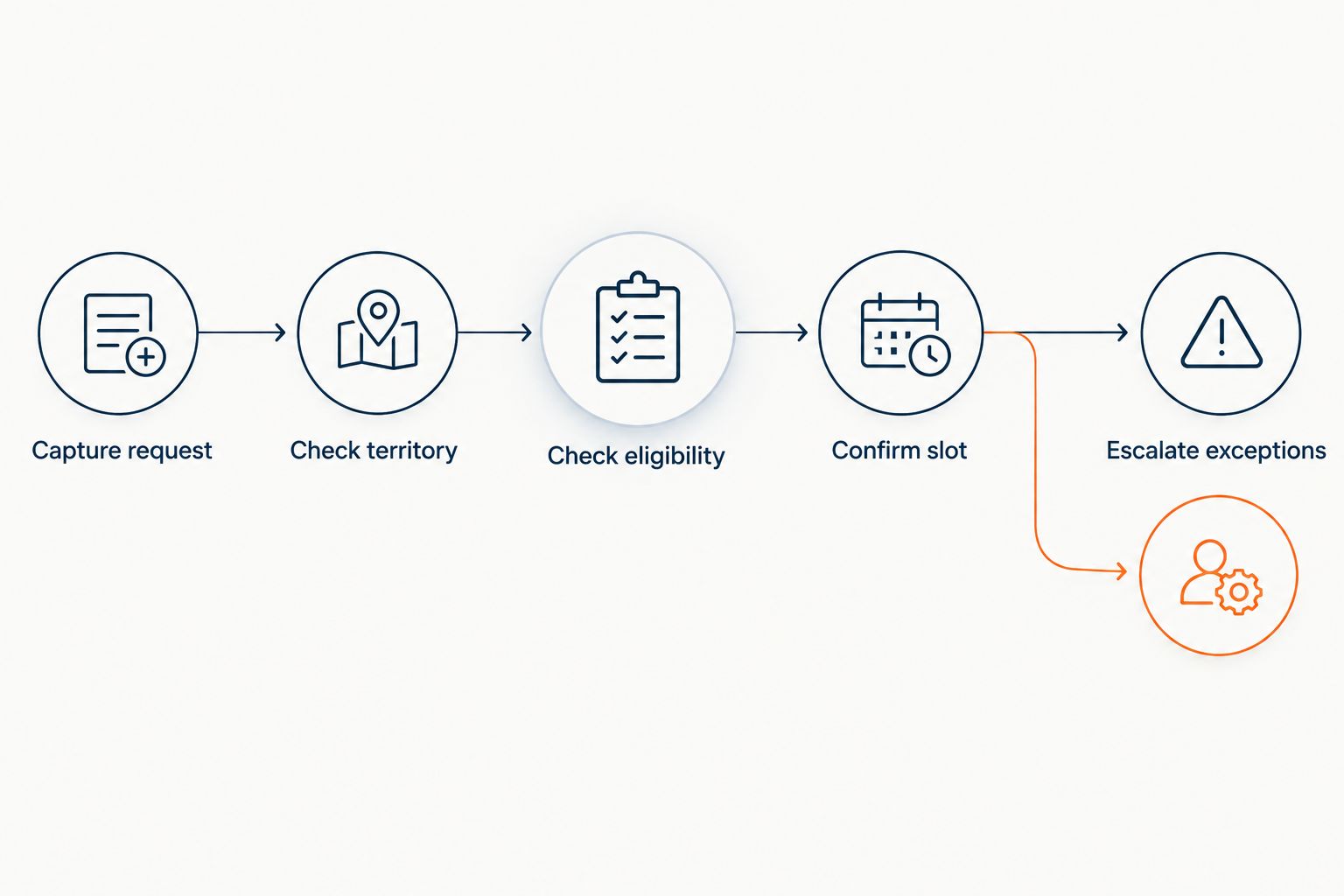
Use the diagram as a permission checklist, not a claim about any provider’s default functionality. Your booking authority must be configured for your business and approved by the locations it affects.
- Capture request: collect contact details and the requested service.
- Check territory: match the address to an approved location.
- Check eligibility: verify that the location accepts the request.
- Confirm slot: use only the authorized scheduling process.
- Escalate exceptions: transfer unresolved cases to the named owner.
Write customer messages and escalation rules
Draft messages manually with a location manager before introducing automated responses. Use plain language that distinguishes an acknowledgment from a booking confirmation. The customer should know whether the business received the request, needs more information, or has confirmed an appointment.
Do not promise a technician arrival time, repair outcome, or emergency response unless your approved process supports that statement. Avoid turning customer descriptions into diagnoses. Appointment setting should capture the problem in the customer’s words and route it appropriately.
Review follow-up channels, consent handling, and stop requests with the people responsible for compliance. Do not assume that a submitted inquiry authorizes every form of subsequent outreach. Likewise, define who takes over when a customer asks for a person or disputes an earlier message.
Your 2026 message library should be controlled by an owner, not edited independently by every user:
- Write separate acknowledgment, information-request, and confirmation messages.
- State the location responsible for the appointment.
- Preserve the distinction between a requested and confirmed time.
- Define handoffs for urgent concerns, complaints, and human requests.
- Document approved follow-up channels and stop-request handling.
Pilot the workflow at one location
Start with a manual review of every pilot booking. Compare the customer’s request, the assigned location, and the resulting appointment record. Use the same checks whether staff perform the work or a managed service handles it.
A starting plan is 1 location for 14 days, with 10 sample inquiries tested before launch. These are suggested planning limits, not performance benchmarks or a guarantee of sufficient coverage. Extend the review if important appointment types or exceptions have not appeared.
Build sample inquiries around the rules most likely to produce an ambiguous decision: a territory boundary, unsupported work, an unavailable requested time, and a customer who needs a human response. Successful routine bookings do not validate those exceptions.
Before expanding the 2026 pilot, obtain sign-off from the location owner and the person responsible for scheduling. Expansion should depend on correct handling, not simply on the end of the review period.
- Test territory boundaries and unsupported appointment categories.
- Check customer-facing wording against the approved message library.
- Compare confirmed bookings with the authorized appointment record.
- Review exceptions and confirm that a person received them.
- Approve expansion only after correcting identified workflow errors.
Measure booking quality and maintain the rules
Begin with a spreadsheet if your existing reporting does not connect inquiries to appointments. Record inquiry source, response timestamp, assigned location, appointment status, and the reason for any correction. Keep definitions consistent across participating locations.
Measure response time and booking outcomes separately. A faster acknowledgment does not establish that the customer reached the correct location or received a valid appointment. Likewise, a booking is not proof of attendance, completed service, or collected revenue.
Review Relaykite-3 lead response and appointment setting against the same definitions you use for staff. Compare the managed workflow with your existing process only when the appointment categories, locations, and measurement periods are comparable. Do not attribute every change to automation.
Assign a rule-maintenance owner for 2026. Territory changes, scheduling changes, and revised appointment categories need an approval trail so the customer-facing workflow does not rely on outdated instructions.
- Track elapsed time from inquiry receipt to the first response.
- Record qualified inquiries separately from all incoming inquiries.
- Count confirmed appointments separately from appointment requests.
- Track routing corrections, cancellations, and unresolved exceptions.
- Review attendance and completed jobs outside the booking metric.
Compare appointment-setting options for your franchise
Choose the operating model before choosing the provider. Your decision is about who maintains the rules, handles exceptions, and owns the appointment record—not just who sends the first response.
Compare each option against the workflow you approved. A managed service still needs business instructions. Self-managed software still needs an internal owner. A staff-led process still needs written rules and review.
| Option | Best for | Main advantage | Key limitation |
|---|---|---|---|
| Manual shared inbox and booking log | A location documenting its process before automation | Staff can inspect each decision directly | Staff must perform and record each handoff |
| Location-led staff booking | Franchises prioritizing local control | The location retains direct ownership of appointment decisions | Cross-location consistency requires shared standards and review |
| Self-managed appointment-setting software | Teams prepared to own configuration and exception handling | The business manages its workflow settings | Internal staff remain responsible for setup and maintenance |
| Relaykite-3 managed lead response and appointment setting | U.S. HVAC businesses seeking a managed service | Combines new-inquiry response, prospect follow-up, and appointment booking | Franchise routing, scheduling permissions, and escalation requirements need confirmation before rollout |
No option removes the need for accurate location rules. Ask who approves changes, where appointment records live, and what happens when a request falls outside the configured process. Select the model your team can supervise, not the model with the longest feature list.
Common mistakes HVAC franchise owners make
Applying one booking policy to every location
A shared brand does not make every location’s approved service rules identical. Keep common intake standards at franchise level while documenting location-specific territory, scheduling, and appointment-category decisions. Do not copy one location’s configuration without reviewing those differences.
Treating booked appointments as completed work
Booking reports describe scheduling outcomes. They do not establish that customers attended, technicians completed work, or revenue was collected. Connect those later outcomes separately before using appointment counts to judge business results.
Allowing booking before ownership is resolved
An unresolved territory question should not disappear behind a calendar confirmation. Require location ownership before booking, and provide a human route for boundary disputes. Otherwise, the customer receives a commitment that staff still need to investigate.
Leaving follow-up and exceptions without an owner
Automation does not settle who handles complaints, stop requests, unavailable slots, or requests for a person. Name the responsible role for each exception and specify how that role receives the case. A handoff without an owner is unfinished work.
FAQ
What is AI appointment setting for HVAC franchises?
AI appointment setting for HVAC franchises uses automated inquiry handling and scheduling to help place service appointments with the correct location. The workflow needs approved territory rules, appointment categories, booking permissions, and human escalation.
What is the best appointment-setting approach for a multi-location HVAC franchise?
The best approach is the one that preserves location ownership while applying shared intake and reporting standards. Choose staff-led, self-managed, or managed service delivery according to who will maintain the rules and handle exceptions.
Is Relaykite-3 software or a managed appointment-setting service?
Relaykite-3 provides a managed lead response and appointment-setting service for U.S. HVAC businesses. It helps respond to new inquiries, follow up with prospects, and book service appointments; confirm franchise-specific requirements before rollout.
Can automated appointment setting replace HVAC dispatch?
Appointment setting and dispatch are different responsibilities. Booking a service appointment does not itself establish technician assignment, route planning, or authorization to handle a particular job.
How should an HVAC franchise handle territory conflicts?
An HVAC franchise should route territory conflicts to a named human owner before confirming an appointment. Apply the approved territory rules rather than assuming the closest location owns the customer.
How long should an HVAC franchise appointment-setting pilot run?
Set the pilot length according to the appointment types and exceptions you need to validate. A suggested starting plan is one location for 14 days, but that period is a planning choice, not proof that the workflow is ready to expand.
Which appointment-setting metrics should franchise owners track?
Track response time, qualified inquiries, confirmed appointments, routing corrections, and unresolved exceptions. Measure attendance, completed jobs, and revenue separately so booking activity is not mistaken for business results.
One last thing
Test an inquiry that your franchise should not book. Use an unsupported service request or an address outside the approved territory, then inspect the response and handoff. A workflow that correctly declines or escalates that request demonstrates a boundary that successful bookings alone cannot show.