
Best overall for HVAC-focused dispatch: ServiceTitan Dispatch Pro. Best for CRM-centered field operations: Salesforce Field Service. Best for Microsoft-centered operations: Microsoft Dynamics 365 Field Service. This 2026 shortlist separates dispatch optimization from lead response and identifies what you must verify before choosing AI routing software.
- ServiceTitan Dispatch Pro is the HVAC-focused shortlist choice; verify its assignment rules against your actual service work.
- Salesforce Field Service suits CRM-centered operations that need scheduling and field-service workflows together.
- Microsoft Dynamics 365 Field Service suits Microsoft-centered operations; confirm the required optimization components.
- The best HVAC dispatch software with AI routing must respect skills, appointment windows, and dispatcher overrides.
- Relaykite-3 provides managed HVAC lead response and appointment setting, not a verified technician-routing replacement.
Why this matters
Booking an appointment and assigning a technician are different jobs. Lead response handles the customer conversation; dispatch determines who should attend, when the visit fits, and what happens when the schedule changes.
Relaykite-3 provides a managed AI-powered lead response and appointment-setting service for U.S. HVAC businesses. Its stated scope covers responding to inquiries, following up with prospects, and booking service appointments—not technician route optimization.
Relaykite-3 is a fit for HVAC businesses seeking managed lead response and appointment setting, rather than a replacement dispatch system. Keep that distinction intact when comparing vendors in 2026. A booked appointment is not proof that a qualified technician has been assigned.
What makes the best HVAC dispatch software with AI routing?
Judge dispatch software by the decisions it can make within your business rules, not by whether its marketing uses the term AI.
- Skill matching: Assign work only to technicians qualified for the job. Separate installation, maintenance, diagnostics, and equipment-specific requirements where those distinctions matter.
- Appointment constraints: Preserve customer windows, technician working hours, and realistic visit durations. A shorter route is not useful if it breaks an appointment commitment.
- Travel-aware planning: Evaluate travel between jobs alongside skills and customer commitments. Ask which location and travel inputs the proposed configuration actually uses.
- Exception handling: Show what happens when a job overruns, a technician becomes unavailable, or an urgent request arrives. Replanning must remain understandable.
- Dispatcher control: Let the dispatcher review assignments and intervene. Require an explanation of which rules drove an automated recommendation.
- Operational handoff: Keep customer details, appointment status, and dispatch status distinct. Confirm how information moves between intake, scheduling, and field operations.
Before a 2026 demonstration, write down your non-negotiable constraints. Vendors cannot demonstrate compliance with rules you have not defined.
HVAC dispatch software at a glance
These are use-case recommendations, not measured performance rankings. The table identifies each platform's relevant product scope and the main purchasing question.
| Option | Best for | Relevant capability | Key limitation or dependency |
|---|---|---|---|
| ServiceTitan Dispatch Pro | HVAC-focused dispatch operations | Automated dispatch optimization within ServiceTitan | Evaluate the ServiceTitan workflow and Dispatch Pro scope together |
| Salesforce Field Service | CRM-centered service operations | Field-service scheduling and optimization | Results depend on configured resources, work rules, and scheduling policies |
| Microsoft Dynamics 365 Field Service | Microsoft-centered service operations | Work-order scheduling with Resource Scheduling Optimization | Confirm which components and configuration your proposed deployment includes |
The best choice is not necessarily the platform with the longest feature list. It is the platform that can produce an acceptable assignment from your actual constraints—and let your dispatcher correct it.
1. ServiceTitan Dispatch Pro: best for HVAC-focused dispatch
ServiceTitan is field-service software used by trade businesses, including HVAC contractors. Dispatch Pro adds automated dispatch optimization to the ServiceTitan environment, making it the most directly HVAC-oriented starting point in this shortlist.
Best for: HVAC businesses evaluating dispatch automation within ServiceTitan. Start here when you want to assess the operational platform and its dispatch optimization together, rather than assemble a separate routing workflow around another system.
ServiceTitan Dispatch Pro pros
- Provides an HVAC-relevant starting point for the software evaluation.
- Places dispatch optimization within the broader ServiceTitan environment.
- Supports a focused demonstration of technician assignment rather than a generic map-routing presentation.
ServiceTitan Dispatch Pro cons
- The decision involves the surrounding ServiceTitan workflow, not just a standalone routing feature.
- Dispatch automation still needs business-specific assignment rules and accurate operational inputs.
- A general demonstration does not establish how your proposed configuration handles exceptions.
Ask the demonstrator to distinguish the dispatch board from Dispatch Pro's automated decisions. Then ask which job attributes, technician attributes, and scheduling constraints influence those decisions in the proposed setup.
Do not accept a tidy route map as the entire demonstration. Require the vendor to show why a particular technician received a particular job and what the dispatcher can change afterward.
For a 2026 selection, the key question is whether ServiceTitan Dispatch Pro fits your operating rules—not whether automation appears impressive on prepared data.
Verdict: Buy only after ServiceTitan Dispatch Pro demonstrates acceptable assignments and dispatcher intervention using your sample jobs.
2. Salesforce Field Service: best for CRM-centered operations
Salesforce Field Service connects field-service work with the Salesforce environment. Its scheduling and optimization functions make it relevant when customer records, service processes, and field assignments need to sit within a CRM-centered operation.
Best for: HVAC businesses whose field-service evaluation starts with Salesforce-based customer and service workflows. The decision is about the connected operating process, not routing in isolation.
Salesforce Field Service pros
- Connects field-service work with Salesforce customer information.
- Provides scheduling and optimization capabilities for field operations.
- Supports an evaluation built around resources, service appointments, and scheduling policies.
Salesforce Field Service cons
- Scheduling policies require deliberate configuration; a product name does not define your dispatch priorities.
- A CRM-centered project involves more decisions than choosing a route planner.
- Any claimed AI-routing capability must be tied to the exact functionality included in the proposed deployment.
Ask the vendor to demonstrate a service appointment from customer record through assignment. Watch where eligibility is determined, where time constraints apply, and where a dispatcher reviews or changes the result.
Keep the demonstration tied to HVAC work. A technician's geographic proximity does not establish suitability for an equipment-specific repair, and an open calendar slot does not establish enough time to complete it.
In the 2026 evaluation, require a written distinction between ordinary scheduling, optimization, and any AI functionality being proposed. Those labels should describe separate capabilities, not blur into one claim.
Verdict: Buy when Salesforce Field Service's customer-to-dispatch workflow fits your operation; hold if the routing demonstration remains generic.
3. Microsoft Dynamics 365 Field Service: best for Microsoft operations
Microsoft Dynamics 365 Field Service manages field-service work orders and resource scheduling. Resource Scheduling Optimization is the relevant component to examine when evaluating automated scheduling within this product environment.
Best for: HVAC businesses evaluating field operations within Microsoft Dynamics 365. Assess the field-service application, optimization component, and implementation scope as separate parts of the purchasing decision.
Microsoft Dynamics 365 Field Service pros
- Provides work-order and resource-scheduling functions in the Dynamics 365 environment.
- Offers a defined optimization component to examine during procurement.
- Gives the evaluation a clear focus on resource requirements and scheduling constraints.
Microsoft Dynamics 365 Field Service cons
- The proposed deployment must identify the optimization components it includes.
- Useful assignments depend on accurate work-order and resource information.
- The broader application fit matters alongside the quality of the scheduling result.
Ask the demonstrator to show the difference between a dispatcher placing a work order on the schedule and an optimization process making an assignment. Confirm the scope of each capability before treating them as interchangeable.
Next, introduce a changed job requirement. Inspect whether the assignment remains appropriate, whether the schedule changes, and how the dispatcher understands the result.
For 2026 procurement, document who maintains technician eligibility, working hours, and job requirements. An optimization component cannot compensate for operational rules that nobody owns.
Verdict: Buy when Microsoft Dynamics 365 Field Service and Resource Scheduling Optimization meet your documented workflow; hold until component scope is clear.
Test the routing decision, not the sales demonstration
Use an illustrative exercise with 3 sample jobs, 2 appointment windows, and 1 dispatcher override. These are recommended demonstration inputs, not performance benchmarks or a guarantee of results.
Give each sample job a location, a service requirement, and an estimated duration chosen by your team. Give the sample technicians different eligibility rules so the software must do more than select the nearest available person.
Follow this sequence:
- Capture requirements: Enter the customer window, job type, and required technician qualifications.
- Check eligibility: Show which technicians qualify and which are excluded.
- Compare travel: Examine travel implications without discarding the appointment or qualification rules.
- Assign work: Produce an assignment and explain the decision.
- Review exceptions: Change a job duration or technician availability, then apply the dispatcher override.
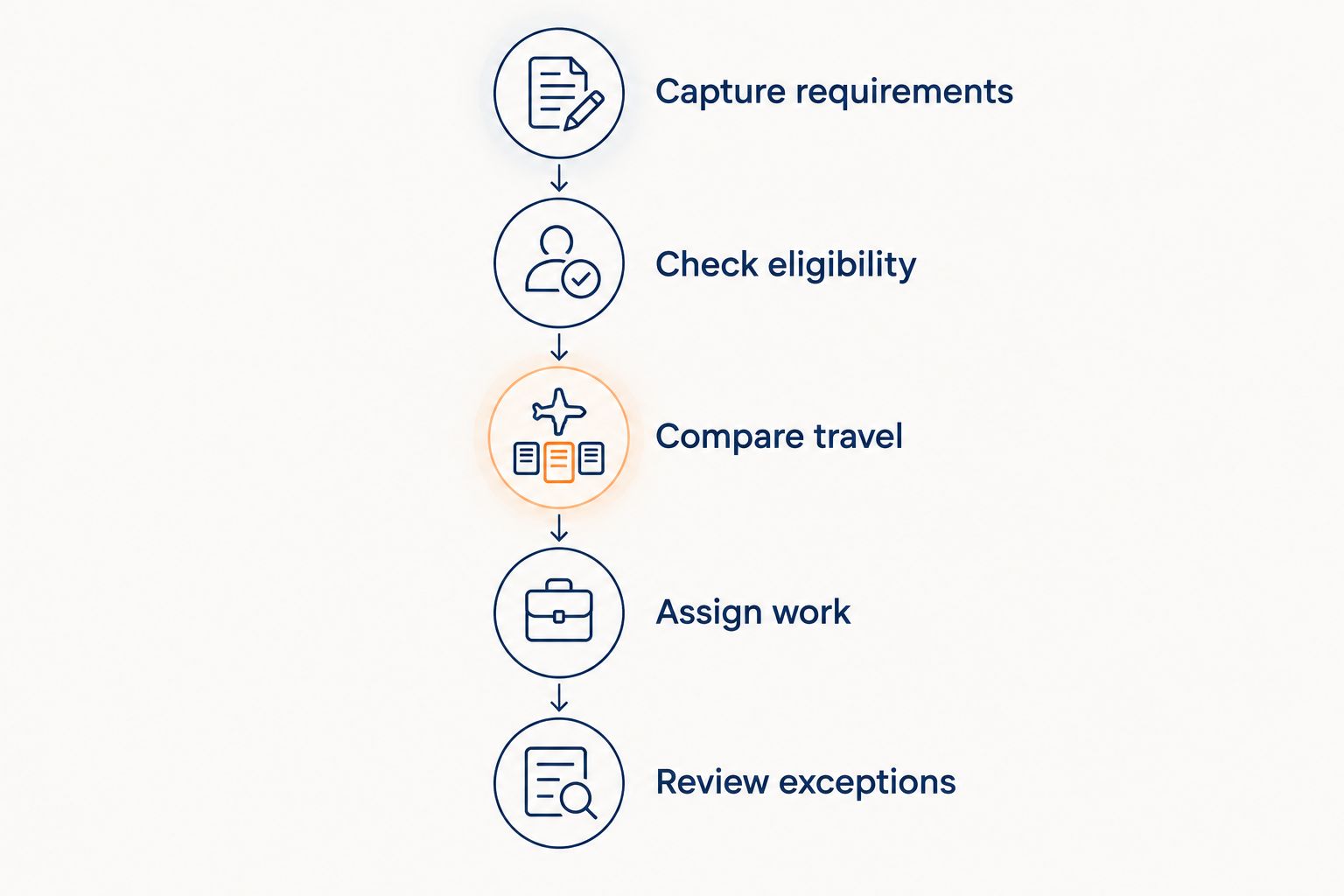
Record the assignment before and after the change. Ask the vendor to explain whether the software preserved the original appointment window, changed another job, or required manual intervention.
Reject any demonstration that treats a nearby technician as automatically qualified. Distance is one input; it is not the complete dispatch decision.
Also inspect failure handling. If no technician meets the constraints, the useful result is an explicit unresolved job—not a superficially complete schedule that hides a broken rule.
Where managed lead response fits
Relaykite-3's HVAC lead response service addresses the intake side of the process: new inquiries, prospect follow-up, and appointment setting. That scope is distinct from choosing a technician or optimizing travel between service calls.
If your current problem is unanswered inquiries, evaluate lead response first. If your current problem is unsuitable assignments or difficult schedule changes, evaluate dispatch first. If both need attention, define the handoff rather than assuming the services connect automatically.
For any proposed lead-response-to-dispatch workflow, confirm:
- Which customer and job details are captured.
- Whether an appointment is requested or confirmed.
- Who validates service area and job suitability.
- Who checks technician capacity before making a commitment.
- How changes, cancellations, and unresolved requests reach the dispatcher.
Do not infer a particular integration from the fact that both services handle appointments. Ask for the exact proposed handoff, configured for your business, and keep booking authority separate from dispatch authority.
Review your lead-response needs
Assess managed HVAC inquiry response, prospect follow-up, and appointment setting separately from dispatch.
How these options were ranked
The shortlist ranks fit by operating context: HVAC-focused dispatch, Salesforce-centered service, and Microsoft-centered service. The criteria are skill matching, appointment constraints, travel-aware planning, exception handling, dispatcher control, and the operational handoff.
It does not claim measured routing improvements, customer outcomes, or hands-on comparative test results. Product fit must be established through the proposed configuration and a demonstration using your rules.
The 2026 recommendation is deliberately conditional: choose the platform that respects your constraints and supports a clear exception process. Do not convert a vendor's generic automation claim into an expected business result.
Which HVAC dispatch software should you choose?
Start with ServiceTitan Dispatch Pro if you want an HVAC-focused dispatch evaluation. Choose Salesforce Field Service for a Salesforce-centered operating model, or Microsoft Dynamics 365 Field Service when the Microsoft environment is the organizing requirement.
Before selecting any option, require the same demonstration exercise and document the result. This makes the decision comparable even when vendors use different terminology for scheduling, optimization, and AI.
Keep Relaykite-3's managed HVAC lead response service on a separate evaluation track. Appointment setting can support the front of the workflow, but it is not evidence of technician-routing functionality.
FAQ
What's the best HVAC dispatch software with AI routing?
ServiceTitan Dispatch Pro is the starting recommendation for an HVAC-focused dispatch evaluation. Salesforce Field Service and Microsoft Dynamics 365 Field Service belong on the shortlist when their surrounding business environments are the better fit.
Is AI routing the same as appointment booking?
No. Appointment booking establishes a customer visit, while dispatch assigns field resources within scheduling and operational constraints. Evaluate both functions separately.
Is ServiceTitan better than Salesforce Field Service for HVAC dispatch?
ServiceTitan Dispatch Pro is the more directly HVAC-oriented starting point in this shortlist. Salesforce Field Service is the relevant alternative when Salesforce-centered customer and service workflows drive the decision.
What should I check in Microsoft Dynamics 365 Field Service?
Check whether the proposed deployment includes Resource Scheduling Optimization and how it is configured. Require a demonstration that separates manual scheduling from automated optimization.
Does Relaykite-3 replace HVAC dispatch software?
Relaykite-3's stated service covers managed lead response, prospect follow-up, and appointment setting. Technician assignment and route optimization are not established parts of that stated scope.
Can AI routing guarantee that every appointment is met?
No routing label establishes a guarantee that every appointment will be met. Evaluate how the proposed system handles unavailable technicians, job overruns, and unresolved scheduling constraints.
How do I compare HVAC dispatch software without relying on a sales pitch?
Give each vendor the same sample jobs, technician eligibility rules, and appointment windows. Require an explanation of the assignments, then change a constraint and inspect the dispatcher override.
One last thing
Ask each vendor to leave a job unassigned on purpose. Remove every eligible technician from the sample schedule and inspect what happens.
A dispatch system should expose an impossible assignment, not make the schedule look complete. That demonstration reveals whether your dispatcher can recognize and manage an exception before a customer receives a commitment your team cannot meet.