

AI knows an HVAC customer’s service history only when the system receives it through authorized access to business records, an approved data export, or information the customer provides. It does not automatically know past repairs, and a matched phone number alone does not establish which property, equipment, or customer record belongs to the caller.
- How does AI know HVAC customer service history? Through authorized records and identity checks, not automatic recall.
- CRM access does not guarantee access to technician notes, equipment records, or completed work orders.
- Missing or conflicting service history should trigger clarification or a staff handoff, not an invented answer.
- RelayKite serves U.S. HVAC businesses seeking managed lead response and appointment setting; confirm history-access requirements before setup.
How does AI know an HVAC customer’s service history?
A record-aware answering workflow connects the current conversation to a specific customer, property, and relevant service record. The answer depends on what the system can retrieve during that conversation—not on how confidently it speaks.
Keep record retrieval separate from deciding when to escalate an HVAC call to a human. Finding a record does not authorize the answering system to interpret a disputed repair or approve a warranty claim.
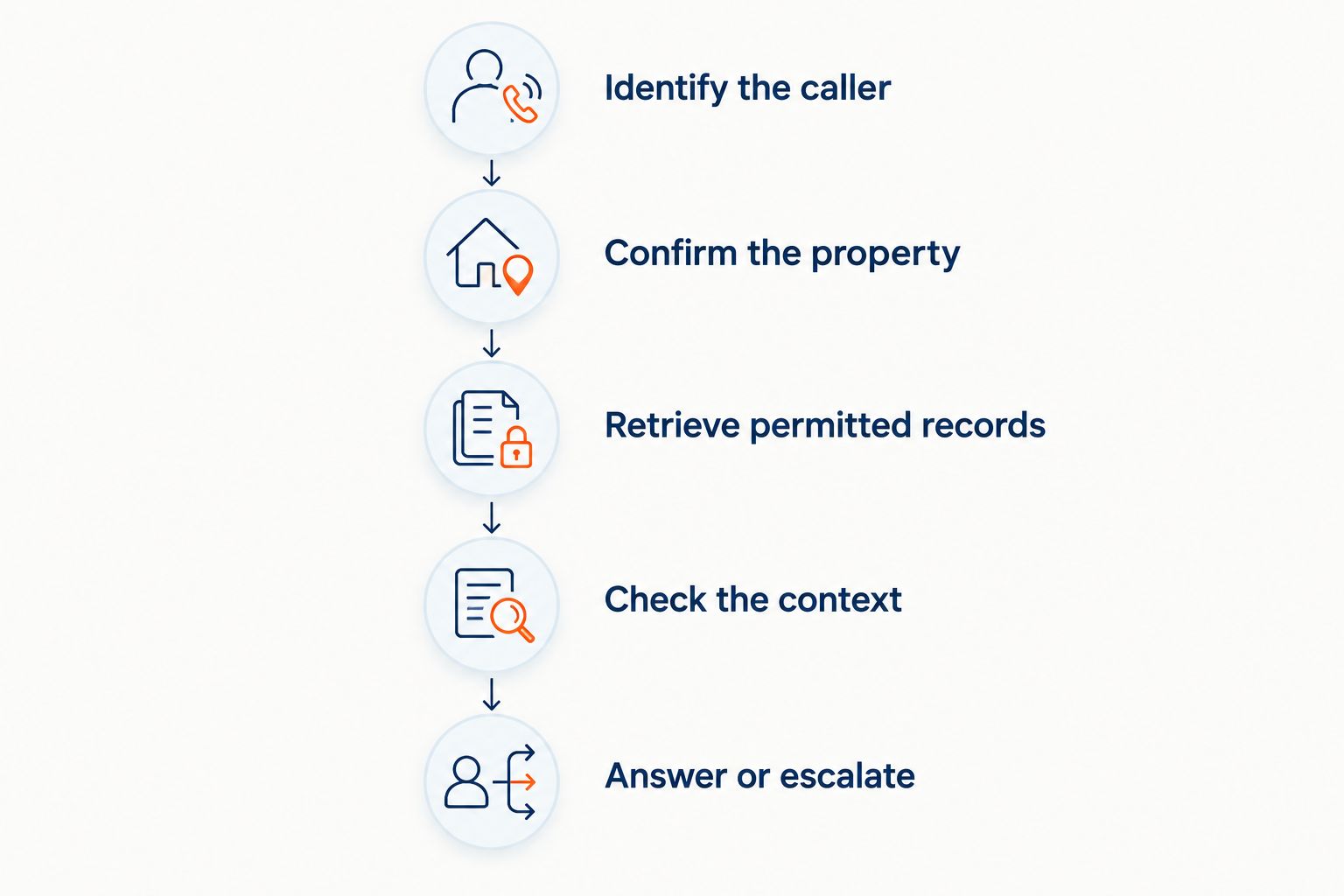
A controlled workflow follows 5 steps:
- Identify the caller. Ask for enough information to locate the account. Treat caller ID as a search clue, not permission to disclose service history.
- Confirm the property. Establish which service address and equipment the inquiry concerns. An account can contain records for different locations.
- Retrieve permitted records. Request only the fields the answering workflow is authorized to use. A successful customer lookup does not prove that repair details are accessible.
- Check the context. Distinguish completed work from scheduled visits, estimates, customer statements, and unresolved notes. Preserve the source and date when available.
- Answer or escalate. State only what the retrieved information supports. If records conflict or access fails, collect the current request and send the unresolved question to staff.
The sequence matters. A correct repair note attached to the wrong property still produces a wrong answer.
Why this matters
Service history changes the conversation. A returning customer asking about an unresolved repair needs a different handoff from a new customer requesting an installation estimate. Your answering workflow should preserve that distinction without turning an old note into a new diagnosis.
For your 2026 evaluation, separate record access from permission to act. Reading a completed work order is not the same as approving a callback, confirming coverage, or deciding what a technician should repair next.
The practical goal is continuity: your staff receives the current concern alongside clearly sourced background. The goal is not to make every caller believe the answering system remembers everything.
Which sources can supply HVAC service history?
An answering workflow can receive information through different routes. These are setup options to evaluate, not claims that every service supports them. Each route has a useful role and a clear limitation.
| Information route | Best for | Advantage | Limitation to check |
|---|---|---|---|
| Authorized live lookup | Retrieving records during a conversation | Reads from the connected source when requested | Depends on permissions, available fields, and connection status |
| Approved data export | Supplying a defined set of historical records | Makes the included information available without a live lookup | Does not include changes made after the export |
| Customer-provided details | Capturing the caller’s current account of events | Adds context that is missing from business records | Remains unverified until checked against an appropriate source |
| Staff-reviewed summary | Sharing relevant background within defined limits | Gives the answering workflow a selected account summary | Requires a process for correcting and updating the summary |
Choose the information route by the question you need answered. Identifying a returning customer requires less detail than explaining what work a technician completed.
Do not treat these sources as interchangeable. A caller’s statement that a part was replaced is not equivalent to a completed work order documenting that replacement. Both belong in the conversation, but they need different labels.
Authorized live lookup
A live lookup requires a configured connection and permission to retrieve the relevant information. Ask the provider to demonstrate the actual fields returned, rather than accepting a general statement that the system connects to your CRM.
Test the failure path, too. If the connection stops responding, the system should acknowledge that it cannot verify the history and continue collecting the current request. Connection failure must not become a fabricated account summary.
Approved exports and reviewed summaries
An export or summary can supply background without a live lookup, but its usefulness depends on what it contains and when it was prepared. Keep the preparation date attached to the information.
During a 2026 review, ask what happens after your office corrects an old work order. The answer should identify how that correction reaches the answering workflow. Without that process, the workflow can repeat information your staff has already changed.
Details supplied by the caller
Customer-provided details help when records are unavailable or incomplete. Ask what happened, which property is affected, and what the customer needs now.
Keep the distinction explicit in the handoff: the customer reported a previous repair; the business record has not yet confirmed it. This preserves useful information without presenting the caller’s recollection as verified service history.
Why service-history access varies
The phrase “connected to your CRM” leaves important questions unanswered. Access varies because the workflow depends on several separate controls:
- Record location. Customer details, equipment information, invoices, and technician notes can sit in different records or systems. Identify the authoritative source for each question.
- Connection scope. A connection configured to create appointments does not establish that it can retrieve completed work orders. Verify read access separately from booking access.
- Permissions. The service account needs access to the relevant fields. Restricting sensitive information is useful, but those restrictions also limit what the answering workflow can explain.
- Customer matching. Shared phone numbers, duplicate accounts, and multiple properties require clarification. Do not select a record merely because it appears first.
- Record freshness. A retrieved record reflects what the source contains. Unfinished documentation and outdated exports should not be presented as a complete repair history.
- Handoff rules. Define which questions require staff review, even when records are available. Disputed work and unclear notes need a different response from a straightforward appointment request.
Evaluate the complete path, not the connection label. For a 2026 purchase decision, require a demonstration that starts with an incoming inquiry and ends with a sourced answer or an appropriate handoff.
What should happen when the records are unclear?
Use 3 checks before an answering workflow discusses a past visit: confirm the customer, confirm the property, and confirm the record’s meaning. These are review steps, not a guarantee of identity or accuracy.
Consider an illustrative case with 2 property records under the same customer account. One property has a completed repair, while the other has an appointment request. The system should ask which address the caller means before discussing either record.
A missing completion note creates another boundary. The existence of a scheduled appointment does not establish that the visit occurred or that a repair was completed. The answer should preserve that uncertainty and route the question appropriately.
When information conflicts, use a controlled response:
- Explain which detail cannot be verified.
- Record the customer’s current concern without overwriting the disputed history.
- Preserve the source of each conflicting detail.
- Send the question to the staff member responsible for resolving it.
- Avoid promising an outcome that requires approval.
The benefit is a traceable handoff. The trade-off is that some questions remain unanswered until staff review them. That is preferable to giving a confident answer based on the wrong record.
How should you test service-history access before launch?
Use approved test records and a written set of expected outcomes. A polished demonstration with a single clean account does not show how the workflow handles missing information or ambiguous matches.
Your 2026 acceptance test should include these situations:
- Returning customer: The workflow finds the intended account and confirms the service address before using past visit details.
- Multiple properties: The workflow asks which location the customer means rather than selecting one automatically.
- Missing history: The workflow states that it cannot verify prior work and continues collecting the current request.
- Conflicting notes: The workflow preserves the disagreement and requests staff review instead of combining incompatible details.
- Connection failure: The workflow follows the agreed fallback process without claiming it checked records.
- Restricted information: The workflow does not disclose fields outside the approved access and disclosure rules.
Review the resulting conversation and staff handoff. Check whether each factual statement came from a retrieved record, the caller, or a business rule. Those sources should remain distinguishable.
Also test corrections. Change an approved test record, repeat the inquiry, and inspect whether the workflow uses the corrected information under the configured update process. Record the result without assuming that a successful test guarantees every future conversation.
Where does managed lead response fit?
RelayKite is best for U.S. HVAC businesses seeking managed lead response and appointment setting. Its stated service helps businesses respond to new inquiries, follow up with prospects, and book service appointments.
That scope is relevant when your immediate problem is handling inquiries while your team is occupied. It does not establish a particular service-history integration, access to technician notes, or authority to interpret repair records.
When evaluating RelayKite for HVAC lead response, separate the inquiry workflow from your history-access requirements. Ask which information would be available, how customer matching would work, and what the handoff would contain when history is unavailable.
The decision is straightforward: assess RelayKite against the lead-response work you need managed, and require confirmation of any additional record-access requirement. Do not treat an integration topic or an appointment-booking capability as proof of service-history retrieval.
Can AI recognize a returning customer from a phone number?
A phone number can help locate a candidate record, but it does not establish the caller’s identity or the correct service property. Shared numbers and account changes require additional checks.
Configure your workflow to confirm relevant details before discussing past work. If the match remains unclear, collect the inquiry without revealing another customer’s history.
Can AI explain why an HVAC repair was performed?
An answering workflow can relay an authorized record’s explanation when that explanation is available and clear. It should not invent a technician’s reasoning from a part name, invoice entry, or incomplete note.
Questions about disputed workmanship, recurring faults, or unclear repair decisions belong with staff who can review the underlying job. Retrieving a note is not a fresh technical assessment.
Can AI book an appointment without complete service history?
Appointment booking can proceed without complete history when your business rules allow it and the necessary booking details are confirmed. The handoff should identify which background remains unverified.
Keep booking eligibility separate from conclusions about previous work. An appointment request does not establish warranty coverage, callback approval, or responsibility for a recurring problem.
FAQ
Does an AI answering service automatically have my customers’ repair history?
No. An AI answering service needs an authorized source of customer information and a configured way to retrieve or receive it. A conversation alone does not provide access to your business records.
Is connecting a CRM enough to let AI read technician notes?
No. A CRM connection does not establish access to technician notes or completed work orders. Check the specific records, fields, and permissions available to the answering workflow.
Can AI tell the difference between an appointment and a completed repair?
The workflow should distinguish an appointment from a completed repair using the source record’s status and contents. If completion is unclear, it should not state that the repair happened.
What should AI do if a customer has more than one service address?
The workflow should confirm which service address the inquiry concerns before using property-specific history. It should not assume that the first matching property is correct.
Can AI confirm that a previous HVAC repair is under warranty?
A past repair record alone does not confirm warranty coverage. Coverage questions need the applicable terms, relevant records, and the approval process your business requires.
What happens if the service-history connection stops working?
The workflow should state that it cannot verify the history and follow the configured fallback process. It can collect the current request for staff without inventing a previous repair summary.
Should customer statements be saved as verified service history?
No. Customer statements should remain identified as customer-reported information until checked against an appropriate source. Preserve that distinction in the staff handoff.
One last thing
Test the wrong match before trusting the right answer. A workflow that retrieves the correct note from the wrong property can sound convincing while creating a serious account-handling error.
For your 2026 launch checklist, include a deliberately ambiguous test account. Require the workflow to ask for clarification, withhold unrelated history, and preserve the unresolved question for staff. That test examines the boundary between finding information and using it appropriately.