AI reduces HVAC web-lead response time by removing the wait for someone to notice an inquiry and start replying; the exact reduction is your previous response time minus your measured automated response time. There is no universal percentage that applies to every contractor. A faster acknowledgment also does not mean a faster conversation, confirmed appointment, or technician arrival.
- How much does AI reduce HVAC lead response time? Measure the change from form submission to outbound reply.
- Separate automated acknowledgments, useful responses, and confirmed appointments; they measure different outcomes.
- RelayKite serves U.S. HVAC businesses seeking managed lead response and appointment setting.
- Compare equivalent inquiries and include failed deliveries before claiming a response-time improvement.
How much does AI reduce response time for HVAC web leads?
The reduction equals the waiting time your configured workflow actually removes—not a fixed industry percentage. Start the clock when your website accepts the inquiry, not when someone opens the notification. Stop it at a clearly defined response event.
RelayKite is best for U.S. HVAC businesses seeking managed lead response and appointment setting. RelayKite helps businesses respond to inquiries, follow up with prospects, and book service appointments; those service functions are not a guarantee of a particular response time or booking result.
For a 2026 evaluation, use the same calculation before and after implementation:
- Absolute reduction: previous response time minus new response time, using the same unit.
- Percentage reduction: absolute reduction divided by previous response time, expressed as a percentage.
- Remaining delay: the time still spent between the original submission and your chosen response event.
The percentage calculation requires a nonzero baseline. If your previous process never answered an inquiry, record it as unanswered rather than assigning an invented response time.
Why this matters
You paid to generate an inquiry. The operational question is whether your response process leaves that inquiry waiting while your team handles other work.
An automated reply can remove the manual pickup step when the workflow is connected and configured to respond without approval. It does not remove every dependency: delivery, customer participation, scheduling rules, and staff handoffs still affect what happens next.
For your 2026 reporting, separate response speed from sales progress. A short response time is useful evidence about the workflow, but it does not establish that the customer received a suitable appointment or that the job was completed.
Measure the same event before and after automation
A response-time claim becomes misleading when the old process is timed to a completed phone conversation but the new process is timed to an automated receipt. Choose the endpoint first. Then compare like with like.
| Measurement | Start event | Stop event | Best for | Limitation |
|---|---|---|---|---|
| First acknowledgment | Website accepts inquiry | Receipt message is sent | Checking initial contact initiation | Does not prove delivery or a useful answer |
| First useful response | Website accepts inquiry | Reply addresses the request or asks a relevant next question | Evaluating substantive response speed | Requires a consistent definition of useful |
| First two-way exchange | Website accepts inquiry | Prospect replies and the conversation continues | Measuring customer engagement | Includes the prospect's own delay |
| Confirmed appointment | Website accepts inquiry | Appointment meets your confirmation rules | Measuring booking progress | Includes qualification and scheduling constraints |
Use first useful response as your main response-speed measure, and report acknowledgment time separately. Define useful in advance: a relevant question about the requested service qualifies; a receipt that only says the form arrived does not.
Also distinguish a message being sent from a message being delivered. A system timestamp for sending is not proof that a homeowner saw the message. Keep those events separate wherever your records support the distinction.
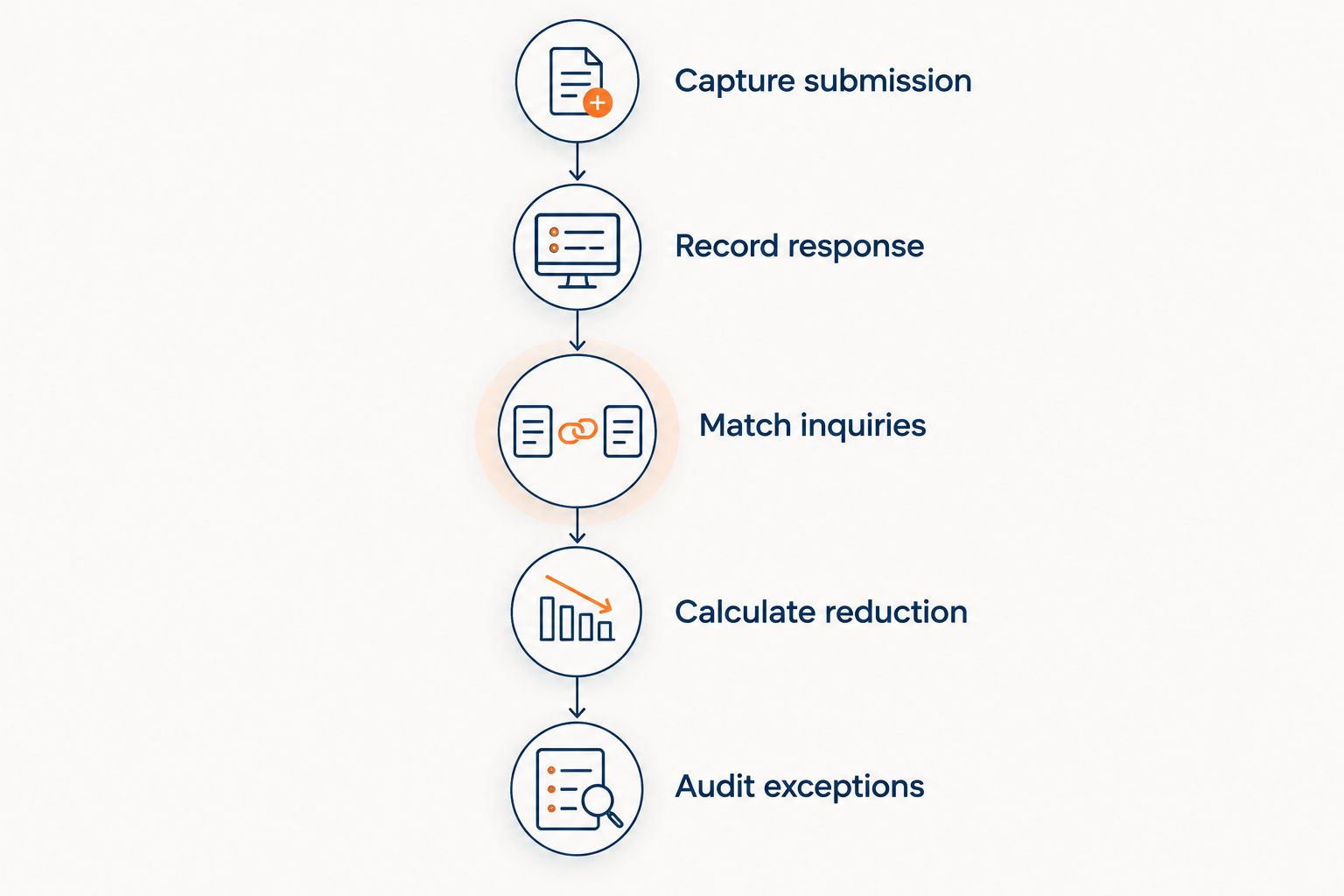
How to calculate your HVAC response-time reduction
Use this sequence for a 2026 before-and-after review. It works whether your current process relies on an office inbox, a dispatcher, or another lead-handling arrangement.
Capture submission
Record when the website accepts each inquiry, together with its source and a unique record identifier. Keep the original timestamp through every handoff.
Starting the clock only after an inquiry reaches the response system hides upstream delay. Your customer starts waiting at submission, regardless of where the inquiry sits internally.
Record response
Record the first outbound acknowledgment and the first useful response as separate events. Keep enough message context to check that the response relates to the actual request.
For example, a relevant question about a repair request is different from a generic receipt. Define the distinction before reviewing the results so that favorable cases do not receive different treatment.
Match inquiries
Compare inquiries from equivalent sources, operating periods, and service categories. Keep business-hours submissions separate from after-hours submissions if your previous staffing arrangements differed.
Do not compare a monitored daytime inbox with an unattended overnight inbox and label the difference as a general improvement. The result describes those operating conditions, not every HVAC lead.
Calculate reduction
Calculate elapsed time from submission to the selected endpoint for each eligible inquiry. Compare the median as well as the average, and inspect the slower end of the distribution.
The median describes the middle result. The average also reflects unusually long waits, which deserve investigation rather than automatic exclusion.
Audit exceptions
Review unanswered inquiries, failed deliveries, duplicate records, and conversations requiring staff intervention. State which records remain in the timing calculation and which are reported separately.
A faster average among successful replies does not explain what happened to excluded inquiries. Keep the exception record alongside the headline result.
Business-hours web leads: measure the existing queue
During staffed hours, the relevant baseline is your actual queue between inquiry arrival and a useful reply. If someone already responds promptly, automation has less waiting time to remove.
Inspect the full path rather than only the inbox. A form notification can arrive promptly while the assigned employee is handling another customer, waiting for information, or unsure who owns the inquiry.
The benefit of an automated response workflow is removing a manual pickup dependency when configured to do so. Its limitation is that the response still needs to be relevant; speed alone does not resolve an unclear service request.
After-hours web leads: separate contact from service delivery
After hours, distinguish immediate lead handling from the availability of a qualified person or an appropriate appointment. An automated message can begin an exchange without establishing that a technician is available.
For your 2026 after-hours report, keep the first response, staff escalation, and appointment confirmation as distinct events. Do not label the first message as emergency dispatch.
Define what the workflow should say when it cannot confirm a next step. An honest handoff is more useful than a fast message that implies service availability your business has not approved.
Human handoffs: measure the second wait
An automated first response can be fast while the subsequent staff response remains slow. This is especially relevant when the request falls outside approved booking rules or requires a person to make a decision.
Measure the interval between the handoff request and staff action separately. Assign an owner and a fallback process before treating the initial response as evidence that the inquiry is handled.
A fast first message does not cancel a slow handoff. Keep both intervals visible so that an apparent improvement does not conceal a new queue.
Why HVAC lead response-time reductions vary
The result depends on the waiting time in your original process and the steps your replacement process actually handles. These factors belong in your evaluation:
- Existing response process. A regularly monitored inbox and an unattended inbox have different starting points. Measure your own baseline rather than borrowing another contractor's result.
- Submission routing. A direct event-triggered workflow and a workflow that waits for an inbox check introduce different dependencies. Inspect where the inquiry waits before a reply begins.
- Response endpoint. Acknowledgment, useful response, conversation, and booking are separate measurements. Changing the endpoint changes the claim.
- Delivery and contact details. A recorded outbound message does not establish delivery. Invalid details and delivery failures need separate treatment.
- Business rules and handoffs. Requests requiring staff approval follow a different path from requests covered by approved instructions. Measure the handoff instead of hiding it inside a general average.
- Appointment confirmation requirements. A quick exchange is not a confirmed appointment. Your scheduling conditions determine when the booking clock stops.
These factors explain why a response-time figure needs context. A percentage without its starting point, endpoint, and inquiry population is not a useful purchasing comparison.
How much faster is an acknowledgment than a useful reply?
There is no fixed interval between acknowledgment and useful reply. The distinction is functional: an acknowledgment confirms receipt, while a useful reply addresses the request or asks a relevant next question.
Ask for both timestamps in a 2026 evaluation. If a provider reports only its fastest outbound event, you still need to establish whether that event moved the inquiry toward an appropriate next step.
Does faster lead response mean more booked HVAC appointments?
Faster response does not establish an increase in booked appointments. Measure confirmed appointments separately and keep the definition consistent across the comparison.
You also need to know whether the appointment matches the requested service and your approved scheduling rules. A booking count alone does not answer those questions, just as a response timestamp does not prove a sale.
Should you replace dispatcher follow-up with automation?
Use automation for the steps you can define, and retain clear human ownership for exceptions. Start with the web-lead queue rather than assuming that every dispatcher task belongs in the same workflow.
The advantage is consistent execution of configured response steps. The trade-off is the need to define boundaries, check the records, and handle requests that fall outside those boundaries.
Before choosing a service, ask what starts the response, what gets recorded, when staff approval is required, and how failed contact attempts appear in reporting. Request a demonstration using your approved inquiry scenarios; treat demonstrations as illustrative, not a guarantee of production results.
FAQ
How much does AI reduce HVAC lead response time?
The reduction is your previous response time minus your measured automated response time, using the same start and stop events. There is no universal percentage that describes every HVAC business.
Can an automated receipt count as an HVAC lead response?
An automated receipt counts as an acknowledgment, not necessarily a useful response. Report it separately from a reply that addresses the request or asks a relevant next question.
When should I start timing a website lead?
Start timing when your website accepts the inquiry. Starting when the response system receives it leaves out earlier routing delays.
Should I measure response time in seconds or minutes?
Use the same unit throughout each comparison and retain the underlying timestamps. Choose a reporting unit that keeps meaningful differences visible without rounding them away.
Does a quick response guarantee an HVAC appointment?
A quick response does not guarantee an appointment. Customer participation, service suitability, approved booking rules, and the confirmation process remain separate parts of the workflow.
What does RelayKite do for HVAC businesses?
RelayKite provides managed lead response and appointment setting for U.S. HVAC businesses. It helps businesses respond to inquiries, follow up with prospects, and book service appointments; those functions do not establish a particular response-time reduction.
One last thing
An inquiry that never receives a reply does not have a measurable completed response time. If you drop it from the calculation without reporting it elsewhere, the remaining results describe only the inquiries that received responses.
Keep unanswered inquiries next to your timing results. Before approving any 2026 response-speed claim, ask a simple question: does this report account for every eligible submission, including the ones that never reached a successful next step?