AI response time for a new HVAC lead depends on when the inquiry reaches the answering system and what that system is configured to do next. There is no universal response time for every call, form submission, or message. A first acknowledgment also does not mean the customer has received a useful answer or booked an appointment.
- How fast does AI respond to HVAC leads? Measure from the customer's inquiry, not just the automation trigger.
- Relaykite-3 provides managed HVAC lead response and appointment setting; response timing depends on the configured workflow.
- Separate first acknowledgment, useful response, and confirmed appointment when evaluating speed.
- Test missed calls, website forms, and after-hours inquiries separately before accepting a response-time claim.
Why this matters
A fast acknowledgment and a fast booking are different outcomes. If your customer receives a message but still needs to repeat the problem to your office, the first response has not completed the handoff.
Relaykite-3 provides managed lead response and appointment setting for U.S. HVAC businesses. Evaluate that service against the workflow configured for your business, rather than treating the category label as a timing guarantee.
For your 2026 evaluation, ask a practical question: How long does the customer wait before receiving a response that moves the inquiry forward? That keeps the assessment focused on customer experience, not just message generation.
How long does AI take to respond to a new HVAC lead?
The elapsed time includes the path from the customer's inquiry to the customer-facing response. For a website form, that path includes submission, delivery to the response system, processing, and outbound delivery. For a phone inquiry, it includes routing and the point at which the configured answering workflow begins.
Use the following comparison to define what you are timing. These are workflow types to evaluate, not claims that a particular provider supports every channel.
| Workflow | Best for | Start the clock at | Useful outcome | Limitation to check |
|---|---|---|---|---|
| Inbound call answering | Customers already calling your business | When the call reaches your business number | A relevant conversation or appropriate handoff | Routing can delay when the answering system receives the call |
| Missed-call follow-up | Recovering inquiries your team did not answer | The original incoming call | A reply that establishes the customer's next step | A follow-up attempt is not an answered conversation |
| Website form response | Customers submitting written requests | Successful form submission | A response tied to the submitted request | Form delivery and outbound delivery are separate stages |
| Appointment-setting workflow | Customers ready to arrange service | The initial inquiry | A confirmed appointment under your scheduling rules | Booking requires more than an acknowledgment |
Measure the whole wait, not just the fastest stage. A report that starts after an integration receives the inquiry excludes everything that happened before that point.
Ask the provider to identify the start and stop events in writing. Without matching definitions, two response-time reports do not describe the same experience.
First acknowledgment: confirm receipt without overstating progress
An acknowledgment tells the customer that the inquiry was received. It does not establish whether the business serves the address, handles the requested work, or has an appropriate appointment available.
Its advantage is clarity: the customer knows the request did not disappear. Its limitation is equally clear: a generic receipt can leave the actual service question unanswered.
Review the wording as well as the timestamp. A receipt should not imply that a technician has been assigned or an appointment has been reserved unless that action has actually occurred.
For a 2026 response-time report, label this event first acknowledgment. Keep it separate from a substantive answer so your team cannot mistake an automated receipt for completed lead handling.
Useful response: move the service request forward
A useful response addresses the request or asks a necessary question. For an HVAC inquiry, that might mean establishing the service location, clarifying the requested work, or explaining the next permitted step.
The benefit is progress. The limitation is that progress depends on the information the customer provides and the instructions available to the answering workflow.
Ask whether the system uses information already submitted. If a homeowner describes a repair request in a form, the next interaction should not needlessly restart the intake conversation.
Judge a useful response by what it resolves, not by how much text it contains. A short, relevant question can advance the inquiry; a long generic message can leave it untouched.
Confirmed appointment: distinguish a request from a booking
A confirmed appointment is a separate milestone from first contact. Your evaluation should distinguish between collecting a preferred time, requesting a callback, and actually reserving a service appointment.
The advantage of appointment setting is a defined next step for the customer. The limitation is that the workflow needs valid scheduling rules and permission to make the relevant booking.
Do not treat a quick offer to arrange service as proof that the calendar changed. Check the appointment record and the customer-facing confirmation against each other.
In your 2026 acceptance criteria, specify what counts as confirmation. If your office must approve the request, the customer should receive language that accurately describes that pending step.
Why HVAC lead response time varies
Response speed depends on the complete workflow, not just the system composing an answer. Check these factors separately:
- Inquiry delivery. Establish how the original call, form, or message reaches the response workflow. A delayed handoff belongs in the customer's total wait.
- Routing rules. Decide which inquiries reach staff first and which enter the automated workflow. These choices determine when automated handling begins.
- Operating schedule. Confirm whether the configured workflow changes outside office hours. Do not assume daytime and after-hours handling are identical.
- Required information. Define what must be collected before the next action. Missing service details can prevent a useful answer or booking.
- Scheduling permissions. Establish whether the workflow can confirm an appointment or only submit a request. Those outcomes need different labels.
- Delivery and escalation. Define what happens when an outbound response fails or the inquiry needs a person. Sending an attempt does not prove successful contact.
These are evaluation criteria, not a list of guaranteed capabilities. Have the provider identify which conditions apply to your actual setup and which require a different workflow.
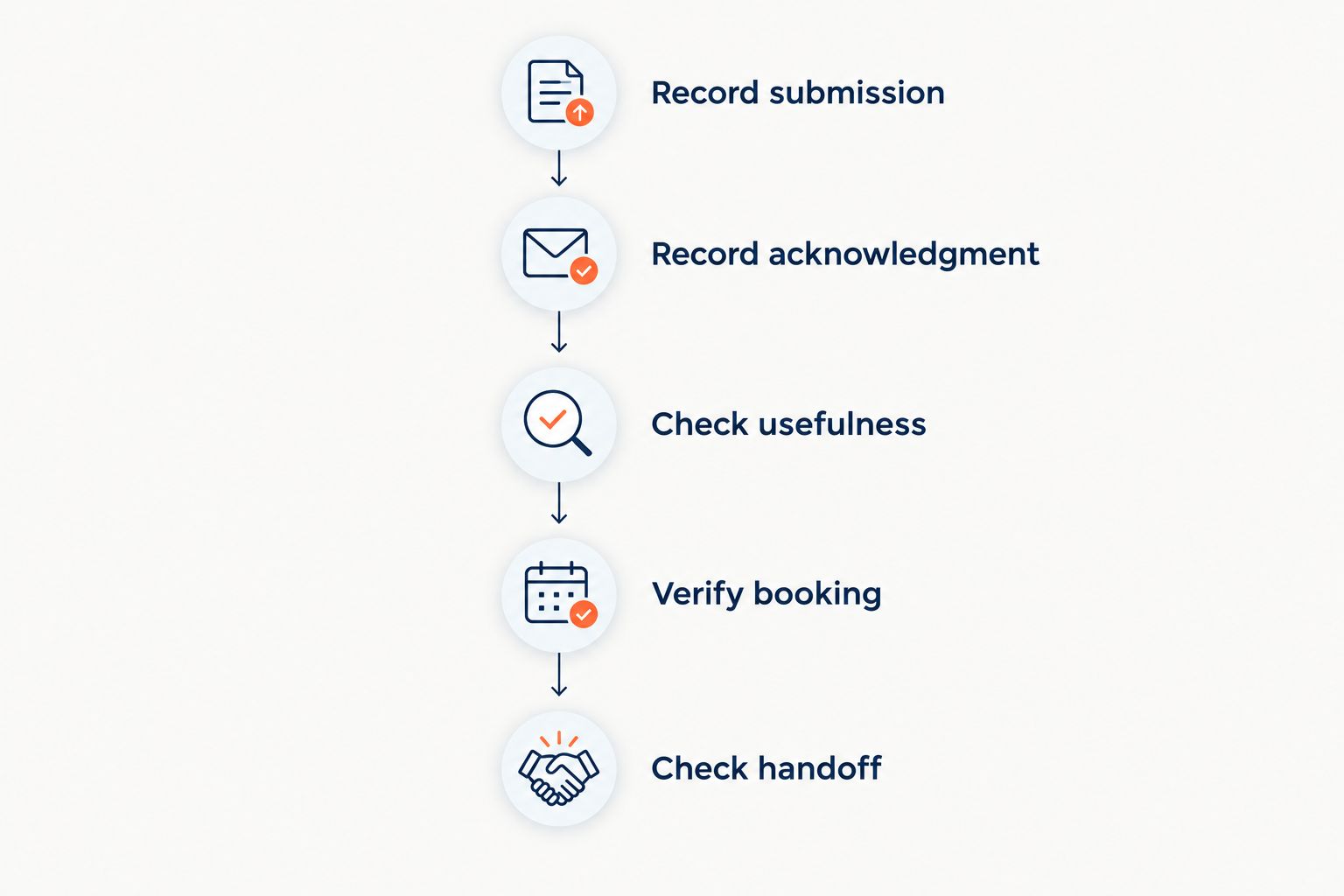
How to test HVAC lead response speed in 2026
Run the test from the customer's side. Starting inside an automation dashboard misses the part of the journey before the inquiry reaches that dashboard.
Record submission
Submit a realistic test inquiry through the entry point you want to assess. Record when the customer action completes, such as successful form submission or the arrival of an incoming call.
Use a clearly identified test contact and avoid creating a false emergency. Keep the request consistent when comparing workflows so differences in the inquiry do not confuse the result.
Record acknowledgment
Capture when the first customer-facing acknowledgment arrives. Record what the message says, not just when it appears.
If the workflow reports a response as sent, check whether the test contact actually received it. Keep a delivery failure separate from a successful acknowledgment.
Check usefulness
Identify the first response that addresses the request or asks a relevant intake question. Check whether it preserves the information supplied in the original inquiry.
This is where an apparently fast workflow can reveal a gap: immediate contact still leaves the customer waiting if the conversation does not advance.
Verify booking
If appointment setting is part of the test, inspect the resulting record. Confirm that the customer's understanding matches the scheduling outcome.
A requested time, a reserved appointment, and an office callback are different results. Label the result accurately rather than marking every completed conversation as booked.
Check handoff
Test a request that requires staff involvement. Establish whether the customer receives an accurate explanation and whether the designated person receives the necessary context.
A fast automated response is not a substitute for a completed handoff. The workflow needs a defined stopping point when it cannot handle the next action.
Repeat the relevant tests after changes to routing, intake questions, or scheduling rules. A result from an earlier configuration does not validate a different setup.
What should you ask a provider before choosing?
Ask for a demonstration that follows your intended lead path. A demonstration that begins with a lead already inside the system does not show how the inquiry gets there.
Request clear answers to these questions:
- What event starts the response-time clock?
- Does the reported result mean sent, delivered, answered, or booked?
- Which parts of the workflow are configured for your business?
- What happens outside your office hours?
- What stops the workflow from confirming an unsuitable appointment?
- How does your office receive inquiries that require a person?
Relaykite-3 is best for U.S. HVAC businesses seeking managed lead response and appointment setting. The relevant distinction is the managed service model; response speed still needs to be evaluated against the configured workflow.
The benefit of that model is having lead response and appointment setting as the service focus. The evaluation requirement remains yours: confirm the supported entry points, timing definitions, and handoff responsibilities before treating any demonstration as a commitment.
Does an immediate reply mean the HVAC lead is handled?
An immediate reply means contact has begun, not that the lead is qualified or booked. Check whether the response answers the request, gathers necessary information, or gives an accurate next step.
For your 2026 reporting, keep acknowledgment and completed handling separate. Otherwise, a fast receipt can conceal an unresolved inquiry.
Can after-hours leads follow the same response workflow?
After-hours leads can follow an automated workflow when that handling is configured. Confirm the operating schedule, escalation instructions, and appointment rules rather than assuming office-hours behavior continues unchanged.
An after-hours acknowledgment must not imply that a technician is already on the way. For urgent inquiries, the approved handoff matters as much as the initial response.
Should you choose the fastest provider?
Choose the provider whose verified workflow meets your response and booking requirements. A faster acknowledgment is not the better result if it misstates availability or loses the service request during handoff.
Compare like-for-like events. Ask each provider to demonstrate the same entry point, inquiry type, and completion milestone before comparing elapsed times.
FAQ
How fast does AI respond to HVAC leads?
AI response time depends on inquiry delivery, routing, and the configured response workflow. Measure from the customer's original inquiry to the customer-facing response, and distinguish acknowledgment from a useful answer.
Does AI respond as soon as someone submits an HVAC contact form?
A form submission does not by itself establish when an automated response begins. Test the path from successful submission through receipt by the response system and delivery back to the customer.
Is a missed-call text the same as answering the call?
A missed-call text is follow-up, not an answered phone conversation. Measure it from the original call and distinguish an outbound attempt from a customer reply.
Does a quick HVAC lead response guarantee an appointment?
A quick response does not guarantee an appointment. Booking depends on the customer's participation and the scheduling rules and permissions configured for the workflow.
Can automated HVAC lead response work after hours?
Automated HVAC lead response can operate after hours when the workflow is configured for that schedule. Confirm the coverage, escalation process, and wording customers receive rather than assuming continuous handling.
What should I measure besides the first response?
Measure the first useful response, the actual booking outcome, and any required staff handoff. Keep these events separate so an acknowledgment is not reported as a completed appointment.
What does Relaykite-3 provide for HVAC businesses?
Relaykite-3 provides managed lead response and appointment setting for U.S. HVAC businesses. Evaluate response timing and appointment handling against the workflow configured for your business.
One last thing
Check where the clock starts. A response can look fast inside the answering system while the customer has already waited elsewhere in the lead path.
Require the original inquiry timestamp alongside the response timestamp. That gives your 2026 evaluation a consistent starting point and keeps an internal processing measurement from being mistaken for the customer's full wait.