There is no single setup duration for an HVAC AI answering service: the timeline depends on what the service must answer, record, route, and book. Agree on a launch date only after the provider reviews your workflow and you approve the acceptance tests. Initial activation is not the same as a tested appointment-booking workflow.
- How long to set up AI answering service HVAC? Base the timeline on approved scope, not account activation.
- RelayKite provides managed HVAC lead response and appointment setting; confirm the configured workflow before agreeing to launch.
- Separate message capture from appointment booking: each requires different rules and acceptance tests.
- Approve call routing, booking boundaries, and human handoffs before directing customer inquiries to the service.
Why this matters
An answering service can acknowledge a homeowner without resolving what happens next. Your setup must distinguish a captured inquiry, an appointment request, and a confirmed booking. Otherwise, your office and your customer can leave the same conversation with different expectations.
RelayKite is best suited to U.S. HVAC businesses seeking managed lead response and appointment setting. That fit does not establish a setup deadline or guarantee a particular phone or scheduling connection. When evaluating RelayKite, confirm the specific workflow configured for your business.
For your 2026 rollout, define completion by customer outcomes rather than access to an account. A working login does not demonstrate that an inquiry reaches the right person or that a booking respects your operating rules.
How long does it take to set up AI answering for HVAC?
The useful setup estimate covers configuration, testing, and approval—not activation alone. Ask for a written sequence that identifies what you supply, what the provider configures, and who approves launch. Keep the planned launch date conditional on those approvals.
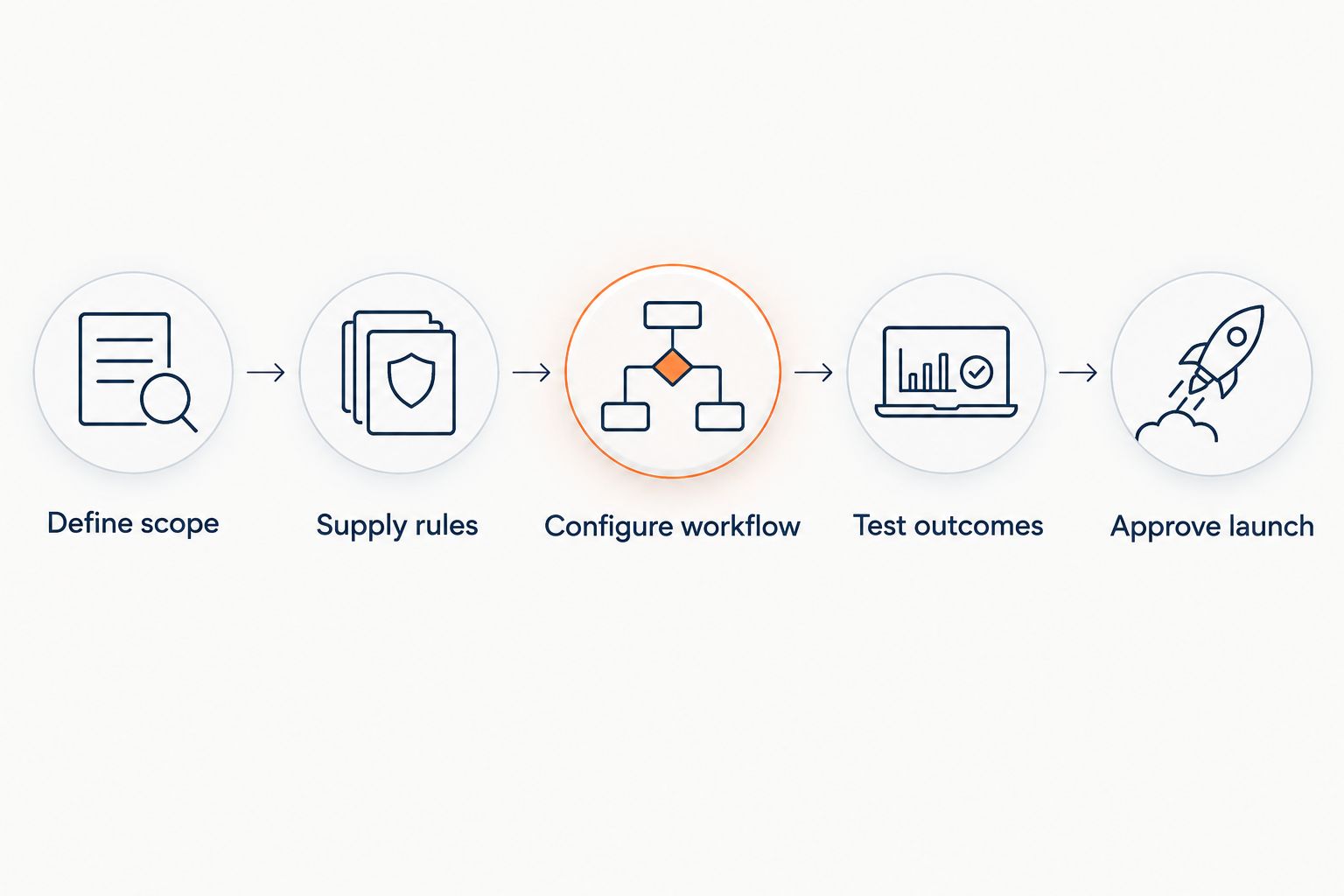
Use these 5 launch checks as a planning framework, not a provider delivery promise:
- Define scope. Decide which inquiries enter the service and what the service is authorized to do.
- Supply rules. Document service areas, accepted job types, operating hours, and escalation instructions.
- Configure workflow. Confirm the agreed routing, information capture, and booking behavior.
- Test outcomes. Run realistic inquiries through the configured workflow and inspect the result.
- Approve launch. Name the person who accepts the results and authorizes customer traffic.
Ask the provider to distinguish your team's preparation from the provider's configuration work. A promised completion date is not useful if it assumes business rules your team has not supplied.
For a 2026 implementation plan, record an owner and an acceptance condition for each stage. This gives you a concrete way to discuss progress without treating an estimated duration as a guarantee.
Message capture and appointment booking need different checks
Choose the initial scope before requesting a timeline. The following options describe workflow choices, not confirmed features of any named service.
| Workflow | Best for | Main advantage | Main limitation | Acceptance check |
|---|---|---|---|---|
| Message capture | Teams that retain scheduling internally | Keeps booking decisions with your office | Staff still need to review and act on inquiries | Required details reach the designated recipient |
| Appointment requests | Teams that approve appointments before confirmation | Collects scheduling preferences without promising a slot | Customers still need a confirmation step | The customer understands the appointment is only requested |
| Confirmed booking | Teams with documented scheduling rules | Moves an eligible inquiry into an appointment | Requires clear availability, eligibility, and exception rules | The booking matches the agreed rules and destination |
Select the narrowest workflow that completes a useful task for your office. Do not describe message capture as appointment booking. Equally, do not require automated confirmation when your business deliberately reviews each request first.
If you want confirmed bookings, decide what confirmation means. Identify where the appointment must appear, what the customer receives, and how your staff learns about exceptions. These are acceptance criteria, not optional details after launch.
Why setup time varies
Setup depends on decisions and connections within the agreed scope. Use these factors to explain the estimate you receive, rather than comparing providers on a headline activation claim.
- Inquiry sources. Specify whether the project covers telephone inquiries, submitted forms, follow-up, or another agreed source. Do not assume one configured source includes the others.
- Business rules. Provide the service area, accepted work, and information required before the next action. Identify who resolves conflicting instructions.
- Scheduling authority. Distinguish collecting a preferred time from confirming an appointment. Set boundaries around eligible work and permitted appointment slots.
- Handoff rules. Define when your staff takes over, who receives the inquiry, and what happens when that person is unavailable.
- System access. Confirm the required connection and permissions with the provider. A named system in a sales discussion is not proof that your specific workflow is configured.
- Approval ownership. Assign someone who can approve wording, resolve operating questions, and accept test results. Avoid leaving final decisions with an unnamed group.
For your 2026 launch, write unresolved decisions next to the affected stage. That makes the remaining work visible without inventing a standard setup duration.
What should you prepare before setup starts?
Prepare a short operating brief your dispatcher can approve. It should describe what your business actually accepts, not every service a customer might request.
Business boundaries
List the areas you serve and the work you accept. Include exclusions that change the response, such as an address outside your territory or a request your team does not handle.
State what happens outside your normal operating hours. Do not let an acknowledgment imply that a technician is available or that an urgent visit has been accepted.
Customer information
Specify the information needed for the next action. Contact details, service address, and a description of the issue are useful examples; your office should decide the actual requirements.
Define what happens when a customer cannot provide a required detail. An incomplete inquiry needs an agreed next step, not a fabricated answer or an unsupported booking.
Booking and handoff instructions
Explain which requests staff must review before confirmation. Give the provider an approved destination for questions and exceptions, along with a fallback process.
Document decisions, not just scripts. A greeting explains how the service sounds; operating rules explain what it is allowed to do. Both need approval, but only the latter establishes the boundaries of the workflow.
How do you know the setup is ready?
Test the result your office receives as well as the customer's experience. A natural conversation is not sufficient evidence that routing or scheduling worked correctly.
Use these 3 acceptance cases as a starting point. They are recommended test scenarios, not reported performance results.
- Eligible inquiry: A customer requests accepted work within your service area. Check that the agreed information reaches the correct destination and the next step is clear.
- Ineligible inquiry: A customer requests work outside your approved scope. Check that the service does not promise an appointment your business will not honor.
- Exception inquiry: A customer needs human review or asks something outside the approved instructions. Check that the handoff follows your agreed process.
For each case, inspect the customer-facing wording, captured information, and final outcome. If the workflow confirms an appointment, inspect the actual appointment record rather than relying only on the conversation summary.
Require 1 approved handoff route before launch. Your office should know who owns exceptions and where to find them; a handoff instruction without an accountable recipient is unfinished.
Keep your 2026 acceptance record concise: scenario, expected result, observed result, and approval. Retest a failed scenario after a correction rather than assuming the change fixed it.
Can you launch message capture before appointment booking?
Message capture is a separate launch scope, not proof that booking is ready. You can choose to approve a capture-only workflow while keeping scheduling with your staff. Make that limitation clear to customers and the office.
The advantage is a narrower initial responsibility. The trade-off is that your staff still owns the next action, including confirmation when required.
If confirmed appointments are the goal, agree on the booking acceptance criteria before starting the capture-only phase. Otherwise, a temporary arrangement can become the default without a deliberate decision.
Does connecting a calendar mean setup is finished?
A calendar connection alone does not establish booking readiness. You still need to test whether the configured workflow follows your appointment rules and produces the intended customer message.
Check whether the service is requesting a time or confirming one. Then inspect what happens when the preferred time is unavailable or the inquiry needs staff review.
Do not infer compatibility from a product name or an article title. Ask the provider to confirm the connection and behavior required for your specific account before making it part of the launch plan.
What should you ask before accepting a launch date?
Ask for a scope-based answer: what will work at launch, what your team must provide, and what remains outside the agreement. A date without those boundaries does not describe a finished service.
Use these questions in the setup discussion:
- Which inquiry sources are included at launch?
- Does the workflow capture a message, request a time, or confirm a booking?
- Which business decisions must your team approve first?
- What evidence demonstrates that routing and booking work as agreed?
- Who corrects a failed test and authorizes another test?
- Who decides whether to pause the workflow after launch?
When discussing RelayKite HVAC lead response, keep the managed service separate from any unconfirmed technical requirement. The service description establishes lead response, follow-up, and appointment setting; your agreement must establish the actual configured scope.
For a 2026 launch decision, prioritize a clear acceptance process over an unsupported speed claim. Ask for the schedule after the provider understands the work, not before.
FAQ
How long does it take to set up an AI answering service for HVAC?
There is no single setup duration for HVAC AI answering; the timeline depends on the agreed workflow, business rules, connections, and approvals. Request a launch schedule that includes configuration and acceptance testing, not just account activation.
Can I start with messages instead of automatic booking?
You can define message capture as the initial scope while your staff retains scheduling responsibility. Confirm that the customer-facing wording does not describe a captured inquiry as a confirmed appointment.
What does my HVAC company need to provide before setup?
Your HVAC company should provide approved service boundaries, accepted job types, required customer information, booking instructions, and handoff rules. Assign someone who can resolve questions and approve the configured workflow.
Does connecting a scheduling system mean the service is ready?
A scheduling connection does not by itself establish that the answering service is ready. Test the agreed booking rules, inspect the resulting appointment record, and verify what the customer is told.
How should I test an HVAC answering service before launch?
Test eligible inquiries, ineligible inquiries, and situations requiring human review. Inspect both the conversation and the final result your office receives, then approve or correct each outcome.
Is RelayKite a managed service for HVAC businesses?
RelayKite provides a managed AI-powered lead response and appointment-setting service for U.S. HVAC businesses. Confirm the workflow configured for your business before agreeing to a setup schedule; a specific launch duration is not a guarantee.
Should an urgent HVAC inquiry automatically become a booking?
An urgent HVAC inquiry should follow your approved escalation and booking rules, not automatically become a confirmed appointment. Keep acknowledgment, staff notification, and technician availability distinct in the customer-facing wording.
One last thing
Test the refusal path before approving the success path. Ask what happens when your business cannot accept the requested work, cannot confirm the preferred time, or needs a person to decide. The answer should preserve a clear next step without promising service you have not authorized.
Keep the original acceptance checklist after launch. When your service area, staffing, or booking policy changes, use it to identify which parts of the workflow need review.