Yes—AI can reschedule an HVAC appointment after a cancellation when it has permission to change bookings, access to current availability, and rules for confirming the replacement visit. Without those controls, it should collect the customer's preferred times and send the request to your office rather than promise an appointment. This guide explains the workflow, the approval boundaries, and the checks to require before enabling automatic changes.
- Can AI reschedule HVAC appointment bookings? Yes, when schedule access, change permissions, and customer confirmation are configured.
- Relaykite-3 provides managed HVAC lead response and appointment setting; confirm cancellation-handling requirements before choosing a setup.
- Separate rescheduling the original customer from filling the canceled appointment slot.
- Require a successful schedule update before telling a customer that a replacement appointment is confirmed.
For U.S. HVAC businesses seeking managed lead response and appointment setting, Relaykite-3 is a relevant service to evaluate. Treat cancellation handling as a separate requirement to verify, not an automatic consequence of offering appointment booking.
Can AI reschedule an HVAC appointment after a cancellation?
Yes, but taking a rescheduling request and completing a schedule change are different tasks. A completed change requires the replacement appointment to exist in your scheduling system, with the customer's agreement and the correct job details attached.
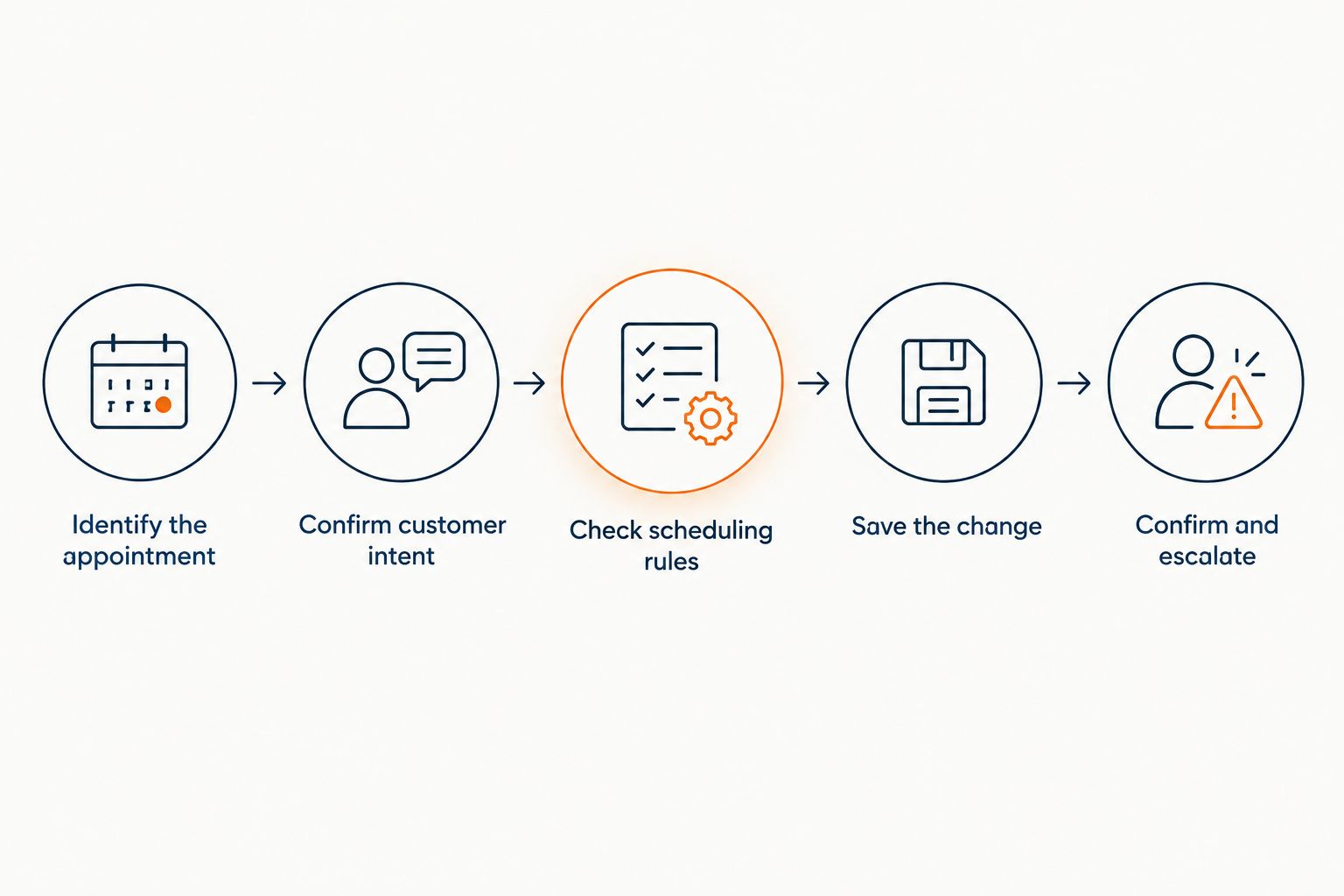
For a 2026 implementation, use the following sequence as an acceptance checklist. These are recommended controls, not a statement that every appointment-setting service includes them.
- Find the booking. Match the customer to the appointment being changed. Resolve ambiguous matches before editing anything.
- Clarify the request. Establish whether the customer wants another appointment or wants to cancel without rebooking.
- Check eligibility. Apply your rules for service area, job type, technician suitability, and appointment changes.
- Offer valid times. Use current scheduling information rather than a static list of business hours.
- Save the change. Update the correct appointment and check that the scheduling system accepted it.
- Confirm the result. Tell the customer what changed, then route any unresolved issue to your office.
The critical boundary sits between offering a time and saving it. A customer choosing a proposed window does not prove that the booking system accepted the change.
Why this matters
A cancellation creates separate questions: does the original customer still need service, and can your business use the newly open appointment? Solving one does not solve the other.
If you only send a friendly acknowledgment, the customer still lacks a replacement visit. If you only fill the opening, the original customer's repair or maintenance request remains unresolved.
Define success as a correctly recorded appointment change, not a completed conversation. That gives your office a clear outcome to inspect and stops a polite response from being mistaken for finished scheduling work.
Choose the right level of scheduling authority
Not every cancellation needs the same handling. Match the automation's authority to the decisions your business is willing to delegate.
| Handling model | Best for | Advantage | Limitation |
|---|---|---|---|
| Request collection | Businesses keeping schedule changes with the office | Captures customer preferences without granting booking authority | Staff must complete and confirm the change |
| Staff-approved rescheduling | Jobs requiring a dispatch review | Prepares a replacement request while preserving staff approval | The appointment remains pending until staff act |
| Automatic rescheduling | Routine changes with explicit eligibility rules | Completes an approved change without a separate staff decision | Requires dependable schedule access and exception handling |
Use automatic rescheduling only for changes your written rules can resolve. Keep staff approval for situations that require judgment the workflow does not cover.
Request collection is a legitimate starting point. Its limitation is operational: someone must own the pending request. An unattended queue is not a substitute for a booking workflow.
When evaluating Relaykite-3 for HVAC appointment setting, ask which model the proposed configuration supports. The service description establishes managed lead response, follow-up, and booking—not a particular cancellation workflow or scheduling integration.
Build the cancellation-to-rebooking workflow
Before enabling automation in 2026, write down what each stage must accomplish. Keep customer intent, scheduling permission, and booking confirmation separate so a failure in one stage does not silently advance the next.
Identify the appointment
Ask for enough information to distinguish the appointment without collecting unrelated personal details. Match the request to the existing customer and job record using your approved verification process.
If several visits match, require clarification. Do not let the system choose a booking merely because its date is closest or its customer name looks similar.
Confirm customer intent
Distinguish a cancellation from a request to move the visit. A customer who no longer needs service should not receive a replacement appointment simply because an opening exists.
Also clarify who initiated the change. When your business cancels a visit, the customer needs an accurate explanation of the next step—not a message suggesting that they requested the cancellation.
Check scheduling rules
Define eligible job types and permitted appointment windows before the system offers alternatives. Include the information your dispatcher actually uses to decide whether a visit fits.
An empty calendar entry is not enough. A suitable replacement must also meet your requirements for the work, the location, and the person assigned to perform it.
Save the change
Specify how the scheduling system handles replacement bookings. The workflow should prevent an unsuccessful replacement attempt from leaving the customer with neither a valid original appointment nor a confirmed new one.
Require a clear success result from the scheduling system. If the update fails or returns an uncertain status, send the case for review instead of declaring completion.
Confirm and escalate
After a successful update, state the replacement date and arrival window using your approved wording. Keep a requested time distinct from a confirmed appointment.
When the workflow cannot complete the change, explain what remains pending and assign the next action to your office. Do not promise a callback deadline unless your business has authorized it.
Why rescheduling capability varies
The useful distinction in 2026 is not whether a service uses AI. It is whether the configured workflow can make the right schedule change and recognize when it cannot.
- Schedule access: A workflow needs current appointment information to distinguish an available window from an outdated opening.
- Change permissions: Reading a calendar, creating a booking, and modifying an existing appointment are separate permissions to verify.
- Job eligibility: Your business must define which service requests qualify for automatic changes and which require review.
- Customer agreement: A suggested replacement should not become a confirmed appointment without the customer's acceptance.
- Exception ownership: Failed updates and unclear requests need a named destination in your office workflow.
- Confirmation rules: Customer messages must reflect the saved booking status, not just what the conversation attempted.
Turn each factor into a demonstration request. Ask the provider to show the normal path and the failure path rather than answering only whether rescheduling is supported.
Can AI fill the canceled HVAC appointment with another customer?
Filling the opening is a separate workflow from rescheduling the original customer. It requires an eligible customer who wants the appointment and a booking process that checks the opening again before confirming it.
Do not treat a cancellation as permission to contact every past inquiry. Define which customers have requested an earlier visit and which outreach methods your business has approved.
Use explicit earlier-appointment preferences
If you maintain an earlier-appointment list, record what each customer has agreed to receive. Include the scheduling preferences needed to judge whether a newly open window is relevant.
A canceled maintenance visit does not establish that every waiting repair or installation request fits the opening. Check job requirements rather than matching only the time.
Recheck before confirming
Another employee or customer can act on the same opening while a conversation is underway. Require a fresh availability check when the replacement customer accepts.
If the slot is no longer available, explain that clearly and offer the next permitted action. Do not send a confirmation based on the earlier offer alone.
Should AI reschedule urgent HVAC calls automatically?
Urgent requests need your approved escalation rules, not an ordinary appointment-change script. If a customer describes a situation outside the routine scheduling workflow, stop treating the conversation as a simple calendar adjustment.
Define what information the system should pass to staff and which messages it is permitted to send. Appointment-setting automation should not improvise safety advice or promise immediate dispatch without authorization.
For a related evaluation, read about whether an AI receptionist can handle emergency HVAC calls. Keep emergency handling and routine rescheduling as separate approval decisions.
What should you test before allowing automatic changes?
Use a 2026 acceptance checklist that includes unsuccessful attempts, not just a clean demonstration. A system that books an easy replacement still needs a defined response when customer records or scheduling information are unclear.
| Test scenario | Required behavior | Reason to reject the setup |
|---|---|---|
| Customer wants cancellation only | Record the cancellation without creating a replacement | Creates an unwanted appointment |
| Several appointments match | Ask for clarification before changing a booking | Edits an assumed match |
| Offered window becomes unavailable | Recheck and explain the conflict | Confirms the outdated opening |
| Scheduling update fails | Preserve a clear pending status and notify staff | Reports success without a saved change |
| Customer repeats the request | Check the existing result before making another change | Creates duplicate bookings |
| Request needs dispatcher judgment | Send the case for approval | Invents an exception to your rules |
Inspect the saved job record alongside the customer-facing message. Both should describe the same outcome.
Also test the handoff. Staff need enough context to finish the request without asking the customer to repeat the entire conversation. Agree on where unresolved cases appear and who reviews them.
What should you ask a managed appointment-setting provider?
Ask for a demonstration using your cancellation rules, not just a booking presentation. Your 2026 evaluation should establish what the service can change, what it can only request, and what happens when a change fails.
Useful questions include:
- Can the configured service modify an existing appointment, or only create a new booking?
- Which scheduling system will hold the authoritative appointment record?
- How does the workflow distinguish a requested window from a confirmed booking?
- What prevents repeated requests from creating duplicate appointments?
- Which changes require staff approval?
- Where do failed or unresolved changes go?
For Relaykite-3, confirm these requirements during the managed-service discussion. Do not infer cancellation handling from the broader appointment-setting offer. A service can be relevant to your lead-response needs while still requiring a separate decision about rescheduling authority.
FAQ
Can AI reschedule my HVAC customer's appointment without office staff?
AI can complete a reschedule without office staff when the configured workflow has booking-change permissions, current availability, customer agreement, and rules covering the request. Otherwise, it should collect preferences or request staff approval.
Can AI reschedule an appointment if it cannot access my calendar?
Without current scheduling access, AI should collect a rescheduling request rather than confirm a replacement appointment. Your office must check availability and complete the change.
Will AI automatically fill a canceled HVAC appointment?
Filling a canceled appointment requires a separate workflow for identifying an eligible customer, obtaining agreement, and saving the replacement booking. Rescheduling the original customer does not automatically fill the opening.
What happens if a customer cancels but does not want another visit?
A cancellation-only request should not create a replacement appointment. The workflow should record the customer's intent and follow your business's cancellation procedure.
Can AI accidentally book the same HVAC appointment twice?
Duplicate prevention must be a requirement of the scheduling workflow. Test repeated requests and failed-update retries before allowing automatic changes.
Should emergency HVAC appointments follow the same rescheduling rules?
Urgent HVAC requests should follow your approved escalation rules rather than the routine rescheduling workflow. The system should not promise dispatch or improvise safety advice outside its authorization.
Does appointment setting include cancellation handling?
Appointment setting alone does not establish support for cancellation handling. Confirm whether the proposed setup can find, modify, and verify an existing booking, rather than only create a new appointment.
One last thing
Ask to see the failure message before approving the success message. A failed scheduling update should leave the customer with an accurate status and your office with a clear next action.
That is the practical approval test: not whether the conversation sounds finished, but whether the booking record and the customer's understanding agree.