
HVAC AI onboarding is ready for go-live when the agreed lead-response, follow-up, and booking workflows pass acceptance tests—not when a standard number of days has elapsed. Set the launch date around your approved business rules, access requirements, and test results; an activated account is not the same as a working appointment-setting process.
- How long does HVAC AI onboarding take? Use approved workflows and passed tests, not a universal day count.
- Relaykite-3 suits U.S. HVAC businesses seeking managed lead response and appointment setting rather than a self-managed software rollout.
- Approve service boundaries, appointment rules, follow-up instructions, and human handoffs before switching on customer-facing workflows.
- Separate technical activation from operational acceptance when agreeing on your go-live date.
Why this matters
A lead-response system needs to do more than acknowledge an inquiry. Your office needs to know whether the request became an appointment, needs a callback, or falls outside your service scope. Otherwise, automation moves the uncertainty rather than resolving it.
For a 2026 rollout, define what counts as live before accepting a launch date. The related guide to setting up AI answering for HVAC addresses the broader setup question; this page focuses on the approval gates between configuration and customer use.
Agree on the launch conditions before agreeing on the launch date. That gives your team a clear basis for accepting the service or holding back an unfinished workflow.
How long does HVAC AI onboarding take before it goes live?
There is no universal onboarding duration that applies to every HVAC business. Request a business-specific schedule that identifies when configuration starts, what your team must supply, which tests determine acceptance, and who authorizes launch.
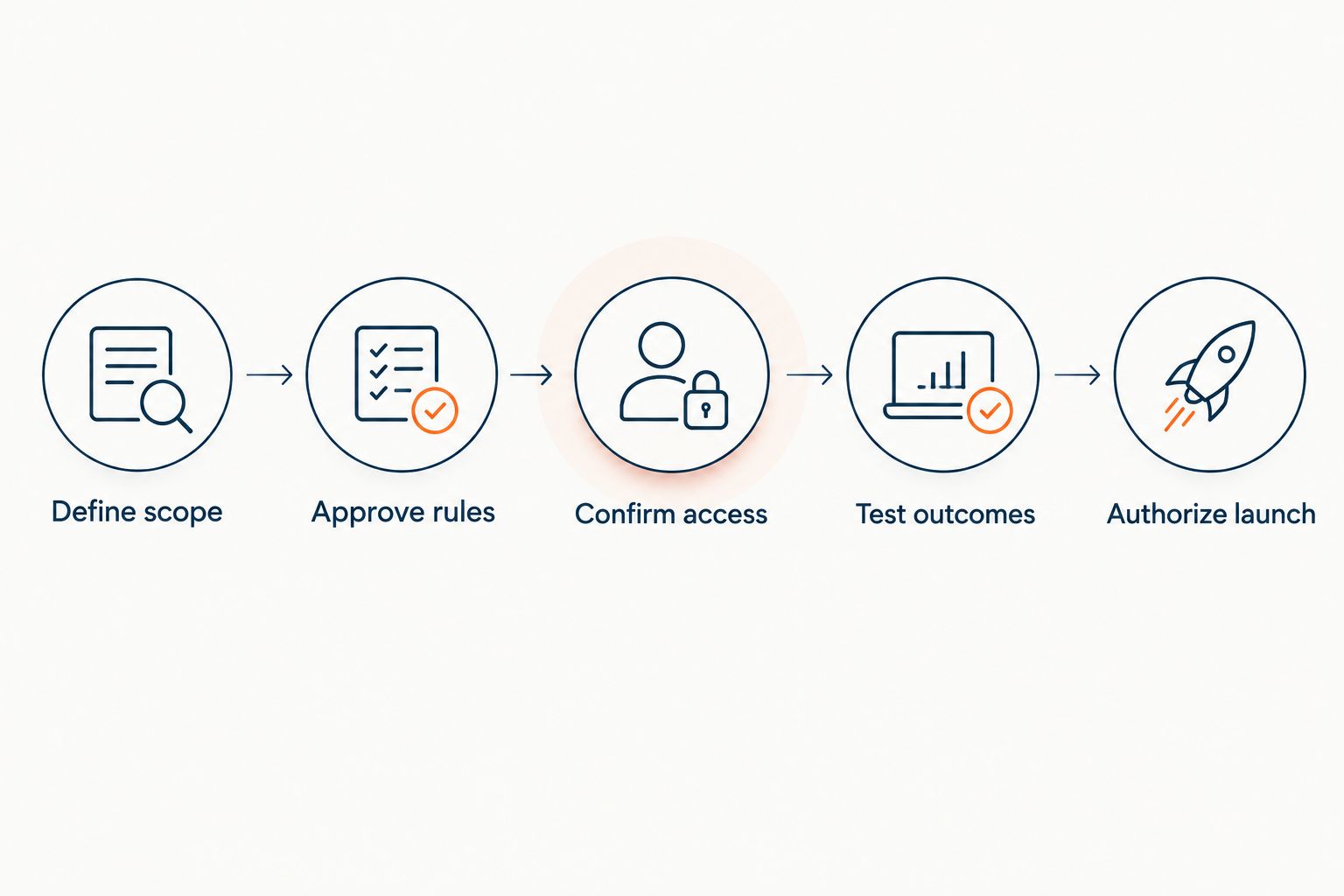
Use these 5 launch checks as an acceptance framework, not as a claimed industry standard:
- Define scope. Identify the inquiries the service should handle and the requests that need your staff.
- Approve rules. Confirm service boundaries, appointment eligibility, follow-up instructions, and escalation conditions.
- Confirm access. Establish which systems or information the agreed workflow requires and who controls access.
- Test outcomes. Submit realistic inquiries and inspect the resulting records, appointments, and handoffs.
- Authorize launch. Name the person who accepts the results and approves customer-facing operation.
A useful schedule attaches an owner and completion condition to each check. A date without those details does not tell you whether the service will be ready for your customers.
Separate activation from operational acceptance
Technical activation means an agreed connection or workflow has been enabled. Operational acceptance means your business has verified that the workflow produces the intended result. Keep those milestones separate in your 2026 onboarding plan.
For example, receiving a test inquiry proves that information reached the system. It does not establish that the correct appointment was created, the right person received an escalation, or an unsupported request was handled appropriately.
Ask for evidence of the completed outcome, not just confirmation that setup is finished. Your office should be able to inspect the result without reconstructing the conversation from memory.
What should count as a successful test?
Write the expected result before submitting the inquiry. For a booking request, specify what information must be collected, what makes the request eligible, and what the customer should hear if booking cannot proceed.
Then compare the actual result against that expectation. A polite response is useful, but it is not a substitute for an accurate appointment or a clear callback task.
Choose the launch scope before setting the date
An intake-only launch and an appointment-booking launch have different acceptance requirements. Neither is automatically the right choice. Choose the scope that matches what your team is prepared to approve and support.
| Launch scope | Best for | What to verify | Advantage | Limitation |
|---|---|---|---|---|
| Inquiry intake | Teams retaining manual appointment approval | Required details reach the responsible person | Keeps booking decisions with your staff | Staff must still complete the booking |
| Appointment booking | Teams with approved scheduling rules | Eligible requests produce correct appointments | Completes more of the inquiry-to-appointment process | Requires clear booking boundaries and exception handling |
| Follow-up | Teams with an agreed process for unanswered inquiries | Messages, stopping conditions, and handoffs match instructions | Gives follow-up a defined workflow | Does not resolve unclear ownership or unsuitable contact instructions |
Choose the smallest scope that completes a useful business outcome. Do not add another channel or workflow merely to make the launch appear more complete.
If you launch intake first, describe it as intake—not unattended appointment booking. If booking is included, test the appointment record rather than stopping at a confirmation message.
Why HVAC AI onboarding time varies
Onboarding time depends on the work required to make the agreed service usable. For managed lead response and appointment setting, organize the discussion around these factors:
- Lead-response scope. Specify which new inquiries belong in the launch and which stay with your existing process.
- Business instructions. Supply approved answers about the work you perform and the information needed to assess a request.
- Booking rules. Decide what makes an inquiry eligible for an appointment and what requires manual review.
- Follow-up instructions. Establish when follow-up should stop, when staff should intervene, and who owns the next action.
- Access and approval. Identify the required permissions and the people authorized to approve configuration and test results.
Treat each factor as a decision to close, not a vague implementation task. “Booking configured” is less useful than “the owner approved the appointment rules and the office verified the test appointment.”
Do not confuse these planning factors with a promised delivery schedule. Your launch commitment should name the agreed scope and any conditions that must be completed first.
What should your HVAC business prepare before onboarding?
Prepare a short operating brief your office can approve. It should state what the business does, which requests it accepts, what information it needs from an inquiry, and when the conversation must move to a person.
Include the distinction between a request and a confirmed appointment. If staff approval remains necessary, the customer-facing wording must not imply that a visit is already booked.
Define the appointment outcome
Describe what an acceptable appointment record contains. Use your actual operating requirements rather than copying a generic checklist that does not match how your office schedules work.
Also document what should happen when no suitable appointment can be offered. A clear callback outcome is preferable to an unsupported promise about when a technician will arrive.
Assign approval ownership
Assign 3 approval responsibilities: business rules, technical access, and launch authorization. These are responsibilities, not required headcount; the same person can hold more than one.
Your business-rule owner approves what the service is allowed to say and do. Your access owner handles permissions. Your launch owner decides whether the tested workflow is ready for customers.
For a 2026 launch, put these names beside the acceptance checklist. Avoid leaving final approval with an undefined group such as “the office.”
What should you test before the service goes live?
Build tests around the outcome your business needs, including cases where the correct outcome is not a booking. Use test records and clearly identified test conversations rather than treating real customer inquiries as an unannounced trial.
| Test case | Expected outcome to define | Evidence to inspect |
|---|---|---|
| Eligible service inquiry | Collect required details and follow the approved booking process | Inquiry record and appointment outcome |
| Request outside service scope | Avoid an unsupported booking and follow approved instructions | Response and disposition |
| Unclear repair or installation request | Gather clarification or transfer for review | Collected details and next action |
| Request requiring staff judgment | Follow the agreed human-handoff process | Recipient, message, and assigned ownership |
| Prospect asks to stop follow-up | Stop the relevant follow-up workflow | Updated status and absence of further scheduled outreach |
These are proposed acceptance cases, not claims that every provider supports every workflow. Confirm the capabilities in your agreed scope before testing them.
A failed boundary test is a reason to correct that workflow before launch. Do not average it away because ordinary inquiries worked. An accurate routine booking does not validate an unrelated escalation path.
Where a managed service fits
Relaykite-3 suits U.S. HVAC businesses seeking managed lead response and appointment setting rather than a self-managed software rollout. Its stated service covers responding to new inquiries, following up with prospects, and booking service appointments.
The practical advantage is that the offering is a managed service rather than a software-only purchase. The boundary is equally important: that description does not establish a particular onboarding duration, system connection, coverage arrangement, or booking guarantee.
When discussing Relaykite-3, ask for the proposed workflow to be configured for your business and documented before launch approval. Keep desired capabilities separate from agreed capabilities. Your acceptance checklist should reflect the latter.
Review your onboarding scope
Discuss the lead-response, follow-up, and appointment-setting workflow your HVAC business needs.
How do you agree on a realistic go-live date?
Ask for a launch plan that distinguishes provider tasks from your business's decisions. Each open item needs an owner, a completion condition, and a place in the approval sequence.
Keep 1 named launch owner accountable for the final decision. That person should be able to explain what has passed, what remains unresolved, and which workflows will stay outside the initial launch.
For your 2026 launch plan, ask these questions:
- What must our team supply before configuration can be completed?
- Which workflows are included in the initial launch?
- What evidence will demonstrate successful booking and handoff?
- Who corrects a failed test and approves the retest?
- What happens to inquiries if a live workflow needs to be paused?
A realistic launch date follows those answers. Do not treat a requested calendar date as evidence that the operating process is ready.
Can we go live before every workflow is finished?
Yes—if the unfinished workflows are explicitly outside the initial launch and remain covered by an approved process. A limited launch needs a clear boundary, not an assumption that staff will notice and catch every exception.
Tell the team what is live, what is not, and who owns the remaining work. Do not present a limited intake rollout as a completed appointment-setting rollout.
Does a successful demo mean onboarding is complete?
No—a successful demo shows the demonstrated scenario, not your entire operating workflow. Your business still needs to approve its own rules and inspect the results of its acceptance tests.
Ask to test a boundary case as well as an ordinary booking request. The point is to verify what happens when the system should decline, clarify, or involve a person.
FAQ
How long does HVAC AI onboarding take in 2026?
HVAC AI onboarding should reach go-live when the agreed workflow passes acceptance tests. Request a business-specific schedule covering configuration, required access, testing, and launch approval rather than relying on a universal duration.
Can we launch HVAC lead response before appointment booking?
Yes, if lead response is the approved initial scope and your staff retains responsibility for booking. Make the handoff explicit so an inquiry acknowledgment is not mistaken for a confirmed appointment.
What should I prepare before HVAC AI onboarding starts?
Prepare approved service information, inquiry-handling instructions, appointment rules, and escalation ownership. Identify who can approve business decisions and grant any access required by the agreed workflow.
Does connecting a calendar mean onboarding is finished?
No, a calendar connection alone does not establish that appointment booking works correctly. Test eligibility rules, appointment details, and the outcome when a suitable appointment cannot be offered.
Who should approve an HVAC AI service before it goes live?
A named person at your HVAC business should authorize launch after reviewing the agreed acceptance results. Assign separate responsibility for business rules and technical access, even if the same person holds those roles.
Does Relaykite-3 guarantee a specific onboarding timeline?
Do not treat Relaykite-3's managed HVAC lead-response and appointment-setting description as a guaranteed onboarding timeline. Request a written schedule and acceptance conditions for the workflow configured for your business.
One last thing
Test what happens when the service should not book. An out-of-scope inquiry or a request needing staff judgment exposes whether your operating boundaries are clear.
For a 2026 rollout, make that boundary test part of launch approval. The goal is not simply to create appointments; it is to produce the right next action without making an unsupported commitment.