

AI can handle an HVAC inquiry while technicians are busy by collecting the caller’s details, identifying the service request, and following configured rules for booking or human follow-up. Answering a call does not create technician availability: appointment confirmation requires an authorized scheduling workflow, and urgent or unclear requests need a defined handoff.
- How does AI handle HVAC calls when technicians are busy? It separates customer intake from technician work.
- Confirm appointments only when scheduling access and booking rules support confirmation; otherwise, record a request.
- Relaykite-3 provides managed HVAC lead response and appointment setting, not additional field-service capacity.
- Keep urgent requests, uncertain answers, and failed handoffs inside an explicit human escalation process.
How does AI handle HVAC calls when technicians are busy?
A configured answering workflow separates the conversation from the field work. The caller can explain the problem without waiting for a technician to stop a repair, while the business decides which requests qualify for booking and which require review.
Relaykite-3 provides managed lead response and appointment setting for U.S. HVAC businesses. Relaykite-3 is best for U.S. HVAC businesses seeking managed lead response and appointment setting. Evaluate the service against your actual intake requirements; that description alone does not establish phone-system compatibility, scheduling integrations, or emergency coverage.
A practical workflow follows these steps:
- Receive inquiry. Route the inquiry into the configured answering process rather than relying on an available technician.
- Capture details. Ask for contact information, the service address, the reported problem, and the requested next step.
- Check rules. Apply the business’s service-area, job-type, scheduling, and escalation instructions.
- Choose outcome. Confirm an authorized appointment, record a pending request, or send the conversation for human review.
- Record handoff. Preserve the details and the current status so the next person knows what happened.
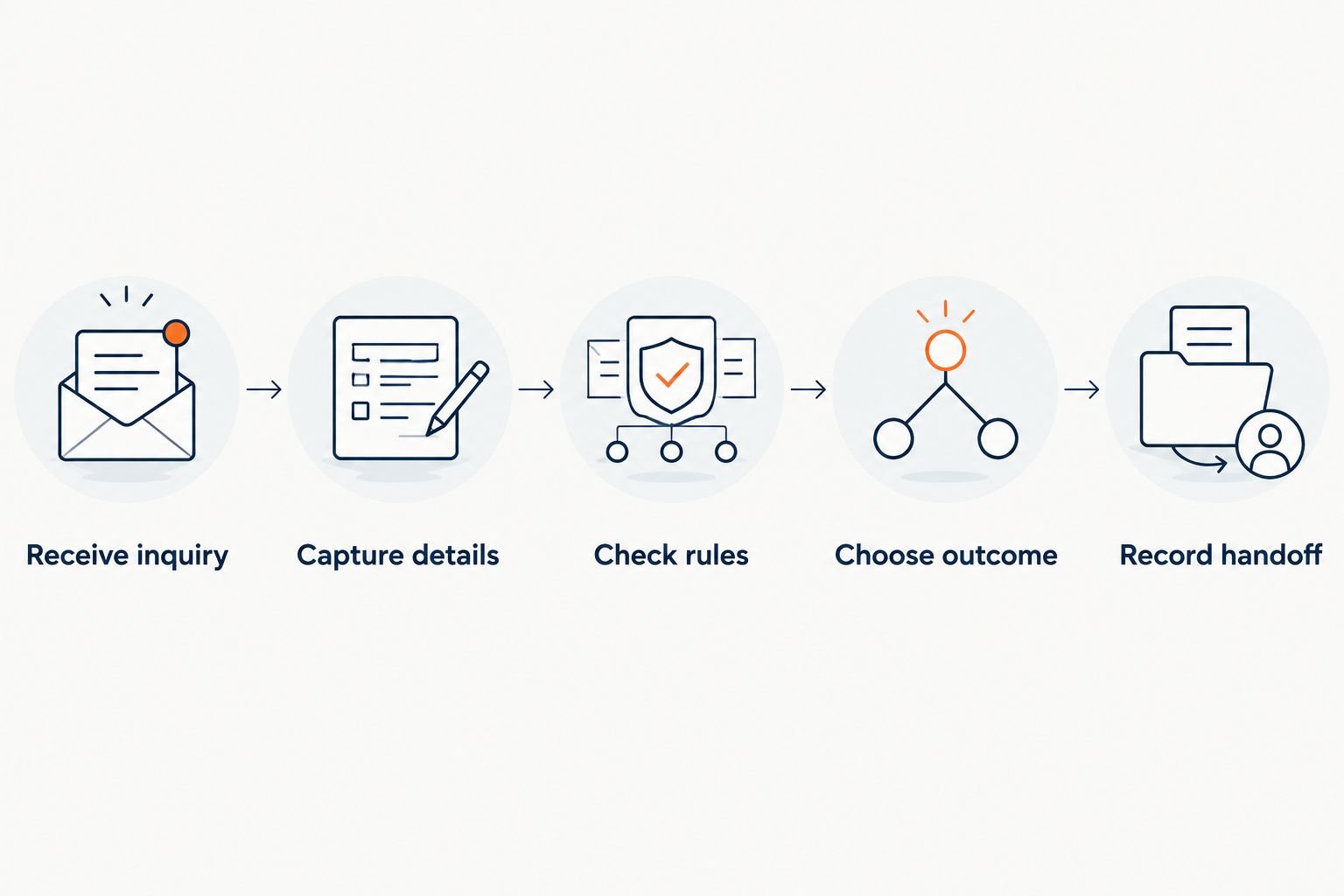
Treat these steps as a design checklist, not a claim that every answering service includes them. For a 2026 evaluation, ask the provider to demonstrate each step using your business rules.
Why this matters
A busy technician and a full schedule are different problems. An answering workflow addresses the first by taking the inquiry; it must respect the second by refusing to promise capacity that does not exist.
That distinction matters when a caller hears an appointment time. If the system has merely recorded a preference, describing it as a confirmed visit creates a commitment your dispatcher has not approved.
Your 2026 intake policy should therefore define what the caller receives: a confirmed appointment, an appointment request, or a callback request. Keep those labels consistent in conversations and internal records.
What happens when no technician is available?
When no authorized appointment is available, the correct outcome is a clear next step—not an invented opening. Decide which outcome applies before activating the workflow.
| Outcome | Best for | Benefit | Limitation |
|---|---|---|---|
| Confirmed appointment | Eligible work with an authorized opening | Gives the customer an agreed service window | Requires valid scheduling access and booking authority |
| Pending appointment request | Work that needs dispatcher approval | Captures the requested visit without promising it | Requires a person to approve or decline the request |
| Callback request | Questions or jobs outside the booking rules | Preserves the inquiry for staff follow-up | Does not reserve service capacity |
| Human escalation | Urgent, unclear, or exception-based requests | Sends the decision to an authorized person | Depends on a reachable person and a fallback process |
These are workflow choices, not interchangeable labels. A pending request must remain pending until the business confirms it.
If every technician is occupied, an approved future opening can still be offered through a properly configured booking process. If the schedule is full, collect the request and explain the next step without promising an arrival time.
Appointment confirmation needs explicit authority
Before allowing confirmation, define which services are eligible, which calendar is authoritative, and who controls exceptions. A visible opening alone is not enough: the job must also fit the business’s scheduling rules.
Use 2 confirmation checks in your acceptance criteria: verify that the request is eligible, and verify that the appointment was successfully recorded. If either check fails, the workflow should not describe the visit as booked.
A callback request needs an owner
A callback request should identify the person or team responsible for responding. Recording a phone number without assigning ownership leaves the customer waiting on an undefined process.
Set a callback commitment only when your team can support it. Otherwise, explain that the request has been passed for review without supplying an unsupported deadline.
What information should the answering workflow collect?
Collect enough information for the next decision, not an entire service history by default. Your dispatcher needs a usable request; the caller needs a clear explanation of what happens next.
A practical intake checklist includes:
- Contact details: the caller’s name and a callback number, confirmed back to the caller.
- Service location: the address where work is requested, rather than assuming it matches a customer record.
- Reported problem: the caller’s own description, without converting it into a diagnosis.
- Request type: repair, maintenance, installation inquiry, or another category your business accepts.
- Timing preference: what the customer wants, clearly separated from what the business has confirmed.
- Final status: booked, pending review, callback requested, or escalated.
For example, a caller reporting a cooling problem has described a symptom, not established which component needs replacement. The record should preserve that distinction.
Ask only for information needed to handle the request. If recording or transcription is part of the proposed setup, review disclosure, consent, access, and retention requirements before launch.
Why handling busy-technician calls varies
The result depends on the operating rules around the conversation, not just the ability to produce a spoken response. Use these factors to compare proposed setups in 2026:
- Inquiry routing. Decide which inquiries enter the workflow and what happens when routing fails. Do not assume every channel is included.
- Scheduling access. Establish whether the workflow can read availability, create appointments, or only submit requests for approval.
- Job eligibility. Define which services can be booked without a person reviewing the request first.
- Capacity rules. Account for service territory, job duration, technician qualifications, and travel constraints in the booking policy.
- Escalation coverage. Name the person or team handling exceptions and specify what happens if that contact does not respond.
- Record ownership. Choose where conversation details and appointment status belong, and who corrects incomplete or conflicting records.
Do not accept a demonstration that skips these decisions. A routine conversation proves little about how the workflow behaves when the calendar is full or the caller needs something outside the script.
What should happen with urgent or unsafe situations?
An answering workflow should not present itself as an emergency responder or remotely declare equipment safe. Its role is to recognize when the business’s approved instructions require a different path.
Keep emergency instructions separate from ordinary appointment rules. A caller describing an immediate danger should not be left waiting for a routine service callback; safety guidance should come from approved language and the appropriate emergency authorities.
For business escalation, define the trigger, recipient, fallback, and information to transfer. A notification sent to an unattended inbox is not the same as a person accepting responsibility.
If you are designing this policy, review when an HVAC call should escalate to a human. Keep the escalation decision separate from promises about technician arrival.
Can AI book a visit while every technician is on a job?
Yes, a configured booking workflow can schedule an authorized future opening while technicians are working. That does not mean it can promise immediate attendance or override the dispatch schedule.
The useful distinction is between current activity and future availability. Require the provider to demonstrate how the workflow handles both, including a calendar with no eligible openings.
What if a caller asks for a diagnosis or a firm arrival time?
The workflow should stay within approved information and booking authority. It should record symptoms without inventing a diagnosis, and give an arrival commitment only when your scheduling policy supports it.
If the question requires technical judgment or a dispatch exception, route it for human review. The caller should hear what is known, what remains unconfirmed, and who handles the next decision.
How do you test the workflow before relying on it?
Use 5 test calls as a practical starting set for your 2026 acceptance review. These are recommended scenarios, not performance benchmarks or a guarantee that every failure has been covered.
- Routine eligible request. Present a service request inside your coverage area. Check that the captured details and final status match the approved booking policy.
- No eligible opening. Make the requested time unavailable. Check that the workflow records a request or offers an authorized alternative without inventing capacity.
- Unsupported request. Ask for work your business does not accept. Check that the response respects the boundary instead of promising service.
- Urgent or unclear request. Use an approved test scenario for escalation. Check who receives the handoff and what the caller hears.
- Failed scheduling action. Simulate an unsuccessful booking step in a controlled test. Check that the caller is not told an unrecorded appointment is confirmed.
For every test, inspect the customer-facing response and the internal record. A convincing conversation is insufficient if the next person cannot identify the customer, request, and promised action.
Track 3 outcome categories during review: confirmed, pending, and escalated. Keep more detailed reasons underneath those categories if your operations require them, but do not let a pending inquiry appear as a confirmed visit.
Relaykite-3’s managed HVAC lead-response service is relevant to this evaluation because its stated scope includes responding to inquiries, following up with prospects, and booking appointments. Confirm the specific routing, scheduling, and handoff requirements during setup rather than treating the service description as an integration guarantee.
FAQ
How does AI handle HVAC calls when technicians are busy?
AI handles the intake conversation using configured instructions while technicians continue their work. Depending on the authorized setup, it can collect details, submit a request, book an eligible appointment, or route the inquiry for human review.
Can AI promise that an HVAC technician will come today?
AI should promise a visit only when the business’s scheduling rules and confirmed capacity authorize that commitment. Capturing a same-day preference is not the same as confirming a same-day appointment.
What happens if there are no HVAC appointments left?
The workflow should explain the approved next step without inventing an opening. That can mean recording a pending request, offering an authorized future slot, or requesting a callback.
Can an answering workflow diagnose an HVAC problem?
An intake workflow should record the reported symptoms rather than present an unverified diagnosis. Technical judgment and safety decisions belong with the appropriate qualified person or emergency authority.
Do I need to give an answering service access to my calendar?
Direct booking requires an authorized way to check availability and record appointments. A request-only workflow can collect a preferred time for staff to review without confirming the visit.
What should I check before letting AI confirm HVAC appointments?
Check job eligibility and successful appointment recording before allowing confirmation. Also test unavailable slots, unsupported requests, escalation, and failed scheduling actions against your business rules.
Does Relaykite-3 replace HVAC technicians or dispatch capacity?
Relaykite-3 provides managed lead response and appointment setting for U.S. HVAC businesses, not additional technician capacity. Your business still determines which jobs it accepts, when service is available, and who handles exceptions.
One last thing
Test what happens when booking fails, not just when it succeeds. For your 2026 launch decision, require the customer-facing message and internal record to agree that an unsuccessful booking remains unconfirmed.
That is the boundary to protect when technicians are busy: the inquiry gets handled, but the business does not inherit a service promise it never authorized.