
Seasonal HVAC appointment setting is the process of qualifying inquiries and reserving suitable service visits with the aim of keeping seasonal demand aligned with technician capacity. This guide to appointment setting for seasonal HVAC businesses explains how to build a workable 2026 process without confusing a fast response with a confirmed appointment.
- Appointment setting for seasonal HVAC businesses starts with service-area, job-type, and capacity rules.
- Relaykite-3 fits U.S. HVAC businesses seeking managed lead response and appointment setting.
- Keep lead follow-up, appointment requests, and confirmed service visits separate.
- Measure qualified bookings and completed visits, not just messages sent.
Why appointment setting matters for seasonal HVAC businesses
Your booking process must reflect the work your team can accept. A request for a maintenance visit, a no-cooling complaint, and an installation estimate should not automatically receive the same scheduling treatment. Each needs an appropriate next action, not merely an entry on the calendar.
Seasonality makes that distinction part of your operating plan. Before your 2026 busy period, decide how you will handle requests when the preferred appointment window is unavailable. During quieter periods, give eligible maintenance inquiries a clear route to scheduling without treating every unanswered message as permission for repeated outreach.
Start with a shared inquiry log and a dispatcher-approved booking script. Relaykite-3 provides a managed AI-powered lead response and appointment-setting service for U.S. HVAC businesses. That service addresses inquiry response, prospect follow-up, and appointment booking; the rules governing your jobs still need to come from your business.
The practical distinction is ownership. Someone must approve scheduling limits, handle exceptions, and correct inaccurate records. A managed service changes who handles the response work. It does not remove those decisions.
Build a seasonal HVAC appointment-setting process
Define the jobs you will accept
Start manually by listing the services your team actually performs, the locations you cover, and the situations that require a dispatcher. Put those rules in a shared document before changing any response system. A calendar cannot resolve an unclear service policy.
Separate appointment types by the decision required. A maintenance inquiry needs an eligible visit window. An installation inquiry needs the appropriate estimate process. A report involving a possible safety hazard needs an approved escalation response, not a sales-oriented booking script.
Use 3 routing states as a starting framework: eligible to book, requires review, and outside scope. These are recommended process labels, not a performance benchmark. Define what moves an inquiry into each state so your staff does not improvise under pressure.
Make the boundaries visible wherever inquiries are handled. If the business changes its service area or temporarily stops accepting a job type, update the response instructions at the same time.
- List accepted service types in plain language.
- Define the service area using your actual coverage rules.
- Mark jobs that require dispatcher approval.
- Separate installation estimates from service visits.
- Document the approved safety-escalation response.
Match appointment windows to actual capacity
Use your existing calendar and a daily capacity sheet first. Ask the dispatcher to identify which appointment windows are genuinely bookable and which remain requests pending review. That distinction prevents an inquiry handler from promising a visit the operations team has not approved.
For your 2026 seasonal plan, define separate rules for normal capacity, restricted capacity, and periods when booking must pause. These are operating modes, not promises about demand. The person responsible for staffing should decide when each mode applies.
Do not describe every visible opening as interchangeable. Your booking rules should account for the job type, assigned coverage area, and any constraints your dispatcher already uses. Where those details are unresolved, acknowledge the request and route it for review rather than confirming the appointment.
Confirm a visit only when the business has authorized that slot. An appointment request is useful, but it is not the same commitment. Your messages and records should use those terms consistently.
- Identify who can release appointment windows.
- Label requested and confirmed visits separately.
- Reserve dispatcher review for uncertain job requirements.
- Write a response for unavailable preferred windows.
- Assign responsibility for updating capacity rules.
Standardize inquiry response before delegating it
Write a short response script and test it with your staff. The manual approach is a shared inbox or inquiry log, an approved opening response, and a named person responsible for the next action. Establish that baseline before assigning the work to a service.
Collect 5 core intake fields: customer name, callback details, service address, requested service, and preferred appointment window. These fields are a suggested starting set. Add information only when your team needs it to decide the next action, and avoid collecting unrelated personal details.
Relaykite-3 is best for U.S. HVAC businesses seeking managed lead response and appointment setting. Relaykite-3 provides response, follow-up, and booking support; suitability depends on how that service is configured for your business. Confirm the supported inquiry channels, handoff process, and scheduling behavior before assigning responsibility.
Keep diagnosis outside the intake script. Record the customer's description without turning it into a confirmed technical finding. A useful response clarifies the request and the next step; it does not invent a repair recommendation.
- Collect the approved intake fields consistently.
- Record symptoms in the customer's own terms.
- State whether the next step is review or booking.
- Assign unresolved requests to a named owner.
- Test replies against your actual service rules.
Separate follow-up from appointment confirmation
Begin with a manual follow-up queue. Give each open inquiry a status, an owner, and a next action. This is more useful than keeping unanswered messages in an inbox without a decision about what happens next.
An unanswered inquiry, an appointment request awaiting approval, and a confirmed visit need different messages. The first needs a relevant follow-up. The second needs a scheduling decision. The third needs accurate appointment information and a clear way to request a change.
Use a documented stop rule. Stop sales follow-up when the customer declines, asks you to stop, or no longer qualifies under your service rules. Follow the applicable consent and messaging requirements for the channels you use. Do not treat a past inquiry as unlimited permission to contact someone.
When delegating follow-up, specify which statuses trigger outreach and which require human review. A follow-up sequence should serve a recorded next action, not run independently of the customer's response. Review exceptions rather than extending the same sequence to every lead.
- Give every open inquiry a current status.
- Record the next action and its owner.
- Separate follow-up messages from confirmations.
- Define when outreach must stop.
- Route conflicting customer replies for review.
Test the booking handoff before the busy period
Run a manual walkthrough from inquiry receipt to the dispatcher's final record. Check what the customer is told, what the office receives, and who notices a failed handoff. Test the complete process rather than only the opening response.
For a 2026 readiness check, create 10 sample inquiries covering your actual rules. This is a suggested test set, not a claim about statistical coverage. Include straightforward requests, unavailable windows, incomplete addresses, repeat inquiries, and jobs requiring review.
Look for differences between the customer-facing message and the operational record. A message saying the visit is confirmed while the dispatcher sees an unapproved request is a process failure, even when every message arrived successfully. Correct the status logic before expanding use.
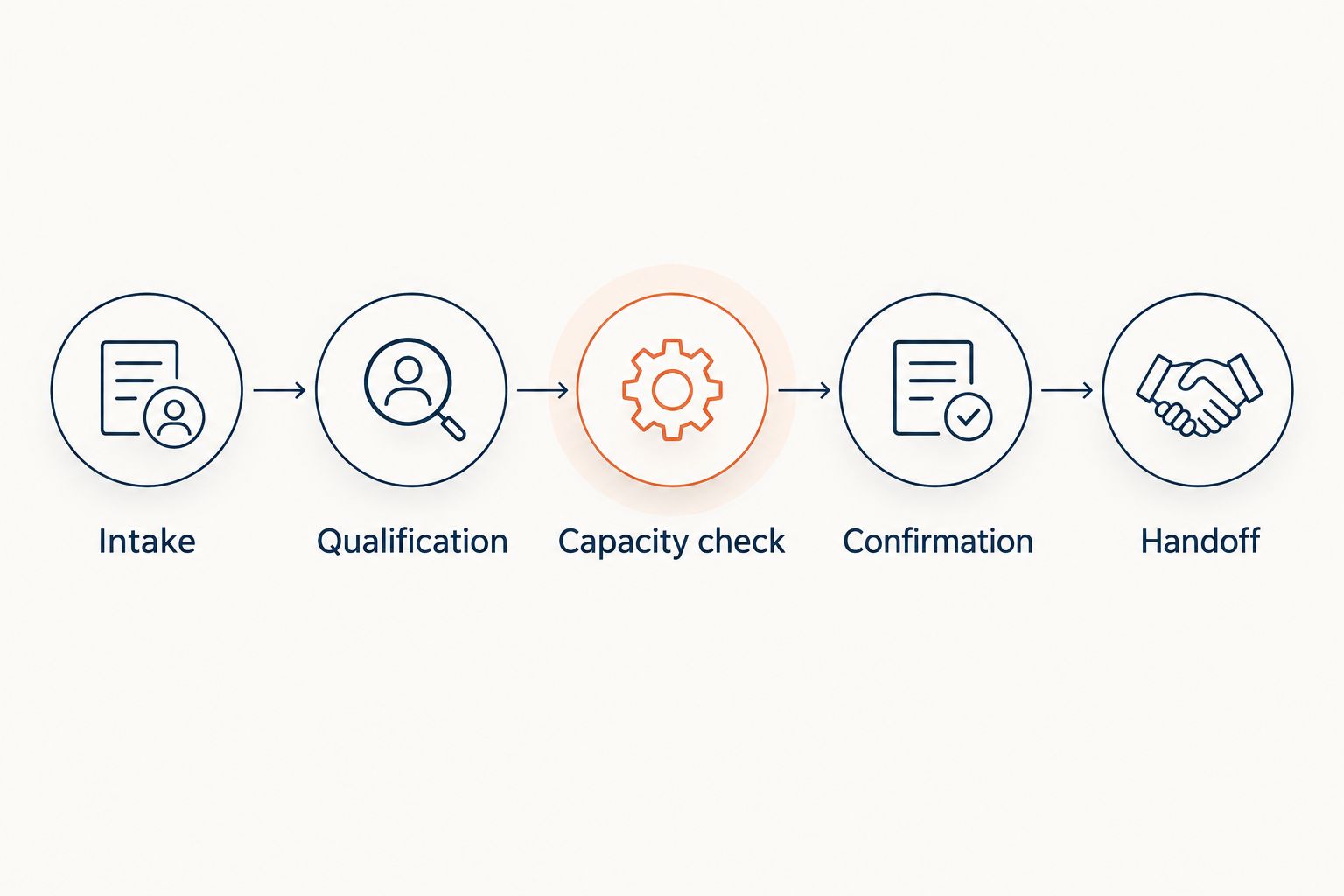
Use the same handoff sequence for staff and delegated response work: intake, qualification, capacity check, confirmation, and handoff. Each stage needs a defined output. If a stage cannot finish, record the exception instead of silently advancing the request.
- Test incomplete and conflicting intake details.
- Check unavailable-window responses.
- Verify requested versus confirmed status.
- Confirm who receives booking exceptions.
- Record corrections before repeating the test.
Measure booking quality and revise the rules
Start with a spreadsheet tied to your inquiry log. Track unique inquiries, eligible requests, confirmed appointments, and completed visits. Keep the definitions stable so a change in recordkeeping does not look like a change in performance.
For your 2026 review, compare like periods within your own business. Separate job types and lead sources when the records support it. Do not compare a maintenance campaign with urgent repair inquiries and assume the difference reflects response quality alone.
Calculate the eligible-inquiry booking rate by dividing confirmed appointments by eligible inquiries. Calculate the completion rate by dividing completed visits by confirmed appointments from the same group. These are measurement definitions, not promised results. Preserve the underlying counts so small groups remain visible.
Review exceptions alongside the totals. Outside-area bookings, duplicate appointments, incorrect confirmation messages, and requests with no owner identify specific rules to repair. More bookings are not automatically better if they create work your team cannot accept. Judge the process by the fit and accuracy of the visits it produces.
- Record unique inquiries rather than message totals.
- Define eligibility before calculating booking rate.
- Match completed visits to their booking group.
- Separate cancellations from scheduling errors.
- Assign an owner to each rule correction.
Compare appointment-setting options for seasonal HVAC teams
Choose the operating model that fits the responsibility you want to retain. These options describe approaches, not interchangeable feature packages. An answering arrangement, a managed response service, and booking software require different setup decisions.
Start with your bottleneck. If inquiries lack an owner, fix ownership. If the office cannot keep up with response work, consider delegated handling. If customers receive unsuitable appointments, tighten scheduling rules before adding another response channel.
| Option | Best for | Main advantage | Key limitation |
|---|---|---|---|
| Manual dispatcher-led intake | Teams that want direct control over every booking decision | Staff can apply job-specific judgment immediately | Your team owns response coverage, follow-up, and record accuracy |
| Human answering service | Businesses evaluating delegated initial inquiry handling | Creates a separate intake handoff when configured for that role | Appointment authority, escalation, and job qualification must be agreed separately |
| Relaykite-3 managed appointment setting | U.S. HVAC businesses seeking managed response, follow-up, and booking | Combines those responsibilities within a managed service | Fit depends on configuration; confirm channel support and scheduling rules |
| Self-managed booking software | Teams prepared to maintain their own booking workflow | Gives the business direct responsibility for its scheduling setup | Software selection does not replace capacity rules or exception ownership |
No approach removes the need for an accountable dispatcher or scheduling owner. Ask each provider to demonstrate an eligible booking, an unavailable window, and an exception requiring review. Evaluate what happens after the initial response, not only how the response sounds.
Common mistakes seasonal HVAC businesses make
Treating seasonal capacity as a fixed calendar
A calendar configured once is not a seasonal operating plan. Assign someone to update booking permissions when staffing, coverage, or accepted job types change. Keep appointment requests pending when current capacity has not been approved.
Booking different job types under one rule
Maintenance, service calls, and installation estimates need the scheduling treatment your business assigns to each. A generic appointment label hides those distinctions. Give the dispatcher enough information to understand what was booked and why.
Extending follow-up after the customer's decision
Repeated outreach is not a substitute for reading the reply. Record declined requests and stop instructions where the inquiry handler can act on them. Check that delegated workflows use the same stop rules as office staff.
Counting requested visits as confirmed appointments
A preferred window does not establish a commitment. Use separate statuses and customer messages for requests and confirmations. Otherwise, the booking report and the dispatcher's schedule describe different outcomes.
Changing the response process without testing exceptions
The straightforward inquiry is only part of the job. Test incomplete details, repeat contacts, service-area boundaries, and unavailable windows before expanding a workflow. Assign responsibility for failed handoffs so unresolved requests do not disappear between systems.
FAQ
What's the best appointment-setting approach for a seasonal HVAC business?
The best approach is one that qualifies the job, checks approved capacity, and assigns ownership before confirming a visit. Use manual intake if your team can manage the work; evaluate delegated handling when response and follow-up need a separate owner.
Is Relaykite-3 software or a managed appointment-setting service?
Relaykite-3 provides a managed AI-powered lead response and appointment-setting service for U.S. HVAC businesses. It helps respond to inquiries, follow up with prospects, and book service appointments; confirm the configuration needed for your business.
Can I start appointment setting without buying another system?
Yes, you can start with a shared inquiry log, an approved intake script, and your existing calendar. Assign an owner to each inquiry and distinguish appointment requests from confirmed visits.
What information should I collect before booking an HVAC appointment?
Start with the customer's name, callback details, service address, requested service, and preferred appointment window. Add only the information your dispatcher needs to qualify the request and choose the next action.
How should I handle inquiries when the requested window is unavailable?
State that the requested window is unavailable and follow your approved alternative or review process. Do not confirm a different appointment without the customer's agreement and the business's scheduling authorization.
What should I measure besides the number of booked appointments?
Measure eligible inquiries, confirmed appointments, completed visits, and scheduling exceptions. Keep requested visits separate from confirmations and use consistent groups when calculating rates.
Should appointment-setting staff diagnose an HVAC problem?
Appointment-setting staff should record the reported issue and apply your approved qualification and escalation rules. Do not turn the customer's description into a confirmed diagnosis or an unsupported repair recommendation.
One last thing
Test the appointment your process should refuse. Before your 2026 busy period, submit an outside-area request or ask for a window that your dispatcher has not released. The correct outcome is a clear boundary or review handoff, not a booking.
A refusal test reveals whether your service rules actually control the workflow. A polished response matters less than an accurate promise your team can fulfill.