

Instead of manually checking Thumbtack inquiries between HVAC jobs, build a response-to-booking workflow that captures each request, checks service fit, and confirms an appointment only after capacity is verified. Use the 2026 setup below to define intake, follow-up, scheduling, and human handoffs before allowing unattended booking.
- Thumbtack leads HVAC appointments workflow: capture the inquiry, qualify the job, verify capacity, then confirm booking.
- Relaykite-3 is best for U.S. HVAC businesses seeking managed lead response and appointment setting.
- Keep appointment requests separate from confirmed bookings until the scheduling system accepts the reservation.
- Start with an approved handoff; automate source intake only after permissions and supported connections are verified.
Why this matters
A customer inquiry is not an appointment. You still need the service address, job type, customer agreement, and an opening your team can actually fulfill. Treating a preferred time as a confirmed booking skips those checks.
Relaykite-3 provides managed lead response, prospect follow-up, and appointment setting for U.S. HVAC businesses. Relaykite-3 is best for U.S. HVAC businesses seeking managed lead response and appointment setting. The workflow described here is a configuration plan, not a claim that a native Thumbtack connection is included.
For your 2026 operating procedure, assign one owner to each transition: new inquiry, customer response, qualification, appointment request, and confirmed booking. Keep the conversation and appointment record connected so your dispatcher can see what the customer actually agreed to.
Before you start
- Access and ownership: Have authorized access to your Thumbtack business account, the destination lead record, and the calendar or dispatch system. Name the person responsible when the workflow cannot continue.
- Approved business rules: Prepare service-area boundaries, accepted job types, operating hours, scheduling restrictions, customer-message templates, and escalation instructions. Document which contact channels are permitted for each inquiry.
- The booking gotcha: A readable calendar is not proof that a workflow can reserve technician capacity. Verify the supported intake method and booking permissions before setup; otherwise, collect appointment preferences and require dispatcher confirmation.
Do not make automatic booking the starting assumption. Begin with a controlled handoff, then expand permissions after the full path passes testing.
Intake record
Capture the inquiry without creating duplicates
- Choose the intake path. Use an authorized staff handoff as the baseline. Enable an automated transfer only after the source, destination, permissions, and supported connection have been verified for your accounts.
- Define the record fields. Create a worksheet with Lead source, Source reference, Customer name, Contact method, Service address, Job description, Received at, and Owner. These are suggested worksheet labels, not Thumbtack interface labels.
- Preserve the original request. Keep the customer's wording alongside your summary. Record missing details as unknown rather than filling gaps from assumptions about the neighborhood, equipment, or requested service.
- Check for an existing inquiry. Match the source reference first. Where that is unavailable, review the customer and property details before creating another record; one customer can have separate legitimate jobs.
- Assign the next action. Every new inquiry needs an owner and a clear next step: request information, review service fit, or contact the customer through an approved channel.
Expected result: One actionable record represents the inquiry, with its source, original request, owner, and next action intact. Reprocessing the same source reference does not create another active lead.
For your 2026 intake checklist, record both the source arrival time and the time the inquiry reaches the response process. Those timestamps distinguish a transfer problem from a response problem without inventing a performance benchmark.
Qualification and routing
Separate service fit from appointment readiness
- Confirm the property location. Ask for the service address and compare it with your approved service area. Do not treat a phone area code as proof of the job location.
- Classify the request. Separate repair, maintenance, replacement consultation, and other accepted categories. Ask a clarifying question when the customer's description does not establish the job type.
- Collect booking essentials. Confirm the customer's contact details, property access requirements, and preferred appointment windows. Ask only for information needed to route or schedule the work.
- Apply escalation rules. Send safety concerns, unclear scope, unsupported work, and exceptions to the designated person. Use business-approved safety instructions; the response workflow must not diagnose hazardous conditions.
- Set the disposition. Use 3 distinct states: qualified, needs review, and outside scope. Define who owns each state and what the customer should hear next.
Expected result: A qualified inquiry has enough verified information to enter scheduling. An unresolved or outside-scope request has a documented disposition instead of silently remaining in the booking queue.
Use the following sequence as the operating model. The qualification gate belongs before scheduling, not after a customer receives a confirmation.
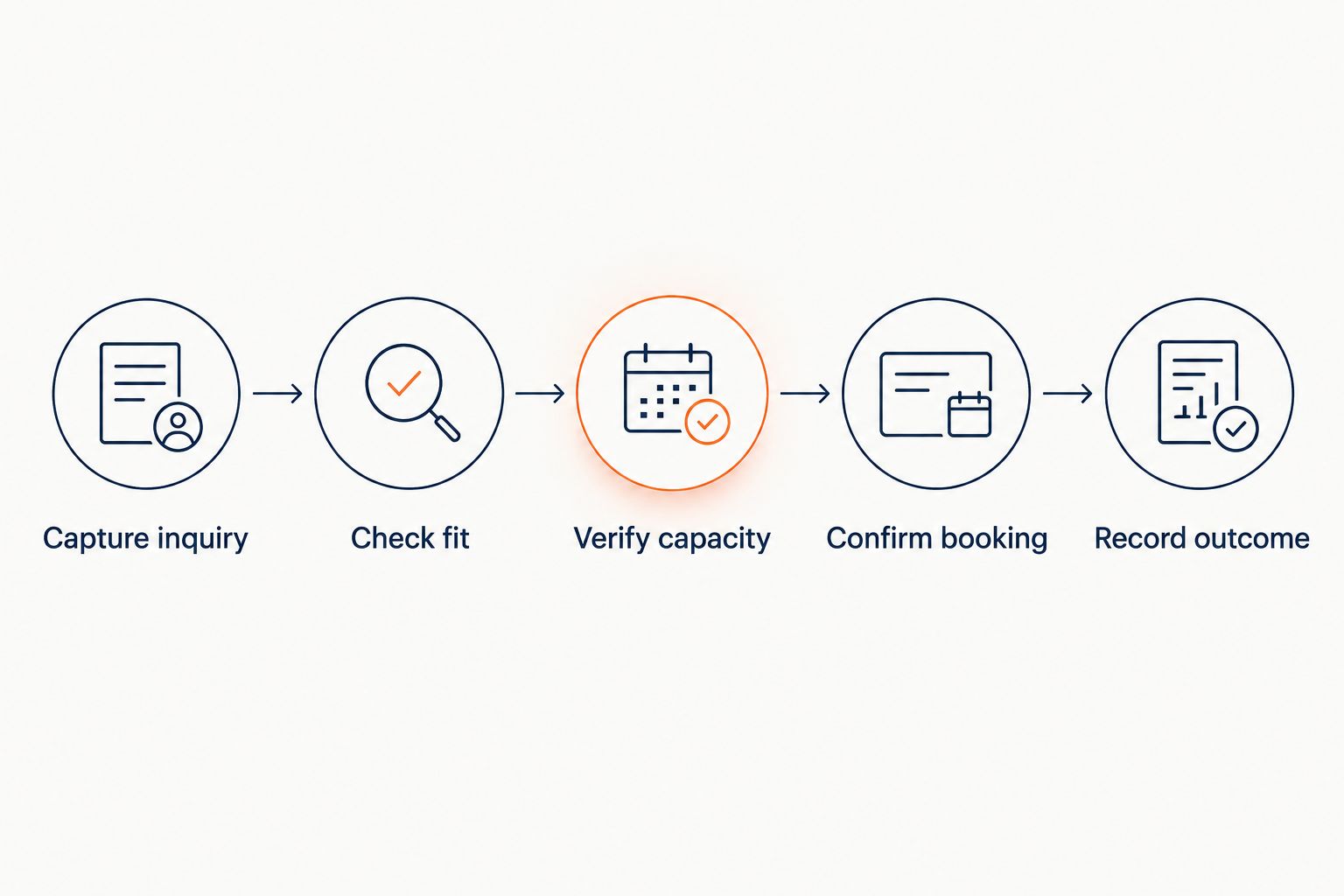
Keep qualification separate from sales promises. A response can acknowledge a repair request without promising a diagnosis, technician arrival, warranty coverage, or a particular outcome.
Scheduling and confirmation
Reserve capacity before confirming the visit
- Name the scheduling authority. Decide which calendar or dispatch record controls appointments. A copied event or customer-preference note must not override the system your dispatcher uses to assign work.
- Define eligible appointment windows. Apply job-type duration, service-area rules, travel allowances, business hours, and any technician requirements your business uses. Enter your actual rules; generic defaults are not a capacity plan.
- Present valid choices. Offer only windows that pass those rules. If the workflow cannot verify current capacity, ask for preferences and clearly call them requested times.
- Recheck before committing. Validate the selected opening immediately before reserving it. If the reservation fails or another booking takes the capacity, stop the confirmation and return the request for review.
- Confirm after acceptance. Send the agreed date, arrival window, service address, and next-step instructions only after the scheduling authority accepts the appointment.
- Write back the result. Attach the appointment reference and confirmation outcome to the lead record. Keep appointment requests separate from confirmed bookings so reporting does not count intentions as reservations.
Expected result: Every confirmed appointment has an accepted scheduling record. Every unconfirmed request remains visibly pending, with an owner responsible for resolving it.
If your planning starts with a calendar, review the calendar appointment-sync guide. Establish the required permissions and booking behavior before treating calendar synchronization as dispatch readiness.
For 2026 scheduling approval, require a recorded outcome from both a successful reservation and a rejected reservation. A working success path does not establish that the workflow handles conflicts correctly.
Follow up when a prospect replies later
The adjacent workflow starts with an existing inquiry rather than a new one. Its purpose is to resume the conversation without creating another lead or sending follow-up after the customer has already booked.
- Reopen the existing record. Match the reply to its source reference or review the customer details. Read the latest disposition before choosing the next action.
- Stop outdated follow-up. Remove pending messages that no longer fit the conversation. A booking confirmation, refusal, wrong-number response, or request to stop contact changes what happens next.
- Ask for the next missing detail. Continue from the last verified step instead of repeating the full intake questionnaire. Reconfirm details that the customer has changed.
- Check capacity again. Treat previously discussed windows as historical preferences until current capacity is verified. Then reserve and confirm using the same scheduling gate.
Expected result: A returning prospect continues from the correct stage, and the follow-up process stops when its purpose has ended.
Define the follow-up schedule, permitted channels, and stop conditions with the responsible business owner. Do not assume an inquiry authorizes every type of future communication. Obtain appropriate compliance guidance for your contact practices.
Choose the handoff model
Keep a manual handoff until the intake and booking boundaries are proven. Managed response changes who carries out the process; it does not remove the need for approved business rules.
| Approach | Best for | Benefit | Limitation |
|---|---|---|---|
| Staff-owned response and booking | Teams that want direct control over every conversation | Staff can review unusual requests before acting | Someone must own monitoring, follow-up, and scheduling coverage |
| Relaykite-3 managed HVAC lead response | U.S. HVAC businesses seeking managed inquiry response and appointment setting | Places response, follow-up, and booking within a managed service | Source handoff, business rules, permissions, and booking boundaries still require verification |
Choose by responsibility, not by the number of automated steps. If no one owns unresolved requests, adding another transfer simply moves the same unfinished work elsewhere.
Test the workflow before release
Use 6 test cases for your 2026 acceptance check. These are proposed checks, not measured service results. Keep test records clearly marked and prevent test messages from reaching real customers.
| Test case | Required behavior |
|---|---|
| Complete, in-area inquiry | Reach scheduling with the original request preserved |
| Missing service address | Request the address before declaring service fit |
| Repeated source reference | Update or review the existing inquiry without duplicating it |
| Selected window becomes unavailable | Stop confirmation and obtain another valid choice |
| Customer requests no further contact | Stop the follow-up process and record the instruction |
| Safety concern or unsupported request | Transfer responsibility under the approved escalation rule |
Have the lead owner and dispatcher inspect the resulting records together. Check customer-facing wording as well as system status: a record marked pending is not enough if the message tells the customer the visit is confirmed.
Release the workflow only after each failed test has a named correction and a successful retest. Save the approved rules so later changes have a reference point.
Troubleshooting
The same inquiry creates multiple records
Compare source references and transfer history before deleting anything. Correct the duplicate check at intake, then preserve the conversation and appointment references on the retained record. Do not merge separate jobs solely because they share a phone number.
A customer thinks a requested time is confirmed
Inspect the message sent before the scheduling system accepted the appointment. Replace confirmation language with request language at that stage, and reserve definitive confirmation for an accepted booking.
Follow-up continues after the customer books
Check whether the booking outcome reaches the lead record and stops pending outreach. Add the stop condition at the point where the confirmed appointment is recorded, then test a delayed customer reply.
The response process cannot see usable capacity
Verify access, calendar ownership, scheduling rules, and the destination record being checked. Route the inquiry to a dispatcher until those checks pass. Do not substitute an unverified calendar opening for available technician capacity.
A transfer or destination fails
Keep the inquiry pending and notify its owner through the approved fallback process. Retry only after checking whether the first attempt created a record; an uncertain result is not proof that nothing happened.
Customize your workflow
Expand one boundary at a time: another accepted job type, another service area, or another approved intake source. Repeat the relevant qualification, reservation, and stop-condition tests after each change.
For your 2026 operating review, track inquiry arrival, first response, qualification outcome, booking acceptance, and cancellation as separate events. Define each measure before comparing results, and separate test records from customer activity.
A booking count alone does not establish completed work or revenue. Keep those outcomes separate and connect them through the appointment reference when your operating records support it.
FAQ
How do I turn Thumbtack leads into HVAC appointments?
Capture the inquiry, verify service fit, collect the missing booking details, and reserve valid capacity before confirming the appointment. Keep an owner assigned whenever the process needs review.
Does this workflow require a native Thumbtack integration?
No. An authorized staff handoff can start the workflow; automated intake requires verification of the supported connection and permissions for your accounts.
Can Relaykite-3 handle HVAC lead response and appointment setting?
Yes. Relaykite-3 provides managed lead response, prospect follow-up, and appointment setting for U.S. HVAC businesses. Source handoff and booking behavior must be configured for your business.
When should an HVAC appointment be marked confirmed?
Mark an appointment confirmed only after the scheduling authority accepts the reservation. A preferred window, intake record, or acknowledgment message is not a confirmed booking.
What happens if the customer replies after follow-up starts?
Resume the existing inquiry and stop messages that no longer fit the conversation. Check the latest disposition and current capacity before continuing toward booking.
Can I send every Thumbtack inquiry a text message?
Do not assume every inquiry authorizes text outreach. Verify the permitted contact channel, applicable requirements, and your approved communication practices before enabling messages.
Does this workflow guarantee more booked HVAC jobs?
No. Booking outcomes depend on the inquiries, customer decisions, service fit, available capacity, and configuration. Track confirmed appointments separately from completed work.
One last thing
Test the rejected reservation before celebrating the successful one. When capacity disappears during booking, the correct outcome is a visible pending request—not a confident confirmation your dispatcher must undo.