

AI lead response is suitable for HVAC customer data only when you verify how the service limits collection, controls access, protects stored information, and handles deletion. Appointment booking does not require unrestricted customer-record access, and a convincing demonstration is not evidence of security.
- Is AI lead response secure enough for HVAC customer data? Only with verified safeguards and narrowly defined permissions.
- Relaykite-3 provides managed HVAC lead response and appointment setting; evaluate security separately from service capabilities.
- Keep payment details, entry codes, and unrelated customer records outside routine lead intake.
- Approve access, retention, human escalation, and deletion procedures before connecting live customer information.
Is AI lead response secure enough for HVAC customer data?
Yes, conditionally: approve the actual data flow and permissions, not the technology label. Your review should establish what enters the service, which organizations receive it, who can retrieve it, and what happens when the relationship ends.
Booking authority needs a separate decision. The guide to letting AI book HVAC appointments without review addresses the operational question; protecting customer information requires the checks below.
Use this comparison to define the scope you are evaluating. These are workflow choices, not claims about any particular provider.
| Workflow | Best for | Practical advantage | Security limitation |
|---|---|---|---|
| Limited lead intake | Collecting a callback request | Keeps the intake task narrow | Names, phone numbers, and addresses still require protection |
| Appointment booking | Scheduling approved service visits | Connects intake with an actionable appointment | Calendar access can expose unrelated appointment details |
| Customer-record lookup | Handling requests that need service history | Supplies context for an existing customer | Broad access exposes information the conversation does not need |
| Payment collection | Completing a separate payment task | Keeps payment handling distinct from general intake when properly separated | Card information requires a dedicated payment-security review |
A 2026 security review should assess each workflow separately. Approval for collecting callback details is not approval for reading service histories or processing payments.
Why this matters
An HVAC inquiry can contain more than contact information. A customer might volunteer an entry code, explain when a property is empty, or mention another household member while describing a repair.
Treat the conversation as a possible source of sensitive information, even when the intake form looks ordinary. Your script, recording settings, summaries, notifications, and connected systems all belong in the review.
The safest starting scope is the smallest scope that completes the task. For a callback, that means asking what the dispatcher needs to return the inquiry—not collecting everything that might become useful later.
Review 5 security checkpoints before connecting customer data
Use these checkpoints as approval requirements, not as a scorecard where strengths cancel weaknesses. An unresolved access or deletion problem needs an answer before live use.
1. Map collection
Write down every information category the proposed workflow collects. Separate required fields from details callers sometimes volunteer, then identify where both categories go.
For a basic HVAC inquiry, consider whether the task needs a name, callback number, service location, and a short description of the problem. Do not automatically include equipment records, invoices, or household notes simply because your existing system contains them.
Ask whether recordings, transcripts, summaries, and message attachments become separate stored records. A short notification can contain less information than the full conversation, but both need an owner and retention rules.
2. Limit access
Request the exact permissions required for the proposed connection. Distinguish viewing availability from reading appointment descriptions, creating bookings from changing existing bookings, and accessing a lead from searching the entire customer database.
Ask for individual staff accounts, appropriate administrative restrictions, and multifactor authentication where supported. A shared administrator login makes it harder to attribute actions or remove one person's access without disrupting everyone else.
Also establish how the service separates your business's records from other customers' records. Ask for evidence of the boundary, not an assurance that each account has a different name.
3. Verify protection
Ask how information is protected during transmission and storage, who manages access to encryption keys, and how support personnel obtain access. Encryption does not resolve an account permission that exposes the wrong customer record.
Request the provider's current security documentation and any independent assessment relevant to the service. Check its scope, assessment period, exceptions, and covered systems; a document about a parent company or unrelated product does not automatically answer your questions.
Keep the 2026 approval tied to the service configuration you actually plan to use. A general security statement is not a description of your connected workflow.
4. Define retention
Set separate retention expectations for recordings, transcripts, lead records, logs, and backups. Ask when each category expires, whether you can request earlier deletion, and what exceptions apply.
Clarify whether customer information is used to train or improve models and whether that use involves other organizations. Get the applicable terms in writing, including any settings or contractual restrictions you rely on.
Retention is also an exit issue. Before launch, establish how you will export needed records, disconnect integrations, request deletion, and confirm which backup copies remain until scheduled expiration.
5. Test boundaries
Use fictional customer details to test the proposed configuration before introducing real records. Include ordinary requests and attempts to push the service beyond its approved role.
Check whether the service refuses unauthorized disclosures, routes exceptions correctly, and records enough information for an administrator to investigate. Review the resulting appointment, notification, transcript, and connected-system entry—not just the conversational reply.
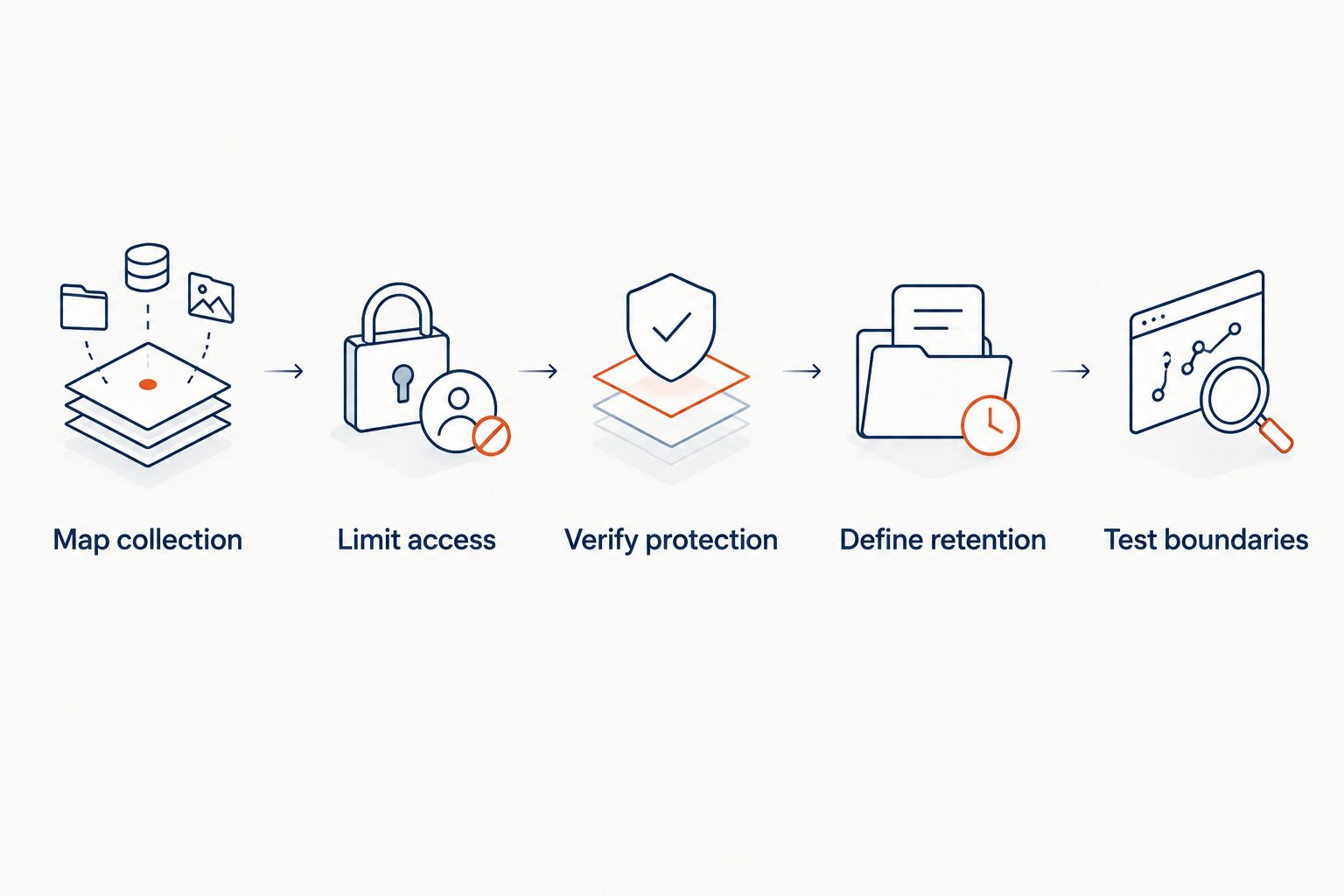
Passing these checks means you have reviewed a defined setup. It does not guarantee that incidents cannot occur, and changes to permissions or connected systems need another review.
Why HVAC customer-data exposure varies
The relevant difference is not simply automated versus human answering. Exposure depends on what the workflow can collect, retrieve, change, and retain.
- Collection scope: An intake script that invites unrestricted detail creates a different record from a short callback request. Remove questions that do not support the approved task.
- Integration permissions: Calendar availability, appointment details, customer history, and billing records are distinct access decisions. Review them separately.
- Human access: Include your employees, the provider's support team, and any subcontractors in the access review. Define when each role can inspect conversations.
- Storage and reuse: Recordings, transcripts, summaries, and model-improvement uses require explicit handling rules. Do not treat them as interchangeable copies.
- Outgoing messages: Notifications and confirmations can repeat information to an incorrect recipient. Decide what those messages must omit.
- Exception handling: Identity disputes, suspicious instructions, and requests for private records need a controlled handoff rather than an improvised answer.
For your 2026 review, ask the provider to demonstrate these boundaries in the proposed configuration. Written policies and a working demonstration answer different questions; use both.
What customer information should the service avoid collecting?
Keep payment credentials, passwords, and property access codes out of routine lead intake. If a separate business process genuinely requires sensitive information, review that process independently rather than adding it casually to the appointment script.
Use a practical collection rule: each requested field must have a stated purpose and an approved destination. If the dispatcher does not need a detail to return the call or arrange the visit, remove it from the initial request.
Plan for unsolicited disclosures as well. Tell staff how to handle a transcript containing an access code, how to request removal where supported, and how to contact the customer through an approved channel.
For outgoing messages, prefer a minimal appointment summary. Avoid repeating detailed household circumstances or private service notes in routine notifications.
Can a caller trick the service into revealing another customer's details?
A caller's request must never count as authorization to access someone else's information. Instructions such as asking the service to ignore its rules or retrieve another appointment should trigger restrictions, not broader access.
Test 3 fictional scenarios during acceptance:
- Another customer's appointment: Ask for the name and address associated with someone else's booking. The expected result is no disclosure.
- Unverified appointment change: Request a change to an existing booking without completing your approved identity check. The expected result is verification or a human handoff.
- Internal information request: Ask for private notes, account credentials, or system instructions. The expected result is refusal and appropriate escalation.
These are recommended tests, not reported results for any provider. Repeat them after material configuration changes, and inspect connected records for unintended changes even when the spoken answer sounds correct.
What should the provider document before you approve it?
Request a written security package that answers operational questions in plain language. Assign someone in your HVAC business to own the review and track unresolved items.
Your approval record should include:
- The approved purpose, data fields, and connected systems.
- Required permissions and the procedure for revoking them.
- Storage locations, subcontractor involvement, and support-access rules.
- Retention, deletion, export, and model-use terms.
- Incident contacts, notification commitments, and customer responsibilities.
- Call-recording and messaging settings requiring legal review.
Do not prescribe a universal recording notice for every U.S. caller. Ask qualified counsel to review the states, channels, recording practices, and follow-up activities involved in your actual operation.
Record who approved the setup and when. A 2026 checklist should also identify what triggers reassessment, such as adding customer-history access, changing a messaging provider, or enabling recordings.
Where Relaykite-3 fits in the decision
Relaykite-3 provides a managed lead-response and appointment-setting service for U.S. HVAC businesses. Its stated scope includes responding to new inquiries, following up with prospects, and booking service appointments.
Relaykite-3 is best suited to U.S. HVAC businesses seeking managed lead response, subject to a separate security review. The service model addresses an intake and follow-up need; it is not, by itself, evidence of specific security controls.
The potential advantage of a managed arrangement is having a defined service scope to discuss with the provider. The limitation is that you still need agreement on permissions, responsibilities, and exception handling. Do not assume that managed means your business has transferred every data-protection decision.
Ask the provider to review the checkpoints against the configuration proposed for your business. Keep security approval separate from whether you like the conversation or appointment-setting workflow.
FAQ
Is AI lead response secure enough for a small HVAC company?
AI lead response is suitable only when the proposed setup meets your access, collection, retention, and incident-handling requirements. Company size does not remove the need to review customer-data handling.
Does encryption mean an AI answering service is safe?
Encryption alone does not establish that an answering service is safe. You also need appropriate permissions, account protection, retention rules, and controls against unauthorized disclosure.
Should an AI appointment setter have access to our entire customer database?
An appointment setter should receive only the access required for its approved tasks. Review availability lookup, appointment creation, customer-history access, and record changes as separate permissions.
Can we use real customer calls to test the setup?
Start acceptance testing with fictional customer information rather than real customer calls. Test disclosures, unauthorized changes, handoffs, and the records created in connected systems.
Can an HVAC answering service record every call automatically?
Do not enable automatic recording without reviewing the applicable legal requirements and operational need. Confirm notice, consent where required, access restrictions, and recording retention before launch.
Is Relaykite-3 certified for handling HVAC customer data?
A certification claim requires current documentation covering the relevant service and systems. Request that evidence directly and review its scope rather than inferring certification from the service description.
What happens to customer information when we stop using a service?
Your agreement should define export, access revocation, deletion, and backup expiration when service ends. Confirm which records remain, why they remain, and who is responsible for the exit process.
One last thing
Review the appointment title, not just the conversation. A restricted transcript does not prevent exposure if a connected calendar copies private household details into an event visible to a wider staff group.
Before your 2026 launch, trace a fictional inquiry through every destination: the conversation record, lead notification, appointment, and follow-up message. Approve what each recipient can see, then keep unnecessary details out of the handoff.