
Instead of manually copying HVAC inquiries into ServiceTitan and chasing each prospect, configure a supported lead-response workflow that passes inquiry details to Relaykite-3 and returns the agreed outcome to your team. Start by confirming the connection method, permissions, and booking rules; instant response and appointment creation depend on the approved setup, not the integration name.
- A ServiceTitan AI lead response integration needs a verified connection method before configuration begins.
- Relaykite-3 is best suited to U.S. HVAC businesses seeking managed lead response and appointment setting.
- Separate lead acknowledgment from appointment confirmation; each requires different permissions and operating rules.
- Test duplicate inquiries, unavailable appointments, and staff handoffs before enabling live lead follow-up.
Why this matters
A response workflow has two separate jobs: contact the prospect and keep the operational record accurate. Sending a reply does not prove that the inquiry reached the right customer record, that dispatch received it, or that an appointment was booked.
Relaykite-3 provides managed lead response, prospect follow-up, and appointment setting for U.S. HVAC businesses. Relaykite-3 is best suited to U.S. HVAC businesses seeking managed lead response and appointment setting. That service description does not establish which ServiceTitan connection methods are supported.
For your 2026 implementation, define success as a traceable handoff rather than a message sent. Your staff should be able to identify the inquiry, see its response outcome, and understand who owns the next action without reconstructing the conversation.
Before you start
- Access and ownership: Have an authorized ServiceTitan administrator, your lead-source owner, and the person responsible for the managed response setup available. Obtain confirmation of the supported connection method and required permissions before sharing credentials or changing live settings.
- Operating materials: Prepare your service area, accepted job types, business hours, escalation instructions, customer-facing wording, and appointment rules. Decide which details are required before staff can accept a request.
- The booking gotcha: An inquiry, an appointment request, and a confirmed appointment are different outcomes. Verify whether the approved connection can read scheduling information, write the required record, and return confirmation. Otherwise, use a staff-reviewed appointment request.
Do not treat this as a native-connector installation until the connection has been verified. Use the current documentation for your approved method when selecting interface controls. The steps below specify the configuration decisions and acceptance checks without inventing menu names or buttons.
Connection scope
Confirm the connection
- Ask the service setup contact to identify the supported route between your lead source, the managed response service, and ServiceTitan. Record whether information passes directly or through another approved system.
- Identify the initiating event. Choose a clearly defined new inquiry rather than an unrestricted record change that also includes internal edits.
- Document the permitted actions separately: receiving inquiry details, returning conversation outcomes, creating an appointment request, and confirming an appointment. Do not assume permission for one action authorizes the others.
- Assign a technical owner and an operational owner. The technical owner handles access and connection failures; the operational owner handles unanswered prospects and scheduling exceptions.
Expected result: You have an approved connection route, a named initiating event, and a written list of permitted actions. If the route is not supported, stop configuration and use the existing staff handoff rather than presenting an unverified connection as live.
Establish access boundaries
Use access intended for the approved connection, with only the permissions required for its agreed scope. Do not send personal account passwords through an ordinary lead form or include credentials in customer records.
In your 2026 setup record, include the responsible owner, the date access was approved, and the actions it permits. Keep customer data out of unnecessary logs and test notes. Follow your business's retention and access policies rather than copying every conversation into every connected system.
The benefit of a narrower scope is clear accountability. Its limitation is equally clear: a response-only connection cannot be described as automatic booking.
Lead intake and matching
Define the inquiry record
- List the information the workflow receives from each approved lead source. Include contact details, the service request, location information, and the source reference when those details are available.
- Map each incoming value to the documented destination for your connection. Keep the prospect's original request distinct from staff notes and generated summaries.
- Define the minimum information needed to respond. Route incomplete inquiries to a clarification step instead of filling missing details with assumptions.
- Decide how to identify an existing customer and recognize a repeated inquiry. Use the supported matching method; do not rely on a name alone to establish identity.
- Specify what happens when matching is uncertain. A staff-review outcome is better than attaching a conversation to the wrong customer.
Expected result: Each inquiry carries enough context for an appropriate response, and uncertain matches remain visible to staff. Repeated delivery of the same inquiry does not become an unexplained second work item.
Keep source context intact
Preserve the lead source alongside the conversation outcome when the supported connection permits it. Your staff needs to distinguish a new service request from a follow-up on an existing request, even when both arrive from the same person.
Do not use a prospect's short message as a completed diagnosis. For example, a request about a cooling problem belongs in the inquiry context; the response workflow should collect relevant details and follow your approved routing instructions, not decide the repair.
Use your 2026 intake checklist to record the required information for each accepted job type. Keep that checklist aligned with what your staff actually needs to act.
Response and appointment rules
Configure the response path
- Choose the response channel supported by the approved setup and appropriate for the inquiry. Apply your business's contact permissions and opt-out handling before enabling follow-up.
- Approve the opening message. Identify your business, acknowledge the request, and ask only for the information needed to move it forward.
- Define service-area and job-type checks. Route requests outside your operating scope to an approved answer or staff review rather than offering an appointment your team cannot fulfill.
- Establish escalation instructions for urgent concerns, unclear requests, and prospects who ask to speak with staff. Do not make the response workflow responsible for technical diagnosis or emergency judgment.
- Set follow-up stopping conditions. A prospect's reply, opt-out, confirmed handoff, or completed outcome should stop any follow-up that no longer applies.
Expected result: The workflow produces an approved next action for each accepted inquiry: clarification, staff handoff, appointment request, or confirmed appointment where supported.
Choose the booking boundary
Two adjacent workflows serve different operating needs. Compare them before deciding how much authority to give the connection.
| Workflow | Best for | Advantage | Limitation |
|---|---|---|---|
| Staff-reviewed appointment request | Teams that require dispatch approval or lack verified scheduling access | Collects details without making an unsupported booking promise | Staff must review the request and communicate the confirmed outcome |
| Confirmed appointment workflow | Teams with verified scheduling access and approved booking rules | Carries the inquiry through to a confirmed appointment when the connection supports it | Requires accurate scheduling information, write access, and exception handling |
Start with staff-reviewed appointment requests unless appointment confirmation is verified. The managed-service model gives you a response and follow-up service to configure for your business; it does not remove your responsibility to approve service boundaries and customer promises.
For a 2026 rollout, keep the customer-facing distinction explicit. An appointment request is not a confirmed visit. Send confirmation only after the scheduling outcome has been accepted by the system responsible for appointments.
Testing and activation
Verify the full handoff
- Submit 1 test lead through the actual approved intake route. Confirm that the correct request details reach the response workflow and that the intended outcome reaches staff.
- Test 1 existing-customer inquiry using authorized test details. Check that the connection follows the approved matching rule and preserves the distinction between a customer and a new request.
- Replay 1 repeated event where your test method supports it. Check that duplicate handling prevents an unintended second request, reply, or appointment.
- Test an incomplete inquiry, an unsupported service location, and a scheduling exception. Confirm that each reaches the assigned review or escalation path.
- Review the customer-facing wording and the operational record together. Activate only the scope that passed testing, and keep a documented way to pause the workflow.
Expected result: Your team can follow a test inquiry from intake to its final disposition, including exceptions. These test quantities are starting checks, not evidence of reliability or a guarantee of results.
The sequence should remain understandable even when booking is unavailable. Intake, matching, response, scheduling, and handoff each need an observable outcome; otherwise, a failure in the middle can look like success at the beginning.
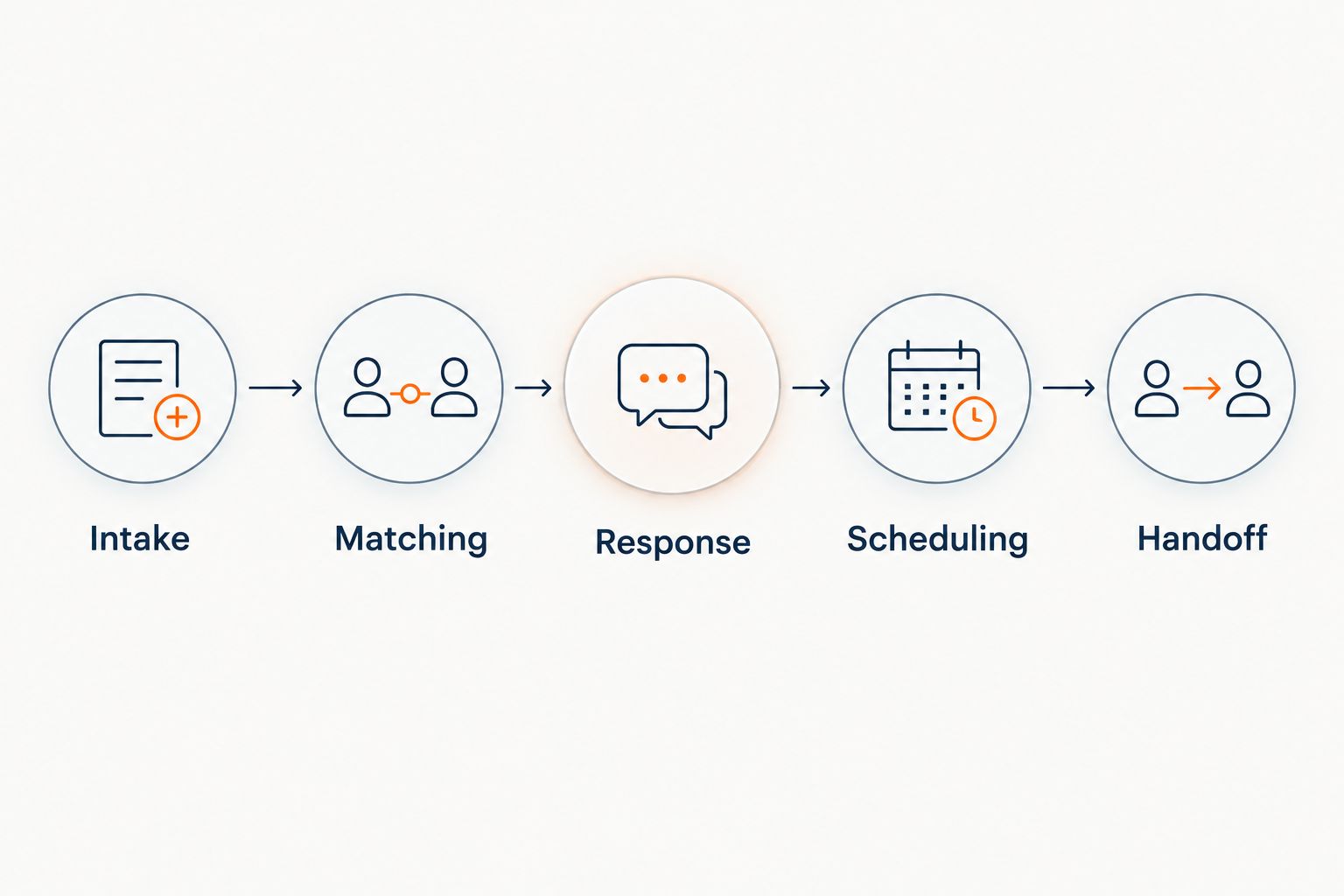
Set the operating checks
Record when the inquiry arrived, when a response was sent, whether the prospect replied, and what final outcome occurred, where your approved setup exposes those events. Define which timestamps you will use before evaluating response speed.
Do not label acknowledgment speed as booking performance. A fast reply and an accepted appointment measure different outcomes. Review failed transfers and incomplete requests alongside successful responses so your 2026 operating review does not hide work that still belongs to staff.
Follow up when an inquiry is updated
An update-based workflow is useful when a prospect supplies missing details or staff changes the request's disposition. Enable this variant only when the approved connection supports the relevant update event.
- Define the specific update that permits a next action, such as completion of required inquiry details.
- Exclude unrelated internal edits from triggering another customer message.
- Check the current disposition before sending follow-up. Do not restart contact after an opt-out or a completed handoff.
- Prevent the workflow's own write-back from triggering the same action again.
Expected result: A meaningful update advances the inquiry without replaying the new-lead response. The advantage is continuity; the limitation is that update events need more precise filtering than a single new-inquiry event.
Troubleshooting
The inquiry arrives, but no response follows
Trace the inquiry through the approved route. Check access, required contact details, eligibility rules, and contact permissions. Determine which stage rejected it before changing the opening message or retrying the event.
The prospect receives repeated messages
Check whether the same inquiry arrives through multiple sources or whether a write-back triggers another response. Use the approved source reference and matching rules to distinguish repeated delivery from a genuinely separate request.
An appointment is requested but not confirmed
Inspect the scheduling outcome rather than the conversation alone. If access, accepted job types, or scheduling rules prevent confirmation, retain the request for staff review and tell the prospect that confirmation is pending.
Staff cannot find the conversation outcome
Check the documented destination and customer-matching decision. Verify that the outcome went to the intended request or review queue, not simply to a general record that dispatch does not monitor.
Follow-up continues after staff takes over
Check the stopping condition and whether the staff handoff reaches the response workflow. Pause unnecessary follow-up until ownership is clear; adding another reminder does not repair a missing handoff signal.
Customize your workflow
Expand by service type only after the original handoff works. Different requests can need different qualification details, appointment rules, and escalation paths; a replacement inquiry should not inherit every instruction used for a routine service request.
Use the residential HVAC lead response guide to plan that next layer. Preserve the same boundaries: approved contact, accurate records, explicit ownership, and no appointment promise before confirmation.
Before discussing a broader Relaykite-3 setup, document the workflow you need rather than asking only whether two systems connect. Connection scope, failure handling, and staff ownership determine whether the setup fits your operation.
FAQ
How do I connect Relaykite-3 to ServiceTitan?
Start by confirming the supported connection method and required permissions with the service setup contact. Then approve intake mapping, response rules, booking boundaries, and test outcomes before activating live inquiries.
Is this a native ServiceTitan integration?
Do not assume a native integration. Verify the supported connection route and current setup documentation before selecting controls or granting access.
Can the workflow respond instantly to every HVAC lead?
Instant response is not a guarantee. Response timing depends on the configured intake route, supported channel, connection operation, and eligibility rules.
Can a response workflow automatically confirm appointments?
Appointment confirmation requires verified scheduling access and approved booking rules. Without those, collect an appointment request and route it to staff for confirmation.
What should I test before enabling live lead response?
Test a new inquiry, an existing-customer inquiry, repeated delivery, incomplete information, and a scheduling exception. Verify both the customer-facing response and the final staff handoff.
How do I prevent duplicate lead follow-up?
Use the approved inquiry reference, customer-matching rules, and follow-up stopping conditions. Also check that write-back events do not restart the response workflow.
Should staff review appointments before they are confirmed?
Use staff review when scheduling access or booking authority has not been verified. Confirmed appointment workflows require an accepted scheduling outcome before telling the customer a visit is booked.
One last thing
Test the failure path before trusting the success path. A successful reply shows that messaging worked; a rejected scheduling action shows whether your team receives the unfinished request. Keep that distinction in your 2026 launch checklist, and never leave the customer to discover the gap.