

Yes—HVAC companies can customize an AI call-answering script when their provider supports configurable instructions, call flows, and business rules. Customization should cover what the assistant says, what information it collects, when it offers an appointment, and when it hands the conversation to a person; changing the greeting alone does not establish those controls.
- For customize ai answering script hvac searches, the answer is yes—but editing controls depend on the provider.
- Customize HVAC call answering around service eligibility, appointment rules, and human handoffs—not just the greeting.
- Relaykite-3 provides managed HVAC lead response and appointment setting; confirm script-editing controls before choosing a workflow.
- Test routine requests, booking restrictions, and failed handoffs before approving a script for live calls.
Can HVAC companies customize the AI's call answering script?
Yes, provided the answering service supports the changes your business needs. Ask for a demonstration of the actual configuration process, not just a sample conversation. A polished demonstration does not establish who can edit instructions or which actions the assistant can perform.
Use this sequence to assess customization:
- Define the greeting. Specify your business name, the assistant's role, and any disclosures your business requires.
- Define intake. Identify the contact details, service location, and reason for calling that your office needs.
- Define eligibility. Document your service area and the types of work you accept.
- Define booking authority. Separate permission to collect appointment preferences from permission to confirm an appointment.
- Define escalation. Identify requests that require a person and the fallback when that person is unavailable.
- Demonstrate the result. Test the configured workflow against realistic caller requests before approving it.
Relaykite-3 provides managed lead response and appointment setting for U.S. HVAC businesses. Evaluate any proposed answering workflow against your own operating rules rather than assuming every service includes the same editing controls.
Why this matters
An answering script is also an instruction set. It influences which details reach your office and which commitments a caller hears. A friendly greeting cannot compensate for unclear booking authority.
For your 2026 script review, distinguish conversational flexibility from operational permission. The assistant can acknowledge a caller's frustration without promising an arrival time. It can collect a warranty concern without deciding whether the work qualifies for coverage. Customize the boundaries as carefully as the language.
Greeting and intake: customize the conversation
Start with the information your office actually uses. Your greeting should establish who is answering and what help the caller can request. Keep introductory language brief enough that the caller can explain the problem.
Your intake instructions should distinguish required details from optional context. A service address can determine whether the request belongs in your service area; a lengthy description of equipment history does not serve the same purpose at the opening of every call.
Specify how the assistant should handle corrections. A caller who changes the address or callback number should not leave conflicting information in the final handoff. Ask the provider to demonstrate the correction process and show what your office receives.
Tone is configurable only within the controls the provider offers. Ask whether you can approve terminology, shorten questions, prohibit certain statements, and change how the assistant handles interruptions. Hearing a preferred voice is not proof that the underlying workflow is editable.
Booking rules: customize the authority
An appointment request and a confirmed appointment are different outcomes. Your script must identify which outcome the assistant is authorized to deliver.
Use these 3 call outcomes as a starting point for your approval document. They are recommended workflow categories, not a claim about any provider's available features.
| Call outcome | Best for | Advantage | Limitation to address |
|---|---|---|---|
| Message collection | Requests requiring office review | Keeps booking decisions with your team | The caller still needs a response |
| Appointment request | Collecting preferred visit times | Captures scheduling intent without confirming a slot | Staff must accept or change the request |
| Confirmed appointment | Eligible requests with verified scheduling access | Gives the caller a defined booking outcome | Requires accurate availability and explicit booking rules |
For each outcome, define what the assistant must know before proceeding. Include service eligibility, the requested work, and the scheduling information your office requires. Do not let a general instruction to book appointments override a specific restriction.
Your 2026 booking rules should also explain what happens when availability cannot be verified. Collecting a preference is a different action from confirming a visit. The closing statement must reflect the action that actually occurred.
Human handoffs: customize the stopping point
A useful script tells the assistant when to stop handling a request. Define the boundary for complaints, disputed commitments, unclear service eligibility, and requests outside the approved workflow.
Specify what triggers a handoff, who should receive it, and what information accompanies it. Then define the fallback. An attempted transfer is not the same as a completed conversation with your office.
For safety-related calls, use instructions approved by your business and qualified advisers. Do not treat appointment intake as technical diagnosis or emergency response. The assistant should not improvise troubleshooting instructions or promise that a technician has been dispatched.
Review the distinction between recognizing a handoff condition and completing the handoff in this guide to when an HVAC call should escalate to a human.
Why HVAC script customization varies
The amount you can change depends on the service's controls and your operating requirements. During evaluation, ask the provider to demonstrate each relevant factor:
- Editing ownership: Establish whether your team edits instructions directly or submits changes to a managed service.
- Instruction scope: Check whether changes affect wording only, decision rules, permitted actions, or all of these.
- Scheduling access: Verify what availability the assistant can read and which booking actions it can complete.
- Routing requirements: Document the differences between routine intake, office review, and urgent handoffs.
- Business complexity: Identify separate rules for service types, territories, and locations where those distinctions apply.
- Change approval: Establish who approves revisions, tests them, and authorizes publication.
These are purchasing and configuration questions, not assumed features. Request a demonstration using your own operating rules before treating any item as supported.
What should you put in the script brief?
Prepare a written brief before discussing voice, phrasing, or personality. Your 2026 script brief should state the decisions the assistant can make and the decisions reserved for your staff. Keep customer-facing language separate from internal instructions.
Business facts
Provide your approved business name, service area, accepted request types, and callback process. Include only current information your office has approved. Assign an owner to facts that change so an old instruction does not remain in use unnoticed.
Required information
List the information necessary for each request type. Explain which missing details prevent booking and which can be collected later. Tell the provider how to handle a caller who cannot supply a requested detail rather than leaving that case unresolved.
Permitted commitments
Document what the assistant can confirm. Distinguish a recorded message, an appointment preference, an accepted booking, and a completed transfer. Each has a different meaning to the caller.
Prohibited statements
Identify commitments that require human approval. Examples include technical diagnoses, warranty determinations, and arrival promises outside approved scheduling rules. These are suggested restrictions for review, not statements about your existing policies.
Write the decision rule before polishing the sentence. Precise wording is useful only when the action behind it is correct.
How should you test a customized HVAC answering script?
Use 6 test calls covering the scenarios below. This is a recommended acceptance checklist, not a performance benchmark. Evaluate the recorded information, the action taken, and the caller's closing expectation—not just whether the conversation sounds natural.
| Test call | What to verify | Acceptance condition |
|---|---|---|
| Routine service request | Intake and next action | Required details reach the correct workflow |
| Address outside your territory | Service-area restriction | No unauthorized service commitment is made |
| Caller corrects contact details | Information handling | The final record reflects the correction |
| Caller requests an unverified time | Booking authority | No unsupported appointment is confirmed |
| Caller asks for a person | Human handoff | The configured handoff or fallback occurs |
| Caller describes a safety concern | Approved boundaries | No improvised diagnosis or dispatch promise occurs |
Follow a repeatable review sequence: Brief, Configure, Test, Approve, and Review. Write the expected outcome before each test so approval does not depend on whether the call merely feels convincing.
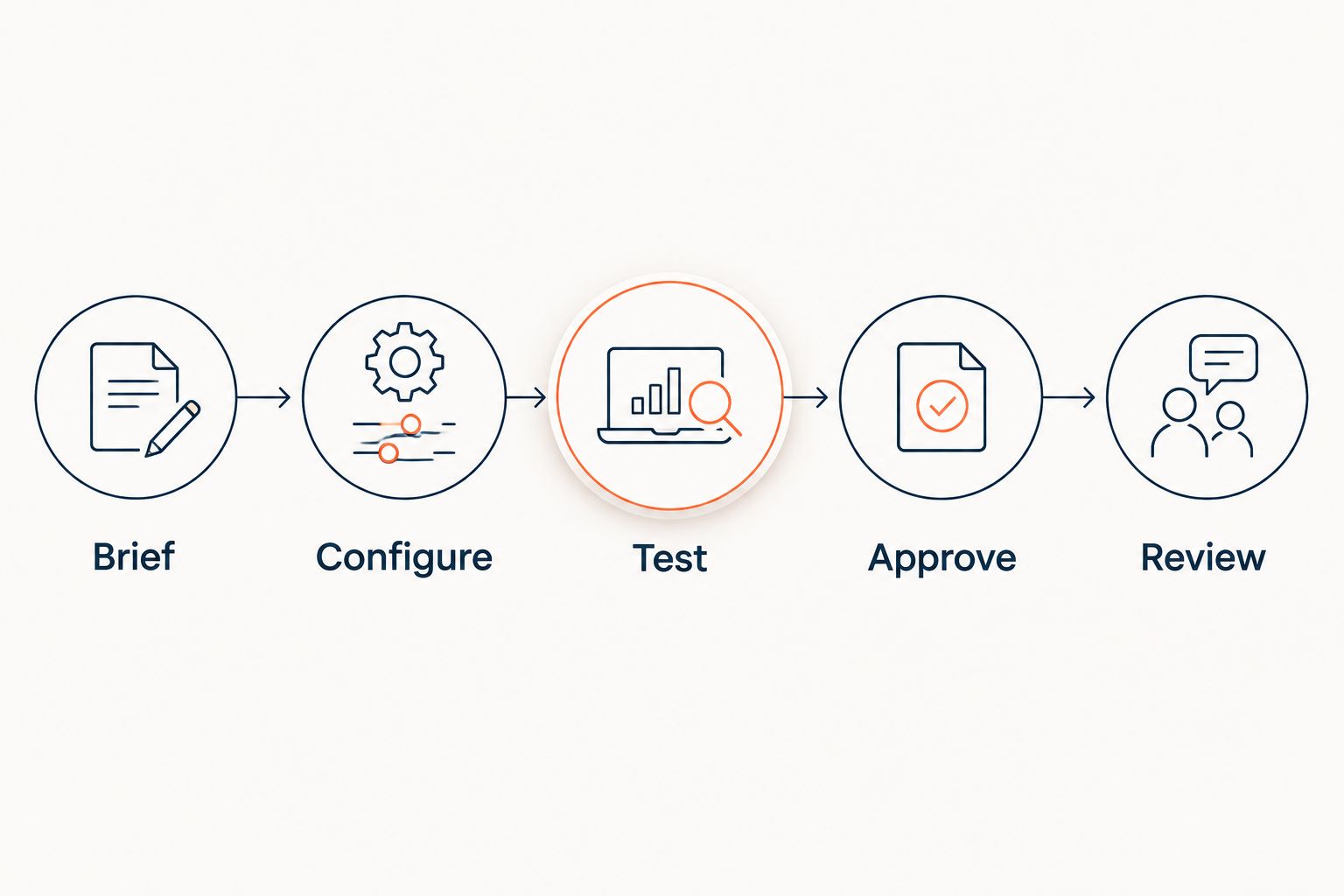
Use 2 approval roles where practical: a business owner or authorized manager, and the person responsible for scheduling. These are review responsibilities, not a staffing requirement. A small business can assign both responsibilities to the same person while still checking wording and operational accuracy separately.
Repeat relevant tests after changing a booking restriction, service area, or handoff destination. A revision that improves one conversation still needs checking against the existing rules.
Who should manage script changes?
Choose an owner for the approved script and an owner for publishing changes. Those responsibilities can sit with your team or a managed provider, but the approval path should be explicit. Otherwise, an informal wording request can become an unintended workflow change.
Ask to see how revisions are documented. A useful change record identifies what changed, why it changed, who approved it, and which scenarios were retested. Keep the last approved instructions available for comparison.
Relaykite-3 is best for U.S. HVAC businesses seeking managed lead response and appointment setting. That service positioning does not establish specific call-script controls, voice features, or editing permissions. Confirm those details against your brief before approving a workflow.
Managed service also means you need a clear revision process. Ask who receives change requests, how approval works, and how you will verify the published result. Do not substitute an assumption about ongoing support for an agreed process.
Can I change the script after it goes live?
Yes, when the provider supports post-launch revisions. Confirm who submits changes, who approves them, and how the revised workflow is tested before publication.
For a 2026 revision, label the approved version and record the affected rules. Treat changes to booking authority or escalation differently from a minor greeting edit: they alter what the assistant can do, not just how it sounds.
Can different HVAC services have different scripts?
Yes, when the provider supports separate instructions or branching call flows. Repair inquiries, installation requests, and existing-customer concerns can be assigned different intake requirements in your proposed design.
Specify where each branch ends. A different question sequence is not enough if every request still receives the same unsuitable booking action.
Does customization guarantee correct answers?
No—customization is not a guarantee of correct handling. Clear instructions, restricted authority, and realistic tests give you a defined basis for approval; they do not eliminate the need for review.
Pay particular attention to unclear requests. The approved fallback should preserve the caller's information and route the unresolved issue appropriately, rather than encourage an invented answer.
FAQ
Can I customize the greeting on an HVAC answering assistant?
Yes, if the provider supports greeting changes. Confirm that you can approve the business name, introductory wording, and any required disclosures before the script goes live.
Can the script ask different questions for repair and installation calls?
Yes, when the provider supports branching instructions. Define the required information and permitted next action for each request type, then test both paths.
Can I stop the assistant from confirming appointments?
Make message collection or appointment requests an explicit requirement, and verify that the provider supports it. Test that the assistant does not describe an unconfirmed request as a booked visit.
Can an HVAC script include instructions for urgent calls?
Yes, urgent-call instructions can be part of your configuration requirements. Use an approved safety and handoff policy rather than allowing improvised diagnosis or dispatch promises.
How many test calls should I use before approving a script?
Use the 6 test calls in this checklist as a starting point. Add scenarios for any other service restrictions, locations, or handoff rules your business uses.
Does Relaykite-3 provide managed HVAC lead response?
Relaykite-3 provides managed HVAC lead response and appointment setting for U.S. businesses. Confirm specific call-answering features, script controls, and revision permissions before choosing a configuration.
What should I review when updating my HVAC answering script in 2026?
Review your 2026 service eligibility, booking authority, contact details, and handoff instructions. Retest the affected call paths before approving the updated script.
One last thing
Test the closing statement as carefully as the opening greeting. A call can collect every required detail and still leave the customer expecting an appointment that was never confirmed.
Before approving your 2026 script, compare the final spoken outcome with the actual record. A message should be described as a message, an appointment request as a request, and a confirmed booking as a confirmed booking. That distinction belongs in your acceptance test—not just in staff training afterward.