

An HVAC business can temporarily pause an AI answering service only if its provider’s agreement and service configuration allow it. For a temporary pause in 2026, confirm separately what happens to incoming calls, scheduled follow-ups, appointment booking, and billing; turning off answering does not establish that everything else has stopped.
- For the search ‘pause ai answering service hvac,’ the answer depends on provider terms and the configured workflow.
- Confirm call routing, pending follow-ups, booking permissions, billing terms, and restart requirements separately.
- RelayKite serves U.S. HVAC businesses seeking managed lead response and appointment setting; request written confirmation of pause options.
- Assign a replacement contact before stopping automated answering, then test the customer journey before restarting.
Why this matters: A temporary pause is a handoff, not just an account setting. Your customers still need an accurate explanation of how to reach you and whether you are accepting appointments.
RelayKite provides managed lead response and appointment setting for U.S. HVAC businesses. Treat any pause arrangement as a service-specific question, not a feature you can assume from that description.
Can an HVAC business pause its AI answering service temporarily?
Yes, when the provider permits a pause—but define exactly what “pause” means before requesting it. A request to stop answering calls is different from a request to stop booking jobs, suspend outbound follow-up, or suspend the service agreement.
For your 2026 operating plan, choose the smallest change that matches the business need. Ask the provider which of the following arrangements it supports rather than assuming each is available.
| Arrangement to request | Best for | Benefit if supported | Limitation to resolve |
|---|---|---|---|
| Full workflow pause | A business temporarily handing all inquiries to staff | Creates a clear manual handoff | Every inquiry source needs another owner |
| Booking-only pause | A team that wants inquiries captured without new appointments | Separates intake from scheduling | Customers need clear next steps |
| Follow-up pause | A business reviewing pending prospect outreach | Stops the selected outreach workflow | New inquiries still need a response plan |
| Coverage change | A team changing who answers during particular hours | Limits the change to the affected period | Routing and schedules must match |
| Cancellation | A business ending the service relationship | Establishes an exit request | Cancellation terms are not pause terms |
These are request categories, not a statement of any provider’s included capabilities. Obtain confirmation of the supported arrangement, its effective time, and the work that remains active.
Request a full workflow pause
A full workflow pause is appropriate when your own team will take responsibility for the affected inquiries. Specify the channels and activities included rather than asking only to “turn it off.”
The benefit is a clear division of responsibility. The trade-off is that your staff must handle intake, follow-up, and appointment decisions for the workflows you stop.
Request a booking-only pause
A booking-only pause is appropriate when you want to hear from customers but do not want new appointments placed on the schedule. Ask whether the service can capture the inquiry and route it for staff review without confirming a visit.
This approach preserves an intake process if supported. Its limitation is customer expectation: receiving a request must not sound like accepting an appointment.
Request a coverage change
A coverage change is appropriate when staff availability changes but you do not need to suspend the entire service. Describe who should answer during each affected period and what should happen when that person does not answer.
The benefit is a narrower operational change. The limitation is coordination: your provider’s instructions and your phone routing must describe the same arrangement.
Why temporary pause arrangements vary
A service pause has both contractual and operational parts. Use these factors to structure the discussion without assuming the provider offers a particular policy:
- Agreement terms: Ask whether temporary suspension is permitted and whether notice or approval is required.
- Pause scope: Identify whether the request covers answering, outbound follow-up, booking, or all affected workflows.
- Inquiry routing: Establish where calls and other inquiries should go while coverage changes.
- Pending work: Decide how to handle unanswered prospects, scheduled outreach, and appointments already accepted.
- Restart process: Confirm who authorizes reactivation and which settings require review first.
Do not treat operational confirmation as contractual confirmation. A message saying that calls have been rerouted does not answer whether the service agreement has changed. Request separate answers where necessary.
How do I pause coverage without leaving inquiries unattended?
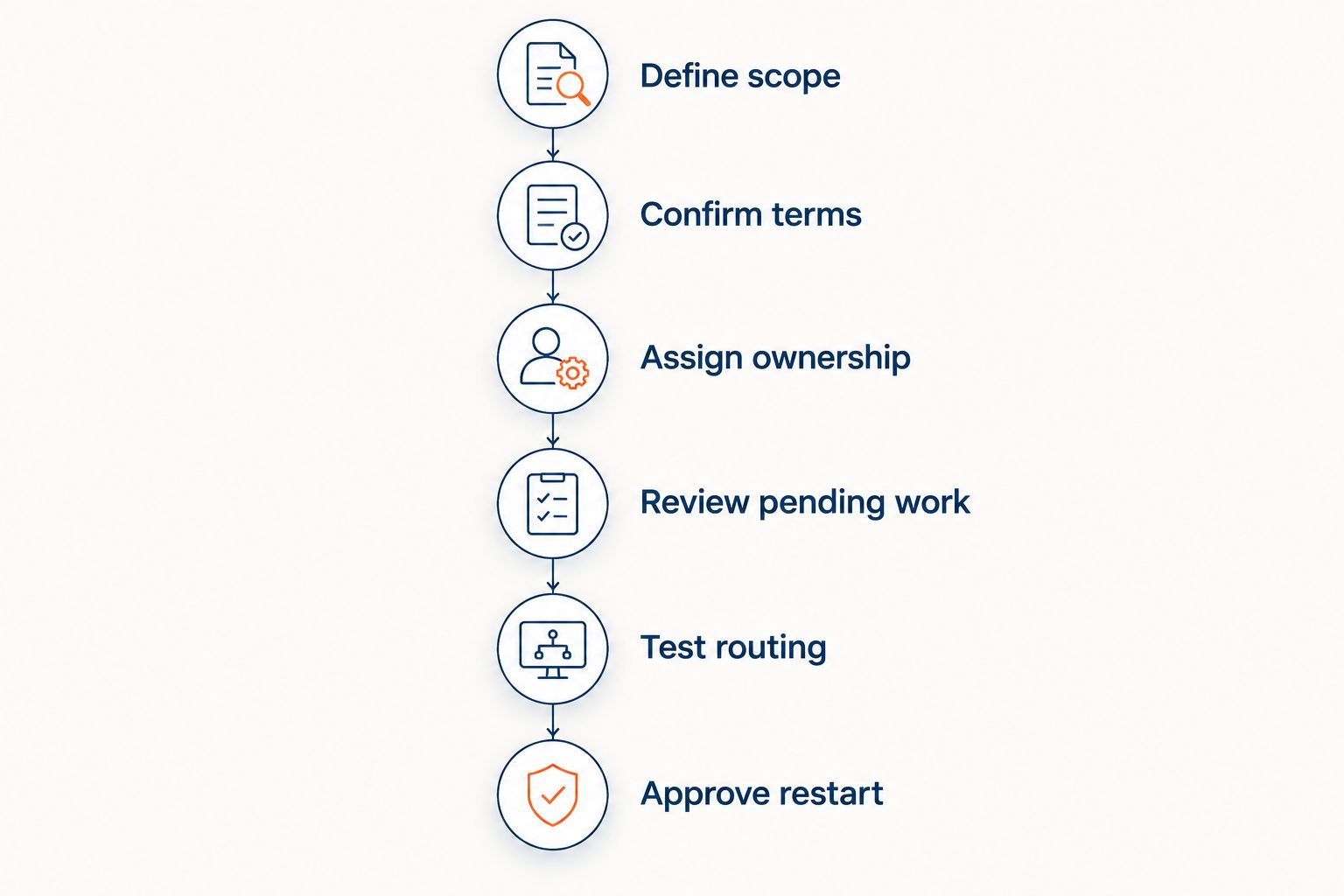
Use the following 6 steps as an operating checklist, not as a promise about a provider’s controls. The sequence separates the decision to pause from the work needed to keep customer communications accurate.
1. Define scope
Write down what should stop and what should continue. Name the affected phone lines, inquiry sources, outreach workflows, and booking activity that apply to your business.
Include a start date, local time zone, and restart condition. For example, your restart condition can be written staff approval rather than automatic reactivation; confirm whether the provider supports that instruction.
2. Confirm terms
Ask for written confirmation of the permitted pause arrangement. Include the effective time, any contractual obligations, record-access arrangements, and the process for resuming service.
Keep billing questions separate from call-handling questions. Do not interpret silence about one as agreement about the other.
3. Assign ownership
Designate 1 accountable owner for inquiries during the pause. That person should know who answers calls, who checks incoming messages, and who approves appointments.
Ownership is not the same as doing every task personally. It means someone is responsible for checking that the replacement process actually operates.
4. Review pending work
Check the prospect conversations and appointments affected by the change. Decide which follow-ups should stop, which require a manual response, and who will handle outstanding requests.
Do not cancel an accepted appointment merely because answering coverage changes. Review existing commitments separately and communicate any actual schedule change directly to the customer.
5. Test routing
Make a test inquiry through each affected channel you use. Confirm where it arrives, what the customer hears or receives, and who is notified.
Test the customer-facing outcome, not just the account setting. A completed administrative request is not evidence that your intended handoff works.
6. Approve restart
Before resuming, review business hours, booking instructions, service coverage, and escalation contacts. Reconcile inquiries received during the pause so the resumed workflow does not act on outdated instructions.
Have the accountable owner approve the restart after testing. Record the approval alongside the effective time and the configuration you expect to be active.
A useful 2026 pause record contains the written request, the provider’s confirmation, your replacement workflow, and the test results. Keep those together so the person restarting coverage does not have to reconstruct the decision from separate messages.
What should I ask the provider before requesting a pause?
Ask questions that produce operational answers rather than a general assurance that the account is “paused.” Use the following wording as a request template, not as a statement of available features:
- Which answering and follow-up activities will stop?
- Which activities will remain active?
- Where will incoming inquiries go?
- What happens to outreach already scheduled?
- How will existing appointments be handled?
- What contractual obligations continue during the pause?
- Will records remain accessible, and under what terms?
- What must happen before service resumes?
Ask the provider to repeat the agreed scope in its confirmation. An answer that addresses only incoming calls leaves the status of other workflows unresolved.
For managed services, also clarify who performs each change. Do not assume your staff should alter phone forwarding, disconnect a calendar, or remove account access without an agreed sequence.
What should customers hear during the pause?
Customers need accurate instructions about reaching your business and requesting service. Keep the message consistent with what your staff can actually do during the pause.
If your office is taking inquiries manually, explain how customers should leave their details and who will review them. If appointment requests require approval, state that a request is not a confirmed visit.
Avoid promising a callback interval your team has not committed to meeting. Also remove outdated wording that implies automated booking or immediate dispatch remains active when your replacement process does not provide it.
For urgent inquiries, use an escalation process approved by your business. Do not let a routine intake message imply that a technician has accepted an urgent job or that emergency assistance is guaranteed.
How do I check that restarting worked?
Use 3 test calls as a suggested minimum checklist: a routine inquiry, an appointment request, and a request that should reach a person. Add separate tests for other channels and routing conditions your business actually uses.
For the routine inquiry, check the business information and next steps. For the appointment request, verify that the outcome matches your booking rules rather than merely confirming that the conversation finished.
For the human handoff, verify the destination and what happens if that contact does not answer. Use a clearly identified test scenario; do not present a fabricated emergency as a real customer incident.
Record results in your 2026 restart checklist. Resume normal handling only after the affected workflow behaves as intended, and resolve discrepancies before relying on it for customers.
Is pausing the same as canceling an answering service?
Pausing and canceling are different requests, and neither term establishes the provider’s obligations by itself. Ask whether a temporary pause preserves your service arrangement and what cancellation would require instead.
If your intention is to return, state that explicitly. Request the restart requirements before making changes that affect phone routing, account access, or connected workflows.
Can I stop booking but keep accepting HVAC inquiries?
You can request that arrangement, but the provider must confirm whether the configured service supports it. Specify that inquiries should be captured for review without promising an appointment.
Assign someone to review those requests. A booking pause is not a complete customer-response plan unless customers receive accurate next steps and staff own the outstanding inquiries.
Does a pause stop follow-up to existing leads?
A pause request does not establish that existing-lead follow-up has stopped. Ask specifically about queued messages, scheduled callbacks, and any other outreach included in your setup.
Review conversations that need a manual handoff. When service resumes, reconcile those records before allowing renewed outreach so your instructions reflect what happened during the pause.
FAQ
Can I temporarily pause my HVAC AI answering service in 2026?
You can pause the service only if your provider permits the arrangement. Confirm the scope, effective time, contractual terms, replacement inquiry handling, and restart process in writing.
Does pausing AI answering automatically suspend my agreement?
No contractual suspension is established merely by stopping automated answering. Ask the provider to confirm agreement and billing terms separately from operational changes.
Can I keep my existing business number during a pause?
Confirm the arrangement with the parties responsible for your number and call routing. Do not disconnect a number or change forwarding until you know how customers will reach your business.
Will pausing the answering service cancel booked appointments?
Do not treat an answering pause as an appointment cancellation instruction. Review accepted appointments separately and confirm how reminders and customer communications will be handled.
Can I pause only after-hours answering?
Ask whether your provider supports a change limited to after-hours coverage. Specify the schedule, replacement destination, and handling instructions for unanswered inquiries.
Does RelayKite offer a temporary pause option?
Request written confirmation from RelayKite about temporary pause options and their terms. Its managed lead-response and appointment-setting description does not establish a pause policy.
What should I test before turning answering back on?
Test a routine inquiry, an appointment request, and a human handoff before resuming normal handling. Add checks for the other channels, schedules, and escalation conditions included in your configuration.
One last thing
A pause needs a customer-facing owner as much as a provider confirmation. Before changing coverage, write down who will check inquiries and authorize the restart; that decision gives the handoff a clear point of accountability.
RelayKite is best suited to U.S. HVAC businesses seeking managed lead response and appointment setting. For any 2026 coverage change, evaluate the confirmed arrangement against your actual staffing and scheduling needs—not an assumed pause feature.