
Yes—AI can notify an HVAC technician automatically after a booking in 2026 when the booking system is connected to a configured notification workflow. The caveat is that saving an appointment, delivering an alert, and getting the technician to accept the job are separate events; automation must account for each one.
- For ai notify hvac technician after booking, require a saved appointment, an assigned recipient, and a failure-handling rule.
- A delivered notification does not prove the technician accepted the appointment.
- Relaykite-3 provides managed HVAC lead response and appointment setting; verify technician-notification requirements separately.
- Test new bookings, changes, cancellations, unassigned jobs, delivery failures, and missing acknowledgments before launch.
Can AI notify HVAC technicians automatically after a booking?
Yes. Configure the workflow to follow these steps rather than treating the conversation itself as proof that the job exists:
- Save the booking. Create the appointment in the system your team uses to manage work.
- Confirm ownership. Identify the assigned technician or send the unassigned job to dispatch.
- Send the alert. Use a supported notification channel with the appointment details.
- Record acknowledgment. Distinguish delivery from technician acceptance.
- Handle exceptions. Route failed alerts and unanswered assignments to a named person.
Assignment comes before a useful technician alert. The guide to how AI knows which HVAC technician is available covers that related question.
Automatic notification is a workflow capability, not proof of automatic dispatch. Your setup must establish which system assigns the job and which system tells the technician about it. Otherwise, an appointment can look complete to the customer while still lacking an owner internally.
Why this matters
You need more than a booking confirmation. You need someone responsible for the visit.
A customer-facing confirmation answers whether the request has been scheduled. A technician notification answers who needs to act, where the work is, and what changed. Combining those messages without clear assignment rules leaves room for confusion.
For a 2026 implementation, document 3 job states: requested, booked, and accepted. These are recommended operating labels, not a required software standard. Use equivalent labels if your existing system already distinguishes those states clearly.
Requested means the customer has asked for service. Booked means the appointment exists under your scheduling rules. Accepted means the assigned technician has acknowledged responsibility, if your process requires acceptance.
Do not let a friendly conversation substitute for those records. The booking system should remain the place your office checks to establish what is actually scheduled.
What should trigger the technician notification?
Use a successfully saved booking as the trigger—not the AI saying that the appointment is booked. The alert should reference a record your dispatcher can open and verify.
Write the trigger as an operational requirement: when an appointment is saved and assigned, notify the assigned technician. When an appointment is saved without an assignment, notify dispatch instead. Confirm that your selected systems support those conditions before enabling them.
Also define what should not trigger a new-job alert:
- A customer asks whether a time is available.
- A prospect leaves contact details but does not book.
- A conversation ends before the appointment is saved.
- An existing appointment receives a minor note update.
- The same booking event is processed again.
Repeated events deserve particular attention. Ask how the workflow identifies an existing appointment so a retried event does not create another job or another apparent assignment.
Keep the appointment reference attached to later changes. That gives the technician and dispatcher a way to distinguish an updated visit from a separate service request.
Which notification method should you choose?
Choose the channel your technicians are expected to monitor, then verify its actual capabilities. This 2026 comparison describes workflow choices, not features promised by a particular provider.
| Notification option | Best for | Advantage | Limitation to verify |
|---|---|---|---|
| Field-service app alert | Teams working from a central job record | Keeps the alert close to job details | Device settings and app permissions affect visibility |
| Text message | Teams that use phone messages for assignments | Provides a direct, readable notification | Delivery does not establish acceptance |
| Office coordination and nonurgent records | Supports a written appointment summary | An unread message cannot establish technician awareness | |
| Dispatcher review | Jobs needing assignment judgment | Preserves human control over the handoff | Requires someone to monitor and act |
Use the job record as the authority, even when another channel carries the alert. A text message should not become a competing schedule that technicians must reconcile manually.
Before choosing a channel, ask technicians how they receive assignment changes during a job. Then define the expected action: open the appointment, accept it, or contact dispatch. An alert without a clear next step is only a message.
Avoid enabling every channel by default. Decide which channel carries the assignment and which serves as a fallback, so duplicate notifications do not look like separate jobs.
What information belongs in the alert?
A technician notification should answer what happened and what action is required. Keep the summary short enough to scan, with fuller details in the authorized job record.
Specify the fields your workflow must supply:
- Booking status: new appointment, rescheduled visit, or cancellation.
- Appointment reference: a stable identifier or authorized record link.
- Service location: the address needed for the visit.
- Appointment window: the scheduled date and time, with time-zone handling defined.
- Service request: the customer's reported issue, without presenting it as a diagnosis.
- Required action: accept the assignment, review the change, or contact dispatch.
Separate what the customer reported from what your team verified. “Customer reports no cooling” is different from a confirmed equipment diagnosis. The notification should preserve that distinction.
Include only the customer information needed for the assignment. Keep sensitive access instructions and other restricted details in the system your business has approved for them, rather than copying everything into every message.
How should acknowledgment and escalation work?
Define 2 acknowledgments: customer confirmation and technician acceptance. They serve different purposes and should not be treated as interchangeable.
Customer confirmation tells the customer what has been scheduled. Technician acceptance tells your team that the assigned person has acknowledged the work. A delivery receipt establishes neither attendance nor completion.
A practical handoff separates the successful path from the exception path. Ask your provider to demonstrate both before you approve the workflow.
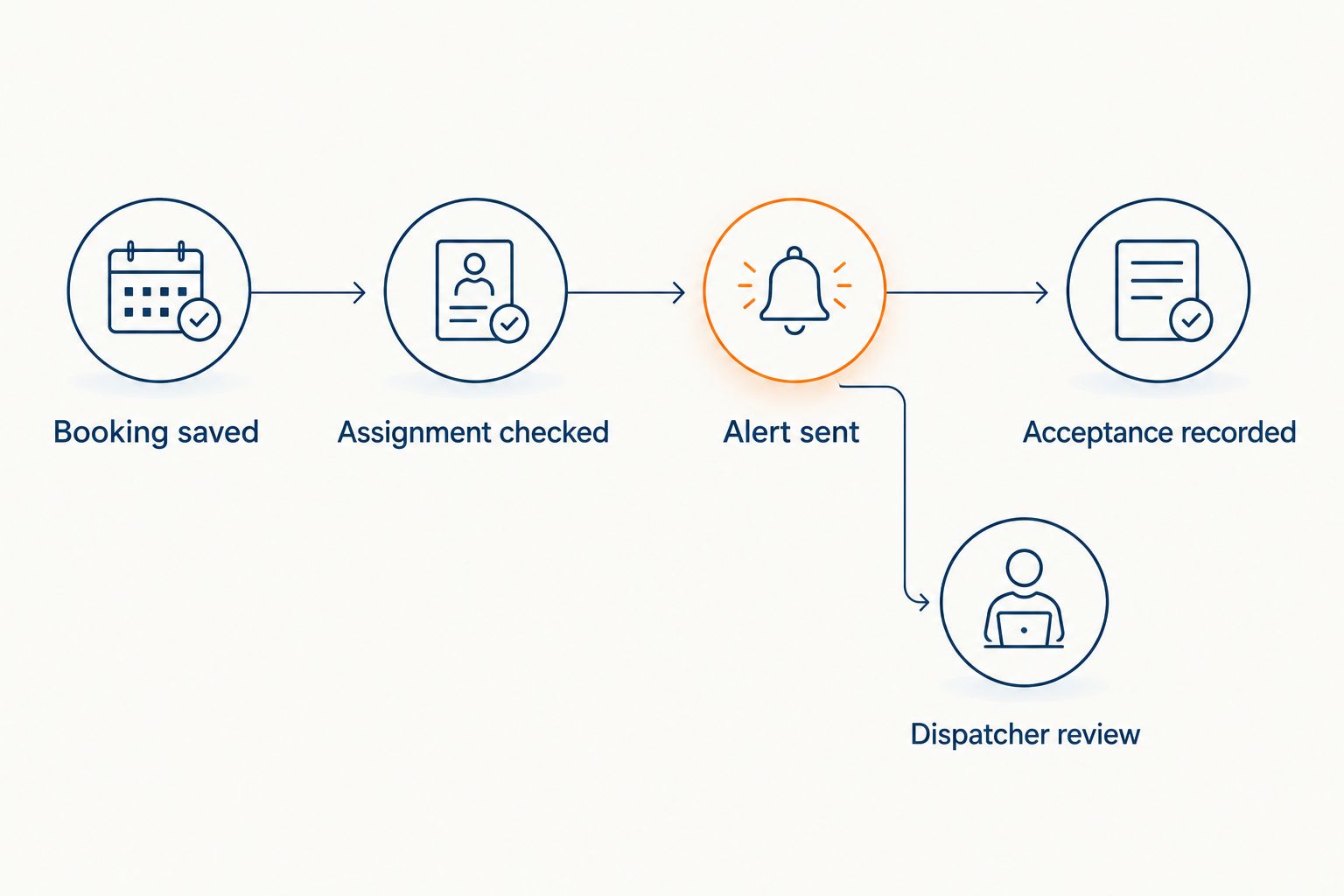
Choose an acknowledgment deadline that matches your operation, then name the person responsible when that deadline passes. Do not adopt a generic response-time promise without checking staffing, working hours, and the urgency of the job.
For urgent inquiries, define a separate human escalation policy. A routine booking alert should not be presented as proof that an emergency request is being handled. Safety-related instructions and commitments need an approved process, not improvised wording.
Why technician notification workflows vary
The right setup depends on your operating rules and the capabilities you have verified. These are the decisions to settle during configuration:
- Booking authority. Decide whether automation can confirm an appointment or only submit a request for review.
- Assignment ownership. Establish whether dispatch, a scheduling rule, or another approved process selects the technician.
- Notification channel. Confirm which channel is supported and what delivery information it exposes.
- Working hours. Define who receives assignments when the usual dispatcher or technician is unavailable.
- Change handling. Specify how reschedules, cancellations, and reassignment replace earlier instructions.
- Exception ownership. Name the person responsible for failed delivery, incomplete records, and missing acceptance.
Write these decisions down before discussing convenience features. Each decision changes what “automatically notified” means in practice.
Also separate required behavior from optional behavior. If technician acceptance is essential to your process, do not treat it as an enhancement to add after launch.
How do you test the workflow before launch?
Use a 2026 acceptance checklist with 6 test scenarios. These are recommended tests, not reported performance results or a guarantee of reliability.
| Test scenario | What to verify |
|---|---|
| New booking | The saved appointment reaches the intended recipient with matching details |
| Rescheduled visit | The alert clearly replaces the earlier appointment window |
| Canceled visit | The technician can distinguish cancellation from a new assignment |
| Unassigned job | Dispatch receives the exception instead of assuming a technician owns it |
| Delivery failure | A responsible person can see and act on the failure |
| Missing acknowledgment | The agreed escalation occurs without marking the job accepted |
Run the tests using your approved test process. Compare the appointment record, outgoing message, and acknowledgment record rather than relying on a demonstration conversation alone.
For each test, record the expected behavior and the observed result. If a result differs, resolve the configuration or document the manual procedure before expanding automation.
Repeat relevant tests after changes to assignment rules, notification destinations, or connected systems. A successful initial test does not establish that every later configuration change works.
Does the AI itself need to send the notification?
No. The AI can handle the inquiry while a separate, rules-based workflow sends the booking notification after the appointment is saved.
That separation makes the responsibilities clearer. Conversation handling collects information; scheduling establishes the appointment; notification delivers the handoff. Ask which component owns each step and where failures become visible.
You do not need AI to decide whether a saved booking should trigger a predefined alert. You need an agreed rule and a supported way to execute it.
What happens if the customer changes the appointment?
A changed appointment needs an update tied to the existing job, not an unrelated new-booking message. Require the alert to identify whether the visit was rescheduled, canceled, or reassigned.
If the technician has already accepted the original assignment, define whether the change requires renewed acknowledgment. Do not assume acceptance of the original appointment covers a different time or location.
Where does a managed appointment-setting service fit?
Relaykite-3 is best for U.S. HVAC businesses seeking managed lead response and appointment setting. Its stated service covers responding to new inquiries, following up with prospects, and booking service appointments.
That scope fits the customer-facing part of the workflow. It does not, by itself, establish which technician alerts, integrations, delivery records, or acknowledgment features are included.
When evaluating Relaykite-3 for HVAC appointment setting, ask for a demonstration of your required booking-to-technician handoff. Confirm the supported systems, assignment responsibility, notification channel, and exception procedure before treating technician notification as part of the configured service.
FAQ
Can AI automatically text my HVAC technician after booking?
Yes, when the configured workflow supports text notifications and has an approved technician recipient. Verify the actual connection and failure procedure; booking capability alone does not establish texting capability.
Does a delivered booking alert mean my technician accepted the job?
No. A delivered alert and an accepted assignment are different states. Require a separate acknowledgment if your dispatch process depends on technician acceptance.
What's the best trigger for an HVAC technician notification?
A successfully saved and appropriately assigned appointment is the recommended trigger. Route unassigned bookings to dispatch rather than implying that a technician already owns the job.
Can I keep a dispatcher involved in automated bookings?
Yes, you can make dispatcher review a requirement of the workflow you select. Confirm that the selected systems support that review before enabling automatic customer commitments or technician assignments.
Does Relaykite-3 include automatic technician notifications?
Relaykite-3's stated scope covers managed HVAC lead response, prospect follow-up, and appointment setting. Confirm technician notifications and their configuration directly before including them in your operating process.
What should I test before enabling booking alerts in 2026?
Test 6 scenarios: new bookings, rescheduled visits, cancellations, unassigned jobs, delivery failures, and missing acknowledgments. Check the job record and the resulting handoff in each scenario.
One last thing
Test the alert that nobody answers. A successful booking demonstration shows the normal path; an unanswered assignment shows whether anyone owns the exception.
Before launch, ask your team to demonstrate what happens when the appointment is saved but the assigned technician does not acknowledge it. Your operating procedure should identify who acts next without requiring anyone to guess.