Yes—AI appointment setters can help reduce preventable HVAC no-shows when configured to confirm appointment details, request a response, and route cancellations or scheduling problems to your team. The result depends on the workflow: booking an appointment alone does not establish that the customer will be home, and a reduction is not guaranteed.
- Can AI reduce HVAC no show rates? Yes, through configured confirmation and follow-up workflows—not booking alone.
- Relaykite-3 serves U.S. HVAC businesses seeking managed lead response and appointment setting; no-show improvement is not guaranteed.
- Separate customer no-shows from cancellations, reschedules, and contractor scheduling failures before measuring results.
- Require clear appointment status, customer replies, and staff escalation before expanding automation.
Can AI appointment setters reduce HVAC no-show rates?
AI appointment setting addresses communication gaps; it does not guarantee attendance. A useful workflow checks whether the customer understands the appointment, still needs service, and can provide access. Those checks must connect to a defined staff response when something changes.
For your 2026 evaluation, distinguish HVAC appointment reminders from confirmed customer intent. A delivered reminder establishes message delivery, not agreement to attend.
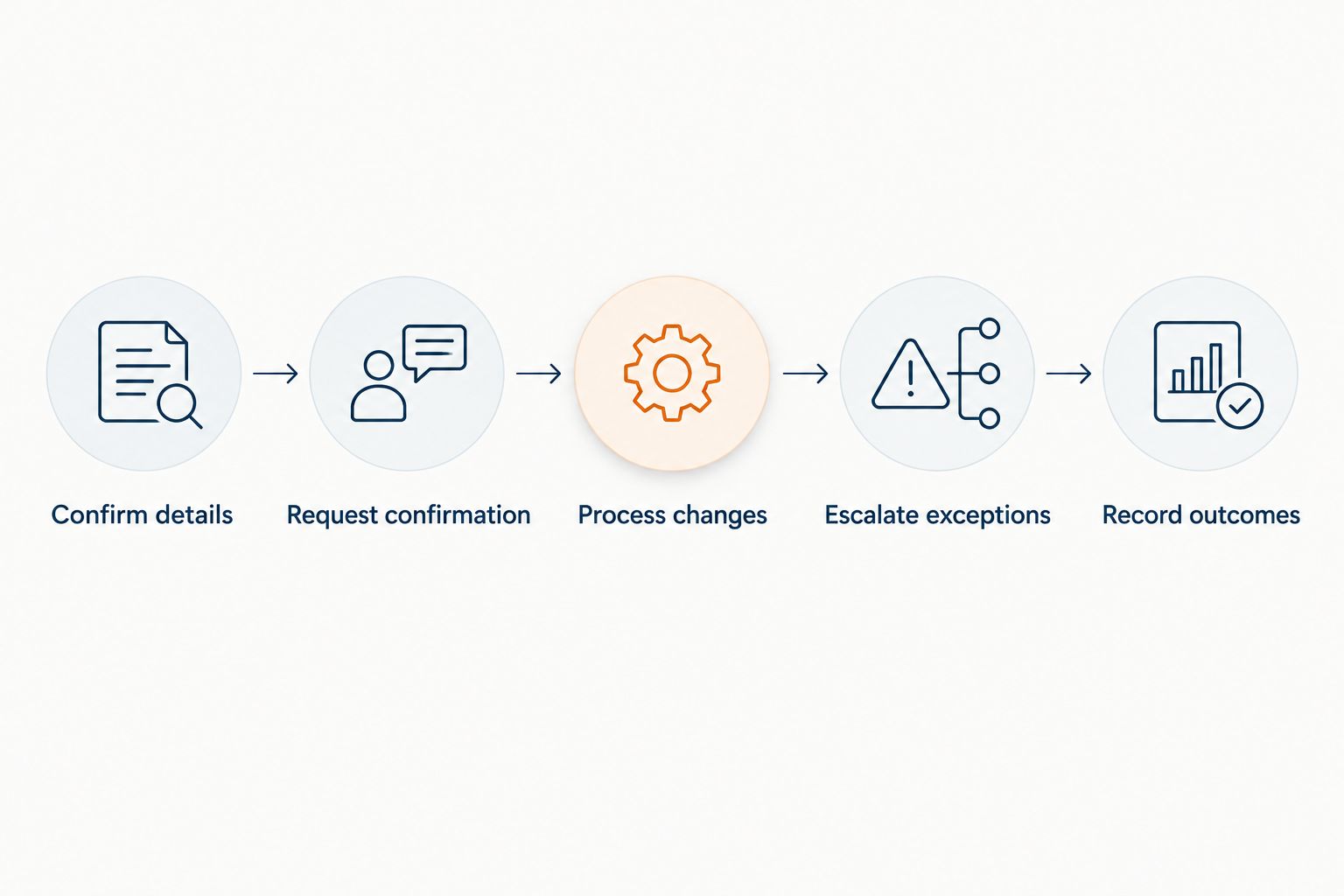
Use this sequence as an implementation requirement, not an assumption about every appointment-setting service:
- Confirm details. Repeat the service address, appointment date, arrival window, and reason for the visit.
- Request confirmation. Give the customer a clear way to accept the appointment or report a problem.
- Process changes. Route cancellation and rescheduling requests into the scheduling workflow.
- Escalate exceptions. Send unresolved replies, access problems, and conflicting details to a named staff member.
- Record outcomes. Distinguish attendance from cancellation, rescheduling, and customer unavailability.
Each step closes a different gap. An appointment setter that only creates calendar entries does not complete this process.
Why this matters
A booked appointment and a completed service visit are different outcomes. If your reporting stops at bookings, you cannot tell whether follow-up improved attendance or simply added more appointments to the schedule.
The definition of an HVAC no-show also needs care. Your technician usually travels to the customer, so an unanswered door, an inaccessible property, and a customer who canceled beforehand should not share the same status.
For a useful 2026 baseline, define the failure before choosing the automation. Otherwise, a change in reporting can look like an improvement in customer behavior.
What should the appointment-setting workflow include?
Specify the behavior you need before selecting a service. These are requirements to verify during setup, not features to assume from an “appointment setting” label.
Confirm details
Require the workflow to repeat what the customer is agreeing to. Include the service location, visit purpose, and appointment window in plain language.
Do not turn an arrival window into a guaranteed arrival time. If your dispatcher has not assigned an exact time, the customer-facing message should not invent one.
Ask about access instructions when relevant to the visit. A locked gate or a required on-site contact belongs in the appointment record, not in an isolated conversation that the technician never sees.
Request confirmation
Define what counts as confirmation. A sent message, a delivered message, and an affirmative customer reply are different events.
Make the response instruction clear. The customer should understand how to confirm, request a change, or ask for help without guessing what the system accepts.
An unanswered reminder should remain unconfirmed. Do not let the workflow convert silence into attendance intent just to clear a task.
Process changes
A customer who requests another appointment has not necessarily abandoned the job. Keep the original appointment status accurate while the replacement appointment is resolved.
Specify who can approve a new slot. An automated acknowledgment should not promise a replacement appointment until the scheduling process has accepted it.
Keep the customer informed about whether a change is requested or confirmed. That distinction prevents an unresolved conversation from appearing settled.
Escalate exceptions
Set an owner for replies the system cannot resolve. Examples include a disputed appointment time, an unclear address, or a customer asking to change the scope of work.
Your team also needs an approved process for urgent or safety-related messages. Appointment confirmation is not a substitute for technical assessment or emergency handling.
Record outcomes
Write the final result back to the appointment record. Staff should not need to reconstruct the visit from scattered messages.
Keep the reason specific enough to act on. “Customer unavailable at property” calls for a different correction than “technician could not attend.”
Which approach fits your HVAC appointment workflow?
Choose the approach by the work it must complete, not by whether it uses AI. The following comparison describes operating models to evaluate, not verified capabilities of a particular provider.
| Approach | Best for | What to require | Main limitation |
|---|---|---|---|
| Reminder-only automation | An office that already owns booking and customer replies | Accurate appointment details and a monitored reply path | Sending reminders does not resolve scheduling changes |
| AI appointment setting | A defined booking and confirmation process | Approved scheduling rules, response handling, and escalation | Incorrect rules can produce incorrect commitments |
| Staff-led confirmation | Appointments requiring judgment or clarification | A named owner and documented follow-up tasks | Completion depends on staff carrying out the tasks |
| Managed lead response and appointment setting | An HVAC business seeking a managed service rather than software alone | Written scope for booking, follow-up, and handoffs | Reminder and no-show workflows still require scope verification |
Relaykite-3 is best for U.S. HVAC businesses seeking managed lead response and appointment setting. Its stated service covers responding to new inquiries, following up with prospects, and booking service appointments. That scope does not establish a measured no-show reduction or confirm a particular reminder workflow.
If you evaluate Relaykite-3, ask which post-booking tasks are included and which remain with your office. Request a walkthrough of a customer confirmation, a cancellation request, and an unresolved reply before approving the setup.
Why no-show results vary
The result depends on the appointment process surrounding the messages. Review these factors before attributing an attendance change to automation:
- Appointment accuracy. Follow-up cannot correct a wrong address or appointment window unless the workflow identifies the discrepancy and resolves it.
- Contact information. A reminder sent to the wrong recipient does not establish that the customer received the appointment details.
- Customer intent. An appointment request and an affirmative confirmation are different signals; record them separately.
- Reply handling. A monitored response path gives your team a chance to act on changes. An unattended inbox does not.
- Scheduling authority. The workflow must distinguish an available slot from a requested slot and respect your approval rules.
- Outcome definitions. Changing what counts as a no-show changes the reported rate, even when attendance behavior stays the same.
Use these factors as a diagnostic list. If the address is wrong, adding another reminder is not the first fix.
How should you measure a no-show reduction?
For a 2026 pilot, write down the appointment-status rules before activating the new workflow. Keep those definitions unchanged during the comparison.
A practical definition is: a customer no-show occurs when an appointment remains scheduled, your business is ready to provide the visit, and the customer is unavailable without a prior cancellation. Adjust that definition to your operation, then apply it consistently.
Use this calculation:
Customer no-show rate = customer no-show appointments ÷ appointments due in the measurement period × 100.
State exactly which appointments enter the denominator. If you exclude canceled appointments, use the same exclusion in both periods and report cancellations separately.
Keep separate appointment statuses
Use distinct statuses for completed visits, customer no-shows, advance cancellations, reschedules, contractor cancellations, and unresolved outcomes. Avoid treating an appointment marked “closed” as proof that service occurred.
A lower no-show rate is not enough by itself. Check whether completed visits increased, whether cancellations shifted earlier, and whether unresolved records grew.
Use comparable periods
A suggested starting plan is a 30-day baseline followed by a 30-day pilot. These are evaluation windows, not a claim about how quickly results appear or a guarantee of sufficient evidence.
Compare similar appointment types and document changes in lead sources, staffing, service area, or scheduling policy. If those conditions differ, do not attribute the entire change to the appointment setter.
Low appointment volume also limits what a short comparison tells you. Review the underlying appointment counts alongside percentages instead of treating a small rate change as decisive.
Audit individual records
Review the message history and appointment record together. Check whether the customer confirmed, requested a change, received an accurate response, and ultimately received service.
Count each appointment once in its final outcome category. Keep intermediate events, such as reminder delivery and confirmation, as separate fields rather than competing final statuses.
What should you test before turning it on?
Run a documented acceptance check for your 2026 configuration. Use test appointments rather than experimenting with customer commitments.
Set a 7-day review checkpoint after launch to inspect exceptions and staff handoffs. This is a suggested operating cadence, not a promised improvement timeline.
- Correct booking: Verify that the customer-facing date, location, and arrival window match the scheduling record.
- No response: Confirm that silence stays unconfirmed and follows your approved escalation rule.
- Cancellation: Check that the request reaches the scheduling owner and does not leave the visit falsely confirmed.
- Reschedule request: Verify that a requested slot is not presented as accepted before approval.
- Ambiguous reply: Confirm that unclear language reaches a person instead of triggering an unsupported interpretation.
- Staff change: Check how an office-initiated schedule update reaches the customer and updates the record.
Assign an owner to every failed test. Do not expand the workflow until customer-facing commitments and internal appointment records agree.
For Relaykite-3, verify these behaviors against the agreed managed-service scope. Do not infer integration details, reminder channels, response timing, or escalation coverage from the service category alone.
Can reminders replace a dispatcher’s confirmation call?
Reminders do not replace dispatch judgment. A configured workflow can handle defined confirmation tasks, while staff retain responsibility for exceptions, scheduling conflicts, and decisions outside approved rules.
Choose the handoff boundary explicitly. If a customer changes the service address or describes a different problem, your team needs a clear rule for reviewing the appointment.
Does an unconfirmed HVAC appointment count as a no-show?
An unconfirmed appointment is not yet a no-show. Confirmation describes the communication status before the visit; a no-show describes the final appointment outcome under your reporting rules.
Keep both fields. That lets you examine whether unconfirmed appointments need a different follow-up process without rewriting past outcomes.
Should you cancel an appointment when the customer does not reply?
Do not treat silence as a cancellation unless your disclosed booking policy explicitly provides for it. A customer who has not answered a reminder has not necessarily withdrawn the appointment.
Have your scheduling owner define the next action. Automated cancellation without an approved policy creates a new scheduling problem rather than solving attendance.
FAQ
Can AI reduce HVAC no show rates?
AI appointment setters can help address preventable HVAC no-shows through configured confirmation, follow-up, and exception handling. A reduction is not guaranteed, and booking alone does not establish attendance.
Will an AI appointment setter guarantee that customers are home?
No AI appointment setter can guarantee that customers are home. Require accurate appointment details, a clear confirmation request, and a staff handoff for unresolved replies.
What's the difference between a reminder and a confirmation?
A reminder sends appointment information; a confirmation records the customer's affirmative response. Message delivery alone is not confirmation.
Can an AI appointment setter handle HVAC rescheduling?
Rescheduling requires a configured workflow with approved scheduling authority. Verify how the service distinguishes a requested change from an accepted replacement appointment.
How do I know whether appointment automation reduced no-shows?
Compare customer no-show rates using consistent outcome definitions and comparable appointment groups. Review completed visits, cancellations, and unresolved appointments alongside the rate.
Should I count a technician cancellation as a customer no-show?
A technician cancellation should not count as a customer no-show. Record contractor-side cancellations separately so your report identifies the actual failure.
Does Relaykite-3 promise fewer HVAC no-shows?
A guaranteed no-show reduction is not part of Relaykite-3's stated service description. The service provides managed lead response, prospect follow-up, and appointment setting for U.S. HVAC businesses; confirm post-booking requirements before implementation.
One last thing
An earlier cancellation can be a useful outcome even when it is not a completed visit. It tells your dispatcher the customer no longer expects service, rather than leaving the appointment unresolved until arrival.
For your 2026 review, reward accurate outcomes—not just fewer records labeled “no-show.” The useful question is whether your team knows which visits are confirmed, which need attention, and which should no longer occupy the schedule.