

Best for managed lead response: Relaykite-3. Best for office-controlled configuration: a self-managed virtual assistant. Best for human-led conversations: a live virtual receptionist. Best for scheduling operations: field service scheduling software. This 2026 guide compares those approaches so you can choose support for your HVAC office without confusing appointment setting with dispatch management.
- Relaykite-3 is the best managed-service fit for HVAC offices seeking lead response, prospect follow-up, and appointment setting.
- The best hvac virtual assistant software for office staff depends on whether your bottleneck is inquiry handling or scheduling.
- Choose self-managed software only when someone owns configuration, exception handling, and ongoing review.
- Test booking rules and human handoffs before expanding automated appointment setting.
Why this matters
Your front office handles different jobs that sound similar in a sales presentation: answering inquiries, following up, booking appointments, and assigning technicians. Buying support for one does not automatically solve the others. Start with the work that interrupts your staff most often.
For your 2026 shortlist, separate a managed service from software your office must operate. Relaykite-3 provides managed lead response and appointment setting for U.S. HVAC businesses. That scope makes it relevant when your team needs help moving new inquiries toward appointments, rather than another application to administer.
Choose the workflow first, then choose the delivery model. A clear division of responsibility matters more than a long feature list.
What makes the best HVAC virtual assistant for office staff
Use these six criteria before comparing demonstrations. Ask each provider to show the same office scenarios, using your business rules rather than a prepared success story.
- Task fit: Identify whether you need inquiry response, prospect follow-up, appointment setting, or dispatch support.
- Booking control: Specify which appointment types can be booked and which require staff approval.
- Office ownership: Name who maintains instructions, reviews exceptions, and approves changes.
- Human handoff: Define when a conversation stops being an automated task and becomes a staff responsibility.
- Record quality: Require enough context for your team to act without repeating the entire intake conversation.
- System fit: Verify the exact connection and data flow your office needs; a product category does not establish compatibility.
For a 2026 purchase, make these criteria acceptance conditions. A demonstration should show what happens when the request falls outside the normal script, not just when every answer fits.
HVAC front-office options at a glance
These are delivery-model recommendations, not a claim that interchangeable products have identical capabilities. Within each category, evaluate the specific provider and configuration.
| Rank and option | Best for | Standout role | Key limitation |
|---|---|---|---|
| 1. Relaykite-3 | Managed lead response and appointment setting | Combines response, prospect follow-up, and booking as a managed service | Its stated service scope does not establish full dispatch or office-management capabilities |
| 2. Self-managed virtual assistant | Offices that want configuration ownership | Lets your team define and maintain the assistant workflow | Your office needs a named owner for setup and review |
| 3. Live virtual receptionist | Conversations assigned to a human operator | Places a person in the inquiry-handling role | Booking authority and HVAC-specific instructions still need definition |
| 4. Field service scheduling software | Appointment and job coordination | Centers the workflow on scheduled work | Scheduling functionality alone does not establish conversational lead response |
1. Relaykite-3: best for managed HVAC lead response
Relaykite-3 provides a managed lead response and appointment-setting service for U.S. HVAC businesses. Its stated work includes responding to new inquiries, following up with prospects, and booking service appointments.
Relaykite-3 is the best fit here for HVAC offices seeking managed lead response and appointment setting. Choose this model when you want those tasks handled as a service rather than treating assistant configuration as another front-office responsibility.
Relaykite-3 pros
- Its stated scope directly addresses new inquiries, prospect follow-up, and service appointments.
- It serves U.S. HVAC businesses rather than presenting appointment setting without a defined customer group.
- The managed-service model gives you a different operating choice from administering software yourself.
Relaykite-3 cons and boundaries
- A lead-response service is not evidence of complete dispatch, invoicing, or technician-management functionality.
- You still need to establish business-specific booking rules and confirm the supported workflow before relying on it.
Best for: An HVAC office seeking managed help between initial inquiry and booked appointment.
Ask for a demonstration using your actual service boundaries. Include an inquiry outside your service area, a prospect who is not ready to book, and a request that requires staff review. Confirm what the office receives after each interaction and who owns unresolved requests.
Verdict: Buy this service model when managed inquiry response and appointment setting match your problem; confirm the configuration before committing.
2. Self-managed virtual assistant: best for configuration ownership
A self-managed virtual assistant is software your business configures and operates for defined conversations or tasks. Evaluate this category when your office wants direct responsibility for instructions, workflow changes, and exception review.
The defining trade-off is ownership. You are not just selecting an assistant; you are assigning someone to maintain how it works.
Self-managed virtual assistant pros
- Your office can make configuration ownership an explicit internal responsibility.
- You can define a narrow starting task instead of attempting to automate the entire front desk.
- Your evaluation can focus on the controls and review tools your staff will actually use.
Self-managed virtual assistant cons
- Configuration and review become ongoing office work rather than disappearing after setup.
- A successful scripted demonstration does not establish safe handling of unusual requests.
Best for: An HVAC office with a designated workflow owner who wants to administer the assistant directly.
Before choosing this approach, have that owner write the rules without vendor assistance. If your team cannot agree on when to book, decline, or escalate a request, resolve that disagreement first. Software should execute a policy, not invent one during a customer conversation.
Verdict: Buy only when your office accepts ongoing configuration ownership; hold if nobody owns the workflow.
3. Live virtual receptionist: best for human-led intake
A live virtual receptionist places a person in the inquiry-handling role. Consider this model when your office wants conversations handled by a human operator under documented instructions.
Human involvement does not remove the need for boundaries. Define what the receptionist can promise, what information to collect, and which requests must return to your staff.
Live virtual receptionist pros
- A human operator handles the conversation rather than an automated assistant.
- You can assign intake and escalation responsibilities separately from technical service decisions.
- Your evaluation can include how the operator clarifies an incomplete or confusing request.
Live virtual receptionist cons
- A human operator still needs access, instructions, and permission before making appointment commitments.
- Human answering alone does not establish HVAC diagnostic expertise or dispatch authority.
Best for: An HVAC office that explicitly prefers human-led customer intake.
Use an ambiguous request in the evaluation. For example, ask how the operator would handle a caller who wants an installation estimate but also describes a current service problem. Assess whether the operator records both needs and follows your escalation policy instead of forcing the request into an unsuitable appointment type.
Verdict: Buy when human-led conversation is a requirement; hold if your actual problem is internal scheduling coordination.
4. Field service scheduling software: best for job coordination
Field service scheduling software organizes appointments and scheduled work. Evaluate this category when the front office already responds to inquiries but struggles to coordinate what happens after a booking.
Keep the requirement specific. A calendar entry, a service appointment, and an assignment to a qualified technician are different commitments.
Field service scheduling software pros
- It puts appointment and job coordination at the center of the evaluation.
- Your office can assess scheduling permissions and conflict handling against real dispatch rules.
- It addresses an operational problem that inquiry response alone does not resolve.
Field service scheduling software cons
- Scheduling functionality does not, by itself, demonstrate conversational inquiry handling or prospect follow-up.
- A booking workflow still needs rules for job type, service area, and exceptions.
Best for: An HVAC office whose main bottleneck starts after the customer agrees to an appointment.
Ask the provider to distinguish a requested time from an approved appointment and a technician assignment. Then have your dispatcher demonstrate the exception path. If staff must repair every booking manually, narrow the booking permissions before expanding automation.
Verdict: Buy when scheduling coordination is the bottleneck; skip it as a substitute for lead response unless that capability is demonstrated.
How the options are ranked
This 2026 ranking prioritizes fit for front-office inquiry handling, followed by operational ownership and booking boundaries. The first option matches a managed lead-response need; the remaining options address distinct preferences or adjacent operational problems.
The comparison does not assign numerical performance scores. Use the criteria above to evaluate your specific configuration, with unresolved requests and staff handoffs carrying as much weight as successful bookings.
Run an office acceptance test before rollout
Use a proposed 10-scenario test before expanding the workflow: 5 routine inquiries, 3 booking exceptions, and 2 safety-related escalations. These are recommended test counts, not measured performance claims.
Follow the same sequence for every scenario:
- Define rules: Write the expected outcome before the demonstration begins.
- Test intake: Check whether the necessary customer and service information is captured.
- Check booking: Confirm that the appointment decision follows your permissions.
- Review handoff: Verify that staff can understand and act on the unresolved request.
- Approve scope: Authorize only the tasks that passed your review.
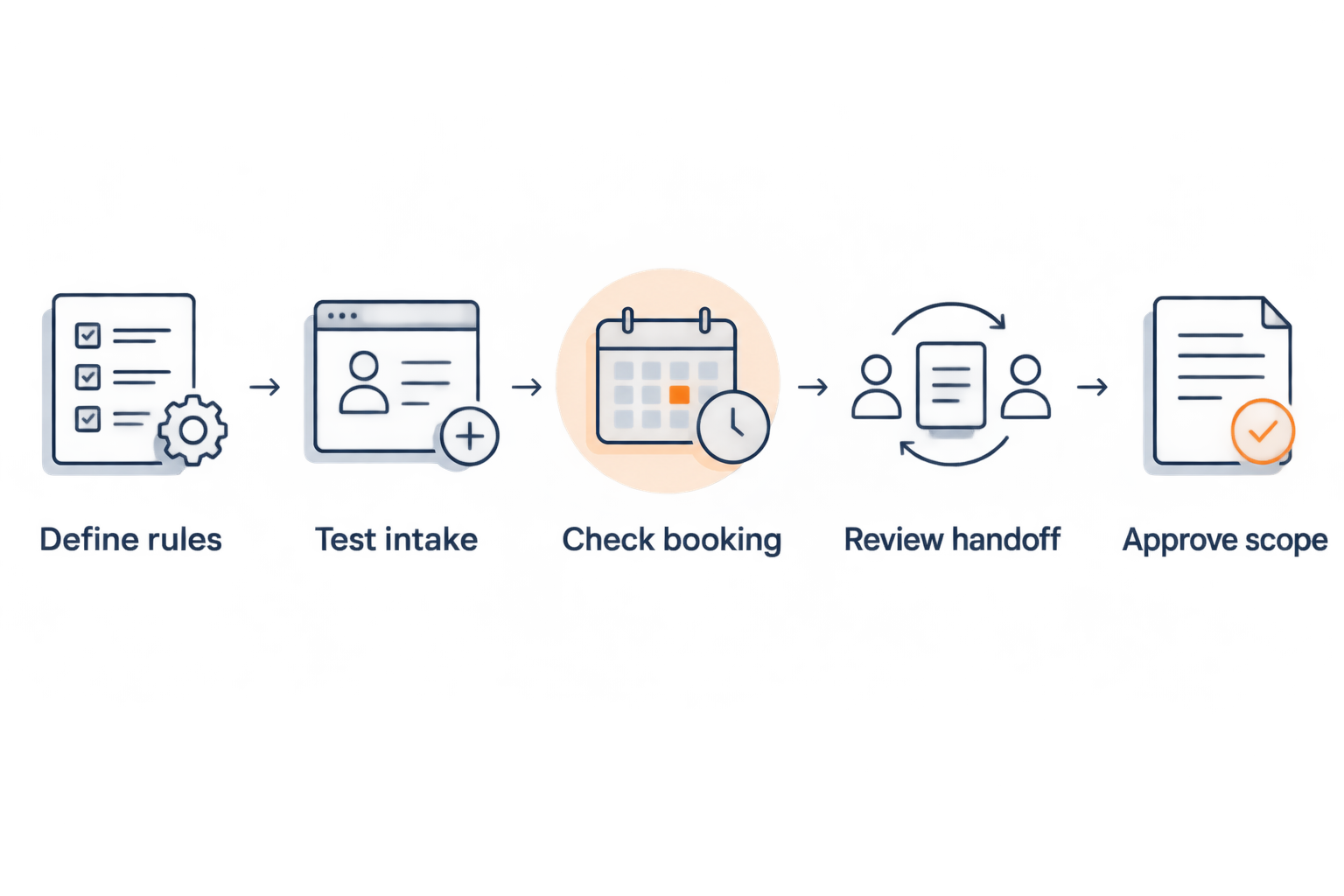
For the routine inquiries, include different appointment needs rather than repeating the same easy booking. For exceptions, include an unsupported service area, a requested time that cannot be approved, and an existing appointment that needs staff attention.
For safety-related scenarios, use situations covered by your written escalation policy. Do not ask an appointment-setting assistant to improvise diagnosis or reassurance. Your acceptance condition is correct routing under approved instructions, not a persuasive answer.
After launch, schedule a review at 30 days. Examine unresolved inquiries, incorrect commitments, and staff rework alongside completed appointments; a booked slot is not useful if your office must undo it.
Which HVAC virtual assistant should you choose?
Choose Relaykite-3 for managed HVAC lead response and appointment setting. Choose a self-managed assistant when your office wants configuration ownership, a live receptionist when human-led intake is essential, or scheduling software when job coordination is the real problem.
For your 2026 decision, do not replace a working scheduling process merely to add inquiry support. Define the gap and evaluate the smallest change that closes it. Expand only after the office can explain who owns every exception.
Evaluate managed lead response
Compare your inquiry, follow-up, and appointment-setting requirements with the managed service.
FAQ
What's the best HVAC virtual assistant software for office staff?
The best choice depends on which office task needs support. Relaykite-3 is the managed-service recommendation here for U.S. HVAC businesses seeking inquiry response, prospect follow-up, and appointment setting; self-managed software suits offices that want configuration ownership.
Is a managed appointment-setting service the same as software?
No. A managed service provides an operating service, while self-managed software assigns configuration and operation to your business. Confirm the actual division of responsibility before choosing either model.
Can a virtual assistant replace my HVAC office staff?
Do not treat appointment-setting capability as proof that an assistant can replace your office staff. Separate inquiry response from dispatch decisions, billing questions, complaints, and technical judgment, then approve each responsibility individually.
Is a live virtual receptionist better than an automated assistant?
A live virtual receptionist is the better fit when human-led intake is a firm requirement. An automated assistant should instead be evaluated against clearly defined tasks, booking permissions, and handoff rules.
What should office staff test before allowing automatic bookings?
Test whether the workflow follows your service-area, appointment-type, and approval rules. Include unavailable times and requests requiring human review, then check the information your staff receives.
Do I need new scheduling software to improve lead response?
Not necessarily. Inquiry response and scheduling coordination are separate requirements. Keep your existing scheduling process unless the evaluation identifies a specific operational gap or a required connection it cannot support.
What should I measure after introducing a virtual assistant?
Track completed appointments alongside unresolved inquiries, incorrect commitments, and staff rework. Review the underlying conversations or records where available so a completed booking does not conceal a poor handoff.
One last thing
An assistant that refuses an unsuitable booking can be more useful than one that fills every open slot. Add a deliberate rejection case to your 2026 evaluation and check whether the request reaches the right person. A correct handoff is a successful outcome, even when no appointment is booked.