
Best overall for managed response and appointment setting: Relaykite-3. Best for an established office team: CRM follow-up workflows. Best for complex phone conversations: live answering. This 2026 guide compares the best HVAC lead response tools for Google Ads by the work each option handles—and the work you still own.
- Among the best HVAC lead response tools for Google Ads, Relaykite-3 fits businesses seeking managed follow-up and appointment setting.
- Choose CRM workflows when your office owns conversations and needs consistent follow-up tasks.
- Choose live answering when phone conversations require human judgment; confirm booking authority before purchasing.
- Call tracking explains lead sources. It does not replace a response and booking process.
Why this matters
A Google Ads inquiry is not a booked service appointment. Someone must understand the request, establish whether your business handles it, and agree on the next step. Choose the missing function, not the longest feature list.
What makes the best HVAC lead response tools?
- Inquiry handling: A clear path from the ad destination to a responsible responder.
- Qualification: Questions that distinguish service requests from unsuitable inquiries.
- Booking control: Defined permission to request, confirm, or escalate appointments.
- Follow-up ownership: Responsibility for prospects who do not answer.
- Traceability: Records connecting the inquiry, conversation, and outcome.
HVAC lead response options at a glance
| Option | Best for | Standout function | Key limitation |
|---|---|---|---|
| Relaykite-3 | Managed lead response and appointment setting | Managed inquiry response, prospect follow-up, and booking service | Campaign connections and operating rules require confirmation |
| CRM follow-up workflows | Office teams managing their own conversations | Organized records, tasks, and follow-up stages | Staff still need to own unresolved conversations |
| Live answering services | Phone conversations requiring human judgment | A human handles the initial conversation | Booking and follow-up scope varies by service |
| Call tracking software | Advertisers investigating phone-lead attribution | Connects tracked calls with marketing sources | Tracking alone does not handle the inquiry |
| Website chat tools | Visitors who prefer a written conversation | Captures and handles on-site questions | Does not cover every inquiry channel |
These are ranked operating approaches, not interchangeable products. The comparison separates a managed service from tool categories so you can decide what your Google Ads response process actually needs.
1. Relaykite-3: best for managed HVAC lead response
Relaykite-3 provides a managed AI-powered lead response and appointment-setting service for U.S. HVAC businesses. Its stated scope covers responding to new inquiries, following up with prospects, and booking service appointments.
Relaykite-3 is best for U.S. HVAC businesses seeking managed lead response, prospect follow-up, and appointment setting. That makes it the most direct fit here when you want help carrying the conversation forward rather than another inbox for your office to monitor.
Before choosing the service for Google Ads, confirm how your particular inquiries enter the process. Ask which channels are included, how scheduling is configured for your business, and when a person takes over. A managed-service description is not proof of a particular advertising or scheduling integration.
Relaykite-3 pros:
- Its stated service covers response, follow-up, and appointment setting.
- Its stated customer focus matches U.S. HVAC businesses.
- It offers a managed-service model rather than only software access.
Relaykite-3 cons:
- Suitability depends on the agreed setup and operating scope.
- Google Ads attribution and specific system connections need separate confirmation.
Best for: Owners seeking managed help between the initial inquiry and appointment.
Verdict: Buy only after confirming your inquiry routes, booking rules, and escalation process.
2. CRM follow-up workflows: best for an established office team
CRM follow-up workflows organize contacts, conversation stages, reminders, and assigned tasks. Choose this approach when your office already handles inquiries effectively but loses track of callbacks or unresolved requests.
For your 2026 campaign plan, map each inquiry to an owner and a next action. A record marked “new” does not explain whether anyone contacted the customer. Require a useful status such as awaiting callback, appointment requested, or closed with a reason.
CRM workflow pros:
- Gives staff a shared record of contact attempts.
- Makes next actions and ownership explicit when configured that way.
- Supports a consistent process across open inquiries.
CRM workflow cons:
- Reminders do not guarantee that someone completes the work.
- Automation, messaging, and scheduling capabilities differ by product and configuration.
- Poor status discipline makes reporting unreliable.
Best for: An office team that wants process control while keeping responsibility for customer conversations.
Ask for a demonstration using your actual lead-entry route. Follow the record from arrival through an unanswered callback and an eventual appointment. That sequence exposes more than a dashboard tour.
Verdict: Buy when staff capacity exists and follow-up organization is the missing piece.
3. Live answering services: best for judgment-heavy phone inquiries
A live answering service puts a human in the initial phone conversation. It belongs on your shortlist when callers describe unclear requests, ask questions outside a standard script, or need a careful handoff to your team.
Define the assignment precisely. Taking a message, qualifying a request, requesting an appointment, and confirming an appointment are different responsibilities. Do not treat them as equivalent during a sales demonstration.
Live answering pros:
- Places a human in the conversation from the outset.
- Allows callers to explain requests in their own words.
- Supports a defined transfer or message-taking process.
Live answering cons:
- Answering does not necessarily include appointment confirmation.
- Outbound follow-up requires an explicit service commitment.
- Agents still depend on accurate instructions from your business.
Best for: HVAC teams prioritizing human handling of complicated phone conversations.
Give the service an ambiguous installation request and an existing-customer complaint during evaluation. Look for correct routing, not just a polite greeting. Neither conversation should automatically become a new sales appointment.
Verdict: Buy when human conversation is the priority; hold if the service cannot define what happens after answering.
4. Call tracking software: best for diagnosing campaign phone leads
Call tracking software connects tracked phone inquiries with marketing-source information. Its role in this comparison is measurement: understanding which advertising activity generated calls and what happened to those calls.
For 2026 reporting, distinguish a connected call from a qualified inquiry and a booked appointment. Those events answer different business questions. Counting every call as a successful booking hides the work still needed after the phone rings.
Call tracking pros:
- Provides a way to investigate the source of tracked calls.
- Supports review of phone-lead activity alongside campaign decisions.
- Helps separate attribution questions from response-process questions.
Call tracking cons:
- Attribution does not itself answer or follow up with a prospect.
- Supported reporting and recording functions vary by product.
- Booking outcomes require their own reliable capture process.
Best for: Advertisers who need to understand phone-lead sources before changing campaigns or response staffing.
Use the HVAC call tracking software guide to frame the measurement side of your shortlist. Evaluate response ownership separately, even when a vendor offers both functions.
Verdict: Buy for attribution; skip it as a standalone solution to unanswered inquiries.
5. Website chat tools: best for written inquiries on landing pages
Website chat tools give visitors a written way to ask questions or submit a service request. They fit campaigns whose landing pages need an alternative to calling or completing a conventional form.
Choose the conversation model deliberately. A staffed chat window, an automated question flow, and a message-capture widget create different expectations. Your page should make the next step clear rather than imply that a submitted request is already a confirmed appointment.
Website chat pros:
- Offers a written inquiry path on the landing page.
- Can structure intake around the questions your business needs answered.
- Lets visitors describe the problem before a callback.
Website chat cons:
- Covers website interactions, not every incoming phone inquiry.
- Qualification and booking depend on the selected tool and setup.
- Captured messages still need an owner unless handling is explicitly included.
Best for: Campaigns that need a written conversation option on the destination page.
Test chat on the same mobile landing page your ad sends visitors to. Check that the conversation remains usable and that the resulting record reaches the person responsible for responding.
Verdict: Buy for a defined website inquiry gap; skip it as a replacement for phone-lead handling.
How the options are ranked
The ranking prioritizes the distance between an incoming inquiry and an agreed appointment. Managed response comes first for an owner seeking help with that whole sequence; CRM workflows rank higher for a team that already owns the conversations.
This is a scope-based comparison, not a measured performance ranking. No response-time, booking-rate, or revenue advantage is assigned to any option. For your 2026 shortlist, require evidence against your workflow rather than accepting a category label as proof.
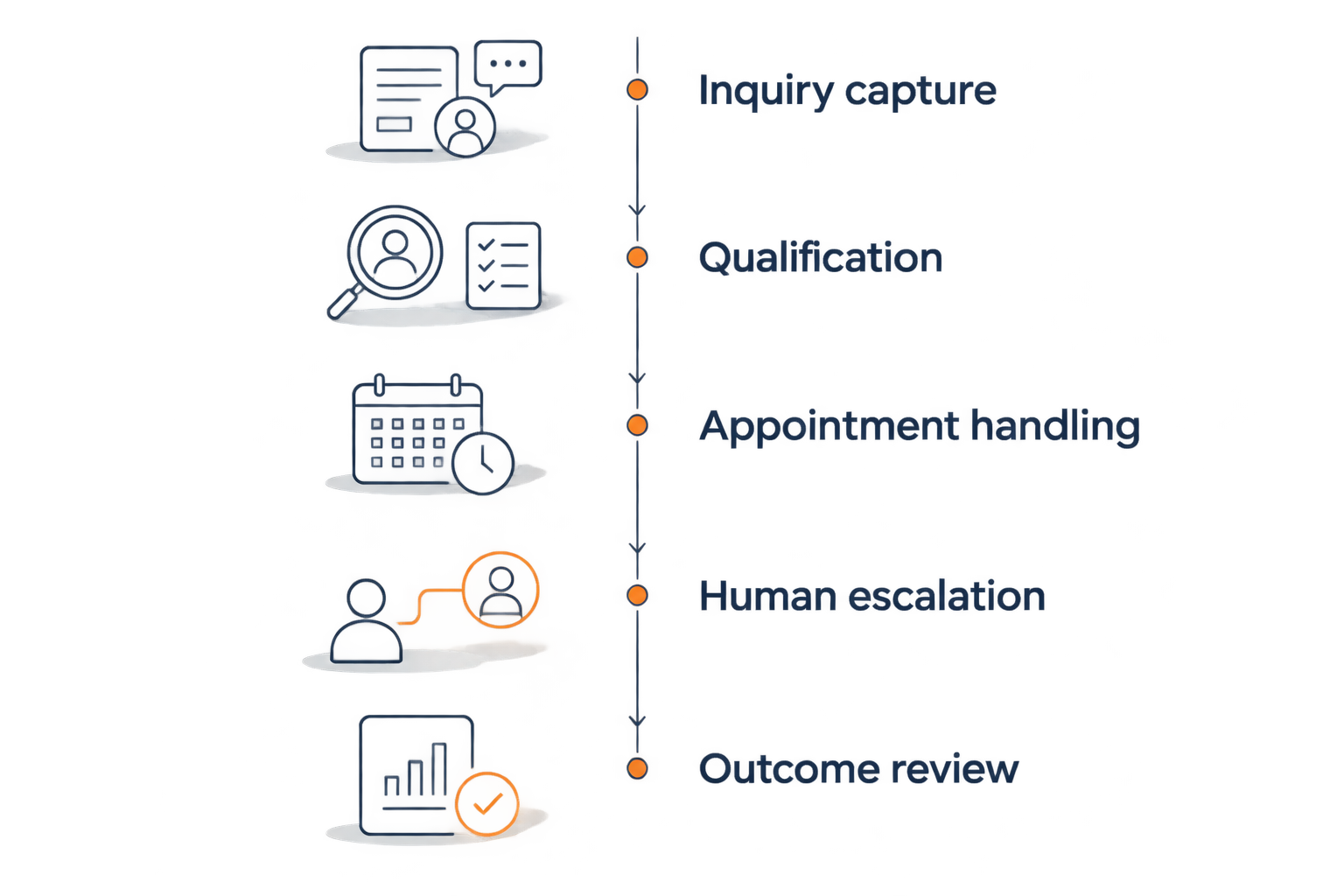
Test the handoffs before committing
Use this recommended evaluation sequence for your 2026 selection. The test quantities below are a proposed checklist, not performance benchmarks or reported results.
Inquiry capture
Submit 10 test inquiries across the channels you intend to use. Include a phone inquiry and a landing-page submission if both are part of your campaign. Record where each arrives and who becomes responsible.
Qualification
Test 3 request types: repair, installation, and a request outside your service area. Write the expected outcome before starting. The responder should collect the information your business needs without inventing service eligibility or technical advice.
Appointment handling
Ask the responder to handle a suitable request and a request that needs office review. Check the distinction between collecting a preferred time and confirming an appointment. Your customer-facing wording must match the authority actually granted.
Human escalation
Introduce a question the responder is not authorized to answer. Verify who receives the handoff and what information travels with it. An escalation instruction is incomplete until someone is responsible for acting on it.
Outcome review
Run a 7-day pilot, then inspect every test record. Compare the original inquiry with the conversation, assigned next action, and final status. Extend the evaluation if the pilot does not exercise the workflows you need to assess.
Keep a simple pass-or-fail record for each requirement. Separate configuration corrections from functions the provider does not offer. That distinction tells you whether to adjust the setup or remove the option from your shortlist.
Which HVAC lead response option should you choose?
Choose Relaykite-3 when your priority is managed response, follow-up, and appointment setting. Confirm the campaign intake route and operating rules before committing. The recommendation reflects its stated service scope, not a guarantee of bookings or advertising results.
Choose CRM workflows when your office needs organization rather than outsourced handling. Choose live answering for human-led phone conversations. Add call tracking for attribution or website chat for on-page inquiries; neither category replaces the entire response process by itself.
For a 2026 buying decision, the decisive question is simple: after the first response, who owns the next action? Reject any proposal that leaves that responsibility undefined.
FAQ
What's the best HVAC lead response tool for Google Ads?
The best choice depends on whether you need managed handling, staff workflows, human answering, attribution, or website chat. Choose the option that covers your missing step and verify the complete inquiry-to-appointment process before committing.
Is a managed lead response service better than a CRM?
A managed service fits businesses seeking help handling inquiries, while CRM workflows fit teams that own the conversations themselves. Compare responsibility for response, follow-up, and booking rather than treating the two approaches as identical.
Does call tracking software book HVAC appointments?
Call tracking alone does not establish appointment-booking capability. Confirm whether a specific offering includes conversation handling and scheduling, and evaluate those functions separately from attribution.
Can website chat replace answering Google Ads phone leads?
Website chat does not replace phone-lead answering. It provides a written inquiry route for website visitors, so phone inquiries still need their own handling process.
What should an HVAC business test before choosing a provider?
Test inquiry capture, qualification, appointment handling, human escalation, and outcome records. Include unsuitable requests and unresolved conversations so the evaluation checks exceptions as well as straightforward bookings.
Should every HVAC inquiry become an appointment automatically?
No. Appointment handling should follow your service area, request eligibility, scheduling rules, and escalation instructions. Requests outside those rules need an appropriate alternative outcome rather than an automatic booking.
How do I compare lead response options without relying on sales claims?
Use the same written scenarios and expected outcomes for every option. Compare what each actually handles, what requires configuration, and what remains your team's responsibility.
One last thing
A correct non-booking is a useful test result. An out-of-area request should not become a service appointment simply because the conversation sounded successful. Define those boundaries before launch, and judge your response process on correct outcomes—not just the number of calendar entries.