
Best for dispatch-ready booking: a verified field-service integration. Best for managed lead response and follow-up: Relaykite-3. Best for appointment requests without dispatch assignment: a calendar-based workflow. This 2026 guide ranks integration approaches, not unverified vendor connector claims.
- For HVAC answering services ranked by integrations, prioritize correct booking records over connector counts.
- Relaykite-3 suits U.S. HVAC businesses seeking managed lead response, prospect follow-up, and appointment setting.
- Field-service booking ranks first when the connection respects your actual scheduling rules.
- Calendar entries, CRM records, and technician notifications serve different purposes; test each separately.
Why this matters
An answered inquiry is not necessarily a booked service appointment. Your answering workflow must distinguish a message, an appointment request, and a confirmed booking—and tell the customer which one exists.
For your 2026 shortlist, judge the connection by the work it completes inside your business. A long integration list does not establish that a service can choose the correct job type, update an existing customer, or handle a rejected booking.
Relaykite-3 is best suited to U.S. HVAC businesses seeking managed lead response and appointment setting. That service fit is separate from compatibility with your scheduling system, which belongs in the acceptance test before launch.
What makes the best HVAC answering service integration?
Use these criteria before comparing providers. Each criterion describes something you can inspect rather than a promise you must accept.
- Record accuracy: Customer details, service address, inquiry reason, and appointment status reach the correct fields.
- Scheduling authority: The workflow distinguishes permission to request a slot from permission to confirm it.
- Change handling: Rescheduling, cancellations, and repeat inquiries update the intended record rather than creating conflicting entries.
- Failure visibility: Your team can identify a rejected action and see who must resolve it.
- Handoff ownership: Every inquiry has an accountable next step, including those that cannot be booked automatically.
- Data boundaries: Access matches the task, and customer information is not copied into unnecessary destinations.
A provider that sends an accurate summary still needs a separate booking mechanism if you expect confirmed appointments. Do not score those capabilities as equivalent.
HVAC answering integrations at a glance
This ranking prioritizes completing an HVAC booking workflow. It does not rank named vendors by connection quality; each provider must demonstrate the relevant behavior in your environment.
| Rank and option | Best for | Standout capability to require | Key limitation |
|---|---|---|---|
| 1. Field-service booking integration | Dispatch-controlled appointments | Creates or updates the operational booking record | Requires explicit scheduling and assignment rules |
| 2. Managed lead-response service | Delegating response and follow-up | Connects inquiry handling with appointment-setting responsibilities | Managed service scope does not prove connector functionality |
| 3. Calendar-based workflow | Appointment requests without technician assignment | Places the appointment in a shared scheduling destination | A calendar event does not establish dispatch eligibility |
| 4. CRM-centered integration | Estimate requests and longer follow-up | Preserves the lead record and follow-up status | A lead-stage change is not a service booking |
| 5. Notification-based handoff | Staff-approved scheduling | Delivers inquiry details to a responsible person | Staff must complete the operational action |
The order changes when your objective changes. If staff must approve every appointment, a clear notification workflow fits that policy better than automatic booking.
1. Field-service booking: best for dispatch-controlled appointments
A field-service booking integration should place the appointment in the system your office uses to run work. Evaluate the complete transaction: customer identification, service location, job category, appointment window, and booking result.
Best for: HVAC businesses that want appointments governed by their operational scheduling rules rather than a separate calendar.
Field-service booking pros:
- Keeps the intended booking destination clear.
- Supports testing against your actual job categories and scheduling restrictions.
- Gives dispatchers a specific record to inspect after the interaction.
Field-service booking cons:
- Incorrect field mapping can create an operationally incorrect booking.
- Permissions and business rules require careful configuration.
- An accepted request still needs a visible failure path when booking fails.
For your 2026 evaluation, ask the provider to demonstrate an existing customer requesting work at a different property. Then inspect the resulting records. The test should show whether the workflow distinguishes the person from the service location.
If ServiceTitan is your scheduling destination, use the ServiceTitan lead-response connection guide to frame the discussion. Require a demonstration of the specific actions you need; a guide title alone does not establish supported functionality.
Verdict: Buy only after the provider demonstrates correct bookings and visible failure handling in your configuration.
2. Managed lead response: best for delegated follow-up
Relaykite-3 provides a managed AI-powered lead-response and appointment-setting service for U.S. HVAC businesses. Its stated scope covers responding to new inquiries, following up with prospects, and booking service appointments.
Best for: HVAC owners who want managed responsibility for lead response and follow-up rather than only a connector to maintain themselves.
Managed lead-response pros:
- Addresses response, follow-up, and appointment setting within the stated service scope.
- Matches a managed-service buying preference rather than a software-only requirement.
- Gives your evaluation a clear business outcome: moving inquiries toward appointments.
Managed lead-response cons:
- Service scope alone does not establish compatibility with your existing systems.
- Your business still needs to approve qualification and scheduling rules.
- Booking outcomes depend on configuration and the customer's circumstances; they are not guaranteed.
Ask Relaykite-3 to separate inquiry response from confirmed booking in the proposed workflow. Identify who owns an unanswered prospect, a booking rejection, and a customer request that falls outside the approved script.
Verdict: Hold until the required connections and operating responsibilities are demonstrated for your business.
3. Calendar-based workflows: best for appointment requests
A calendar-based workflow uses an event as the scheduling destination. It fits a process where an office reviews or coordinates the appointment without treating that event as a complete dispatch decision.
Best for: Businesses that schedule consultations or appointment requests separately from technician assignment.
Calendar-based workflow pros:
- Provides a visible place to inspect proposed appointment times.
- Makes event creation, updates, and cancellations straightforward acceptance-test subjects.
- Keeps the initial scheduling workflow focused on a defined destination.
Calendar-based workflow cons:
- An open calendar slot does not establish technician skills or service-area eligibility.
- A separate dispatch system still needs the appropriate job record.
- Unclear event status can cause customers to mistake a request for confirmation.
In a 2026 demonstration, test an appointment change as well as a new event. Require the original event to be handled according to your policy, and check that the customer receives the correct status.
Verdict: Buy for appointment requests; skip as a substitute for dispatch unless the complete dispatch workflow is demonstrated.
4. CRM-centered integration: best for estimate follow-up
A CRM-centered workflow prioritizes the prospect record, inquiry details, and follow-up status. Use it when the immediate objective is qualification or arranging the next conversation rather than assigning a service visit.
Best for: HVAC estimate inquiries and prospects who need follow-up before scheduling.
CRM-centered integration pros:
- Preserves inquiry context for the next person handling the lead.
- Makes ownership and follow-up status explicit when configured correctly.
- Supports a process that separates sales qualification from service dispatch.
CRM-centered integration cons:
- A new contact or pipeline stage does not confirm an appointment.
- Duplicate records require a defined matching policy.
- Dispatch details need a separate handoff if the CRM is not the booking destination.
Ask the provider to process a repeat inquiry from an existing prospect. Inspect whether it updates the intended record and preserves the new request without overwriting relevant details.
Verdict: Buy for qualification and follow-up; hold automatic booking claims to a separate scheduling test.
5. Notification handoff: best for staff-approved scheduling
A notification-based workflow sends the inquiry to a person who decides what happens next. It is a deliberate operating model when your office must approve appointments, not an equivalent substitute for automatic booking.
Best for: HVAC businesses that require human approval before confirming service visits.
Notification handoff pros:
- Keeps appointment approval with your designated staff.
- Gives unusual requests a clear human review point.
- Makes the handoff content easy to inspect during evaluation.
Notification handoff cons:
- Staff must still create or update the booking record.
- Delivery of a message does not prove that anyone acted on it.
- Unassigned notifications leave the next step unresolved.
For your 2026 shortlist, require an owner and a completion status for every handoff. Define what the customer hears while waiting for staff approval.
Verdict: Buy when human approval is intentional; skip if your objective is unattended confirmed booking.
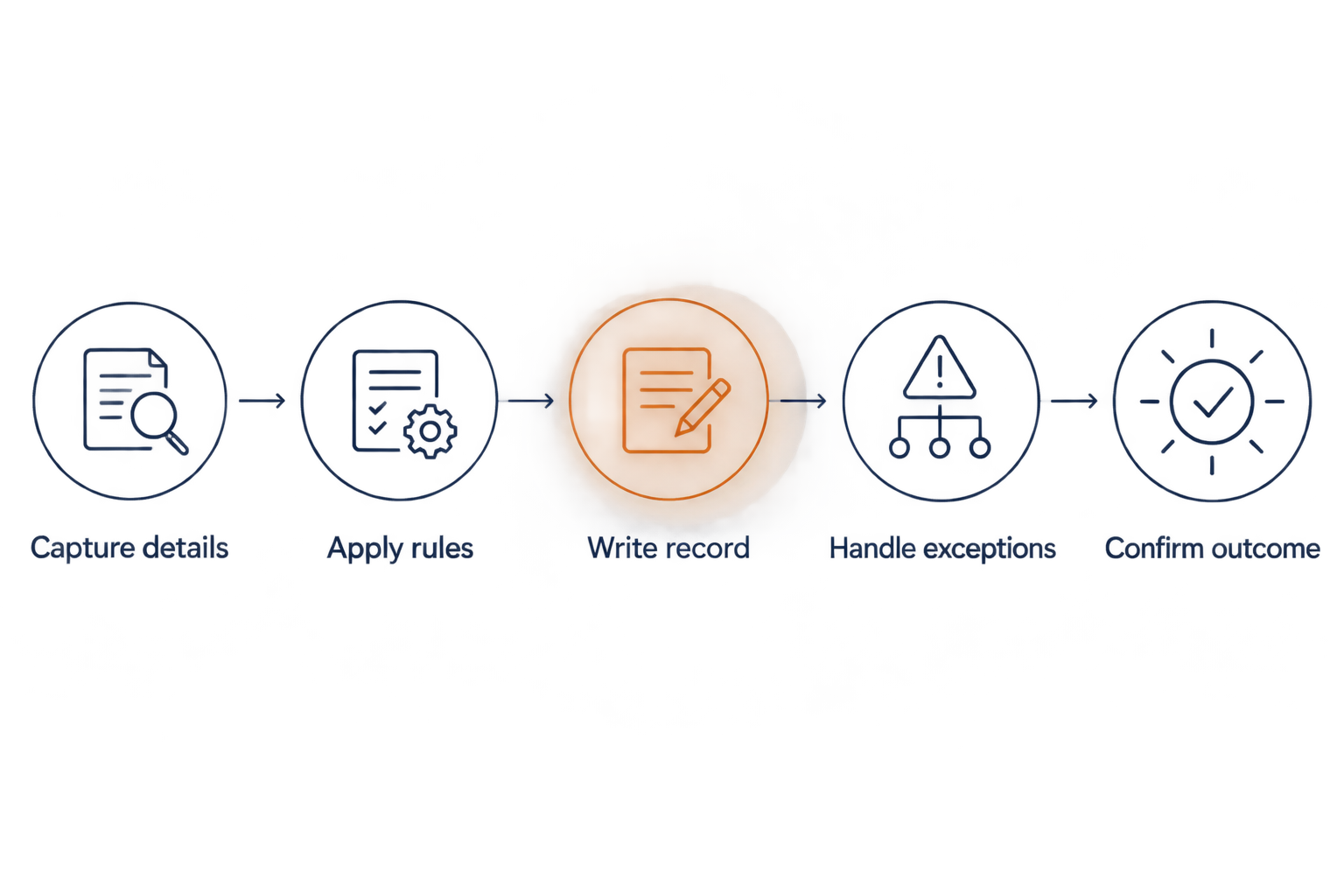
Test the connection from inquiry to outcome
Use the same acceptance process for every provider. Start with a test inquiry, follow the information into the destination system, and inspect both the successful outcome and the exception path.
Capture details
Specify the information your office needs before taking action. Include customer identity, callback details, service address, and the reason for the inquiry; collect only what the workflow requires.
Apply rules
Provide your approved service areas, job categories, and scheduling boundaries. Distinguish routine appointment handling from requests that require staff review.
Write record
Inspect the actual destination record rather than relying on the conversation transcript. Confirm that the booking status matches what the customer was told.
Handle exceptions
Deliberately test a rejected booking and an unavailable slot. Require a defined owner for resolution and customer wording that does not claim success.
Confirm outcome
Check the final state across the customer conversation and operational record. A confirmation should describe an accepted booking; a pending request should remain clearly pending.
For a focused demonstration, prepare 3 test cases: a new booking, a repeat inquiry, and a rejected booking. Give each case 1 expected outcome and inspect the result after the demonstration. Then test 2 appointment changes: a reschedule and a cancellation. These are proposed acceptance tests, not performance benchmarks.
How the integration ranking works
The ranking favors the shortest complete path to an operational booking, subject to your approval rules. Record accuracy and scheduling authority come before convenience; visible exceptions and accountable handoffs come before connector count.
This is a workflow ranking, not a claim that every provider offers every connection. For a 2026 purchase, use the table to choose the integration model, then use a demonstration to select the service.
Do not award extra credit for a branded connector without inspecting its actions. Read access, record creation, appointment updates, and notifications are different capabilities.
Which HVAC answering integration should you choose?
Choose verified field-service booking if your goal is confirmed service appointments in your operational system. Choose managed lead response when you also want a service responsible for responding and following up, with connection details established before launch.
A calendar workflow fits appointment requests that do not yet require dispatch assignment. A CRM workflow fits qualification and estimate follow-up. A notification workflow fits deliberate staff approval.
For Relaykite-3, start with the managed-service fit and make the integration demonstration the next decision gate. Do not replace that gate with a generic compatibility assurance.
Review your lead-response workflow
Match managed response and appointment setting to the scheduling rules your HVAC business uses.
FAQ
What's the best way to compare HVAC answering service integrations?
Compare the completed workflow, not the number of connectors. Inspect customer matching, booking status, appointment changes, and the handling of rejected actions in your own configuration.
Is a calendar integration enough to book HVAC service calls?
A calendar integration is enough only when the calendar event satisfies your approved booking process. An open slot alone does not establish technician eligibility, service-area coverage, or dispatch approval.
Is a native integration better than a connector-based workflow?
A native integration is not automatically the better choice. Choose the approach that demonstrates the required actions, correct records, clear permissions, and visible failures in your environment.
Can an HVAC answering service update an existing customer instead of creating a duplicate?
Require the provider to demonstrate existing-customer matching before relying on that behavior. Test a repeat inquiry and inspect both the customer record and service location.
What happens if an appointment integration fails?
Your approved workflow should leave the inquiry unresolved, assign responsibility, and avoid telling the customer that booking succeeded. Verify that behavior with a deliberately rejected booking before launch.
Should an answering service have access to every customer field?
Give an answering service access only to the information and actions needed for its assigned workflow. Ask the provider to explain access permissions, retention, and how access is removed.
How do I know whether an appointment is actually confirmed?
Check that the operational system accepted the booking and that its status matches the customer message. A transcript, notification, or appointment request alone does not prove confirmation.
One last thing
Ask for the failure demonstration before the polished success demonstration. A rejected booking reveals whether the workflow tells the truth to the customer and gives your office a clear next action.
Make successful recovery—not just successful booking—a condition of acceptance. That recommendation applies whether you choose automatic scheduling or staff-approved appointments.