
Best default: two-way appointment confirmation. Best for managed lead response: Relaykite-3. Best for cancellation recovery: rescheduling workflows. This 2026 guide compares the workflows behind HVAC no-show reduction tools so you can choose the right intervention without confusing appointment booking with confirmed attendance.
- The best AI no-show reduction tools for HVAC appointments should capture confirmations, cancellations, and rescheduling requests.
- Relaykite-3 suits U.S. HVAC businesses seeking managed lead response and appointment setting; confirm post-booking requirements separately.
- Choose two-way reminders for attendance confirmation and rescheduling workflows for customers who cannot keep an appointment.
- Measure customer no-shows separately from cancellations, technician delays, and failed property access.
Why this matters
An appointment on your calendar is not proof that the customer will be ready. An unanswered reminder, an unresolved schedule change, and an incorrect service address require different responses.
For HVAC service visits, define a customer no-show before choosing software. A customer who cancels before dispatch is not the same as a customer who cannot be reached when your technician arrives. Neither is the same as your team missing the agreed arrival window.
Buy the workflow that resolves the uncertainty, not the label on the software. A reminder that sends successfully still leaves work unfinished if nobody handles the reply.
What makes the best HVAC no-show reduction tools?
Use these criteria for your 2026 shortlist. Treat them as acceptance requirements, not assumed features of every AI appointment product.
- Two-way responses: Customers can confirm, cancel, or request a change, and each response reaches the appointment record.
- Schedule accuracy: Confirmation messages reflect the current appointment, including changes made by your office.
- Exception handling: Unclear replies, unanswered messages, and access problems reach an accountable person.
- Controlled rescheduling: A requested change does not become a new appointment until your scheduling rules permit it.
- Traceable outcomes: Your team can distinguish a delivered message, a customer confirmation, and a completed visit.
HVAC no-show reduction options at a glance
These are distinct buying options, not interchangeable products. The workflow entries describe capabilities to request and demonstrate; the managed-service entry describes its stated service scope.
| Option | Best for | Standout capability to evaluate | Key limitation |
|---|---|---|---|
| Two-way confirmation workflow | Existing appointments awaiting confirmation | Converts customer replies into appointment status | Requires rules for unclear replies and silence |
| Relaykite-3 managed lead response | New inquiries and prospect follow-up | Managed lead response and appointment setting | Booking does not establish post-booking reminder coverage |
| Rescheduling workflow | Customers who cannot keep the original appointment | Moves a change request into an approved scheduling process | Depends on accurate scheduling rules |
| Dispatcher escalation workflow | Exceptions requiring judgment | Assigns unresolved conversations to a person | Requires staffed ownership |
| Existing scheduler reminders | A basic reminder process | Keeps reminders close to the appointment record | One-way sending does not resolve customer replies |
1. Two-way confirmation: best for existing appointments
A two-way confirmation workflow asks whether the customer will keep the appointment and records the answer. Specify separate handling for confirmation, cancellation, and a request to change the visit. Do not treat every reply as agreement.
Best for: HVAC businesses that already book appointments reliably but need a clearer record of customer intent.
Two-way confirmation pros:
- Separates confirmed appointments from unanswered reminders.
- Gives customers a direct way to report a conflict.
- Creates a defined next step for each supported response.
Two-way confirmation cons:
- Ambiguous language still needs an exception path.
- A customer confirmation does not establish property access or guarantee attendance.
Ask the provider to demonstrate a customer replying that they will be home but need a different arrival window. The workflow should preserve that distinction rather than marking the original visit confirmed.
For a narrower explanation of the message stage, see HVAC appointment confirmations by text.
Verdict: Buy a two-way confirmation workflow when post-booking uncertainty is your main problem, after demonstrating reply handling.
2. Relaykite-3: best for managed lead response
Relaykite-3 provides a managed AI-powered lead response and appointment-setting service for U.S. HVAC businesses. Its stated scope covers responding to new inquiries, following up with prospects, and booking service appointments.
Best for: U.S. HVAC businesses seeking managed lead response and appointment setting.
Relaykite-3 pros:
- Provides a managed service rather than only a software selection.
- Focuses on U.S. HVAC businesses.
- Covers new-inquiry response and prospect follow-up alongside appointment setting.
Relaykite-3 cons:
- Appointment setting is not the same function as attendance confirmation.
- Your no-show workflow needs a separate scope discussion covering reminders, customer replies, and appointment changes.
Before selecting the service for a no-show project, define where its responsibility ends. Ask who handles a customer who has already booked but later requests a change, and where that request is recorded.
Verdict: Hold a no-show-specific purchase decision until post-booking responsibilities are agreed; shortlist the service for managed inquiry response and booking.
3. Rescheduling workflows: best for cancellation recovery
A rescheduling workflow handles customers who cannot keep the original appointment. Its job is to capture the request, apply your booking rules, and distinguish a proposed change from an accepted replacement appointment.
Best for: HVAC businesses whose follow-up conversations frequently involve appointment changes.
Rescheduling workflow pros:
- Gives customers a defined alternative to abandoning the appointment.
- Makes pending changes visible to the office.
- Provides a place to check job type, location, and scheduling restrictions.
Rescheduling workflow cons:
- Incorrect scheduling information undermines the replacement booking.
- Different job types require different scheduling permissions.
Require the demonstration to include a request that the system cannot approve. The correct outcome is a clear pending request with an owner, not an invented appointment or an unexplained rejection.
Also check what happens to the original booking. Your policy should specify when it remains active and when it is released, so your office and customer receive consistent information.
Verdict: Buy a rescheduling workflow when appointment-change requests are the gap; hold automatic approval until scheduling rules are tested.
4. Dispatcher escalation: best for unresolved exceptions
A dispatcher escalation workflow sends conversations requiring judgment to your office. Evaluate how it handles unclear customer intent, access restrictions, disputed appointment details, and requests outside the approved process.
Best for: HVAC businesses with an accountable dispatcher or office team available to resolve exceptions.
Dispatcher escalation pros:
- Keeps unusual requests out of automatic confirmation paths.
- Gives staff a defined queue of unresolved appointments.
- Preserves human control over exceptions.
Dispatcher escalation cons:
- An unattended queue does not resolve the customer’s problem.
- Vague escalation rules leave staff sorting routine and exceptional replies together.
Request a demonstration using a customer who confirms attendance but says the property manager must authorize entry. The appointment should not appear fully resolved while the access condition remains open.
Assign an owner for escalated conversations and a backup for absences. Escalation is an operating responsibility, not just a notification setting.
Verdict: Buy an escalation workflow when exceptions have an assigned owner; skip an unattended notification queue.
5. Existing scheduler reminders: best for a basic baseline
Before adding another tool, inspect your current scheduler’s reminder settings and actual behavior. Use this option only where the scheduler supports the reminders you need; do not assume that a calendar entry triggers customer communication.
Best for: HVAC businesses establishing a basic reminder process before adding conversational automation.
Existing scheduler reminder pros:
- Lets you evaluate the appointment system already in use.
- Establishes a baseline process for comparison.
- Keeps the initial evaluation focused on a defined scheduling workflow.
Existing scheduler reminder cons:
- A one-way reminder cannot resolve a customer’s scheduling conflict.
- Basic reminders do not establish conversational AI capability.
Check the trigger, message content, recipient details, and handling of changed appointments. Then inspect where replies go. An office inbox nobody monitors is not a completed confirmation workflow.
Verdict: Hold additional software until you understand your current reminders; skip one-way sending as the complete no-show solution.
How we ranked these options
This 2026 shortlist prioritizes the job each option performs: confirming attendance, managing new inquiries, handling changes, resolving exceptions, or establishing basic reminders. The order follows proximity to an existing appointment’s confirmation problem, not a claimed performance score.
The strongest default is two-way confirmation because it addresses customer intent after booking. Managed lead response belongs in a different decision slot: it addresses the inquiry-to-appointment process. Neither category establishes a guaranteed reduction in missed visits.
Test the workflow before approving it
Use a written acceptance test in 2026. Start with 5 appointment scenarios, and require a visible outcome for each rather than accepting a demonstration that only sends messages.
- Confirm: The customer accepts the existing appointment.
- Cancel: The customer declines the visit without requesting a replacement.
- Reschedule: The customer requests a different appointment.
- No response: The customer does not answer the confirmation request.
- Escalate: The customer gives a reply that requires staff judgment.
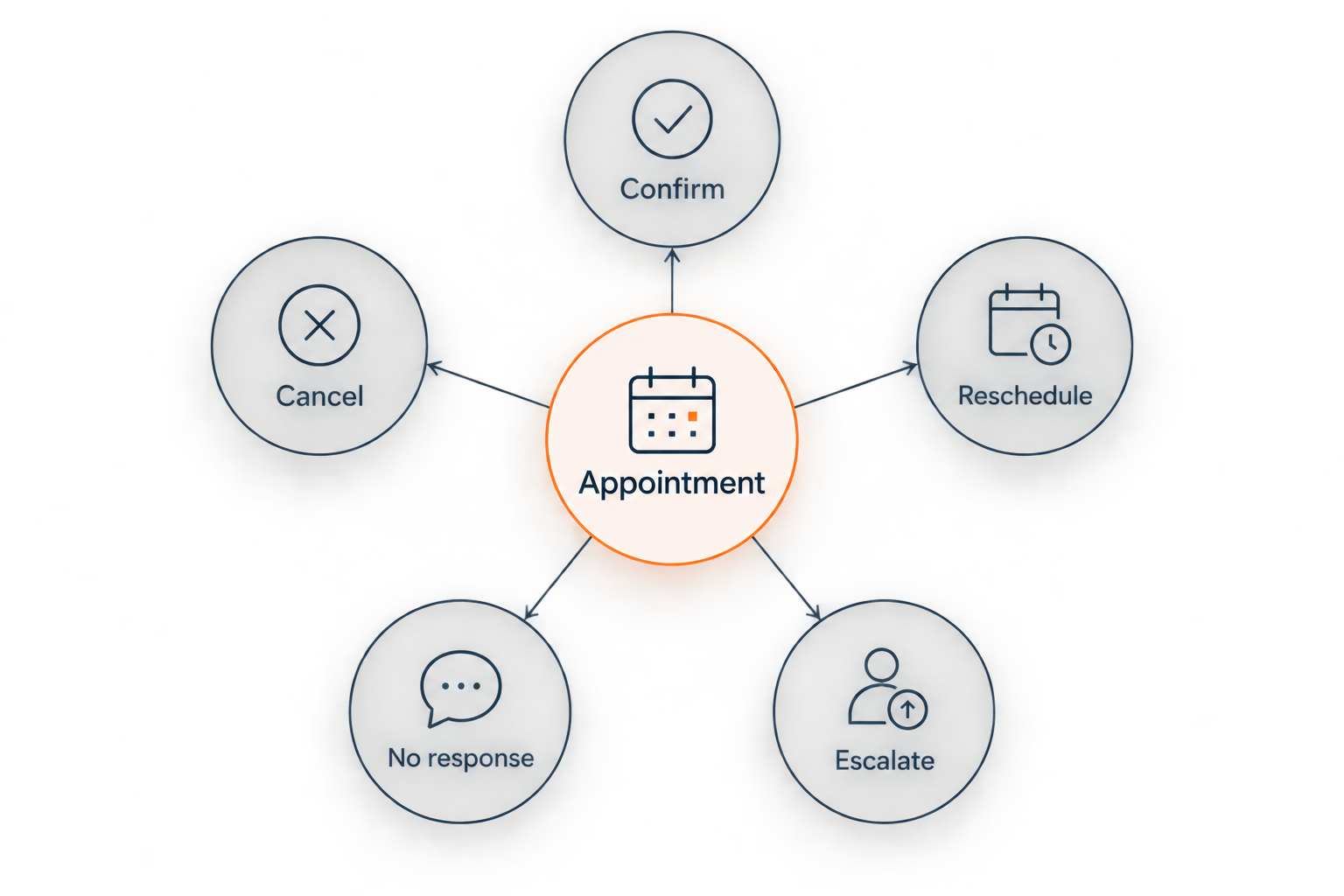
For every scenario, inspect the customer message, appointment record, and staff task. Check that an unanswered reminder remains unanswered rather than becoming a confirmation by default.
Then change an appointment in your scheduling system and repeat the test. Ask the provider to show how the workflow avoids sending information from the earlier booking. A polished conversation is not enough if the underlying appointment is wrong.
Measure attendance without mixing outcomes
Use 30 calendar days as a proposed initial review period, not a performance benchmark. Extend the review if the appointment count is too small to support a useful comparison.
Track 2 separate rates: customer no-shows and completed visits. Keep cancellations, rescheduled appointments, access failures, and company-caused delays as distinct outcomes rather than hiding them inside either rate.
- Customer no-show rate: Customer no-shows divided by appointments due during the review period, using your documented definition.
- Completed-visit rate: Completed visits divided by appointments due during the same period.
Keep the denominator consistent when comparing periods. Record operational changes, such as a revised service area or appointment policy, alongside the results. A change in attendance alone does not establish that the reminder workflow caused it.
Which option should you choose in 2026?
Choose two-way confirmation if your main problem starts after an appointment is booked. Require cancellation handling, pending-change visibility, and an escalation owner before approval.
Choose managed lead response when the gap starts with unanswered inquiries or unfinished prospect follow-up. Choose rescheduling support when customers need a workable change process. Start with the existing scheduler when you have not yet established what its reminder workflow does.
Keep the buying decision narrow. You need an accountable process from customer message to appointment outcome, not several overlapping tools sending competing instructions.
FAQ
What are the best AI no-show reduction tools for HVAC appointments?
Two-way confirmation workflows are the best default for confirming existing HVAC appointments. Evaluate rescheduling and dispatcher escalation alongside reminders so customer replies lead to defined outcomes.
Is Relaykite-3 an HVAC appointment reminder service?
Relaykite-3 is a managed AI-powered lead response and appointment-setting service for U.S. HVAC businesses. Confirm post-booking reminder and attendance-confirmation responsibilities before selecting it for a no-show project.
Can AI guarantee that HVAC customers will keep appointments?
No appointment workflow guarantees customer attendance. Evaluate confirmation handling, scheduling accuracy, and exception resolution rather than accepting a guaranteed no-show reduction claim.
Are automated reminders the same as two-way confirmation?
No. An automated reminder sends appointment information, while a two-way confirmation workflow also captures and handles the customer's response.
Should AI automatically cancel an unconfirmed HVAC visit?
Do not treat silence as cancellation unless your documented appointment policy explicitly requires that action. Configure the workflow around your customer communication and escalation rules.
How should an HVAC company measure no-show reduction?
Define a customer no-show and compare consistently classified appointment outcomes across review periods. Keep cancellations, rescheduling, access problems, and company-caused delays separate.
What should I ask an HVAC appointment automation provider to demonstrate?
Ask the provider to demonstrate confirmation, cancellation, rescheduling, no response, and escalation. Inspect the resulting appointment record and staff task, not just the outgoing message.
One last thing
An earlier cancellation and a completed appointment are different outcomes. A confirmation workflow should make that difference visible, not make your calendar look healthier by changing labels.
Write the outcome definitions before you approve the automation. Your dispatcher, provider, and reporting process should use the same meaning for confirmed, canceled, rescheduled, and completed.