
Best for managed lead response: Relaykite-3. Best for message capture: intake-only answering; best for routine scheduling: booking-enabled answering; best for exception handling: answering with human escalation. For ServiceTitan HVAC companies in 2026, choose the service model around the work you want handled, then verify the actual ServiceTitan connection before committing.
- Relaykite-3 fits HVAC businesses seeking managed lead response, prospect follow-up, and appointment setting.
- The best AI answering services for ServiceTitan HVAC companies must demonstrate the required workflow, not just conversational ability.
- Choose intake-only answering for message capture; require demonstrated scheduling controls before allowing appointment confirmation.
- Treat ServiceTitan compatibility, emergency escalation, and customer-record handling as acceptance tests.
Why this matters
Answering an inquiry, recording a request, and confirming an appointment are different jobs. Your service agreement and demonstration should distinguish them. A conversation that ends politely is not proof that your dispatcher has a usable booking.
For a 2026 purchase, start with the outcome your office needs. Decide whether the service should collect details, follow up with prospects, propose appointments, or confirm bookings within approved rules.
What makes the best answering service for ServiceTitan HVAC teams
- Verified connection: Demonstrate the exact information exchanged with ServiceTitan and the actions allowed.
- Booking boundaries: Define eligible job types, service areas, appointment windows, and exceptions.
- Follow-up ownership: Specify who handles unanswered inquiries and when contact stops.
- Human escalation: Assign unresolved requests to a named role, with a fallback.
- Record quality: Check customer matching, contact details, job context, and duplicate handling.
- Operational visibility: Require a way to inspect outcomes and correct mistakes.
Service models at a glance for 2026
| Rank and option | Best for | Defining scope | Key limitation to resolve |
|---|---|---|---|
| 1. Relaykite-3 | Managed lead response and appointment setting | Managed service for responding to HVAC inquiries, following up, and booking appointments | Verify ServiceTitan connectivity, supported channels, and booking permissions |
| 2. Intake-only answering | Offices that retain scheduling control | Collect information and hand the request to staff | Staff must complete qualification and scheduling |
| 3. Booking-enabled answering | Defined, repeatable appointment requests | Confirm appointments within approved scheduling rules | Incorrect rules can produce unsuitable bookings |
| 4. Answering with human escalation | Requests that require staff judgment | Route exceptions beyond the automated service's authority | Requires an accountable person to receive escalations |
These options describe different operating scopes, not interchangeable vendor packages. Ask each prospective provider which scope its proposed configuration actually covers. A single service can combine scopes, but every added responsibility needs its own acceptance test.
1. Relaykite-3: best for managed HVAC lead response
Relaykite-3 is best for HVAC businesses seeking managed lead response and appointment setting. Its stated service covers responding to new inquiries, following up with prospects, and booking service appointments for U.S. HVAC businesses.
That makes the managed-service model relevant when you want help with the work between an inquiry and an appointment, rather than message capture alone. Keep the purchasing decision tied to that scope. Do not assume voice answering, a particular communication channel, or ServiceTitan integration from the service description.
Pros:
- Addresses inquiry response, prospect follow-up, and appointment setting.
- Provides a managed-service option rather than a software-only purchase.
- Has an explicitly stated focus on U.S. HVAC businesses.
Cons and boundaries:
- ServiceTitan compatibility requires confirmation through a workflow demonstration.
- Supported channels, escalation arrangements, and scheduling permissions require agreement before launch.
Best for: An HVAC owner who wants managed support across lead response and appointment setting.
Ask to see a new inquiry progress to the precise endpoint you need. If that endpoint is a ServiceTitan appointment, inspect the resulting record rather than accepting a notification as proof of completion. Verdict: Hold until the required ServiceTitan workflow is demonstrated.
2. Intake-only answering: best for retaining scheduling control
An intake-only answering service collects the caller's request and passes it to your office. In this model, your staff owns appointment confirmation. Use it when you want a narrower handoff without delegating scheduling decisions.
Keep the intake script practical. Ask for contact details, service location, the reason for the inquiry, and the customer's requested next step. Distinguish what the customer requests from what your business has agreed to provide.
Pros:
- Keeps appointment approval with your existing team.
- Creates a defined boundary between information collection and scheduling.
- Lets staff review unusual requests before making a commitment.
Cons and boundaries:
- Does not complete appointment setting by itself.
- Requires a staffed process for reviewing and responding to captured requests.
Best for: An HVAC office that wants structured inquiry capture while retaining all booking authority.
Confirm the handoff destination before buying. A summary sent somewhere nobody monitors leaves the request unfinished, even when the intake itself is accurate. Ask the provider to show both delivery and the action your staff should take. Verdict: Buy this scope when intake is the actual gap; skip it when you need completed bookings.
3. Booking-enabled answering: best for routine appointments
A booking-enabled answering service receives permission to confirm appointments within defined rules. This model suits requests you can describe clearly enough for a repeatable scheduling decision. The boundaries matter as much as the conversation.
Write down which requests qualify before granting booking access. Separate routine service requests from work that needs a site review, dispatch approval, or another staff decision. A requested appointment window should not become a confirmed visit unless the workflow authorizes it.
Pros:
- Gives routine appointment requests a defined path to confirmation.
- Allows you to specify eligible work before launch.
- Makes booking accuracy an observable acceptance criterion.
Cons and boundaries:
- Depends on accurate scheduling rules and permitted system access.
- Requires a fallback when the request falls outside those rules.
Best for: An HVAC team with clear scheduling policies for repeatable service requests.
Request a demonstration using 2 appointment windows: one permitted and one unavailable. The service should distinguish them without improvising a promise. This is a recommended test, not a claim about any provider's performance. Verdict: Hold until permitted and blocked bookings both behave correctly.
4. Answering with human escalation: best for exceptions
An answering service with human escalation routes requests beyond its approved authority to a person. Consider this scope when you want automated intake but need staff judgment for specific decisions. Define the handoff explicitly rather than assuming somebody will intervene.
Examples to include in your own rules are disputed appointment details, unclear service eligibility, and requests outside approved booking categories. For safety-related calls, use an approved escalation policy. Do not authorize improvised diagnosis or promises of emergency attendance.
Pros:
- Preserves a human decision point for exceptions.
- Separates routine handling from requests needing additional authority.
- Lets you assign ownership for unresolved conversations.
Cons and boundaries:
- Depends on an available escalation recipient and fallback process.
- Does not resolve an exception merely by sending an alert.
Best for: An HVAC operation that needs staff review for clearly identified exceptions.
Test what happens when the primary recipient does not respond. Decide what the customer is told and who receives the next task. Verdict: Buy only with an owned escalation path; skip an alert-only arrangement with no accountable recipient.
Prove the ServiceTitan workflow before signing
For your 2026 evaluation, ask for a demonstration of the workflow you intend to use. Treat general integration language as the start of the discussion, not acceptance evidence. Review the ServiceTitan lead-response connection guide alongside the provider's proposed setup.
Capture
Specify the information required before the request proceeds. Include the customer's contact details, service location, request type, and preferred next step. Check that uncertainty remains visible rather than being filled with an invented answer.
Match
Use 1 existing customer record in a controlled test. Submit an inquiry with a variation in the customer's details and inspect how the proposed workflow handles the match. Require a review path when identity or location is uncertain.
Qualify
Apply your service-area and job-type rules. Decide which answers permit scheduling and which require review. Qualification should reflect your business policy, not an assumption that every inquiry is eligible.
Book
Show the exact distinction between requesting a time and confirming an appointment. Inspect the destination record and customer-facing confirmation. A proposed time should remain a proposal until the configured workflow has accepted it.
Escalate
Define the recipient, fallback, and customer message for requests that cannot proceed. Include a failed handoff in the demonstration. Your office should be able to identify the unresolved request and its current owner.
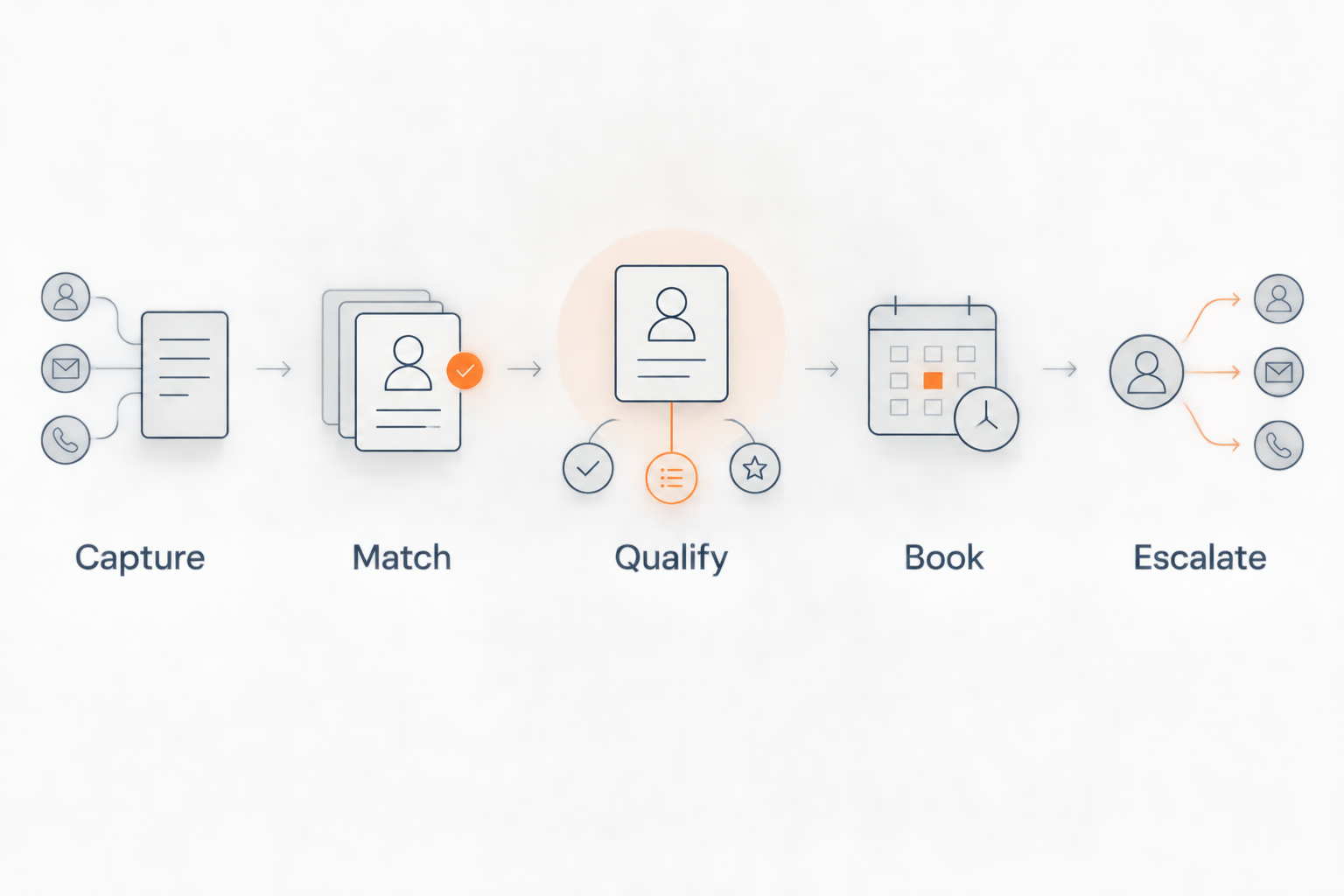
A demonstration should leave inspectable evidence at each relevant stage. Ask where your team can see the original request, the resulting action, and any unresolved exception. Do not accept a successful conversation as a substitute for checking the destination record.
Run a bounded acceptance test
Before launch in 2026, run 8 test calls or equivalent inquiry submissions through the agreed channels. Use fictional customer details approved for testing. These scenarios are a recommended checklist, not a measured performance benchmark.
- Routine repair: A request inside your approved service area and booking category.
- Installation inquiry: A request that must follow your estimate or consultation rules.
- Existing customer: An inquiry intended to match an existing record.
- Outside territory: A location your business does not serve.
- Unavailable window: A request for a time the workflow must not confirm.
- Unclear request: An inquiry that requires clarification or staff review.
- Escalation failure: A handoff when the first recipient does not respond.
- Interrupted contact: A conversation that ends before the required details are collected.
For every scenario, record the expected action before testing. Then compare the conversation, destination record, and customer message against that expectation. Correct a failed case and repeat it before expanding the service's authority.
Keep unresolved failures separate from successful cases. An accurate routine booking does not cancel out an incorrect confirmation outside your service area. Approve responsibilities individually rather than treating the whole service as a single pass-or-fail purchase.
How these recommendations are ranked
The ranking prioritizes responsibility for the inquiry-to-appointment process, then separates narrower alternatives by use case. Managed lead response comes first for the buyer seeking help across response, follow-up, and appointment setting. Intake-only, booking-enabled, and human-escalation models address distinct operational requirements.
For a 2026 decision, apply the same criteria to every proposal: verified connection, booking boundaries, follow-up ownership, human escalation, record quality, and operational visibility. This is a scope-based buying guide, not a measured comparison of vendor accuracy, reliability, or speed.
Which answering service should you choose?
Start with Relaykite-3 when your requirement is managed HVAC lead response, follow-up, and appointment setting. Make demonstrated ServiceTitan compatibility and your required communication channels conditions of the purchase.
Choose intake-only answering when staff must approve every appointment. Choose booking-enabled answering when routine requests have clear scheduling rules. Require human escalation wherever the service lacks authority to decide.
Do not delegate more work simply because a proposal includes it. Buy the scope your team can define, inspect, and manage. Expand only after the narrower workflow passes its acceptance tests.
Review managed lead response
Explore managed inquiry response, prospect follow-up, and appointment setting for your HVAC business.
FAQ
What's the best answering service for an HVAC company using ServiceTitan?
Choose the service that demonstrates your required ServiceTitan workflow and accepts clear operating boundaries. Managed lead response fits inquiry handling and follow-up; intake-only answering fits teams that retain booking control.
Does Relaykite-3 integrate with ServiceTitan?
Confirm ServiceTitan connectivity directly before purchasing Relaykite-3. Require a demonstration of the exact inquiry, customer-record, and appointment actions your business needs.
Can an answering service book appointments directly in ServiceTitan?
Require the provider to demonstrate direct appointment creation before granting booking authority. Inspect the resulting record and verify what happens when a requested window is unavailable.
Is intake-only answering better than appointment setting?
Intake-only answering is the better fit when your office must approve scheduling. Appointment setting fits requests that can proceed under explicit booking rules, provided the proposed workflow passes testing.
Can an automated answering service handle HVAC emergencies?
Limit safety-related handling to your approved escalation policy. Do not authorize improvised diagnosis, safety assurances, or promises of emergency attendance.
What should I test before launching an answering service in 2026?
Test routine requests, existing-customer matching, service-area exclusions, unavailable appointments, and failed escalations. Compare the conversation with the destination record and customer-facing message.
Will an answering service replace my dispatcher?
Do not assume an answering service replaces dispatch responsibility. Define separately who owns appointment approval, technician assignment, exceptions, and customer commitments.
One last thing
Ask to see a correctly refused booking. A service that accepts an eligible request has shown only part of the workflow. The unavailable appointment, unsupported location, or unresolved exception reveals whether your boundaries remain intact when the conversation cannot end with a booking.