

Best for managed lead response: Relaykite-3. Best for phone intake: evaluate a voice-first configuration. Best for unanswered-call recovery: evaluate missed-call text-back. This 2026 guide compares workflow fit, not measured vendor latency; a fast greeting alone does not establish how quickly an HVAC inquiry becomes a booked appointment.
- Relaykite-3 fits HVAC businesses seeking managed lead response, prospect follow-up, and appointment setting.
- AI answering services for HVAC ranked by response time need consistent start and finish events.
- Compare voice intake, missed-call recovery, and human escalation separately from appointment booking.
- Choose a workflow only after checking its configured behavior against your scheduling rules.
Why this matters
Your customer needs an answer, but your business needs a usable next step. Answering a call, acknowledging an inquiry, and confirming an appointment are different events.
For your 2026 shortlist, separate those events before comparing services. Otherwise, a quick acknowledgment can appear to beat a slower interaction that actually resolves the scheduling request.
What makes the best HVAC answering service
Use these 5 evaluation criteria before accepting a response-time claim:
- Clock definition: Specify exactly which event starts and stops the timer.
- Useful response: Require a relevant next step, not just a greeting.
- Booking completion: Distinguish appointment requests from confirmed appointments.
- Exception handling: Define what happens when automation cannot proceed.
- Operational visibility: Request timestamps and outcomes you can inspect.
HVAC response workflows at a glance
The 4 workflow options below are ranked by the breadth of the lead-handling task they address, not by demonstrated speed. The configurations are evaluation categories, not named competitor products or verified feature packages.
| Rank and option | Best for | Standout role | Response interval to inspect | Key limitation |
|---|---|---|---|---|
| 1. Relaykite-3 managed lead response | Delegating response, follow-up, and appointment setting | Managed service covering those stated tasks | Inquiry received to useful response, then booking | Phone-channel behavior and timing require separate confirmation |
| 2. Voice-first intake configuration | Making phone intake the primary task | A specification centered on answering and gathering details | Call received to meaningful exchange | Answering does not establish booking completion |
| 3. Missed-call text-back configuration | Recovering inquiries after unanswered calls | A specification centered on restarting the conversation | Missed-call event to actionable reply | A sent message does not establish customer engagement |
| 4. Hybrid escalation configuration | Keeping staff responsible for exceptions | A specification centered on an accountable handoff | Escalation trigger to staff acceptance | Human availability remains part of the response path |
Relaykite-3 is best for U.S. HVAC businesses seeking managed lead response and appointment setting. That is a service-fit verdict, not a claim that it answers faster than another provider.
1. Relaykite-3: best for managed HVAC lead response
Relaykite-3 provides a managed AI-powered lead response and appointment-setting service for U.S. HVAC businesses. Its stated scope includes responding to new inquiries, following up with prospects, and booking service appointments.
That makes it a relevant starting point when you want help with the lead-handling process rather than another intake tool to operate yourself. Assess the service against your actual inquiry sources and booking requirements; the stated scope alone does not establish phone-answering behavior, integration support, or a response-time commitment.
Relaykite-3 pros:
- Its stated scope covers response, follow-up, and appointment setting.
- Its stated audience is U.S. HVAC businesses.
- Its managed-service model matches buyers seeking help executing these tasks.
Relaykite-3 cons:
- The service description does not establish a measured speed advantage.
- Its stated scope does not establish which phone, messaging, or scheduling configurations your business can use.
Ask for a walkthrough that starts with a new inquiry and ends with a recorded outcome. Include a prospect who needs follow-up, not just someone ready to select an appointment immediately.
Best for: Owners who want managed help handling new inquiries through appointment setting.
Verdict: Hold the purchase decision until the proposed configuration demonstrates your required workflow.
2. Voice-first intake: best for phone-centered inquiry handling
A voice-first configuration puts the live phone interaction at the center of your evaluation. Specify the details the answering service must gather, the questions it can answer, and the point at which staff must take over.
Treat this as a purchasing specification, not an assumption about every voice service. For your 2026 comparison, inspect both the wait before the conversation begins and the pauses inside the conversation.
Voice-first intake pros:
- Gives your phone-answering evaluation a clear starting event.
- Lets you assess whether callers can explain their request without repeating themselves.
- Makes conversation quality part of the acceptance decision.
Voice-first intake cons:
- A quick greeting does not prove the system understands the request.
- Capturing caller details does not prove an appointment exists.
Use a repair inquiry and an installation inquiry as separate test cases. Require the proposed service to explain what information it records and what happens next, without assuming either inquiry follows the same scheduling path.
Best for: HVAC businesses whose immediate requirement is handling incoming phone conversations.
Verdict: Hold until the service demonstrates a useful exchange, not merely a fast pickup.
3. Missed-call text-back: best for unanswered-call recovery
A missed-call text-back configuration addresses the point after your business fails to answer. Evaluate it as a recovery path rather than a substitute for answering the original call.
Define the intended message, the permitted follow-up, and the action available when the customer responds. Keep delivery, customer reply, and appointment completion separate in your reporting.
Missed-call text-back pros:
- Defines a specific recovery event you can track.
- Gives you a way to evaluate follow-up separately from live answering.
- Supports a clear test of whether the conversation reaches a next step.
Missed-call text-back cons:
- Sending a message does not mean the customer has read it.
- A customer reply still needs an appropriate response or handoff.
Do not rank this configuration above live answering solely because a message-generation timestamp looks quick. The original unanswered interval still belongs in the customer journey. Ask how the proposed setup handles replies that arrive after your office closes, and confirm messaging permissions and opt-out handling before activation.
Best for: Businesses addressing a defined unanswered-call recovery gap.
Verdict: Skip as the sole answering strategy when your requirement is a live phone conversation.
4. Hybrid escalation: best for staff-controlled exceptions
A hybrid configuration divides responsibility between automated handling and your staff. Define which requests stay in the automated path and which require an accountable person to accept the handoff.
Do not treat a notification as a completed transfer. The important event is acceptance by someone responsible for the next action, followed by a clear update to the customer.
Hybrid escalation pros:
- Makes exception ownership an explicit purchasing requirement.
- Allows you to preserve staff review for requests outside approved rules.
- Separates routine intake from decisions requiring human judgment.
Hybrid escalation cons:
- Sending an alert does not establish that staff have accepted it.
- The workflow needs a fallback when the intended recipient cannot respond.
Test an out-of-area request, an uncertain service category, and a request the proposed setup cannot safely resolve. Require an explicit escalation result for each. Read the guide to when an HVAC call should escalate to a human when defining those boundaries.
Best for: HVAC teams that want staff to retain responsibility for exceptions.
Verdict: Hold until the handoff has an owner and a tested fallback.
How to compare response time without mixing clocks
Use 3 response intervals in your 2026 evaluation. Record each separately, because a service can complete one stage without completing the next.
First response
Start at the original inbound event: the received call, submitted inquiry, or other agreed trigger. Stop at the first customer-facing response.
For phone calls, distinguish the beginning of a greeting from the beginning of a useful exchange. For messages, distinguish a sent acknowledgment from a response that addresses the request.
Useful response
Start at the same inbound event. Stop when the customer receives a relevant next step, such as a qualification question, scheduling instruction, or clear escalation explanation.
Write the acceptance rule before testing. Without that rule, different reviewers can label very different interactions as a useful response.
Booking confirmation
Again, start at the original inbound event. Stop when the appointment is confirmed in the scheduling process you have approved.
Keep inquiries that need staff review outside the completed-booking category until that review finishes. An appointment request and a confirmed appointment are not interchangeable outcomes.
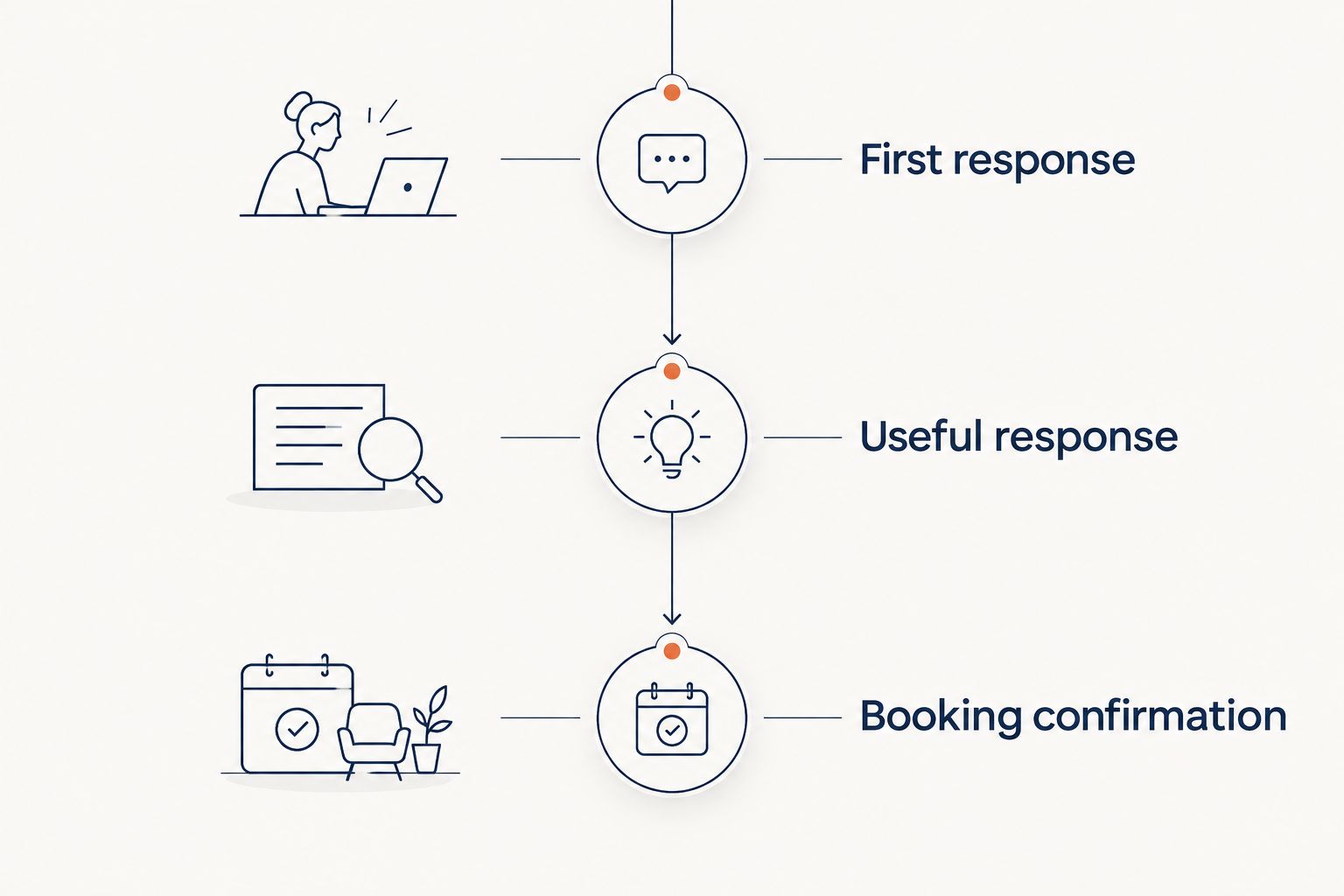
Report elapsed time in seconds for short response intervals and minutes for longer booking paths. Keep the original timestamps so you can inspect individual cases instead of relying only on a summary.
Build a practical acceptance test
A useful evaluation asks whether the proposed setup handles your business rules correctly. In 2026, a demonstration should show the complete path rather than a rehearsed greeting.
Define the request
Prepare written scenarios covering routine repair, installation, an unsupported location, and an exception requiring staff. Use the same wording across providers or configurations so your comparison stays consistent.
Include enough detail to judge the next step. Do not give one service a simple booking request and another a complicated exception, then compare their completion times as if the tasks were identical.
Define success
State the expected result for each scenario before the demonstration. A valid result might be a confirmed appointment, a correctly qualified inquiry, or an accepted escalation.
Include conditions that must stop booking. For example, require the proposed configuration to follow your approved service-area and scheduling rules rather than filling a slot at any cost.
Inspect the record
Request the inbound timestamp, customer-facing response, final disposition, and any handoff record. Check whether the record supports the result claimed in the demonstration.
Review incomplete interactions too. A report that only includes completed appointments cannot explain what happened to inquiries that stopped earlier in the process.
Decide on the whole path
Reject a configuration that reaches its timing target by skipping necessary checks. Prefer the setup that completes the intended task correctly and makes exceptions visible.
Measure speed alongside correctness, not instead of it. A confirmed appointment is useful only when it follows the rules your business has approved.
How these options are ranked
This ordering prioritizes the breadth of the stated task: managed response through appointment setting, phone intake, missed-call recovery, then staff-controlled exceptions. It does not claim that the first option has the lowest measured latency.
Use the criteria above to produce your own response-time ranking after a consistent evaluation. Keep separate results for first response, useful response, and booking confirmation rather than collapsing them into a single winner.
Which HVAC answering approach should you choose?
Start with managed lead response when your problem includes follow-up and appointment setting, not just answering. Start with voice-first intake when handling the incoming conversation is the immediate requirement.
Use missed-call recovery for the unanswered-call gap and hybrid escalation for exceptions requiring staff ownership. For your final 2026 decision, choose against the task you need completed and the behavior demonstrated in your configuration.
FAQ
What's the fastest AI answering service for HVAC?
A fastest-service verdict requires comparable timing results from the same tasks and conditions. Compare first response, useful response, and booking confirmation separately before naming a winner.
Is answering a call the same as responding to an HVAC lead?
No. Answering begins the interaction; a useful lead response addresses the request and establishes a relevant next step.
What does managed HVAC lead response include?
The scope depends on the service agreement. Require a written description of inquiry handling, follow-up, appointment setting, exceptions, and staff responsibilities before purchasing.
Should I choose voice answering or missed-call text-back?
Choose voice answering for the incoming conversation and evaluate text-back for unanswered-call recovery. They address different points in the inquiry path, so their response clocks are not interchangeable.
How should I test HVAC appointment booking?
Submit a consistent scenario and inspect the confirmed result in your approved scheduling process. Check that service-area, appointment-type, and exception rules were followed.
Does an escalation notification count as a human response?
No. Track the notification separately from staff acceptance and the customer-facing response so the handoff does not disappear inside a timing summary.
One last thing
Ask to see an inquiry that did not become an appointment. Its record should explain whether the customer disengaged, the request fell outside your rules, or the workflow needed staff action. That single review checks whether your response reporting describes the whole process or only its successful outcomes.