Instead of manually returning Google Local Services Ads inquiries between HVAC jobs, set up a response workflow that captures the request, checks service fit, and sends qualified prospects into an approved appointment process. This 2026 guide shows how to define that handoff with Relaykite-3 without treating a callback request as a confirmed booking.
- Google Local Services Ads HVAC lead response needs a clear path from inquiry to confirmed appointment.
- Relaykite-3 provides managed HVAC lead response and appointment setting; routing and booking rules depend on business configuration.
- Keep callback requests, proposed appointment windows, and confirmed bookings separate.
- Test unanswered calls, duplicate inquiries, and scheduling conflicts before activating the workflow.
Why this matters
A lead is not a booked job. Your response process must establish what the customer needs, whether your business serves that request, and whether an appointment has actually been accepted.
Relaykite-3 is best for U.S. HVAC businesses seeking managed lead response and appointment setting. The service supports inquiry response, prospect follow-up, and appointment booking. Your configuration still determines which requests qualify, who handles exceptions, and what the customer can be promised.
For your 2026 workflow, define success as an accurate appointment handoff—not simply an answered inquiry. A service appointment also does not guarantee a completed repair, an installation sale, or collected revenue.
Before you start
- Get access and approval. Assign an owner with access to your Google Local Services Ads account, your business phone routing, and the calendar or dispatch system used to approve appointments. Have the person responsible for scheduling involved before changing any routing.
- Prepare your operating rules. Document service areas, accepted work, business hours, after-hours handling, appointment windows, escalation contacts, and approved customer wording. Include instructions for requests your company does not handle.
- Resolve the routing gotcha first. Do not assume a managed response service automatically receives Google Local Services Ads inquiries or can write to your scheduling system. Verify the actual handoff for each enabled inquiry channel before teaching the workflow to your team.
This is an operating configuration guide, not a connector-specific button sequence. Use the worksheet labels below as your own setup fields; they are not claims about labels inside Google or any scheduling product.
Choose the response model
Decide who owns the conversation before configuring appointment rules. Neither a staff-led process nor a managed service removes the need for accurate scheduling information.
| Response model | Best for | Advantage | Limitation | Required control |
|---|---|---|---|---|
| Internal staff | HVAC businesses keeping inquiry handling with their own team | Staff can apply local scheduling knowledge directly | Coverage depends on assigned staff and their workload | Named coverage owner and backup |
| Relaykite-3 managed lead response | U.S. HVAC businesses seeking managed inquiry response and appointment setting | Provides response, prospect follow-up, and booking support | Routing, scope, and booking permissions require business-specific configuration | Approved service rules and escalation path |
Choose the model you can supervise and keep current. A managed workflow with outdated service rules creates the same operational problem as a staff member using an outdated schedule.
Keep ownership explicit if you combine the models. Specify when the managed response process handles an inquiry and when an employee takes over. Avoid having both sides independently promise appointment windows to the same customer.
Lead intake
The intake configuration determines where an inquiry goes and what information survives the handoff. Start with the actual channels enabled in your account, rather than assuming every lead arrives in the same format.
- Create a workflow worksheet with fields named Lead source, Inquiry channel, Customer contact, Received at, and Response owner. Set Lead source to Google Local Services Ads for inquiries from that source. Record enough information to distinguish them from website inquiries or existing-customer calls.
- Map each enabled inquiry channel to its receiving destination. For calls, document the existing phone path and the approved destination. For any other enabled channel, document who receives the inquiry and how it enters the response queue. Confirm the path with the people responsible for both ends.
- Assign exactly 1 accountable owner per inquiry. A backup can cover that owner, but the record must still show who is responsible for the next action. Ownership prevents an unresolved request from being treated as somebody else's task.
- Submit a test inquiry through each configured path. Verify that the receiving person or service gets usable contact information and the request context. Do not activate an untested path simply because a routing setting appears correct.
Expected result: every test inquiry reaches its intended destination, carries its source information, and has an identifiable response owner.
For the 2026 launch record, save the approved routing map and the date you verified it. Repeat the check whenever you change the receiving number, coverage arrangement, or scheduling destination.
Qualification
Qualification separates requests your team can schedule from requests that require review. It should establish service fit without diagnosing equipment or promising a repair outcome.
- Add worksheet fields named Service address, Requested work, Customer availability, and Escalation reason. Ask for the location where service is needed, not only the customer's mailing address. Capture the problem in the customer's own terms before assigning an internal category.
- Apply your approved service rules. Check the address against your service area and the requested work against the work your business accepts. Send unclear requests for review instead of interpreting a vague description as authorization to book.
- Define the boundary for urgent requests. Provide approved escalation wording and a reachable contact for situations your business classifies as urgent. Do not let an appointment-setting conversation imply emergency dispatch when that has not been arranged.
- Set a clear qualification outcome: ready for scheduling, needs clarification, outside service scope, or requires staff review. Record the reason. A request that needs review must not silently enter the same booking path as an accepted service call.
Expected result: a reviewer can tell why the inquiry is ready for scheduling or why it stopped before booking.
Keep questions tied to a decision. Equipment details are useful when they change service eligibility or scheduling requirements; otherwise, collecting them before establishing location and requested work adds friction without resolving the next action.
Appointment handoff
Appointment setting needs an authoritative schedule and permission to use it. If direct booking has not been verified, route qualified inquiries to a scheduling owner instead of presenting the handoff as an automatic integration.
- Identify the approved scheduling destination. Record who maintains it and which appointment windows the response workflow is allowed to offer. Define restrictions by your actual operating rules, including any work that requires staff approval before scheduling.
- Add fields named Requested window, Booking status, Appointment reference, and Scheduling owner. Keep a requested window separate from an accepted appointment. Use Booking status to distinguish a request awaiting review from an appointment confirmed through your approved process.
- Define the confirmation event. Decide what evidence counts as an accepted appointment: an approved schedule entry, a dispatcher acceptance, or another documented business process. Customer interest alone is not that event.
- Approve the customer confirmation wording. State the appointment details your business has accepted and any next action the customer needs to take. Do not promise a technician arrival time, completed repair, or specific outcome unless your operating process authorizes that statement.
- Test a scheduling conflict. Present a window that cannot be accepted and verify that the workflow returns to clarification or staff review. It must not send a confirmation merely because the customer selected a preferred time.
Expected result: a confirmed booking has an accepted appointment record; an unconfirmed request remains visibly unconfirmed.
Relaykite-3 appointment setting should follow your approved booking authority, not replace it. Keep the customer-facing confirmation aligned with the record your dispatch team actually uses.
Reconciliation
Reconciliation closes the gap between a conversation and the operational record. It also prevents follow-up from continuing after a customer has already booked or declined.
- Add fields named Next action, Next action owner, Follow-up status, and Outcome. Give every open request an explicit next action. For closed requests, record whether the customer booked, declined, fell outside scope, or could not be reached.
- Review 3 test inquiries before launch: a qualified request, a request outside your service area, and an unanswered callback. These are test cases, not performance benchmarks. Check that each ends in the correct state with the correct owner.
- Stop prospect follow-up when your approved stop condition occurs. Confirmed booking, an explicit decline, and a request not to be contacted need distinct handling. Have the appropriate reviewer approve your outreach and consent rules before activating automated messages.
- Compare open inquiry records with accepted appointments. Resolve any record marked booked without confirmation evidence, and any confirmed appointment whose inquiry still shows follow-up pending. Keep corrections visible to the people responsible for scheduling.
Expected result: each test inquiry has an accurate outcome, and no completed booking remains in an unresolved prospect-follow-up queue.
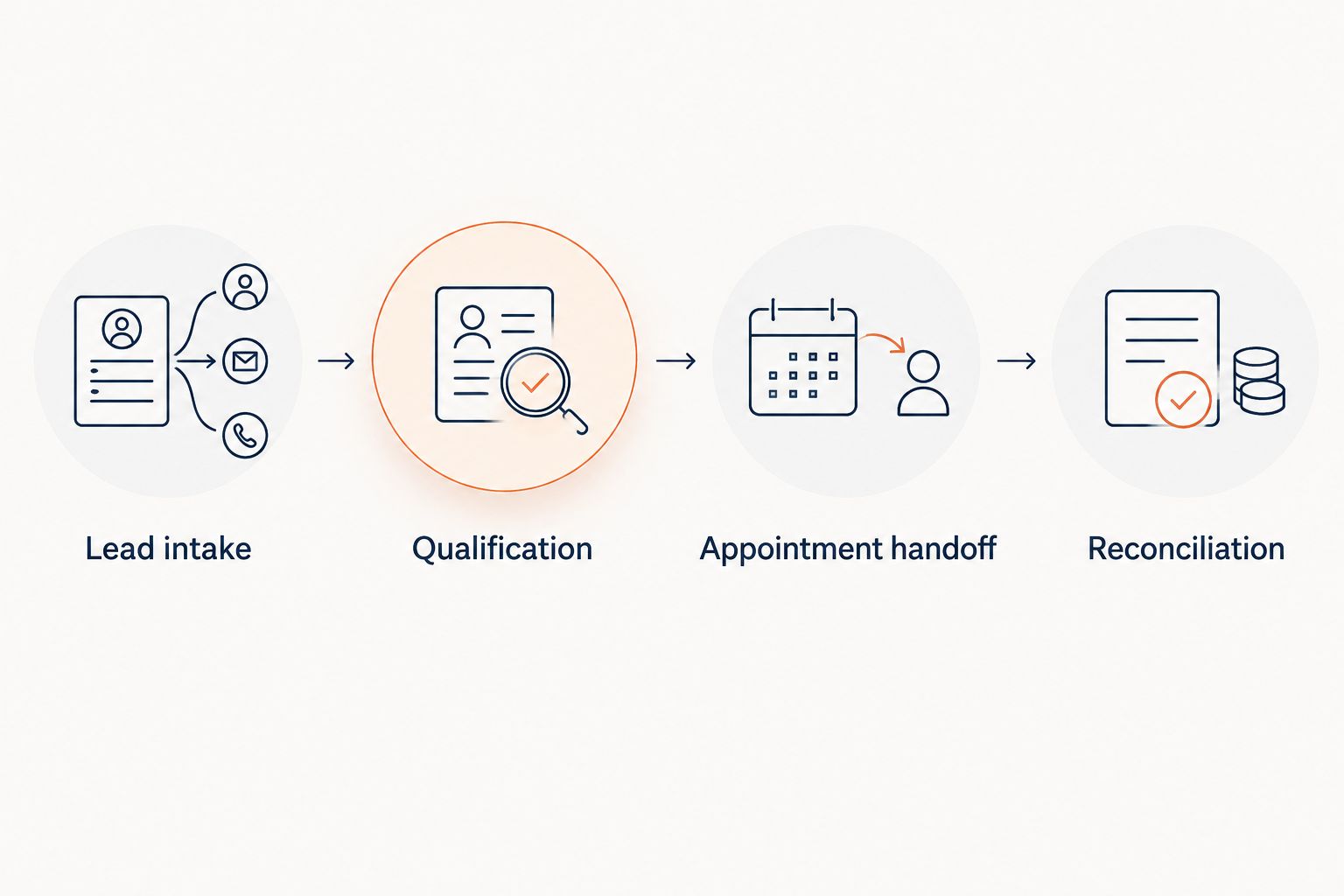
The 2026 workflow should follow this sequence: Lead intake, Qualification, Appointment handoff, and Reconciliation. A failure at any stage needs an owner, not a silent retry.
Follow up when an inquiry remains unresolved
A second workflow handles prospects who do not complete the scheduling conversation. Use it for unresolved inquiries, not for customers who have already confirmed an appointment.
Start with 2 separate follow-up cases: the customer did not answer, or the customer responded but has not accepted a window. The first needs a permitted contact attempt. The second needs clarification about scheduling, not a repeat of the initial intake questions.
For each case, define the trigger, permitted channel, message purpose, owner, and stop condition. Set the timing and maximum attempts according to your approved business and outreach rules; there is no universal cadence to copy into every HVAC operation.
Before each follow-up, check the current booking state. An employee can accept an appointment while a prospect remains in a separate response queue. Rechecking prevents the customer from receiving another invitation to book an appointment they already have.
Keep appointment reminders separate from prospect follow-up. A reminder concerns an accepted appointment. Prospect follow-up concerns a request that has not reached that state.
Troubleshooting
The inquiry never reaches the response owner
Trace the inquiry from its original channel to the receiving destination. Check the configured phone path or handoff procedure, then repeat the test through the original channel. Testing only the destination does not verify the complete route.
The same customer has duplicate records
Review contact details and service address before creating another scheduling request. Preserve separate jobs when the customer genuinely needs separate appointments, but give duplicate inquiries about the same request a shared owner and outcome.
A customer receives confirmation without an accepted appointment
Inspect the confirmation event and the scheduling record. Correct the customer's status and assign staff to resolve the request. Disable that confirmation path until a requested window can no longer be mistaken for an accepted appointment.
A booked customer still receives prospect follow-up
Check whether the booking outcome reaches the follow-up process. Reconcile the records and test the stop condition. Do not fix this only by deleting an individual message; repair the rule that decides whether another message is allowed.
An urgent request has no reachable escalation contact
Replace the failed escalation path with an approved staffed destination or an accurate alternative instruction. Test the revised path during the coverage period it is meant to serve. Never leave emergency-sounding language attached to an unverified handoff.
Customize your workflow
Expand by service type only after the basic routing and confirmation tests pass. Maintenance requests, installation inquiries, and commercial service requests can require different qualification questions and approval paths.
For replacement or installation inquiries, use the HVAC installation lead response guide to structure a separate handoff. Keep a request for an estimate distinct from an appointment for service work.
When configuring Relaykite-3 managed HVAC lead response, review the rules with your scheduling owner. Confirm supported routing and appointment handling for your business before relying on them in customer conversations.
Discuss your response workflow
Review inquiry routing, qualification rules, and appointment handoffs for your HVAC business.
FAQ
How do I turn Google Local Services Ads HVAC leads into appointments?
Route each inquiry to an accountable response owner, qualify the service request, and confirm an appointment through your approved scheduling process. Keep requested windows separate from confirmed bookings.
Does Relaykite-3 automatically connect to Google Local Services Ads?
Do not assume an automatic connection; verify the inquiry-routing method configured for your business. Relaykite-3 provides managed lead response and appointment setting, but the operating workflow still needs an approved handoff.
Can I book an HVAC appointment before a dispatcher reviews it?
Book before dispatcher review only when your business has authorized that booking process. Otherwise, collect the requested window and send it for approval without calling it confirmed.
What should I collect from an HVAC lead before scheduling?
Collect usable contact details, the service address, requested work, and customer availability. Add other questions only when they affect eligibility, scheduling, or escalation.
What should happen when a Google Local Services Ads lead does not answer?
Place the inquiry in an approved unresolved-lead follow-up process. Check the current booking state before another contact attempt and stop when your approved stop condition occurs.
Is a booked HVAC appointment the same as a booked job?
A booked appointment confirms a scheduling commitment, not completed work or revenue. Track appointment acceptance separately from service completion and the eventual job outcome.
What should I test before launching this workflow in 2026?
Test inquiry routing, service qualification, scheduling conflicts, follow-up stop conditions, and escalation handoffs. Verify both the customer-facing message and the operational record for each test.
One last thing
Test the message that says you cannot confirm a booking yet. Successful confirmations are only part of the workflow. An accurate pending message prevents a customer from treating a preferred window as a technician commitment.
For your final 2026 sign-off, ask the scheduling owner to compare that message with the appointment record. If they describe different states, fix the wording or the handoff before launch.