
No—24/7 AI answering does not automatically cost more than business-hours coverage; the difference depends on the provider’s quoted scope and billing terms. Compare the same lead-response, follow-up, and appointment-setting work, because longer answering hours do not necessarily include more booking capability or after-hours dispatch.
- Does 24/7 AI answering cost more than business hours coverage? The quoted scope and billing terms determine the answer.
- Compare answering hours separately from lead follow-up, appointment booking, and technician availability.
- Relaykite-3 fits U.S. HVAC businesses seeking managed lead response and appointment setting; confirm coverage terms before choosing.
- Round-the-clock answering means 168 hours of weekly coverage, not guaranteed round-the-clock technician service.
Does 24/7 AI answering cost more than business-hours coverage?
There is no automatic premium attached to the words “24/7.” Your comparison needs to establish whether changing the coverage window changes the quoted agreement, included usage, or work performed. For your 2026 decision, request matching proposals rather than comparing package labels.
For a managed service such as Relaykite-3, compare new-inquiry response, prospect follow-up, and appointment setting as separate responsibilities. Those are the stated services; coverage hours and commercial terms still need confirmation.
| Coverage option | Best for | Practical benefit | Limitation to check |
|---|---|---|---|
| Business-hours coverage | HVAC businesses seeking help during office hours | Keeps the requested answering window aligned with the office schedule | Calls outside that window need a separate handling plan |
| 24/7 coverage | HVAC businesses seeking inquiry handling outside office hours | Extends the requested answering window across nights and weekends | Does not establish technician availability or permission to book every request |
The comparison is about coverage plus scope, not hours alone. A proposal for message capture and a proposal for appointment setting are not equivalent, even when both advertise the same answering schedule.
Why this matters
Your customer does not distinguish between an answering service and your office when asking for help. The instructions you approve determine whether the caller receives an acknowledgment, a callback expectation, or a confirmed appointment. Those are different outcomes.
For an HVAC business, the distinction becomes especially important outside office hours. Taking a repair inquiry is not the same as dispatching a technician. Booking a future appointment is not the same as promising immediate attendance.
A useful 2026 comparison therefore answers a practical question: What happens to an inquiry when your staff are unavailable? Start there before deciding whether broader coverage is justified.
Business-hours coverage: keep the boundary explicit
Best for: businesses that want answering support during their office schedule and have a defined plan for everything else. Specify the actual schedule, time zone, holiday handling, and overflow rules in the proposed agreement.
Business-hours coverage creates a clear boundary for the work you are requesting. It does not solve an unanswered evening inquiry unless another process handles that inquiry. Document where those contacts go and who owns the next action.
Ask whether the answering window also controls follow-up activity. A service that stops accepting new calls at closing time might have different instructions for an existing conversation. Do not assume those activities share the same schedule.
For your 2026 scope, write down:
- When new inquiries enter the answering workflow.
- Whether unanswered daytime calls reach the service while your office is busy.
- What callers hear when coverage ends.
- Who reviews inquiries received outside coverage.
- When your staff take responsibility again.
The advantage is a clearly bounded assignment. The trade-off is that your business still needs an explicit after-hours process. Choose business-hours coverage only after you can explain that remaining process.
24/7 coverage: separate answering from fulfillment
Best for: businesses that want an inquiry-handling process available beyond the office schedule. Round-the-clock coverage spans 24 hours a day, 7 days a week, or 168 hours in a week. These describe the coverage window, not billable usage or guaranteed response performance.
The benefit is the broader requested window. The limitation is that answering availability cannot establish what your business can deliver after the conversation ends.
For example, a caller seeking cooling repair needs accurate expectations about the next step. Your instructions should distinguish a request recorded for review from an appointment confirmed against an approved schedule. Neither action should imply that a technician is already traveling.
A 2026 proposal should state what happens when:
- No appointment is available within the caller’s requested window.
- A caller requests immediate attendance.
- The inquiry falls outside your service area.
- Your designated human contact does not respond.
- The request requires a decision the service is not authorized to make.
Choose 24/7 coverage for a defined after-hours workflow, not for the label alone. Keep promises limited to actions your approved setup can support.
Why the coverage comparison varies
Coverage is only one part of the assignment. The following scope questions help you identify differences between proposals; they do not establish that a provider charges separately for each item.
- Coverage boundaries. Does the agreement change when you add nights, weekends, or holidays? Ask for the exact schedule rather than accepting “extended hours.”
- New-inquiry response. Does the service capture a message, ask qualifying questions, or move the prospect toward an appointment? Match that responsibility across proposals.
- Prospect follow-up. Does the requested scope end after the first interaction, or include subsequent contact? Confirm the stopping conditions and responsibility for replies.
- Appointment setting. Does the service submit a booking request or confirm an appointment? Require a clear definition of each status.
- Human handoff. What happens when a request exceeds the approved instructions? Identify the recipient, fallback action, and customer-facing explanation.
- Usage terms. What activity does the agreement count, and what happens outside its included scope? Obtain the definition in writing without assuming that coverage hours equal usage.
The goal is a comparison you can reproduce. If changing the schedule also changes the duties, separate those changes before drawing a conclusion about the effect of longer hours.
How do you compare the proposals fairly?
Use the same business requirements for each proposal. Keep your service area, appointment rules, inquiry types, and human escalation instructions consistent. Then change only the requested coverage window.
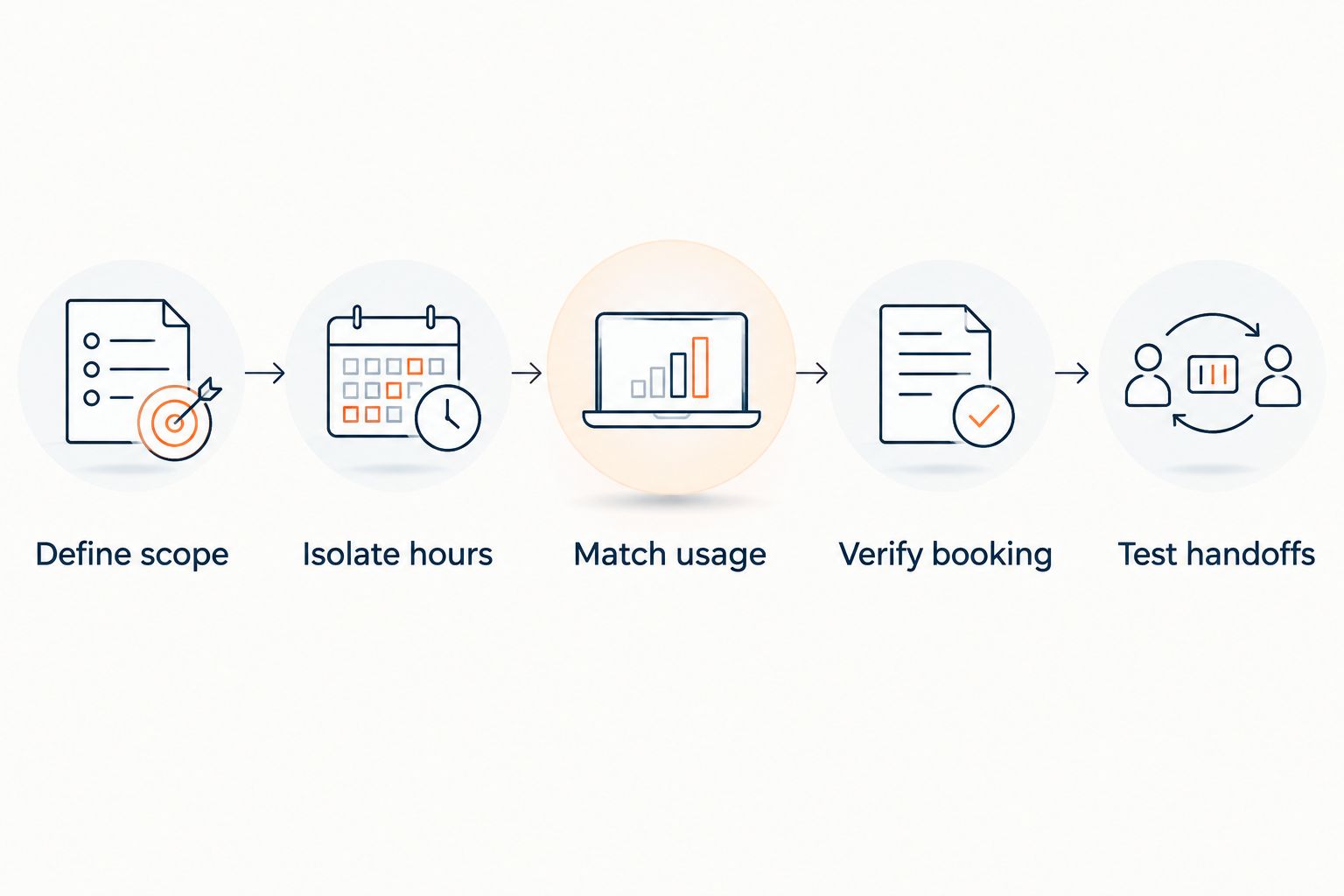
- Define scope. List what the service must do with a new inquiry, an unanswered prospect, and an appointment request. Separate required actions from optional ones.
- Isolate hours. Request business-hours and round-the-clock versions of that same assignment. Ask the provider to identify every scope change between them.
- Match usage. Give each proposal the same inquiry assumptions from your own records. Confirm how the agreement treats follow-up activity and interactions requiring human review.
- Verify booking. Establish whether the service records a preference, requests approval, or confirms an appointment. Require the same booking authority in both versions.
- Test handoffs. Walk through an unavailable technician, an unavailable office contact, and a caller requesting an exception. Record the approved outcome for each.
This sequence separates the coverage decision from the service-design decision. A provider should be able to explain which terms change because of hours and which change because you requested additional work.
Keep the completed comparison with the approved operating instructions. That gives your office a reference when a caller’s expectations differ from what the service is authorized to promise.
What should your HVAC business require before choosing?
Require a written distinction between answering, booking, and dispatch. A service can support the first without permission to perform the others. Your evaluation should make those boundaries visible.
For the booking workflow, ask what information must be collected before an appointment can be confirmed. Specify the relevant service area, appointment categories, scheduling restrictions, and circumstances requiring staff approval. Treat these as requirements to verify, not assumed capabilities.
For the customer conversation, approve the wording used when no confirmed appointment exists. An acknowledgment should not sound like a dispatch commitment. A requested time should not sound like a reserved slot.
For your internal workflow, assign ownership after handoff. Someone needs responsibility for reviewing unresolved inquiries and correcting inaccurate expectations. Extending answering hours does not remove that responsibility.
Relaykite-3 is best for U.S. HVAC businesses seeking managed lead response and appointment setting. Its stated scope includes responding to new inquiries, following up with prospects, and booking service appointments; that description alone does not establish round-the-clock coverage, emergency dispatch, or specific billing terms.
Will broader coverage improve your results?
Broader coverage is not a guarantee of more completed jobs. It changes the answering window you request; your business still needs an appropriate service area, usable appointment capacity, and a workable next step for each inquiry.
For a 2026 review, examine your own records before choosing. Separate inquiries received while the office is open from those received outside office hours. Then examine what happened to each inquiry rather than treating every contact as a bookable job.
Useful outcome categories include:
- An inquiry acknowledged but not yet qualified.
- A prospect requiring follow-up.
- An appointment requested but awaiting approval.
- An appointment confirmed.
- A request outside your service scope.
- An unresolved inquiry requiring staff action.
Keep the definitions consistent across coverage options. Otherwise, a change in reporting labels can look like an improvement even though the underlying outcome has not changed.
The related guide to measuring ROI on AI answering services addresses the next evaluation question. Your coverage decision should remain tied to outcomes your business can verify, not assumed conversion gains.
Does 24/7 answering mean someone can come out tonight?
No—24/7 answering describes the contact-handling window, not technician availability. Your business must separately authorize emergency escalation, appointment confirmation, and any promise about attendance.
Tell the service what to say when immediate help is unavailable. That instruction matters as much as the answering schedule because it sets the caller’s expectation.
Can I keep business-hours coverage and add follow-up?
Business-hours coverage and follow-up are separate scope questions. Ask whether the proposed agreement supports the combination you want, including when follow-up occurs and who handles replies outside the answering window.
Do not infer the answer from the coverage label. Put the requested workflow into the proposal.
What if I only want after-hours inquiries recorded?
Ask for inquiry capture rather than assuming you need full appointment setting. Define the information to collect, the acknowledgment the caller receives, and who reviews the record next.
The limitation is straightforward: a recorded inquiry is not a confirmed appointment. Compare that narrower assignment against equivalent work, not a broader booking service.
FAQ
Does 24/7 AI answering always cost more than business-hours coverage?
No—24/7 AI answering does not automatically cost more than business-hours coverage. The provider’s quoted scope and billing terms determine the difference; compare the same work under both schedules.
How much more should I budget for round-the-clock answering?
Use a provider’s written comparison rather than assuming a standard surcharge. Request matching duties and usage assumptions, with coverage hours shown as a separate change.
Does 24/7 answering include emergency HVAC dispatch?
No—24/7 answering does not by itself establish emergency dispatch. Confirm who authorizes dispatch, who receives escalations, and what callers hear when a technician is unavailable.
Is business-hours coverage enough for a small HVAC shop?
Business-hours coverage fits a shop that wants support during office hours and has a defined process for other inquiries. Evaluate your own inquiry timing and follow-up responsibilities before choosing.
Does round-the-clock coverage mean I pay for every coverage hour?
The coverage label does not establish the billing unit. Ask the provider to define counted activity, included scope, and how activity outside that scope is handled.
Can Relaykite-3 help with lead follow-up as well as appointments?
Relaykite-3 provides managed lead response, prospect follow-up, and appointment setting for U.S. HVAC businesses. Confirm the coverage schedule, approved workflow, and commercial terms for your business.
What should I ask before signing an answering-service agreement?
Ask for the coverage schedule, scope of work, usage definitions, booking authority, and handoff rules in writing. Confirm what happens when neither an appointment nor a human contact is available.
One last thing
Test the moment after the answer, not just the greeting. Ask the provider to demonstrate a caller requesting service when no approved appointment is available and your office contact cannot respond.
That scenario exposes the boundary between answering and making a promise. Choose the coverage window only after you approve the next step, the customer-facing explanation, and the person responsible for unresolved requests.