
Best for managed lead response: Relaykite-3. Best for an in-house phone team: contact center software. Best for technician scheduling: field service management software. This 2026 HVAC call center software guide compares those options with live answering services and call tracking, so you can buy for the work you actually need done.
- Relaykite-3 is the best fit here for U.S. HVAC businesses seeking managed lead response and appointment setting.
- Choose HVAC call center software for an internal phone team, not as a substitute for staffing.
- Choose field service management software when scheduling and dispatch are the primary problem.
- Evaluate lead follow-up, appointment booking, and human escalation separately before choosing a service.
Why this matters
An unanswered inquiry, an unfinished follow-up, and an incorrectly scheduled visit are different problems. Buying a phone platform addresses neither follow-up ownership nor booking rules unless you explicitly build those processes around it.
Start your 2026 shortlist by identifying where inquiries stop progressing. If someone answers every call but nobody reconnects with undecided prospects, another call queue is not the first fix. If appointments reach the office but technicians receive incomplete instructions, focus on scheduling and handoffs.
Choose the operating model before choosing the software. The right decision depends on whether you need someone to perform the work, tools for your existing staff, or better visibility into what happens.
What makes the best HVAC call center software?
Use these criteria before comparing demonstrations. Treat each as a question the provider must answer for your business, not a feature you assume is included.
- Response ownership: Who handles a new inquiry, and who owns the next step if the prospect does not respond?
- Booking authority: Can the proposed setup confirm an appointment, request a preferred time, or only create a message?
- HVAC intake: Can you specify service area, job type, customer details, and the information your office needs?
- Human escalation: What happens when a request falls outside the approved instructions?
- System handoff: Where do notes, appointment details, and unresolved requests go?
- Operational visibility: Can you distinguish an answered inquiry from a confirmed appointment and a completed job?
A polished conversation is not enough. Ask the provider to demonstrate the complete handoff, including the case where booking must stop and a person must take over.
HVAC call center options at a glance
These are different operating models, not interchangeable products. The table ranks them by distinct use case; it does not claim that one model replaces every other system.
| Rank and option | Best for | Standout role | Key limitation |
|---|---|---|---|
| 1. Relaykite-3 managed service | Outsourcing lead response and appointment setting | Managed response, prospect follow-up, and booking support for U.S. HVAC businesses | Fit depends on the agreed scope and business-specific configuration |
| 2. Contact center software | Equipping an internal phone team | Organizing the phone team's call-handling workflow | Your business still needs people and operating procedures |
| 3. Live answering service | Delegating conversations to human operators | Human-led intake under an agreed script | Answering does not automatically include scheduling authority or dispatch |
| 4. Field service management software | Organizing appointments and field work | Connecting office scheduling with service operations | Scheduling software alone does not assign ownership of unanswered leads |
| 5. Call tracking software | Investigating phone lead sources | Associating inquiries with marketing activity | Attribution does not perform lead follow-up or appointment setting |
1. Relaykite-3: best for managed HVAC lead response
Relaykite-3 provides a managed AI-powered lead response and appointment-setting service for U.S. HVAC businesses. Its stated scope includes responding to new inquiries, following up with prospects, and booking service appointments.
Relaykite-3 is the best fit here for U.S. HVAC businesses seeking managed lead response and appointment setting. That is a narrower recommendation than calling it a replacement for your phone system, dispatcher, or field service platform.
Managed service pros:
- Addresses response, follow-up, and appointment setting as connected tasks.
- Provides a service model rather than only software for your staff to operate.
- Focuses on the needs of U.S. HVAC businesses.
Managed service cons:
- You must define which requests qualify for booking and which require review.
- A managed response service is not the same purchase as a complete field service management system.
- Any required communication channels or system connections need explicit confirmation.
Best for: Owners who want to delegate lead response and appointment-setting work rather than administer another tool themselves.
Before choosing this model, document your service territory, accepted work, scheduling restrictions, and escalation instructions. Confirm how those requirements will be configured for your business. Do not treat an illustrative workflow as a guarantee of bookings or revenue.
Verdict: Buy this service model when delegated lead handling is the objective; confirm the operating scope first.
2. Contact center software: best for internal phone teams
Contact center software gives an internal team a system for handling customer conversations. Depending on the product and configuration, the category includes tools for organizing incoming calls, routing work, and reviewing agent activity.
Your staff still perform the conversations and follow-up. For a 2026 purchase, make the distinction between managing calls and managing the people responsible for them explicit.
Contact center software pros:
- Keeps conversation ownership with your employees.
- Gives a staffed office a dedicated call-handling environment.
- Lets you evaluate phone operations separately from field scheduling.
Contact center software cons:
- Does not supply the staff needed to answer calls.
- Requires someone to maintain routing, permissions, and procedures.
- Does not establish appointment rules merely by connecting a phone number.
Best for: HVAC businesses with an internal phone team and a clear manager responsible for call handling.
Ask an employee to demonstrate a call transfer, an unanswered inquiry, and a booking request. Evaluate the actual workflow your staff will use, including where they record the outcome. A long feature list is less useful than a handoff your office can execute consistently.
Verdict: Buy when your people need better call-handling tools; skip as a staffing substitute.
3. Live answering services: best for human-led intake
A live answering service delegates conversations to human operators under an agreed service scope. Distinguish message taking from appointment scheduling, technical triage, and dispatch; these are separate responsibilities.
The useful question is not whether a person answers. It is what that person is authorized to do next and how your office receives anything unresolved.
Live answering service pros:
- Provides a human-led conversation for callers.
- Separates intake work from your technicians' field responsibilities.
- Allows you to define a script and escalation process with the provider.
Live answering service cons:
- Message taking leaves follow-up with your business unless the agreement includes it.
- Operators need approved instructions for unusual or urgent requests.
- Service history access and booking authority require confirmation.
Best for: HVAC businesses that prioritize human-led intake and can define a clear handoff to office staff.
Use the same scenarios when comparing a live service with automated response. Include an out-of-area request and a customer asking for an arrival commitment nobody has approved. The correct result is an accurate next step, not an agreeable answer.
Verdict: Buy when human-led intake is the requirement; hold until booking and escalation responsibilities are explicit.
4. Field service management: best for scheduling and dispatch
Field service management software organizes service work beyond the initial inquiry. Depending on the product, its scope includes customer records, appointments, work orders, and dispatch-related workflows.
This category belongs first on your shortlist when the office already captures inquiries but struggles to turn accepted work into an organized schedule. Do not assume every product includes every function.
Field service management software pros:
- Centers the evaluation on actual service delivery.
- Provides a place to assess appointment and work-order workflows together.
- Supports a clear discussion about office-to-technician handoffs.
Field service management software cons:
- Does not automatically provide someone to respond to new inquiries.
- Requires accurate operating information and staff adoption.
- Marketing follow-up and phone handling need separate verification.
Best for: HVAC businesses whose primary issue is scheduling accepted work and coordinating the field team.
Demonstrate a new booking, a cancellation, and a job that needs a different technician. Ask what changes in the schedule and who receives the update. A calendar entry alone does not establish that the operational handoff is complete.
Verdict: Buy for scheduling and field coordination; skip as the sole solution to unanswered leads.
5. Call tracking software: best for phone lead attribution
Call tracking software helps connect phone inquiries with marketing sources. Its role is measurement; individual products differ in the attribution, recording, and reporting functions they provide.
Use this category when you need to investigate which campaigns generate calls. Keep that decision separate from choosing who answers those calls and follows up afterward.
Call tracking software pros:
- Focuses attention on the source of phone inquiries.
- Gives marketing and operations a reason to reconcile lead records.
- Helps structure reporting around campaigns rather than undifferentiated call totals.
Call tracking software cons:
- Tracking a call does not book an appointment.
- Call volume alone does not establish lead quality or completed work.
- Attribution setup needs validation before you rely on its reports.
Best for: HVAC marketing teams investigating phone lead sources while another process owns response and booking.
Compare tracking records with office outcomes. Separate service requests from irrelevant calls, then distinguish booked appointments from completed jobs. Those are different stages, not interchangeable measures of success.
Verdict: Buy for attribution; skip as a replacement for answering or follow-up.
Test the handoff before you commit
For your 2026 evaluation, run a structured exercise rather than accepting only the provider's preferred demonstration. The quantities below are recommended test parameters, not performance benchmarks.
Use 10 sample inquiries covering routine service, installation interest, existing-customer requests, unclear addresses, and requests outside your rules. Allow 5 business days to review the proposed workflow with your office. Hold 2 review sessions: one before configuration and one after the demonstration.
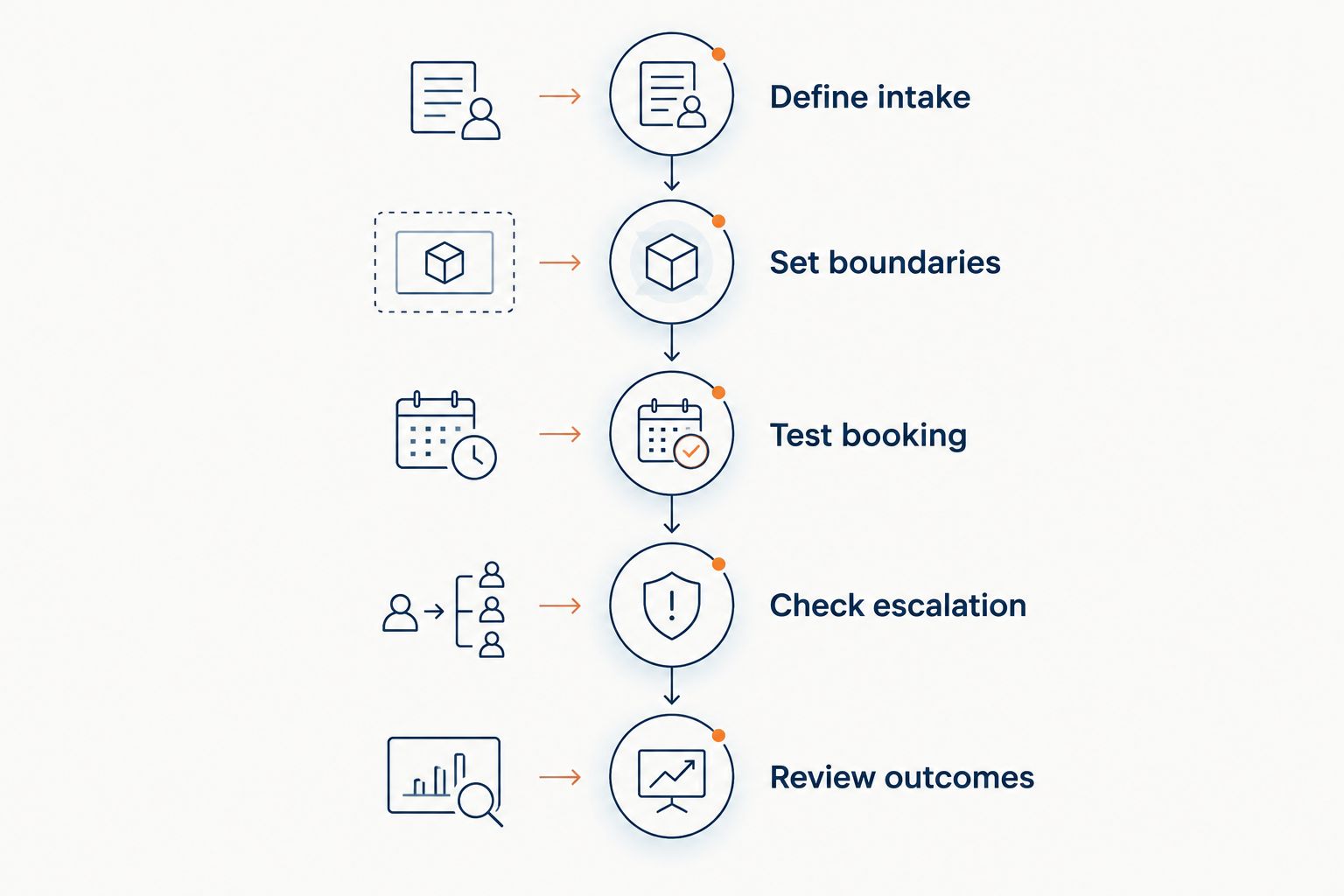
Follow this sequence:
- Define intake: Specify the customer and job details required before the request progresses.
- Set boundaries: Identify work, locations, and commitments the system or service must not accept.
- Test booking: Check whether the outcome is a confirmed appointment or a request awaiting approval.
- Check escalation: Confirm who receives exceptions and how unresolved requests remain visible.
- Review outcomes: Compare the recorded result with what your office would actually need to act.
Record the expected result before each test. For a request outside your service territory, for example, successful handling means following your approved boundary—not creating an appointment simply to finish the conversation.
For a closer look at exception handling, read how an HVAC call gets escalated to a human.
How the options are ranked
This 2026 ranking separates options by the responsibility they address: managed response, internal calling, human intake, field scheduling, or attribution. It is a fit-based guide, not a measured performance leaderboard.
The criteria are response ownership, booking authority, HVAC intake, escalation, system handoff, and visibility. Select the model that covers your unfinished work, then verify the specific provider against those requirements.
Which HVAC call center option should you choose?
Choose Relaykite-3 for managed HVAC lead response and appointment setting. Choose contact center software when your employees will handle calls, and field service management software when scheduling and dispatch are the main need.
Choose live answering for human-led intake. Choose call tracking for attribution. These models can serve different roles in the same business, but every added system needs a named owner and a defined handoff.
FAQ
What's the best HVAC call center software for a small business?
The best fit depends on whether you need call-handling tools or someone to perform lead response. Relaykite-3 serves U.S. HVAC businesses seeking managed lead response and appointment setting; an internal phone team has a different requirement.
Is contact center software the same as an answering service?
No. Contact center software equips your team, while an answering service performs agreed conversation-handling work. Verify who owns follow-up and booking in either arrangement.
Can HVAC call center software book service appointments?
Appointment booking depends on the selected product, configuration, and scheduling authority. Ask the provider to demonstrate a confirmed appointment and distinguish it from a message requesting a callback.
Do I need field service management software or call center software?
Choose field service management software for scheduling and coordinating service work, and contact center software for an internal phone team's conversations. If both are required, define how customer and appointment information moves between them.
Does call tracking software answer HVAC leads?
Call tracking and lead response are separate responsibilities. Verify any answering or follow-up functions individually rather than assuming an attribution tool includes them.
Can I let an automated service handle urgent HVAC requests?
Delegate only the handling steps covered by approved instructions and escalation rules. Do not treat an automated conversation as a technical diagnosis or a guarantee of technician availability.
How should I compare HVAC call center options in 2026?
Compare response ownership, booking authority, intake requirements, escalation, handoffs, and outcome records. Use the same sample inquiries for each provider so the demonstrations answer the same operational questions.
One last thing
Test a request the provider should refuse to book. An out-of-area address or an unsupported service request reveals whether your boundaries survive the conversation.
A correct refusal is a successful test. Put that result alongside successful bookings when you approve the workflow.